Repository navigation
Releases: TomaszBojanowski/vumi
Release list
Vumi 0.1.1

 TomaszBojanowski
Tomasz Bojanowski
5fe745a
TomaszBojanowski
Tomasz Bojanowski
A small update to Vumi 0.1.0.
Changes
- Vumi has a website: https://vumi.bojanowski.me.
- Media controls: the player is now named after Vumi's app ID on the session bus (
org.mpris.MediaPlayer2.io.github.tomaszbojanowski.Vumi). GNOME Shell and the media keys work as before; tools that pick the player by name, such asplayerctl -p, now useio.github.tomaszbojanowski.Vumi. - About Vumi links to the website.
- A correction to the 0.1.0 notes: Play This Year on the Tuner plays a random mix of 50 songs from the chosen year, not the whole year.
Updating
The new player name is a new permission for the sandbox: Vumi now owns org.mpris.MediaPlayer2.io.github.tomaszbojanowski.Vumi on the session bus instead of org.mpris.MediaPlayer2.Vumi.
flatpak updatelists it under "New io.github.tomaszbojanowski.Vumi permissions" (bus ownership) and then asks the usual "Proceed with these changes?"; there is no separate question.flatpak update -ylists it and goes on.- GNOME Software 51 counts this name as the standard media player name of the app, not as an extra permission, so it does not ask about it and updates Vumi like any other app.
Install
flatpak install --user https://flatpak.bojanowski.me/io.github.tomaszbojanowski.Vumi.flatpakrefThe GNOME 51 runtime it needs is downloaded from Flathub if it is not installed yet. Updates then arrive with flatpak update or in GNOME Software.
Without the repository: download vumi-0.1.1.flatpak below and run flatpak install --user vumi-0.1.1.flatpak. This bundle does not update itself; download the new one from the next release.
SHA-256 of vumi-0.1.1.flatpak: 27f972d552f0c3d7b4f384779a9e2addf42ac2b92900d7d4a39a919873530009
Vumi 0.1.0
TomaszBojanowski
Tomasz Bojanowski
7dd160d
TomaszBojanowski
Tomasz Bojanowski
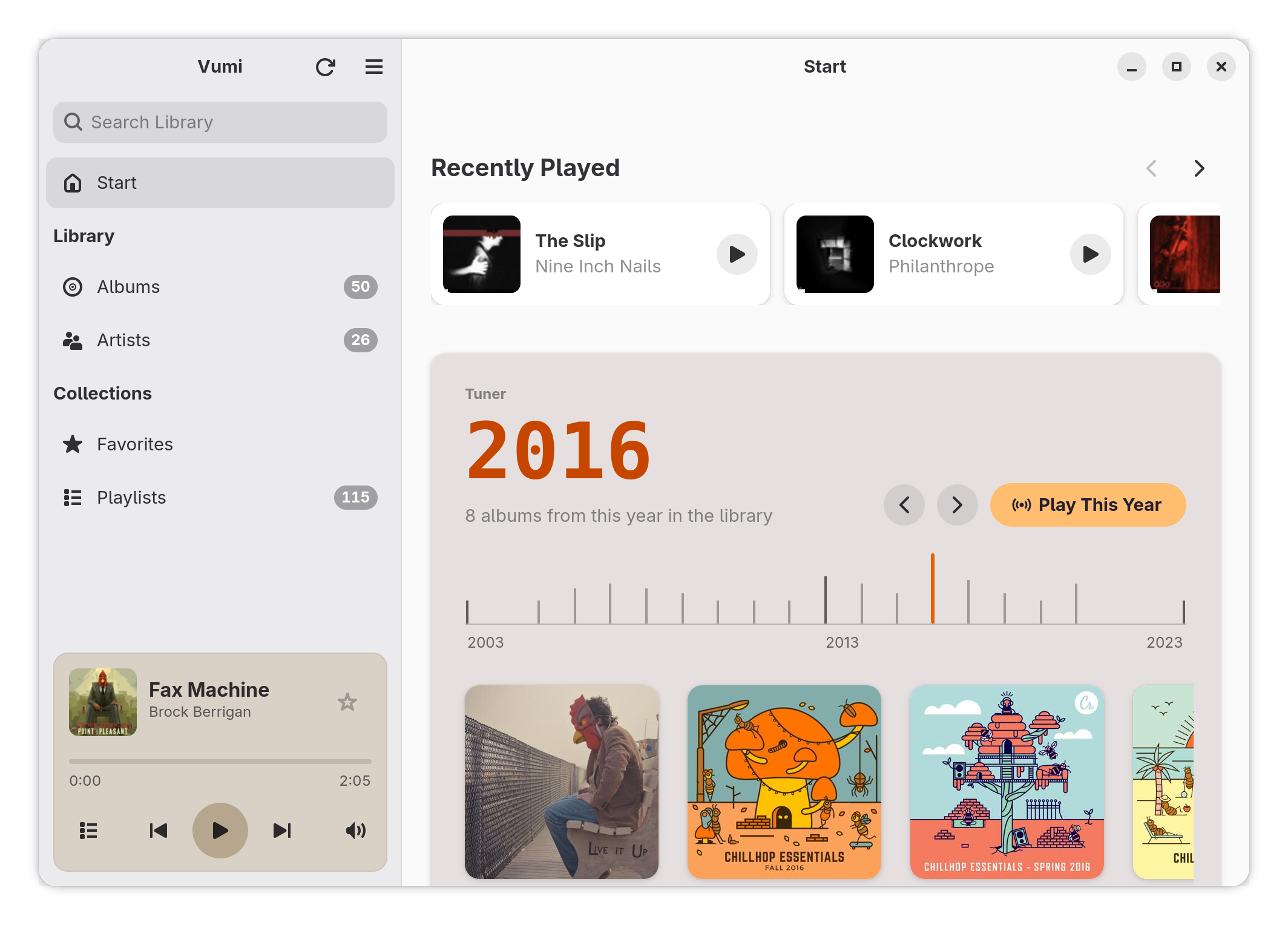
Vumi is a music player for GNOME that plays the music on your own Navidrome server, or on another Subsonic or OpenSubsonic server. This is its first release.
What it offers
- The Tuner on the Start page: go through your library year by year, and play a random mix of songs from a year.
- Recently Played: the albums you played lately, each resumed where you stopped.
- A quick start: the library is kept in a local database, so it is on screen at once. After the first sync, the albums and songs are fetched again only when the server has scanned new music.
- A native GNOME app: GTK 4 and libadwaita, media controls in GNOME Shell, layouts for narrow and low windows, keyboard shortcuts (Ctrl+? lists them).
- AudioMuse-AI, optional: with the AudioMuse-AI plugin on your Navidrome server, similar songs, endless radio and album radio.
Also: gapless playback, optional volume normalization from ReplayGain tags, scrobbling to your server, light and dark style. In English and Polish.
Requirements
A Navidrome server, or another server that speaks the Subsonic or OpenSubsonic API. Tested with Navidrome 0.64.
Install
flatpak install --user https://flatpak.bojanowski.me/io.github.tomaszbojanowski.Vumi.flatpakrefThe GNOME 51 runtime it needs is downloaded from Flathub if it is not installed yet. Updates then arrive with flatpak update.
Without the repository: download vumi-0.1.0.flatpak below and run flatpak install --user vumi-0.1.0.flatpak. This bundle does not update itself; download the new one from the next release.
Known limitations
- No offline playback: the music plays from the server.
- The window is at least 366 px wide.
- Servers with self-signed certificates are not supported.
Feedback
This is a first release, so please report anything that does not work as expected.
Bugs and ideas: Issues. If you enjoy Vumi, you can buy me a coffee.
SHA-256 of vumi-0.1.0.flatpak: 056ba6c40218874e07419770b268c68db7c64c5fbb82a4310a8984c53f3b064d