Repository navigation
v3.1.0: mods, recomp updates, game file checks and benchmarks

Trooper's Skate 3 Recomp Launcher v3.1.0
The biggest update yet. v3.0.0 made the Skate 3 Recomp easy to configure. v3.1.0 makes it easy to install, keep working, mod and benchmark. Everything from v3.0.0 is still here, your settings and profiles carry over, and it's still one portable .exe with no installer.
The sidebar has four new pages (Photo Mode, Game files, Mods, Benchmark) and the Launcher and Logs pages have new cards.
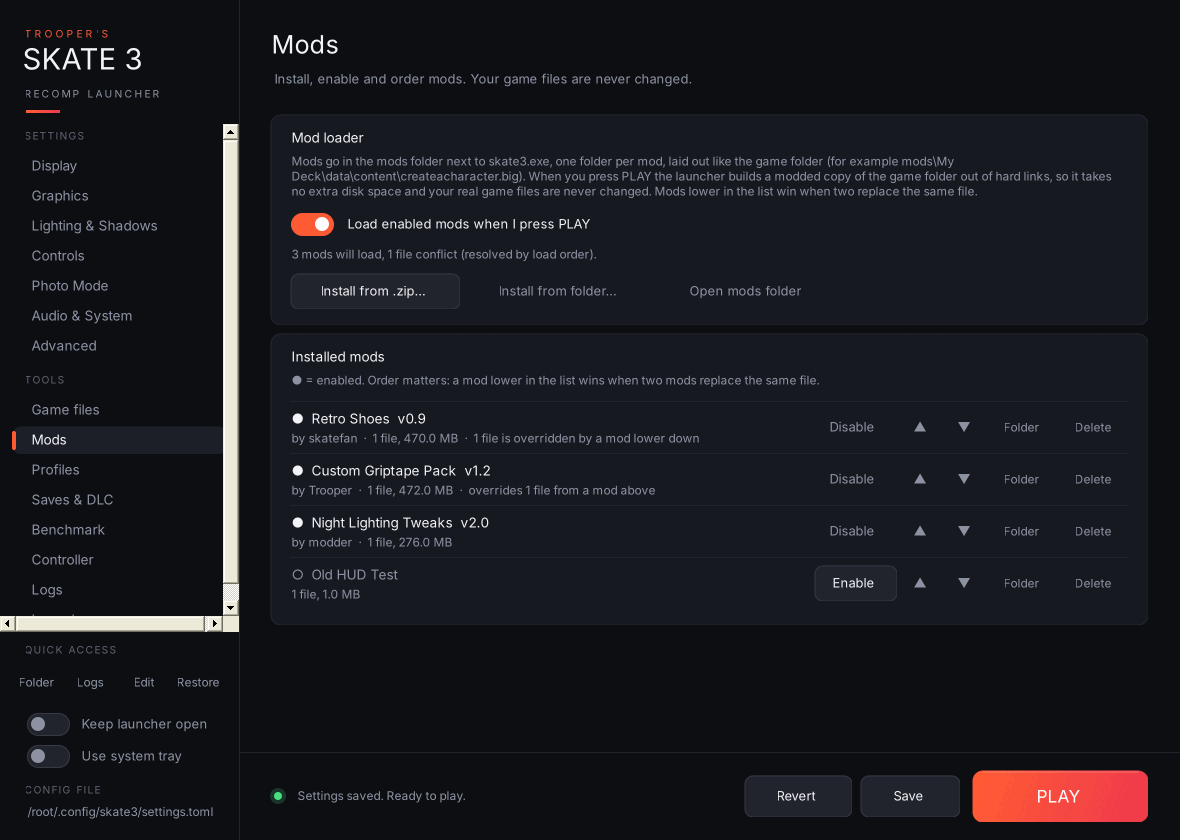
🧩 Mod loader (new Mods page)
- Install from .zip… / Install from folder… copies a mod into a
modsfolder next toskate3.exeand enables it. You can also drop mod folders in by hand; new folders start disabled. - Installed mods lists every mod with its name, version, author, file count and size. Each row has Enable / Disable, ▲ / ▼ to change the load order, Folder and Delete.
- Load order matters: a mod lower in the list wins when two mods replace the same file. Each row says whether its files are overridden by, or override, another mod.
- Load enabled mods when I press PLAY is a master switch for turning all mods off without disabling them one by one.
How it works: when you press PLAY with mods enabled, the launcher builds mods\.active-game, a copy of your game folder made of hard links, so it uses no extra disk space. It swaps in the mods' files and starts the game with --game_data_root pointing at that folder.
- Your real
gamefolder is never changed. - The modded folder is only rebuilt when something changes, so launching stays instant.
- With no mods enabled, the game starts exactly as before.
Safety:
- Mods can't replace
default.xex,default.xexpor the EAWebkit files, because the recomp's code is built against exactly those. - If a game file a mod replaces changes later (after a game or recomp update), you're warned once before launching.
- Mods are switched off for a launch, with a message saying why, if the game files or Title Update 3 aren't installed yet.
Making a mod takes a folder laid out like the game folder, holding only the files you change. mod.json is optional and can hold name, author, version and description:
mods\
  My Deck Pack\
    mod.json
    data\content\createacharacter.big
Mods need an NTFS drive (most internal drives are) and must be Xbox 360 files. PS3 mods use different formats.
⬇️ Recomp install, update and rollback (new Game files page)
- Shows your installed Skate 3 Recomp version and the latest release on GitHub, with its date and download size.
- Install vX.Y.Z downloads
Skate3Recomp-Windows.zipand installs it over your current build, with live download progress and a Cancel button. - Every file it replaces is backed up into
recomp-backupsfirst. If anything fails partway through, the old build is put back automatically. - Roll back (one row per backup, newest 3 kept) restores the previous build and removes any files the update added.
- Install from a zip… installs a release zip you already downloaded.
- Your
gamefolder, saves, settings, mods and the launcher itself are never touched by an update. - The update available badge in the sidebar now opens this page instead of the website.
✅ Setup checklist and game file check (also on Game files)
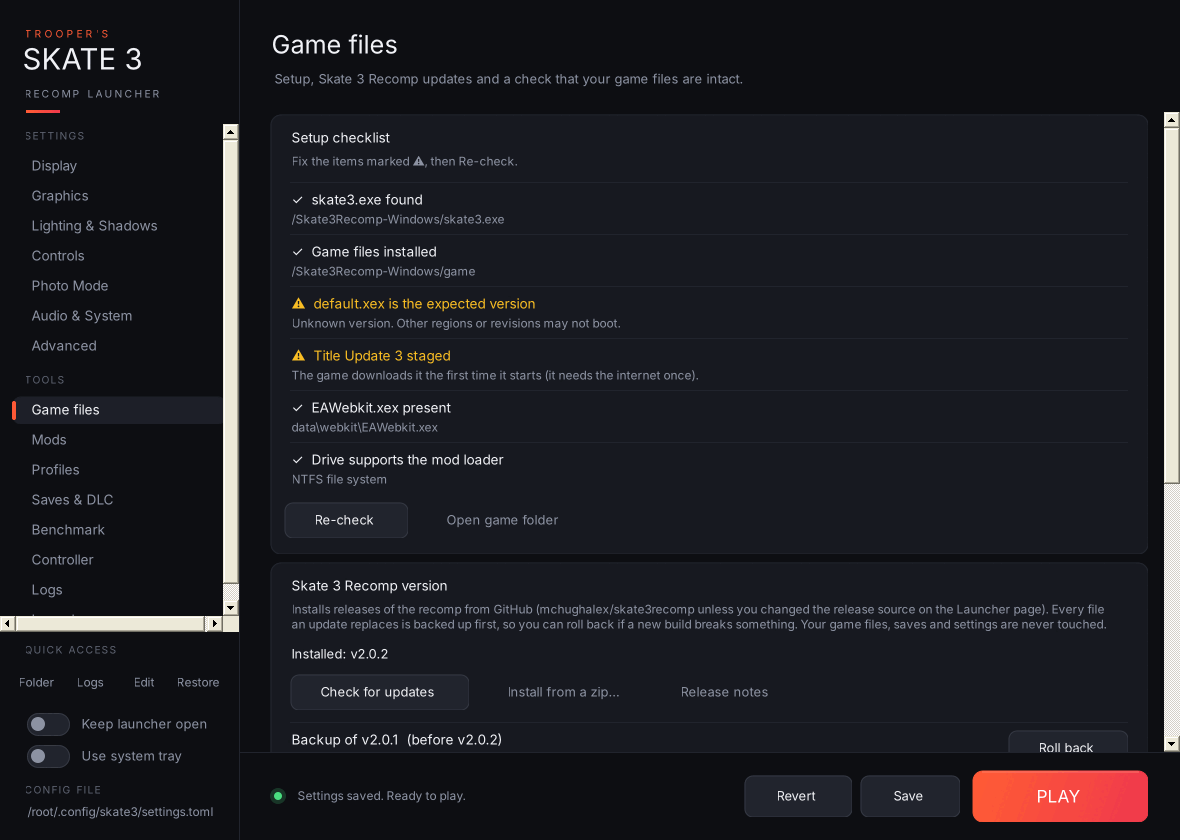
Setup checklist:
skate3.exefound.- Game files installed. If they aren't, Start the game's installer runs
skate3.exeso you can pick your ISO. default.xexis the version the recomp is built for.- Title Update 3 is staged, checked against the same SHA-256 hashes the recomp's own installer uses.
EAWebkit.xexis present.- The drive supports the mod loader (NTFS).
The checklist runs quietly every time the launcher starts, and opens this page only if something's missing.
Check game files:
- Quick check compares sizes against a known-good dump in seconds.
- Full check SHA-256 hashes every game file (about 6 GB), with progress and Cancel. It lists anything missing or different.
- Save as my baseline is for copies from another region. Save your own working files once, and later checks compare against those instead.
📊 Benchmark (new page)
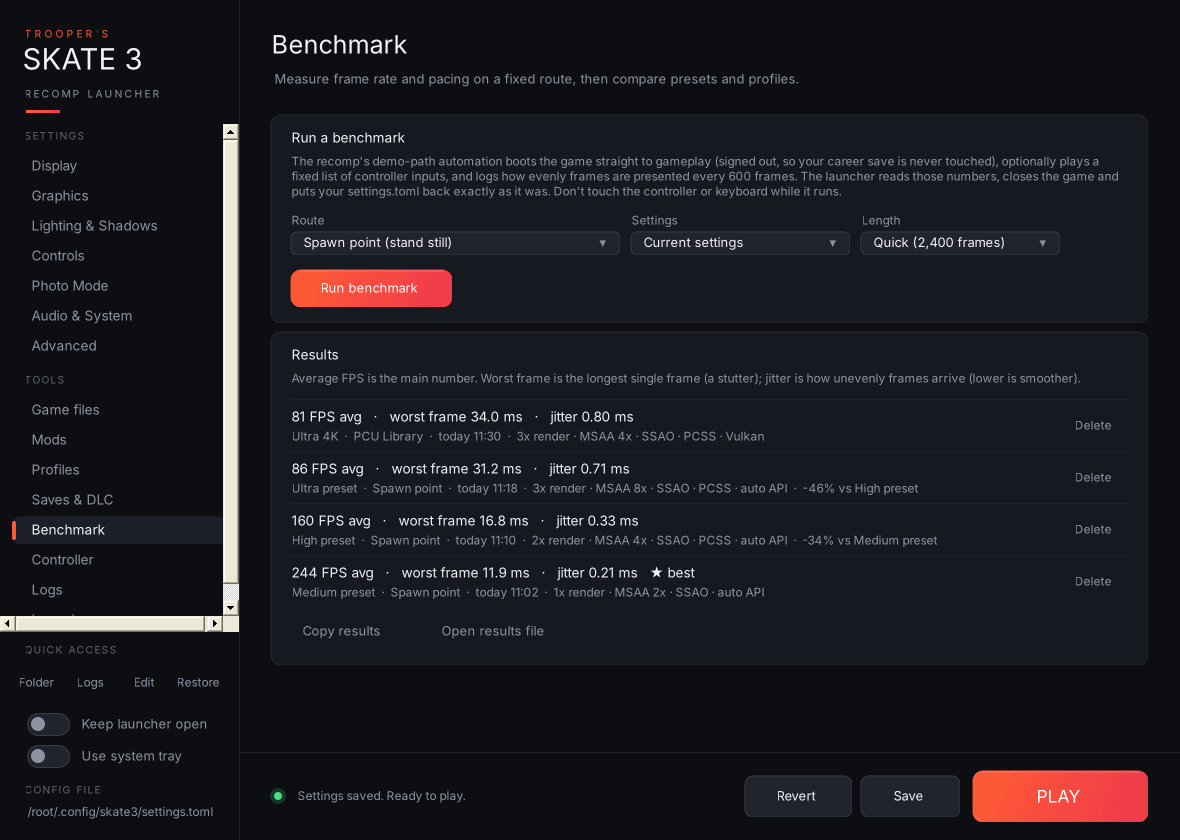
- Choose a Route:
- Spawn point (stand still).
- PCU Library, the map-switch route from the recomp's own help text.
- Custom inputs: your own comma-separated list, using
a b x y start back lb rb lt rt up down left right l3 r3, with:msto wait after one (for examplert:1500).
- Choose the Settings to test: your current settings or any saved profile.
- Choose a Length: 2,400, 6,000 or 12,000 frames.
What happens when you press Run:
- The launcher turns on the recomp's own demo-path automation and frame-pacing log in
settings.toml, then starts the game. - The game boots straight to gameplay signed out, so your career save is never touched.
- The scene settles, then the launcher reads the frame-pacing numbers the recomp logs every 600 frames.
- The launcher closes the game and puts
settings.tomlback exactly as it was. If the launcher is closed halfway, your settings are restored the next time it starts.
Results show average FPS, worst frame (the longest single frame, i.e. stutter) and jitter (how unevenly frames arrive). Each result also lists the settings, the GPU and the % change against your previous run on the same route, and your best run is starred. Copy results and Open results file (launcher-benchmarks.csv) are there too.
📸 Photo Mode (new settings page)
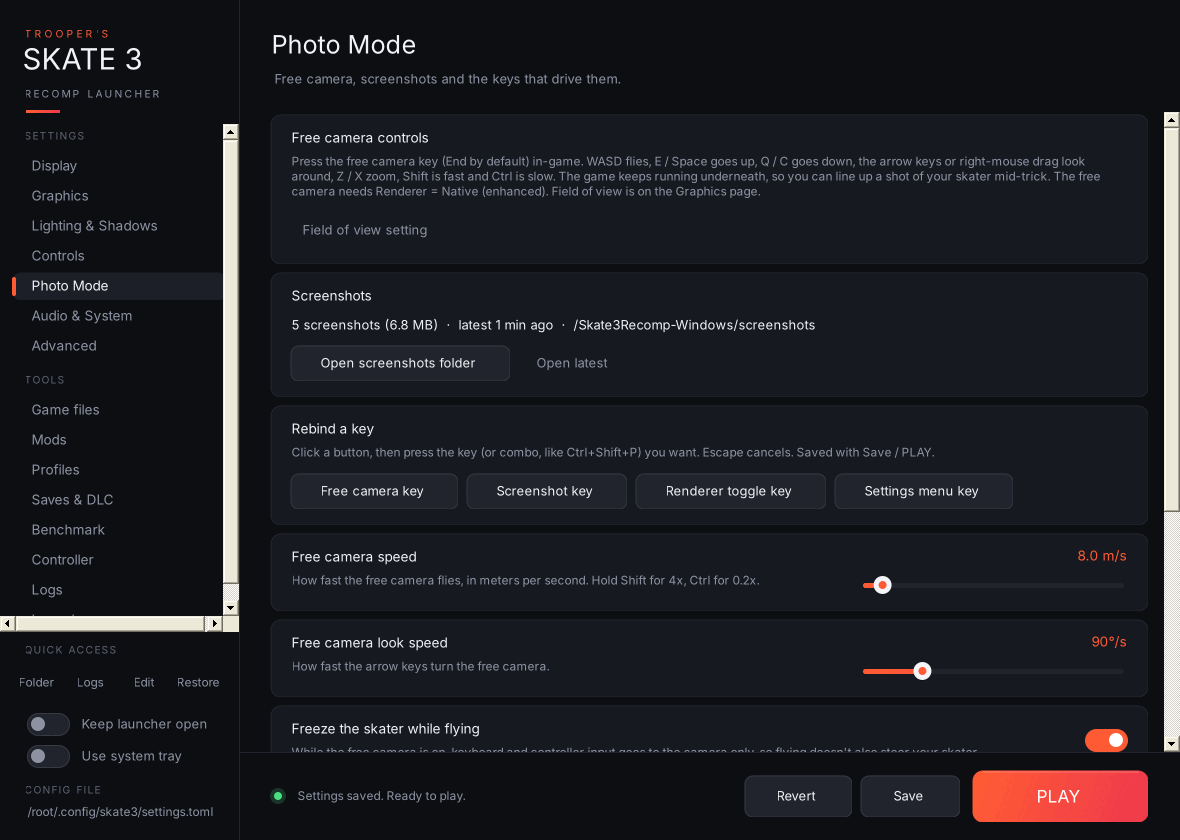
- Free camera speed (0.5–100 m/s) and look speed (10–360°/s).
- Freeze the skater while flying: input goes to the camera only.
- Key binds for the free camera (End), screenshot (F6), renderer toggle (F5) and settings menu (F1).
- Rebind a key: click a button and press the key or combo you want (for example Ctrl+Shift+P). Key names are written exactly the way the recomp spells them.
- Warnings when a key is empty, isn't a key the recomp knows, or clashes with another bind or one of the recomp's own keys (F2–F4, F8–F12, Backtick, Escape). Also when the free camera can't work because Renderer is set to Emulated.
- A Free camera controls card with the in-game controls (WASD, E/Space, Q/C, arrows or right-mouse drag, Z/X zoom, Shift/Ctrl speed).
- A Screenshots card with how many you've taken, Open screenshots folder and Open latest.
🎮 Controller navigation
Drive the whole launcher from the couch with an Xbox controller:
| Button | Action |
|---|---|
| D-pad / left stick ↑↓ | Move between controls |
| D-pad / left stick ←→ | Change sliders, drop-downs, toggles and pickers |
| A | Press / toggle / open a drop-down |
| B | Close a drop-down |
| LB / RB | Previous / next page |
| Start | PLAY |
| Back | Save |
It's on by default (toggle on the Launcher page) and pauses on the Controller page so the tester sees every button.
🚂 Add to Steam (Launcher page)
- Adds Skate 3 (Recomp) to your Steam library as a non-Steam game, for Big Picture and Steam Deck.
- Choose whether it opens the launcher (controller-friendly) or plays straight away.
- Set artwork… files your own images by shape: tall = library cover, very wide = hero banner, wide = grid, square = logo.
- Steam must be closed while the launcher edits your library. A backup of
shortcuts.vdfis kept.
🩺 Graphics driver check (Launcher page)
- Shows your GPU, driver version and date, and the Vulkan driver the game reported.
- Flags drivers over a year old.
- Check driver also compares against a known-issues list kept in this repo.
- Get the latest driver opens AMD's, NVIDIA's or Intel's driver page.
🐞 Better crash reports (Logs page)
- Report on GitHub… asks whether the problem is with the game or the launcher, then opens a new issue in the right project. The issue is pre-filled with your versions, PC, driver, mods and the last session's status, and the full report is copied to your clipboard.
- Keep crash dumps asks Windows (one admin prompt) to save a small
.dmpfile wheneverskate3.execrashes. The newest one is added to the bug-report zip. - Bug reports now include your GPU driver, enabled mods, game-file check result and crash-dump status.
✨ Smaller changes
- A What's new pop-up the first time you open a new version. It's also on the Launcher page.
- Sidebar entries shrink to fit all 15 pages without scrolling.
- The Updates card now points to the Game files page for installing.
Upgrading from v3.0.0
Replace the old exe with the new one. Your settings, profiles, settings history, save backups and launcher options are all kept.
Install
- Download
TroopersSkate3Launcher-v3.1.0-win.zipbelow. - Extract
Trooper's Skate 3 Recomp Launcher.exeinto your Skate 3 Recomp folder, next toskate3.exe. - Run it. It needs Windows 10 or 11, which already includes the .NET Framework it uses.
The exe isn't code-signed, so Windows SmartScreen may warn you the first time. Click More info → Run anyway. This release was built by GitHub Actions directly from the source in this repo.
Known limitations
- Mods that change individual files inside the game's
.bigarchives (most texture packs) aren't supported yet. That's next on the Roadmap. - Mods need an NTFS drive.
Found a bug? Use Logs → Report on GitHub… and it fills most of the issue in for you.
Unofficial and not affiliated with the Skate 3 Recomp developers or EA. No game files are included. Screenshots show example mods and benchmark results.