Repository navigation
Releases
Remjet 0.1.0-alpha.3

Remjet 0.1.0-alpha.3, an alpha build of the film emulator for Leica M9 DNGs.
Download Remjet-0.1.0-alpha.3-windows-x64.zip below, unzip and run remjet.exe. Windows 10/11 x64.
Not yet code-signed: Windows SmartScreen may warn about an unknown publisher (More info → Run anyway).
- Renamed to Remjet (formerly Kodachromer): the executables are now
remjet.exeand
remjet-cli.exe, and the repository is https://github.com/Tyrannik/remjet. - Your edits, settings and tuned films move automatically from
%APPDATA%\Kodachromerto
%APPDATA%\Remjeton first start. Settings copied to the clipboard by Kodachromer still paste. REMJET_DATA_DIRreplacesKODACHROMER_DATA_DIR(the old name still works).
Built by GitHub Actions from tag v0.1.0-alpha.3. SHA-256: CA9101E5C49085A3D1FCE781976205261FCD10A2BA22B0D06C791112B5DD74A9
Kodachromer 0.1.0-alpha.2
Kodachromer 0.1.0-alpha.2, an alpha build of the film emulator for Leica M9 DNGs.
Download Kodachromer-0.1.0-alpha.2-windows-x64.zip below, unzip and run kodachromer.exe. Windows 10/11 x64.
Not yet code-signed: Windows SmartScreen may warn about an unknown publisher (More info → Run anyway).
- Projected slide output alongside the scanned look: full density range, flare-limited deep
blacks, warm lamp and corner falloff (tunable under Tune look). - Edits no longer clutter photo folders: they live in
%APPDATA%\Kodachromer\edits, matched by
file content so they survive moves and renames. Old sidecar files are imported and removed
automatically. Reset all now returns an image to unedited. - Undo / redo per image (Ctrl+Z, Ctrl+Y / Ctrl+Shift+Z, toolbar buttons).
- Copy / paste settings shortcuts are more robust, also use the system clipboard (paste
settings across sessions), and every action shows a short confirmation message. - Fixed: a crash when Windows or another tool reported an invalid window size during a resize.
KODACHROMER_DATA_DIRenvironment variable to keep app data elsewhere (portable use).- Releases are now built and published by GitHub Actions from the tagged source.
Built by GitHub Actions from tag v0.1.0-alpha.2. SHA-256: 61CBA8995F769222680CEE53E159A114A17C4741A9871628757703CE7EF0F4A6
Kodachromer 0.1.0-alpha.1

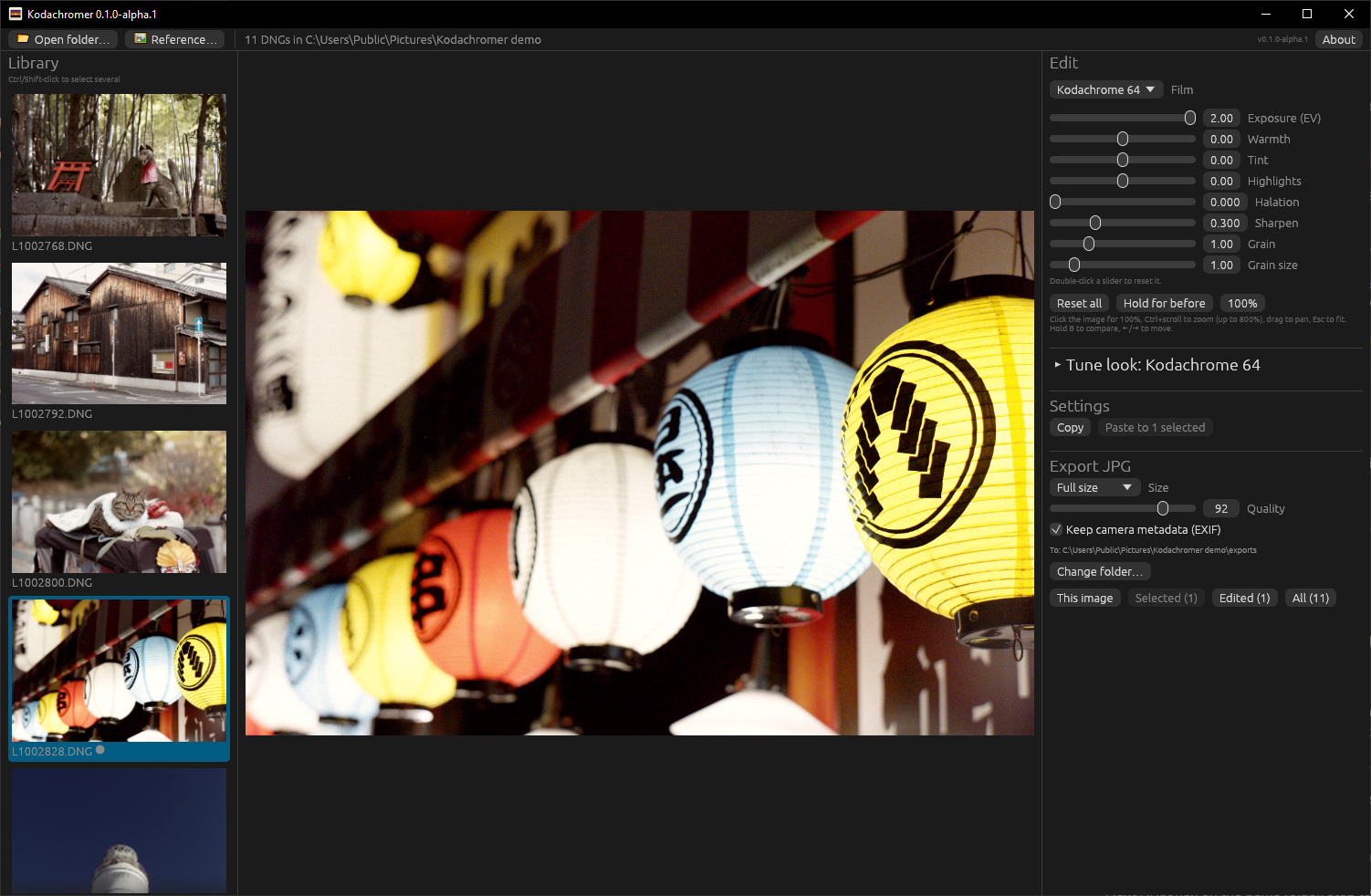
First public alpha of Kodachromer, film emulation for Leica M9 DNGs, starting with Kodachrome 64 as it looks on a scanned slide.
Download
Kodachromer-0.1.0-alpha.1-windows-x64.zip (below): unzip anywhere and run kodachromer.exe. There is no installer.
Requires 64-bit Windows 10/11 and a DirectX 12 or Vulkan capable GPU.
Windows SmartScreen may warn about an unknown publisher because alpha builds are not code-signed. Choose More info → Run anyway, or build from source.
What's in it
- Kodachrome 64 model built on Kodak's published data (E-55): characteristic curves and dye cross-absorption, plus a virtual scanner for the scanned-slide look.
- Per-image controls: exposure, warmth, tint, highlights, halation, sharpen, grain, grain size.
- Tune look: adjust the film itself and save variants as new films.
- Smooth viewing: live preview, click for 100%, Ctrl+scroll up to 800%, lag-free panning, hold B for before/after, reference image beside the preview.
- Non-destructive edits saved beside each DNG; copy/paste settings; batch JPG export with EXIF.
kodachromer-cli.exefor scripted exports.
Known limitations
Leica M9 only (other DNGs untested) · Windows only · clipped raw highlights can't be recovered · first 100% view of an image takes a second or two · no undo · unsigned binaries. Details are in the README.
Please report problems and ideas in Issues.
SHA-256 of the zip: 67937C53E197C708A466CDC6F7C7E11689C3249CA0723F0F1DE3776CD3F84D30
Kodachrome and Kodak are trademarks of Eastman Kodak Company. Kodachromer is an independent project, not affiliated with or endorsed by Kodak or Leica.