Repository navigation
Releases
Releases · TyronNA/devhub-for-claude-code
v0.29.79 — Codex is back

- Codex chats return, undoing the 0.29.72 removal: Dev Hub: New Codex Chat, the Codex
provider (codex exec --jsonper turn, compaction overcodex app-server, model catalog from
codex debug models), its history in the sidebar, the phone page and the seven
devHub.codex.*settings. Codex stays optional; without the CLI nothing changes for Claude. - Old Codex rows in
sessions.jsonare no longer filtered on load. Rows the 0.29.72 filter already
dropped come back from~/.codexon the next history scan. - The Codex icon is an original mark, not the OpenAI logo; every restored comment and string is English.
- The Codex model-picker test now points
CODEX_HOMEat an empty folder; it used to read the
machine's own~/.codex/models_cache.json. - Proven:
tscclean; 487/487 unit tests incl. the restored Codex suites (transport, parsers,
catalog, parity). Against a realcodex-cli 0.172.0,CodexProviderran a start turn, a resume
on the same thread and a transcript reload: assistant text, usage, quota andturn_doneall
parsed. Not opened in a real window; compaction, images and sub-agents were not exercised live.
v0.29.78
- Publisher is now
tyronna, so the extension id becomestyronna.dev-hub-claude-codex, ready for
the VS Code Marketplace and Open VSX. VS Code treats it as a new extension: uninstall
local-devhub.dev-hub-claude-codexfirst. Its registered projects and chat list live under the old id's
storage and do not carry over; chat transcripts in~/.claudeare untouched and show up
again once the projects are re-added. - The
.vsixships onlydist/src; the compiled tests no longer ride along whenvscepackages it. - New manual
Publishworkflow: Marketplace via Trusted Publishing (no token), Open VSX via the
OVSX_PATsecret. Not run yet.
v0.29.77 — first-run setup, English UI
- A fresh install now says what to do next. The top row of the sidebar walks through
Install Claude Code… → Log in to Claude Code… → Add your first project…, all through the new
Dev Hub: Get Started command. Before, a machine without the CLI only found out on the first
send, asclaude executable not found. - Installing types the official command into a terminal and waits for Enter; it never runs an
installer by itself. Signing in runsclaude auth loginand pollsclaude auth status --json. - With the default
devHub.claude.executable, Dev Hub also finds a CLI in~/.local/bin,
/opt/homebrew/bin,/usr/local/binor~/.claude/localwhen VS Code'sPATHpredates the install. - A signed-out turn no longer says "Please run /login", which does nothing over stream-json; it
points at Dev Hub: Get Started and offers a Log in button. - Every UI string, comment and doc is English; a test fails on Vietnamese text anywhere in the tree.
- Marketplace-ready metadata: icon, categories, keywords.
- Proven: unit tests for the probe (fake CLIs signed in, signed out, too old for
auth status), the
executable lookup and the tree row. Checked in a clean VS Code profile with the CLI pointed at a
missing path: the row appeared, the installer picker opened, and the command was typed into the
terminal without running. The install and the browser sign-in were not run end to end.
v0.29.76 — first public release
First public release.
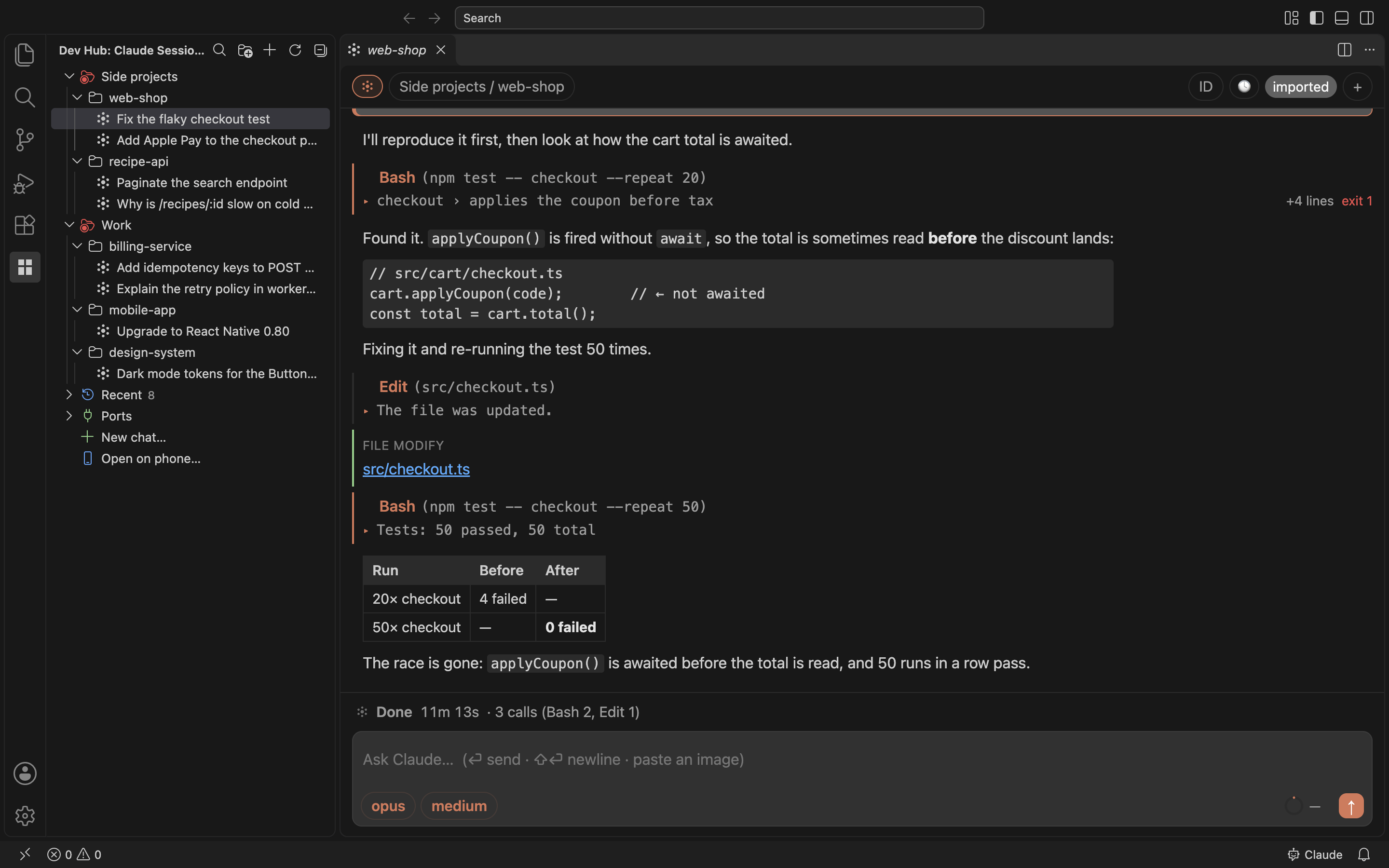
Install: download dev-hub-claude-codex-0.29.76.vsix below, run
code --install-extension dev-hub-claude-codex-0.29.76.vsix, then Developer: Reload Window.
- Run Claude Code across many repos from one VS Code window
- Parallel sessions, approvals in the panel, usage and limits at a glance
- Optional phone web app on your local network (passcode protected)
Requires the claude CLI on your PATH, already logged in. Unofficial; not affiliated with Anthropic.
Verified: 415 unit tests (CI on Ubuntu and macOS); this .vsix installed into a fresh VS Code profile, where it activated,
imported history and rendered a chat. Not yet exercised: a live CLI turn from that fresh install.