Repository navigation
Releases
Launcher v2.0.0

Launcher 2.0.0 — On-device search and live downloads
Find files by name, by what they show, or by what they say
Files now opens from a saved catalog and checks for new, renamed, and deleted files in the background. Start with All, Images, or Documents to choose which searches run. As results appear, the scope buttons give way to file-type filters like PDF, JPG, and DOCX. Image results show a thumbnail, and tapping one opens the original in your default image viewer.
Search photos by description, text, or person
Type “dog sleeping on a couch” to find a photo by its content. Search for a receipt number, an error message in a screenshot, or a phrase you remember seeing in a photo. The People page groups similar faces and lets you name a group, so you can search Files for someone by name.
Find a passage buried in a document
Search for “the lease clause about pets” even when the filename and the relevant passage use different words. EmbeddingGemma 2 indexes passages from PDFs with selectable text, DOCX, TXT, Markdown, and CSV files. Each passage vector takes 512 bytes, plus index metadata.
Image and document search live under Settings → Search. Each feature has its own model download, indexing status, and storage controls. Launcher processes your files on-device and checks for new or changed content while charging. You can also start indexing manually.
Follow downloads from Home
Paste a direct file link into Launcher or send one through Android’s share menu. Launcher starts the transfer, closes the keyboard, and takes you to Home. Eligible large files download in four parallel ranges, with a single-stream fallback. Finished files are saved to Android’s Downloads folder and appear in Launcher’s download history.
Each active transfer gets a compact Home card with its filename, percentage, and an accent-colored progress bar. The cards use Liquid Glass when enabled and sit midway between the notification marker and your favourites, or the up chevron if the dock is empty. Cards disappear as transfers finish, and the battery indicator returns after the last one.
Manage Kokoro from a full settings page
Speech & audio now opens directly to a full page with voice and playback controls, news read-aloud, and Kokoro model management. You can follow download progress, cancel a transfer, see how much storage the model uses, or remove it from the same page.
Launcher v1.5.14
What’s new
- Notifications group by app and sort by the newest notification. Multi-notification groups collapse into stacks with a count. Tap a notification to open it.
- Home pages and the app drawer follow swipe gestures. The Quick panel scrolls as one view.
- Liquid glass covers Today cards, notifications, app tiles, dock icons, and search bars on Android 13 and later. It is enabled by default and respects saved preferences.
- App search can search shared files after Android file access is granted.
- Swipe right on Home can open Today or open Google Discover through the Google app.
APK
Launcher 1.5.14, build 42, supports Android 7 and later. The production-signed APK can update an existing Launcher installation with the same signing lineage.
SHA-256: 5B9FC7CA33EB5D2CB40C2728937D33673F9A0F8B57D1E58936B930D14993D86D
Launcher v1.5.6
A simpler home and a swipe-up app drawer
- A centered clock, animated app drawer, customizable favourites and a visual accent chooser.
- Swipe up from Apps home to reveal grouped apps or the all-apps grid. Swipe down from the top of the drawer to return home.
- The larger, thin clock moves with the drawer. Turn weather and the home battery indicator on or off in settings.
- Choose up to five favourites for Quick access. The dock icons sit directly on the background with compact notification badges.
- Pick an accent from animated swatches, including Forge Orange. Page tabs are optional and start hidden in new layouts.
Full Changelog: v1.5.5...v1.5.6
Launcher v1.5.5
What's Changed
- Feature/kokoro tts reader by @V4LKYR13101 in #4
- Lock Gesture (Double-tap an empty area on the Today or Apps screen to lock your phone.)
- Setting poage tidy up
Full Changelog: v1.5.4...v1.5.5
Contributors

Assets 3
Launcher v1.5.4
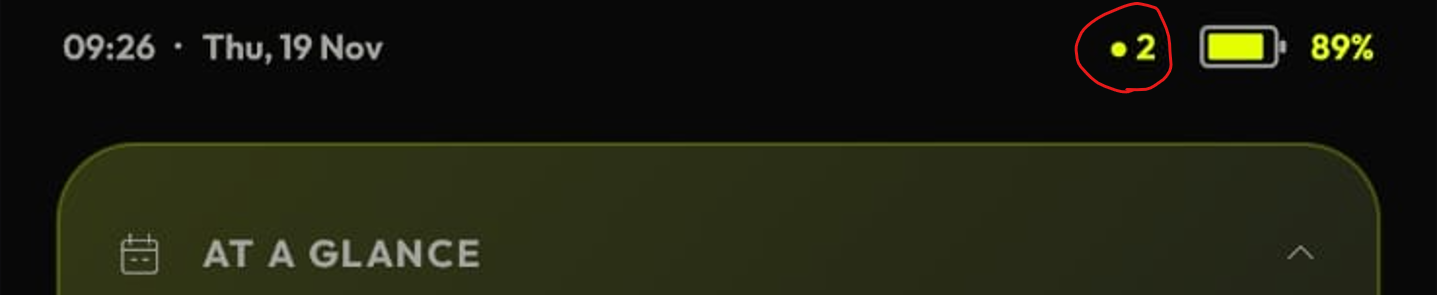
Silly little addition, but i added a notification indicator to the launcher status bar, i found myself missing some messages.
Launcher v1.5.1
Launcher v1.5.1
A powerful, minimalist and fully customisable Android launcher, built from scratch using C# and .NET.
Launcher transforms your Android home screen into a personalised workspace, combining productivity tools, customisation, privacy and at some point in the future, some Windows integration with a companion the app.
Key Features
- Fully Customisable Home Screen: Personalise app drawers, layouts, icons, spacing, colours and themes.
- Biometric App Locking: Protect selected applications with fingerprint authentication within Launcher.
- Smart Notification Centre: Manage notifications, filter conversations, maintain optional message history and reply directly where supported.
- Interactive Dashboard: Access notes, timers, weather forecasts, calendar, music controls, RSS feeds and system information.
- Windows Companion: Connect your Android device to Windows for wireless file transfers, file browsing and remote note editing. (WIP)
- Custom System Panel: Access notifications, media controls, brightness, volume and connectivity shortcuts.
- Advanced Icon Customisation: Support for icon packs, Material, Phosphor and Bootstrap icon libraries, and individual app icons.
- Dynamic Themes: Light, Dark and Sun themes with custom accents and automatic ambient-light switching.
- Motion and Visual Effects: Perspective transitions, animations and optional sensor-driven depth effects.
- Focus and App Organisation: Organise applications into custom drawers, manage favourites and personalise individual app tiles.
- Privacy-Focused Design: No accounts, no advertising and local storage for personal preferences and notification data.
Improvements
- Refined interface layouts, spacing and visual consistency.
- Adjustable application icon sizing.
- Improved application tile appearance and customisation.
- Enhanced navigation and interaction animations.
- Improved notification and system panel controls.
- Expanded icon library integration.
- Configurable haptic feedback.
- Improved widget presentation and dashboard organisation.
- Additional personalisation and accessibility options.
Installation
Requirements: Android 7.0 or newer.
- Download
Launcher-1.5.1.apkfrom the release assets below. - Open the downloaded APK on your Android device.
- Allow installation from the selected source if Android requests permission.
- Install and launch Launcher.
- Navigate to Launcher → Settings → Permissions → Default home app.
- Select Launcher as your default home screen.
- Customise your experience.
Windows Companion version: 1.2.0
Links
- Website: https://kevlog.co.za/
- Project Page: https://kevlog.co.za/projects/launcher/
- Development Article: https://kevlog.co.za/blog/building-launcher-for-android/
- Source Code: https://github.com/V4LKYR13101/Launcher
Built with C# and .NET 11 for Android.
No unnecessary accounts. No advertisements. Just a home screen designed around how you use your device.