Repository navigation
Getting Started
Your first hour on Scavenge & Survive, step by step. You have one character, everything you own is an item lying somewhere in the world, wounds bleed and death takes it all. Each step below links to the page that explains it in full.
Connect with the nickname you want to keep: your account is your nickname (1 to 22 characters). A window first asks for your language; pick one of the ten and press Continue. Then Register For A New Account asks for a password of 4 to 32 characters. Accept creates the account, logs you in and shows the welcome text, whose button counts down from 10 before you can close it. Next time the same name asks for the password: five wrong tries disconnect you for 10 minutes. See Account & Login.

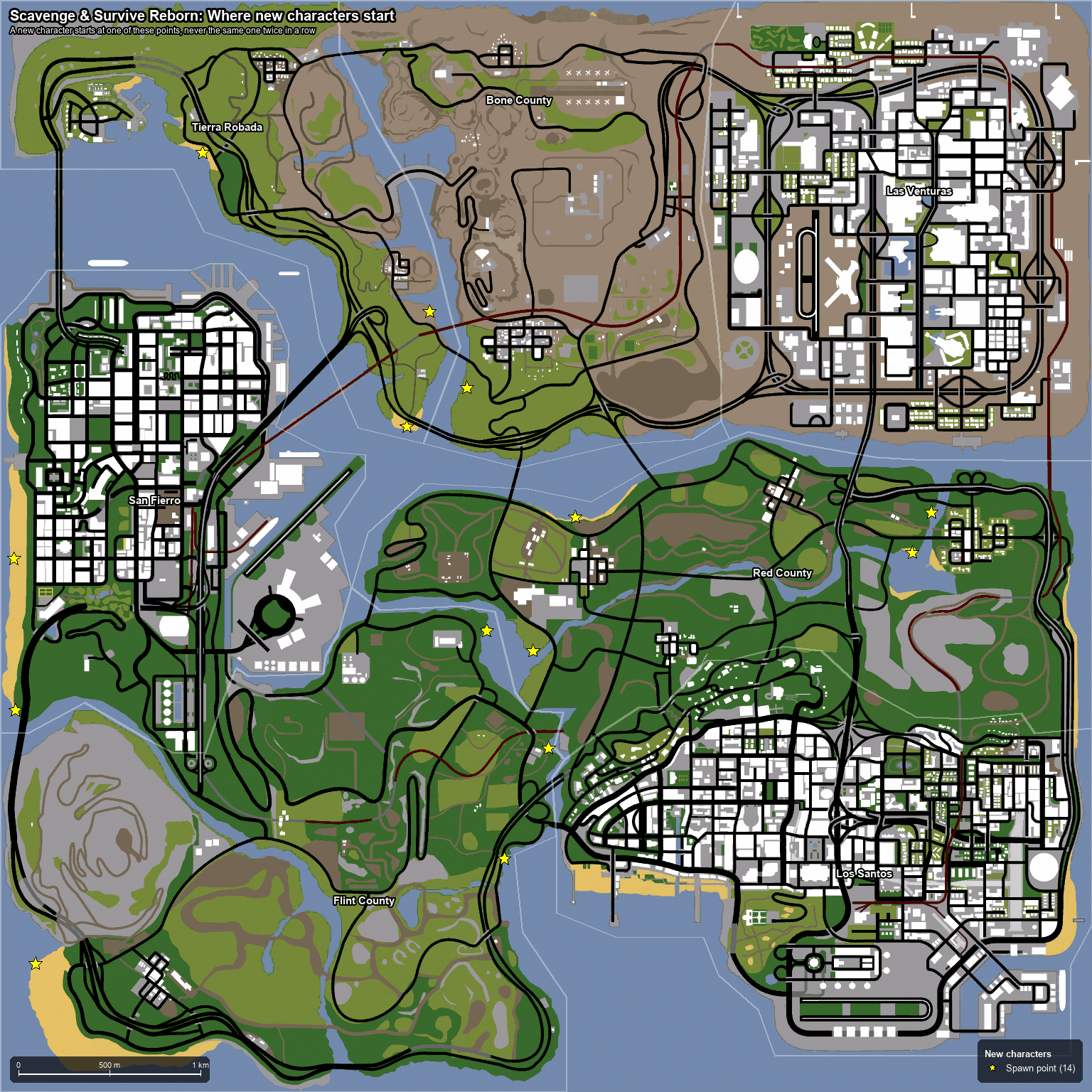
Your character spawns at one of 14 spots at the water's edge, in random clothes. Your very first character has 90 health, 80 hunger and a Combat Knife in its hands; every character you make after a death starts with 100 health, 40 hunger and an Antiseptic Bandage instead. There is no bag, no map and nothing else: all you have is what you find. See Death.


Top right: the red health bar and the green hunger bar above it, the icon of what you hold with its rounds (10/0), and a column of yellow keys with white actions that tells you what F, N, Y, H and R do right now. Bottom left: the watch, with your compass bearing, the time and your radio frequency. There is no radar, no map and no money. Green text near the centre gives tips (/tooltips turns them off). See HUD and Controls.
Walk towards the coast road, into the first houses and yards. Items lie on the ground with a yellow label within 4 m. Tap F to take the nearest one into your hands, Y to put it away, N to drop it (or hand it to a player standing next to you). Bags, boxes and crates open on a tap and are picked up on a hold of F; the boxes lying around warehouses and yards are often already full. See Inventory and Containers & Bags.

H opens your inventory: six slots in the middle (every item takes as many slots as its size), the Health Status panel on the left (wounds, bleed, hunger, infections, drugs, knockout chance) and six gear tiles on the right: HEAD, FACE, HAND, HOLSTER, TORSO, BACK. Choose a row for Equip, Use, Wear or Move to. Big things (crates, wheels, panels, bodies) never go into the inventory: carry them in both hands or put them in a trunk or box. See Inventory.
Hunger falls all the time, faster when you run, and below 20 you lose health. Hold food and press F to eat it whole; hold a Bottle or Can and hold F to sip. Food that can be cooked is worth only 70 % raw, and raw meat and fish also infect you, so cook them on a campfire or barbecue first. See Food & Drink, Infection and Health.


Every hit that draws blood adds a wound and raises your bleed rate; while it is above zero you lose health every second and do not regenerate, and other players see your blood trail. Hold a bandage and hold F for 4 seconds to bind yourself (or a player within 1.5 m). A Dirty Bandage infects one time in three; the Antiseptic Bandage never does; a Medkit also closes wounds. Bandage early, a small bleed is cheap to stop and a heavy one is not. See Bleeding & Wounds and Medical.
A bag is the first thing worth looking for: hold it and press Y to wear it, and everything that does not fit your six slots goes in there (a Small Bag adds 7 slots, a Backpack 11, a Travel Rucksack 19). Firearms take one calibre each: hold the gun, stand over an ammunition tin lying on the ground and press F to load it, R to reload from the reserve, hold N to unload. The gun's name shows its rounds, M9 (10/7, 9mm, Hollow Point). Y holsters a weapon on your thigh or back and draws it again with empty hands. See Containers & Bags, Firearms, Ammunition, Melee Weapons and Holster.


Nearly every vehicle you find is damaged, almost out of fuel, and half the time locked. F gets you in when there is nothing to pick up where you stand; Y starts the engine, N the lights, R the radio, and F at the rear opens the trunk. The engine needs fuel in the tank and a charged battery under the bonnet: fill a Petrol Can at a petrol station pump (F), then pour it in at the side of the vehicle (up to 10 litres a hold). A Crowbar breaks a plain lock in 3 seconds; a Locksmith Kit gives you a Key and a lock a Crowbar cannot break. Leave it locked when you walk away. See Vehicles, Fuel and Repairing & Locks.


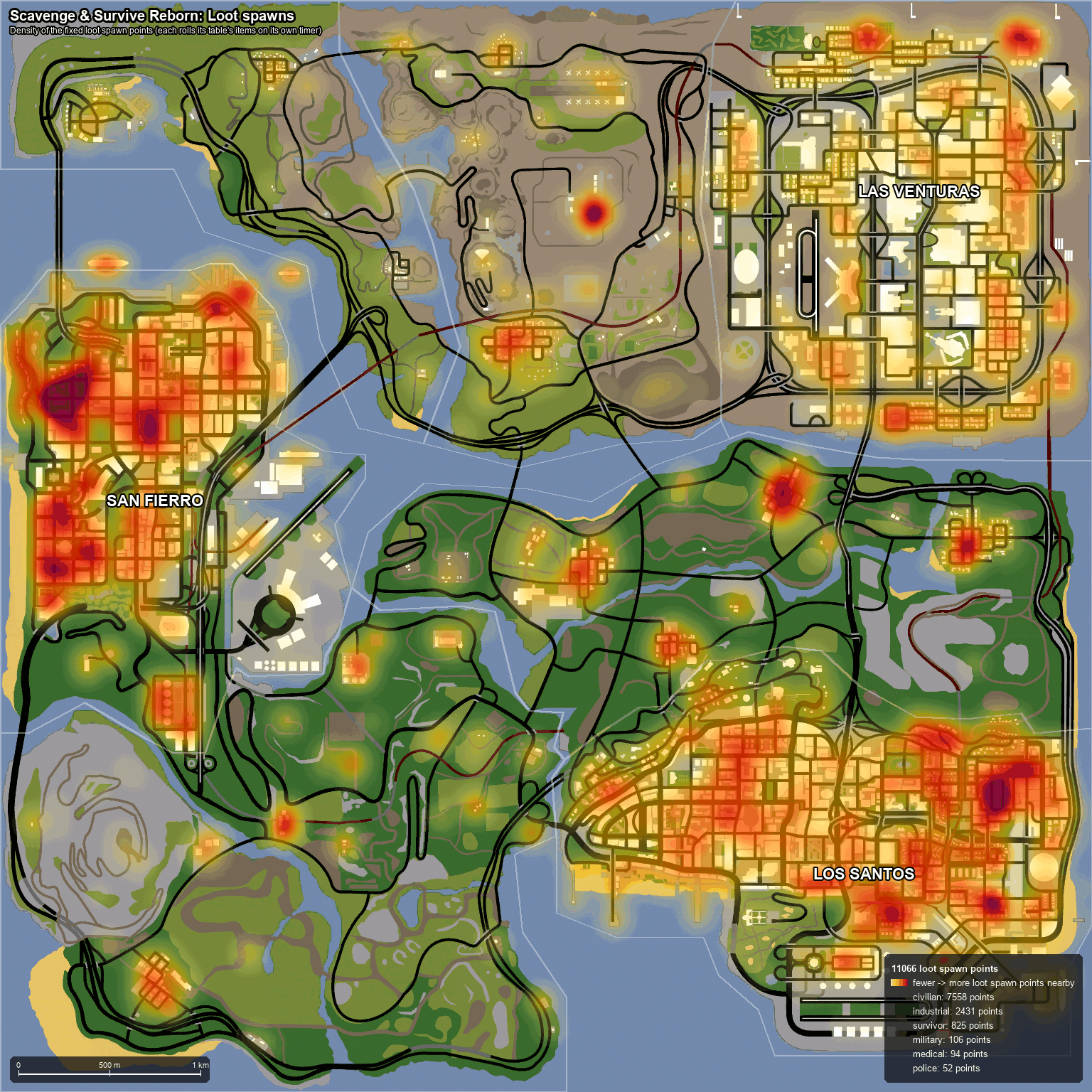
The map is split into seven zones. The three cities hold most of the loot points (Los Santos about 4,000, San Fierro 3,200, Las Venturas 2,000), the countryside far fewer. Civilian points give tools, food, bags and pistols; industrial yards give tools, panels and petrol; medical, police and military points hold the good things and the crowds. New loot lands at random points across each zone, never within 150 m of a player, and a point that rolled waits 3 to 9 hours before it rolls again, so a busy street stays bare for a while. Supply drops are announced in chat and draw everyone. See World & Zones, Loot & Respawn and Supply Drops.
A Tent Pack pitched with a Hammer (3 seconds) is a camouflaged 16-slot store that survives server restarts; a Crowbar packs it up again once it is empty. Three Wood Logs lit with a Lighter make a Campfire that cooks one food in a minute and burns for 10 minutes; the logs come from felling a tree with a Chainsaw. A tent has no lock, so hide it. See Tent, Campfire & BBQ and Trees & Wood.


Walls and doors are defences: drop the panel, hold a Screwdriver (upright) or Hammer (flat) and hold F for 10 seconds; a Crowbar from the inside takes it down again. A Motor turns a panel into a door, and a Keypad on top locks it behind a 4-digit code. Vehicles take a Locksmith Kit and a Key; the walk-in Airstream trailer takes a keypad on its door too. Most of these parts are made at a Workbench. See Defences, Keypads, Repairing & Locks and Constructing.

At 0 health your character is dead for good. Everything it held, wore and carried lands in a ring around a body, a Clothes item lies beside it, and anyone, your killer included, can take it for the next 120 minutes. >Play Again< gives you a fresh character on a beach with nothing but an Antiseptic Bandage: no items, no skills. Your account, password and language stay. Quitting in the middle of a fight counts as dying too. See Death and Combat Log.
T opens the chat. /l is local (40 m), /g global (everyone, and the Discord channel), /r your radio frequency; type the command alone to switch, or with text to send one line. /freq 101.3 tunes the radio and /radio opens its panel; push-to-talk voice follows the same rules. Set a line with /aimshout and shout it with aim and look-behind while you keep your gun up. Global lines are relayed to the community's Discord and lines typed there appear in game as [Discord] name: text. See Chat, Radio and Aimshout.
/report <name> [reason], /report near or /report killer sends a report to the staff, /bug a bug report, /admins shows who is on. The server itself kicks for high ping (above 400 ms for 10 seconds) and for tabbing out for more than 60 seconds, mutes chat floods for 30 seconds, and bans hacks on the spot. Three lines in one second is a flood. See Reports & Bans and Fair Play.
Try Skills (every repeated action gets faster), Gardening and Fishing for food that does not run out, Scrap and Machines for building material, and Area 69 and the Code Hunt once you have something to lose. The FAQ answers the questions that come up next.