Repository navigation

Release 023 · October 2026 · Current
VEX v0.4.3
Watch the market. Pick the brain.
0.4.3 is about keeping an eye on things, choosing who does the thinking, and reading the answer as it arrives.
Follow the tokens you care about and get told when they move. Read a market's technicals with a chart right in the chat. Pick a different model for each conversation. Plug in tools of your own from any MCP server. And when you ask something, your question now stays at the top of the screen while the answer writes itself beneath it, with a live line above the composer saying what the agent is doing.
Nothing here trades on its own. Alerts only tell you, the analysis is only a reading, and your own tools only read, each call behind a card unless you say otherwise.
This release covers the work merged after 0.4.2.
89 commits · Watchlist and price alerts · Reading while it writes · A model per chat · Technical analysis · Your own MCP tools · Three database migrations, applied on first launch
01 · Watchlist
Follow a token by its ticker.
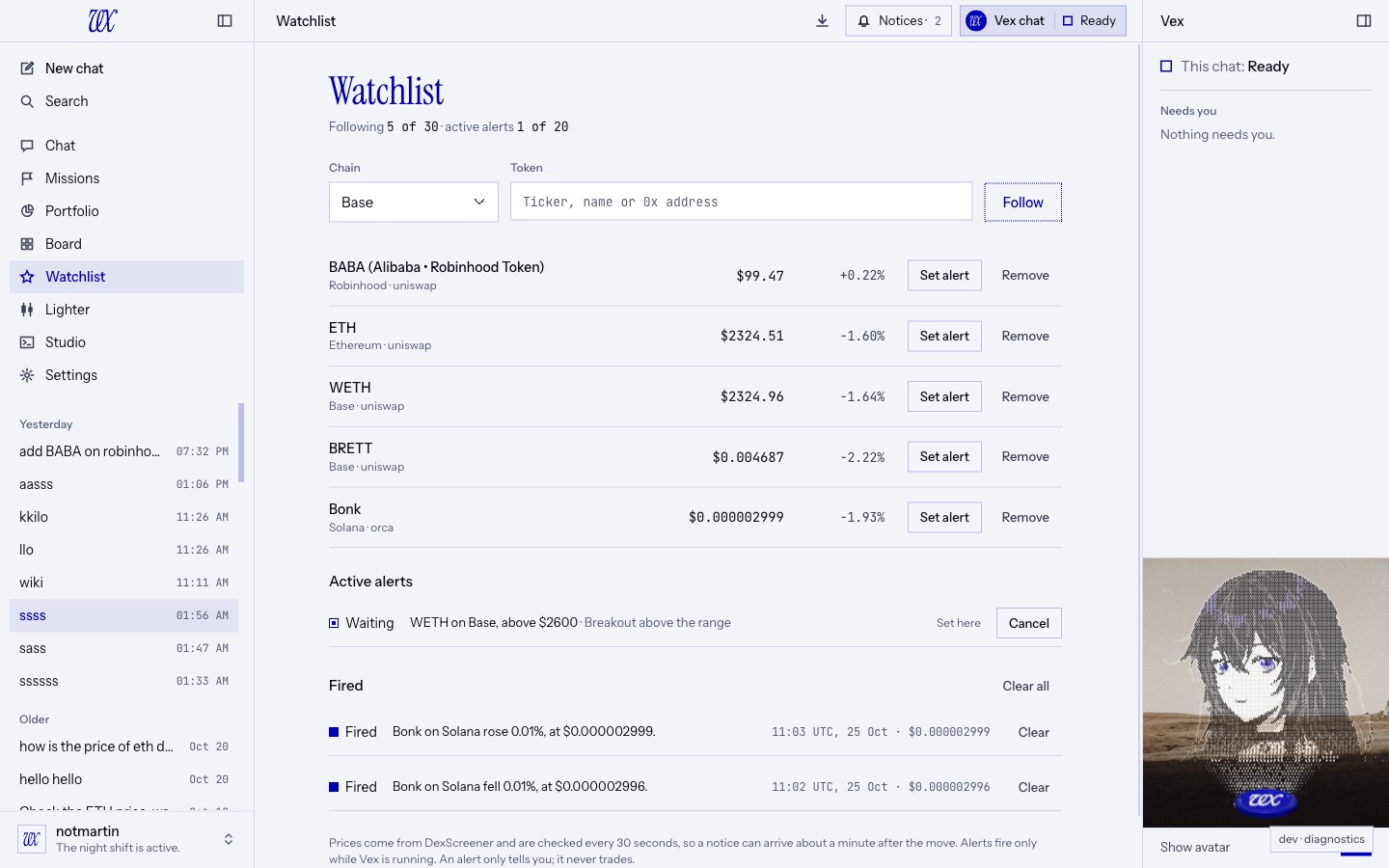
01 · Its own page. Watchlist sits in the sidebar, right after Board. Follow up to 30 tokens. Each row shows the price now, the 24 hour change and the pool the price came from, with Set alert and Remove at the end. The page refreshes every minute on its own.
02 · Twenty chains. Base, Ethereum, Solana, Arbitrum, BSC, Polygon, Optimism, Avalanche, Robinhood Chain, Linea, Mantle, Sonic, Berachain, Ronin, Unichain, HyperEVM, Plasma, Monad, MegaETH and Arc: the EVM chains VEX swaps on, plus Solana.
03 · Type the ticker, pick the token. Choose a chain and type a ticker or a name. VEX lists what DexScreener knows on that chain, with each token's short address, price, 24 hour volume and number of pools. Arrow keys and Enter work. Pasting an address still works too.
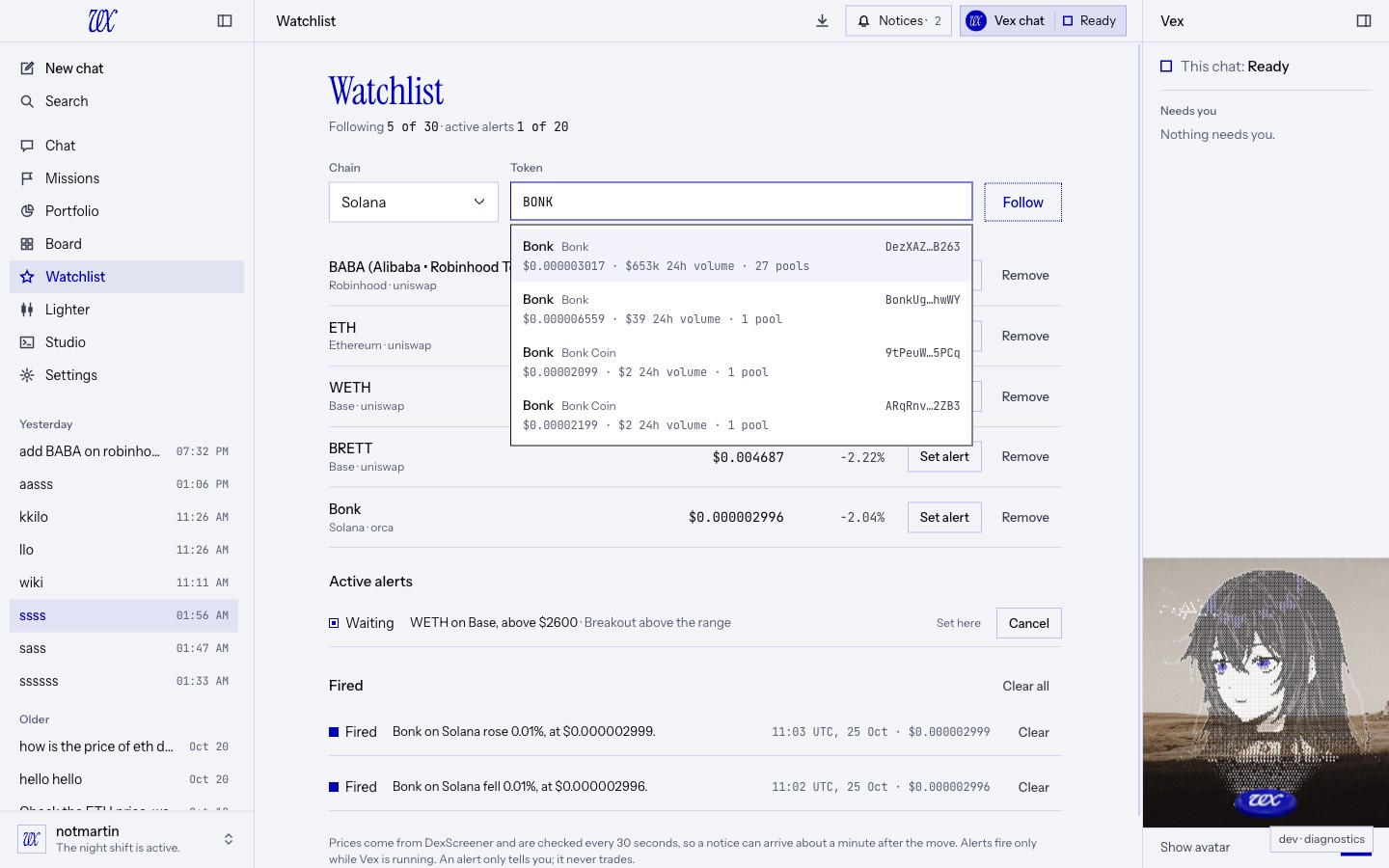
04 · The real one first. Many tokens share one ticker. The list puts the token that actually trades first, by 24 hour volume, then by number of pools, then by liquidity, because a liquidity figure is cheap to fake. Searching BONK on Solana, two copies claiming $50M and $23M of liquidity traded $2 that day. The real BONK, trading about $700k that day across many pools, comes first. The address is always on the row, so you can check.
05 · One price, from the deepest honest pool. VEX reads every pool for the token on its chain, sets aside any pool whose price is ten times or more away from the others (once there are at least three), and takes the price of the deepest pool left. The 24 hour change is shown when the token is the pool's main token; otherwise the row says n/a rather than show another token's move.
06 · Free and keyless. Prices come from DexScreener's public data. No API key, no model, no wallet: the watchlist keeps working while your vault is locked. A row whose read failed says Price unavailable; a token with no pool yet says No price yet.
Following a token is not a position. Nothing on this page holds, buys or sells anything.
02 · Price alerts
Told once, never traded.
01 · Four kinds. The price goes above a level, goes below a level, rises by a percentage or falls by a percentage from where it was when you set the alert. A rise can be up to 1000%; a fall must be under 100%. Add a note of up to 140 characters if you like.
02 · Checked before it is set. A level the price has already reached is refused, so an alert can't fire the moment you set it. A token with no price can't take an alert yet. Setting the same alert twice gives you the one you already have.
03 · From the page or from chat. Use Set alert on a row, or just ask: "tell me when SOL is above 250". Both go through the same rules, so the limits and the answers are the same. Up to 20 alerts can wait at once. The agent sets or cancels an alert only when your own message asks; a web page or a tool result can't ask for you.
04 · It only tells you. When an alert fires you get a notice in VEX with Open watchlist. If VEX is not the window in front, you also get a system notification, and clicking it brings VEX up on the Watchlist, even with the window closed. An alert never buys or sells anything.
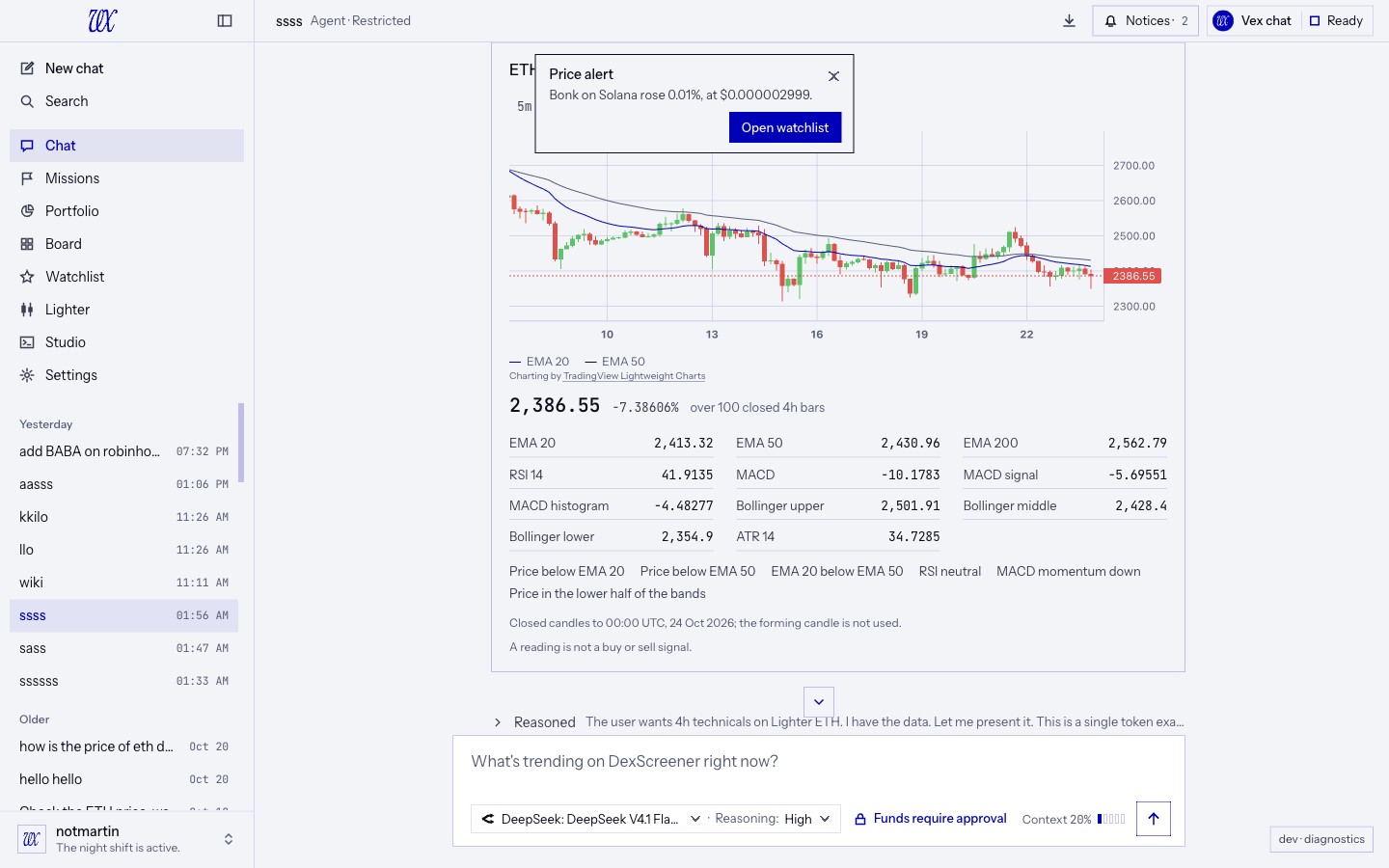
05 · Locked screen, quiet notice. While your vault is locked, the system notification says only "A price alert fired. Unlock Vex to see it.", so your tokens and levels don't show on a locked screen. Prefer no system notifications at all? Turn off Price alert notifications in Settings.
06 · Honest timing. Prices are checked every 30 seconds, from data that can itself be about 30 seconds old. A notice can come about a minute after the move. Touching the level counts. A check that fails or times out (each read gets 5 seconds) is skipped and the alert keeps waiting for the next one; if DexScreener asks VEX to slow down, checks pause for as long as it asks, up to a minute.
07 · While VEX runs. Alerts are checked while VEX is open. On macOS they keep running with the window closed. On Windows and Linux, closing the window quits VEX, and checks resume at the next launch.
08 · Fired stays put. An alert fires once. It moves to Fired, with the time and the price it fired at, until you Clear it or Clear all. A fired alert you haven't seen is shown again the next time VEX starts. Waiting alerts can be cancelled at any time.
An alert is a heads-up, not a stop-loss. It cannot place, change or cancel an order.
03 · Reading while it writes
Your question at the top. The answer beneath it.
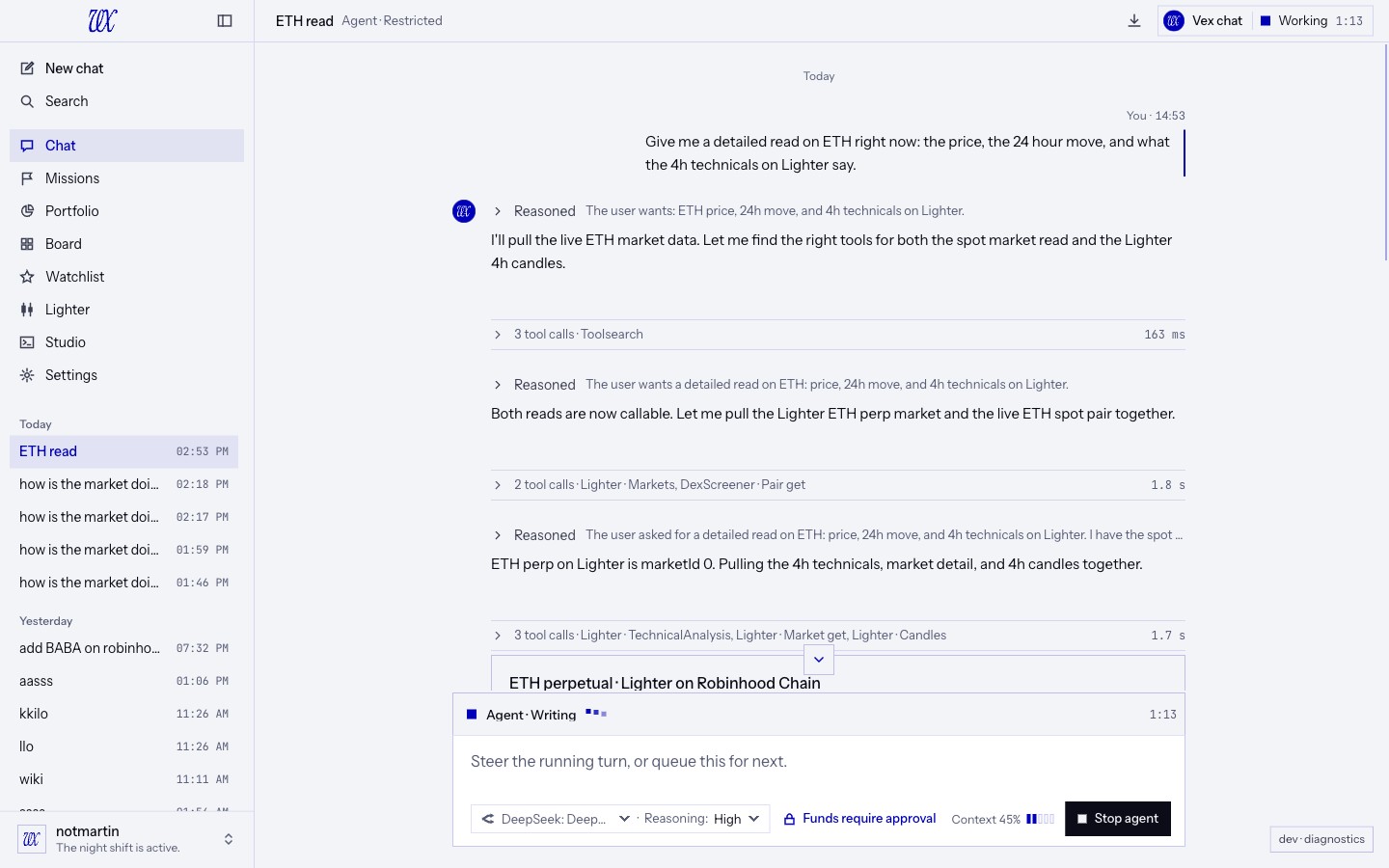
01 · The question stays in view. When you send a message, VEX moves it to the top of the chat and the answer grows downward beneath it. The view doesn't move while the answer streams, so you read a long answer from its first line instead of chasing its last.
02 · You take the view when you scroll. Scroll up or down while the answer streams and VEX leaves the view where you put it. Scroll back to the very bottom, or press the arrow above the composer, and the chat follows the newest text again for the rest of the answer.
03 · Cards get room. An approval card, a form or a chart that arrives with the answer fills the space beneath your question, without pushing it off the screen.
04 · What it's doing, always in view. A long answer can run past the bottom of the screen, so the line above the composer now says what the agent is doing right now: Agent · Thinking, Agent · Calling DexScreener · Gainers, Agent · Writing, with three moving dots after the words and the turn's clock at the right. It is the same word and the same clock as the live row at the end of the chat. Missions read the same way, as Mission · ....
05 · Still when it waits on you. When a decision is yours, the dots stop and the line reads Waiting for approval behind the still approval mark. With reduced motion turned on, the dots don't move.
06 · Back where you were. Switch to another chat and back, and one you left mid-read returns to the same message, even if the window changed size meanwhile. A chat that was following opens at its newest message. Loading older messages keeps your place.
The line above the composer only describes the turn. Stop agent is still the one way to stop it.
04 · A model per chat
Pick the brain for this conversation.
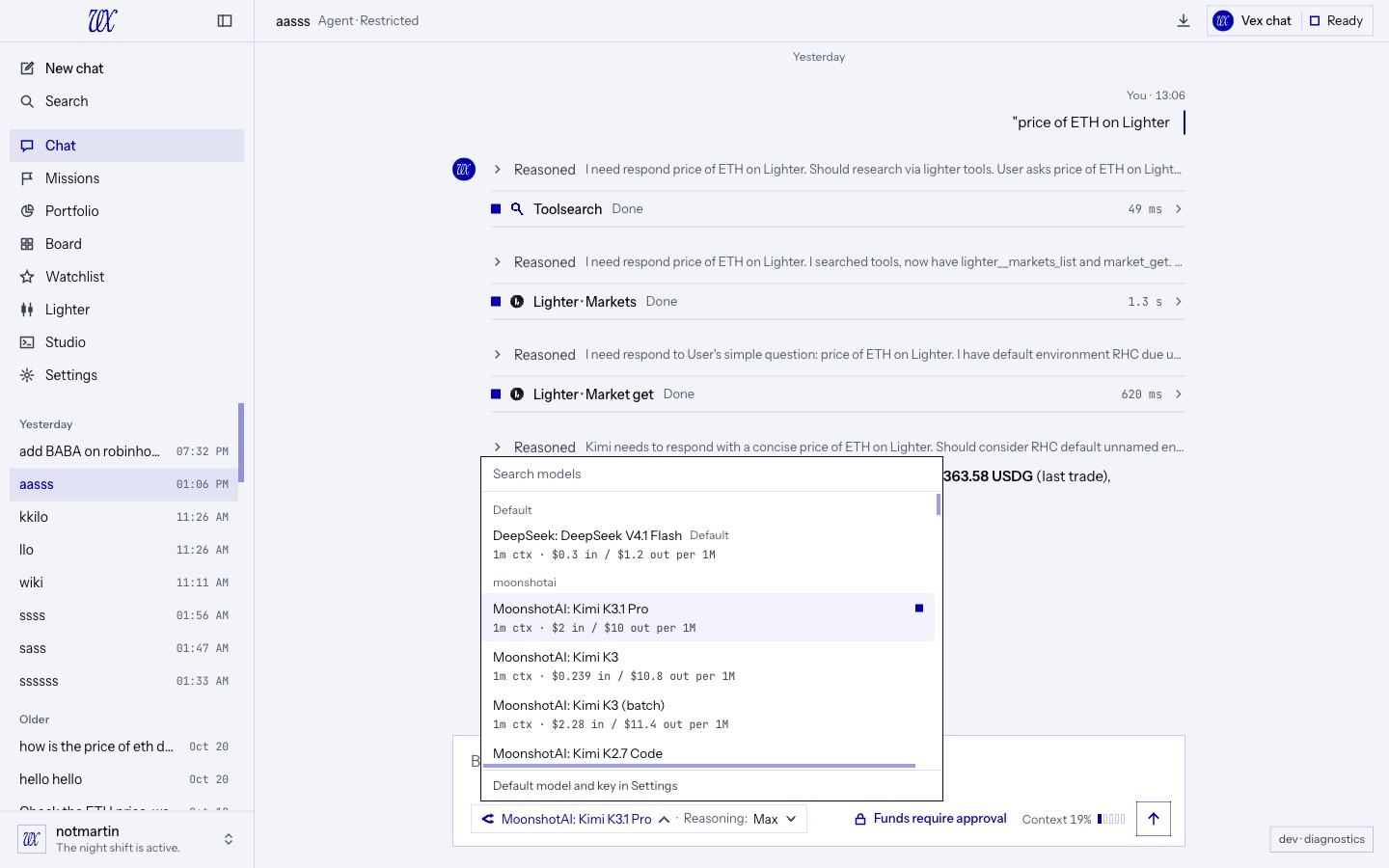
01 · Right in the composer. The model name in the composer is now a menu. Your Settings model comes first, marked Default, then every model grouped by its maker, newest first. Only models that can use tools are listed. Each row shows its context size and its price per million tokens, input and output, such as "200k ctx · $3 in / $15 out per 1M". Search by name or id.
02 · It sticks to the chat. The pick belongs to that conversation and takes effect on your next message; the menu is locked while a turn runs. Every later turn uses it, including ones nobody typed: wake-ups and resumes after an approval or a form. Your other chats keep their own models, and new chats start on the default. The reasoning level beside it stays per chat as before, and offers only the levels the picked model supports, from Off to Max.
03 · OpenRouter or Vex Inference. The menu lists the models of the provider you use. Switch providers in Settings and a chat whose pick isn't offered there runs on your default model, and the turn says so. If a model is taken off the list altogether, the turn stops and names it rather than quietly swapping.
04 · Missions keep their model. Set a mission's model on its contract card. It is part of what you accept and is fixed when the mission starts, so changing your default later doesn't change a running mission. Changing a mission's model after accepting asks you to accept again. The agent can't change it. If the model stops being available, the mission pauses on an error instead of running on something you didn't choose.
05 · Background work stays put. Memory and summarising keep using your default model. A conversation longer than the picked model holds says so in the menu: "This conversation is longer than this model holds. Vex compacts it before the next reply." Because summarising runs on your default model, a chat on a model with a larger window than your default is summarised at your default's size.
05 · Technical analysis
Read the chart, in the chat.
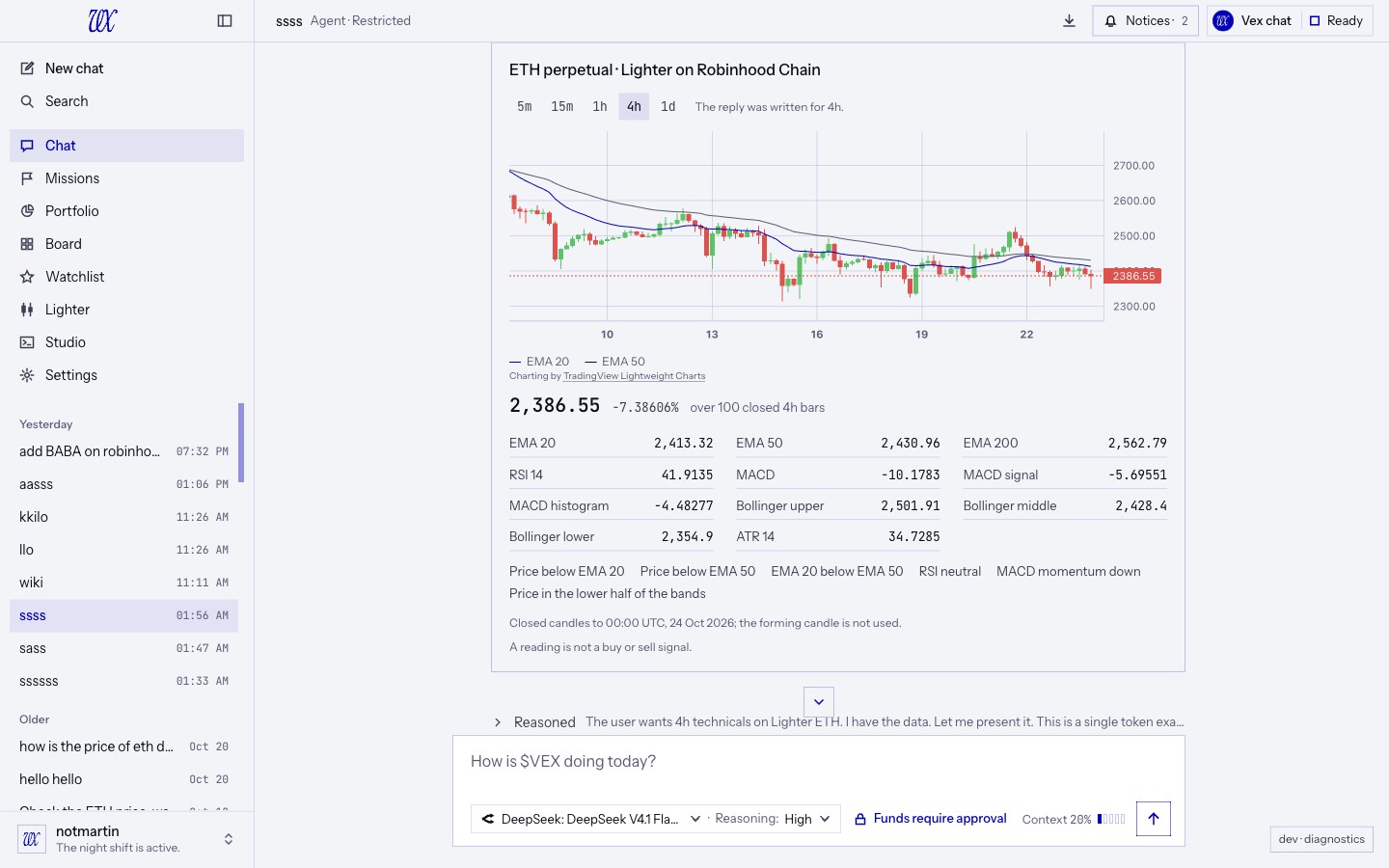
01 · Ask for the technicals. "4h technicals on ETH on Lighter", for a Lighter perp or spot market, or on any DEX pool DexScreener covers, on the EVM chains and Solana. Lighter candles come from Lighter's public API; pool candles come from DexScreener.
02 · One fixed set. EMA 20, 50 and 200, RSI 14, MACD 12/26/9, Bollinger 20/2 and ATR 14, on 5m, 15m, 1h, 4h or 1d candles. The numbers cover the newest 100 candles by default, anywhere from 30 to 200, and VEX reads at least 220 so even the EMA 200 is settled.
03 · Six signals, in words. Price against EMA 20, price against EMA 50, EMA 20 against EMA 50, RSI zone (overbought at 70, oversold at 30), MACD momentum and where the price sits in its Bollinger band. Alongside: the change, high and low over the candles covered, and the last ten closes with their RSI.
04 · Closed candles only. The candle still forming never moves a number. The answer names the candle it ended on. With fewer than 30 closed candles, VEX says there isn't enough history for that interval instead of drawing conclusions from a handful.
05 · A chart under the answer. The card draws the candles with EMA 20 and EMA 50, framed on exactly the candles the numbers cover. Switch between 5m, 15m, 1h, 4h and 1d without asking the agent again.
06 · Move around in it. Scroll the chat over the chart and the chat scrolls. Swipe sideways, or hold Shift and scroll, to go back in time; near the left edge, older candles load as you go. Pinch to zoom, from 10 candles up to 1,000.
It is a reading of past prices, not a buy or sell signal, and the card says so.
06 · Your own MCP tools
Plug in a server. Every call asks first.
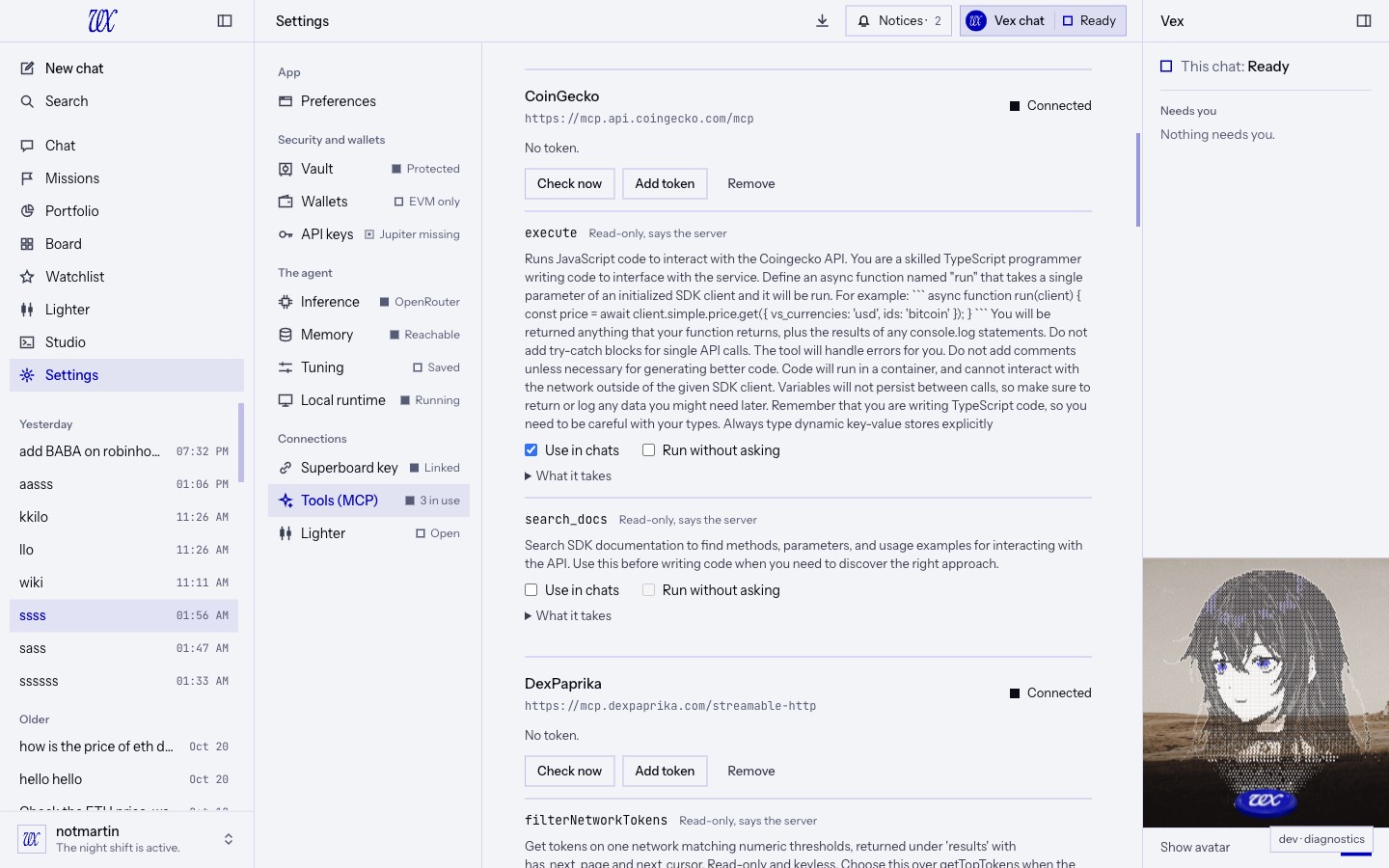
01 · Add a server. Settings now has Tools (MCP). Add an MCP server by its address, with a token if it needs one. VEX connects over Streamable HTTP, lists up to 100 of its tools, and shows what each one takes. Up to 5 servers. Two market-data servers work with no token at all: CoinGecko at https://mcp.api.coingecko.com/mcp and DexPaprika at https://mcp.dexpaprika.com/streamable-http.
02 · Off until you say. Every tool starts off. Turn on the ones you want, up to 8 at a time across all your servers. A tool whose inputs VEX can't check safely (references, either-or shapes, deep nesting) is listed but can't be turned on.
03 · Every call asks first. When the agent wants to use one of your tools, an approval card shows the server, the tool and the exact arguments that will be sent, in Restricted and Full access alike. Nothing leaves until you approve.
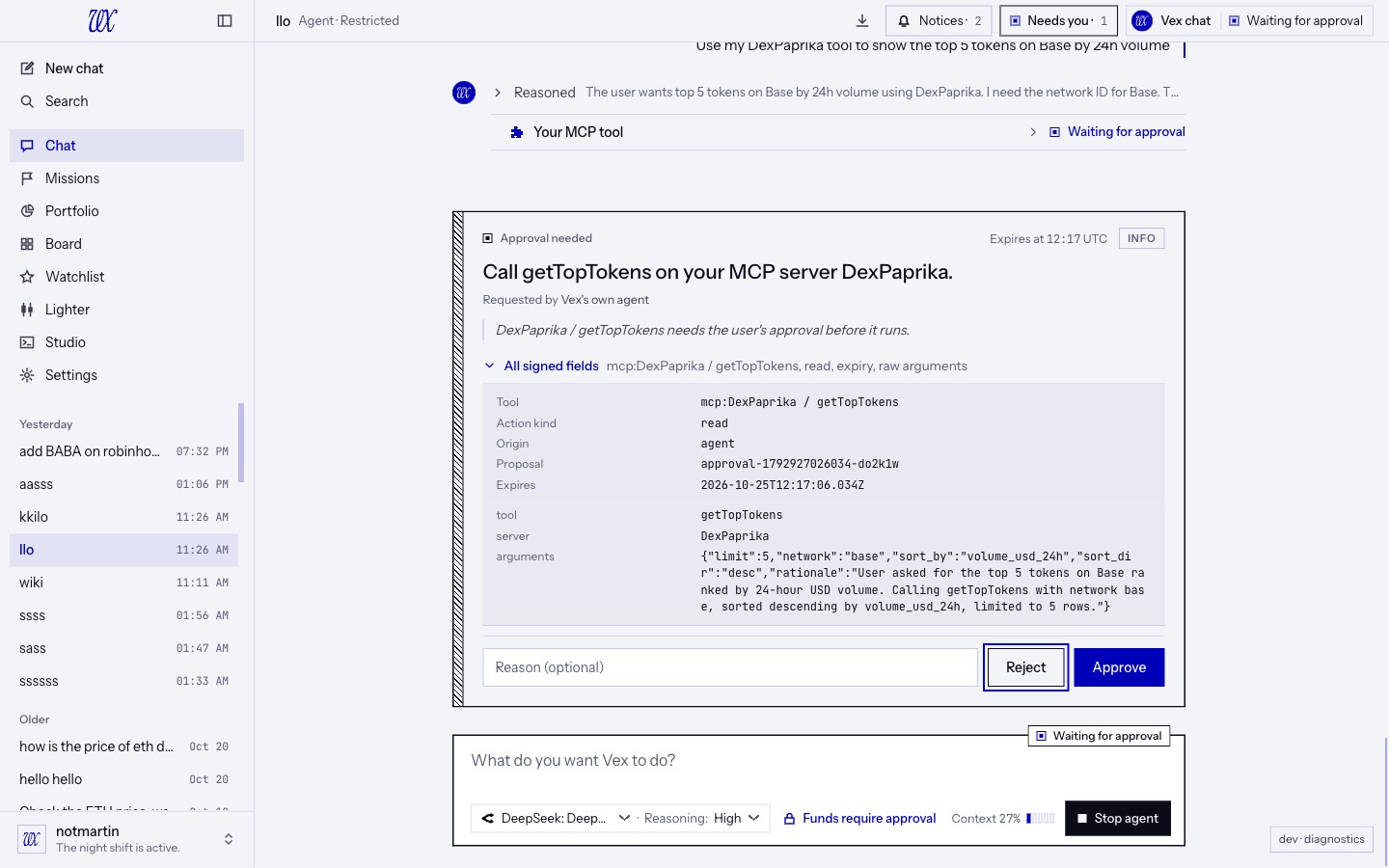
04 · Read only, by design. Your tools can only read and return text. They can never prepare a swap, a transfer or any other action, and their card carries no real-funds stamp because no funds move. If a server marks a tool as read-only and you've turned it on, you may let it Run without asking, and only in Settings.
05 · Treated as someone else's words. The agent is told that what your server returns is data from a third party: never instructions to follow, and never a place to put a secret. Each call gets 15 seconds and up to 256 KB back; the agent reads at most 16,000 characters of it. Calls are limited to 30 a minute across all servers.
06 · Where servers can live. On the internet over HTTPS, or on this computer, where plain HTTP is allowed. Addresses on your local network, link-local and cloud-metadata addresses are refused, and so is a name that points at one. The address is checked again when VEX connects and held for the call, so a name can't switch to a private address after the check. Redirects are refused, and your token is sent only to the server you added.
07 · Changed tools switch off. VEX checks your servers again every 6 hours. A tool that disappeared, whose inputs changed, or that is no longer marked read-only while set to run without asking is turned off until you look at it again, and VEX tells you which ones. New tools arrive off. A server that misses three checks in a row has its tools off in chats until a check succeeds.
08 · Kept to chats. Your tools are offered in chats only, not in missions, and never to coding agents connected through Studio. A server token is kept in your vault.
07 · Also in 0.4.3
Smaller changes worth knowing.
01 · One set of indicators. The Lighter desk's chart studies and the technical analysis card now compute from the same indicator code, so an EMA on the desk and an EMA in the chat agree.
02 · More tools at hand. The agent can keep up to 41 discovered tools ready in one conversation, up from the previous bound, so it searches for tools less often in long, varied chats.
03 · Per-model settings, per model. Model settings are cached per model, and a provider failover in one chat no longer carries over to a chat running a different model.
04 · A fallback that says so. A turn that ran on your default model instead of the chat's pick shows that on the turn.
08 · Performance and verification
Checked before it ships.
All nine CI checks passed on the merged main commit: 25,571 core tests, desktop suites on Linux (16,066), macOS (15,963) and Windows (15,995), 893 real PostgreSQL tests, packaging and bridge checks, and 156 end-to-end tests with no failed or flaky cases. Existing optional and platform-specific skips remain. Main CI results.
Each feature was also tried in the app itself before it merged: a watchlist and a fired alert on Solana, a model switch mid-chat, technical analysis of ETH on Lighter with its chart, calls to the CoinGecko and DexPaprika MCP servers through their approval cards, and a long answer streaming beneath its question with the live line above the composer.
09 · Before you update
What to know.
Three migrations, 182 through 184, apply automatically on first launch:
- 182 gives each chat its own model (three new columns on chats) and lets a mission contract carry its model.
- 183 adds two tables for your MCP servers and their tools.
- 184 adds two tables for your watchlist and its price alerts.
Nothing existing is changed or removed.
Everything carries over. Sessions, missions, memory, wallets, your provider and your settings. Every chat starts on your default model until you pick another.
10 · Bug fixes
Fixed since 0.4.2.
Chat and transcript
- The note the engine writes for the model after an approval ("[Engine: approval_resolved ...]") no longer shows in the chat or in a Markdown export. It was never meant for you; your approval card and the tool's result already show what happened. Older chats are cleaned up when they open, and nothing is deleted.
- A long answer no longer scrolls your question away: see Reading while it writes.
Composer
- A long model name no longer runs over "Reasoning" when the Stop agent key narrows the composer; it ends with an ellipsis inside its key.
Technical analysis chart
- The chart frames exactly the candles the analysis covers instead of opening cut off.
- The mouse wheel over the chart scrolls the chat again; going back in time is a sideways swipe or Shift and scroll.
- Older candles load only once you move the chart, and the view stays put when they arrive.
MCP tools
- A call to your own MCP tool no longer carries the real-funds stamp on its approval card.
- Server and tool states in Settings are written as words, not codes.
App and Studio
- Clicking a price alert's system notification reopens VEX even when its window was closed.
- The file explorer in the Studio rail starts a little taller, so it keeps its room now that the sidebar has one more page. A size you set by dragging is kept.
Security
- Dependency updates clear published advisories: zod 4.6 and undici 7.30.1.