Repository navigation


[CRITICAL] 此版本发布了多个安全更新,建议更新。
What's NEW / 新增了什么?
新功能
文字、回顾与画面,一次搜索 #251
现在,你可以在同一次搜索中查看快照文字、每日回顾与画面搜索结果,并共用时间、应用和分类筛选。我们优化了画面检索的性能,使其成为可能。
You can now view snapshot text, daily recaps, and visual search results within a single search, while applying shared filters for time, apps, and categories. We have optimized the performance of visual retrieval to make this possible.

更好用的时间筛选与结果排序 #275
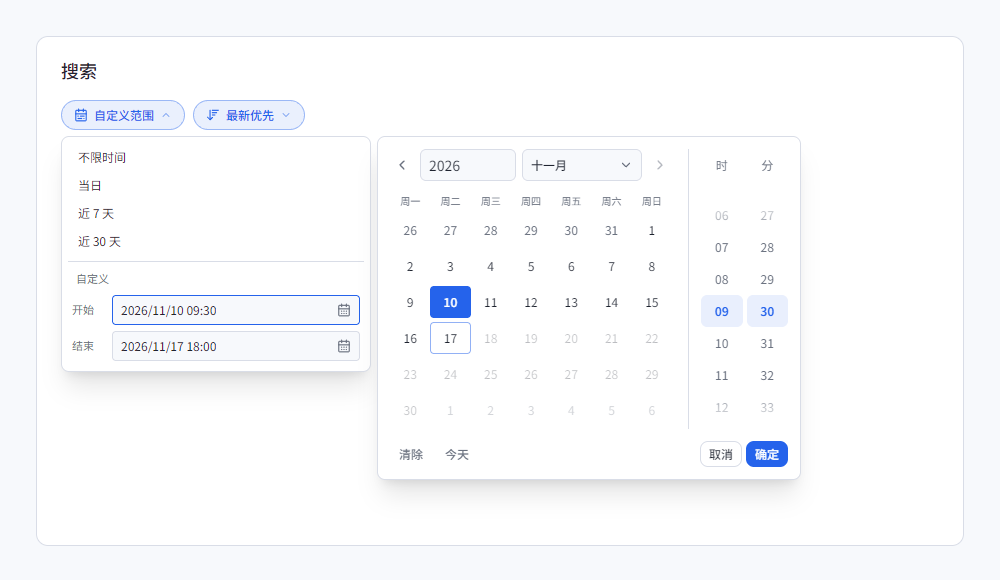
自定义时间范围现在提供日历、年月选择和时分滚轮。选好日期和时间后,点击“确定”应用;取消、按 Esc 或点击外部会保留原来的选择。开始和结束时间会相互约束,帮助选出有效的范围。
文字、回顾和画面搜索现在都可以选择“最新优先”,默认仍按相关程度排序。切换排序会重新加载结果,后续页面也会继续使用同一排序方式。
Custom time ranges now offer a calendar, year/month selection, and hour/minute wheels. Confirm a date and time to apply it; cancelling, pressing Esc, or clicking outside keeps the previous selection. Start and end bounds help you choose a valid range.
Text, recap, and visual search now offer newest-first ordering, with relevance remaining the default. Changing the order reloads the results, and subsequent pages retain that same order.
界面组件预览 / Component preview:
为一天整理主线 #263
每日回顾现在可以把一天中相关的活动串成主线,展示在各个时段的回顾上方。你可以沿着主线查看关联任务,也可以打开支撑这些内容的快照,了解一件事如何在不同时间继续推进。主线尚未生成或生成失败时,已有的时段回顾仍可查看。
整理回顾时,AI 还可以进一步查找当天的文字记录、附近快照与关联活动,补充所需的线索。生成详情会展示查找线索与整合主线的过程。自动整理会优先处理当天,并覆盖此前两天;更早的日期可以手动生成。
Daily Recap can now connect related activities into daily mainlines above the individual period recaps. Follow a mainline to its associated tasks or open the supporting captures to see how work continued across the day. Existing period recaps remain available while mainlines are pending or if their generation fails.
During generation, AI can look up additional evidence from the day's captured text, nearby screenshots, and related activities. Generation details show these evidence requests and the daily integration step. Automatic generation prioritizes today and also covers the preceding two days; older dates can be generated manually.

从托盘快速查找和控制记录 #264
右键点击托盘图标,现在会打开原生面板。无需先打开主窗口,就能浏览最近的记录、输入搜索、打开快照或跳转到时间线,也可以暂停记录、定时暂停、排除某个应用,以及打开设置。
面板在轻量模式下也可使用,并会跟随主题与语言设置。节电策略暂停记录时,按钮会显示原因;接回电源、暂停条件解除后,相关操作会恢复可用。
Right-clicking the tray icon now opens a native panel. Browse recent captures, enter a search, open a snapshot, or jump to the timeline without first opening the main window. You can also pause recording, set a timed pause, exclude an application, or open settings.
The panel works in lightweight mode and follows your theme and language. When power saving suspends recording, the controls show the reason and become available again once the power restriction clears.

在预览中编辑截图 #272
现在可以直接在快照预览中使用画笔、橡皮擦、文字和马赛克进行标注,调整缩放,并撤销或重做修改。离开尚未保存的编辑时,界面会提醒你确认。
保存后,文字识别会在后台继续,时间线缩略图和搜索结果会随编辑和识别完成而更新。识别失败时可以单独重试,已保存的图片仍会保留。
You can now annotate a saved screenshot directly in its preview with a brush, eraser, text, and mosaic, adjust zoom, and undo or redo changes. Leaving unsaved edits prompts for confirmation.
After saving, text recognition continues in the background, and timeline thumbnails and search results refresh as edits and recognition complete. Failed recognition can be retried while retaining the saved image.
可以带到另一台电脑的加密备份 #257
现在,你可以导出受密码保护的 .cpbackup 完整备份,凭备份文件和密码在另一台电脑恢复记录。导出和恢复准备过程均提供进度与取消操作;取消或准备失败时,当前记录不会被替换。完成导入后,备份中的记录会替换当前记录。
旧版 ZIP 备份仍需要原电脑有效的 Windows 安全凭据。可以先在原电脑恢复,再导出新的便携备份。
You can now export a complete, password-protected .cpbackup file and restore your records on another computer using that file and its password. Export and restore preparation show progress and support cancellation. Cancelling or failing during preparation leaves the current records untouched; a completed import replaces them with the backup's contents.
Legacy ZIP backups still require the original computer's valid Windows credentials. Restore them on that computer first, then export a new portable backup.
现代化 UI
从一个问题开始 AI 搜索 #251
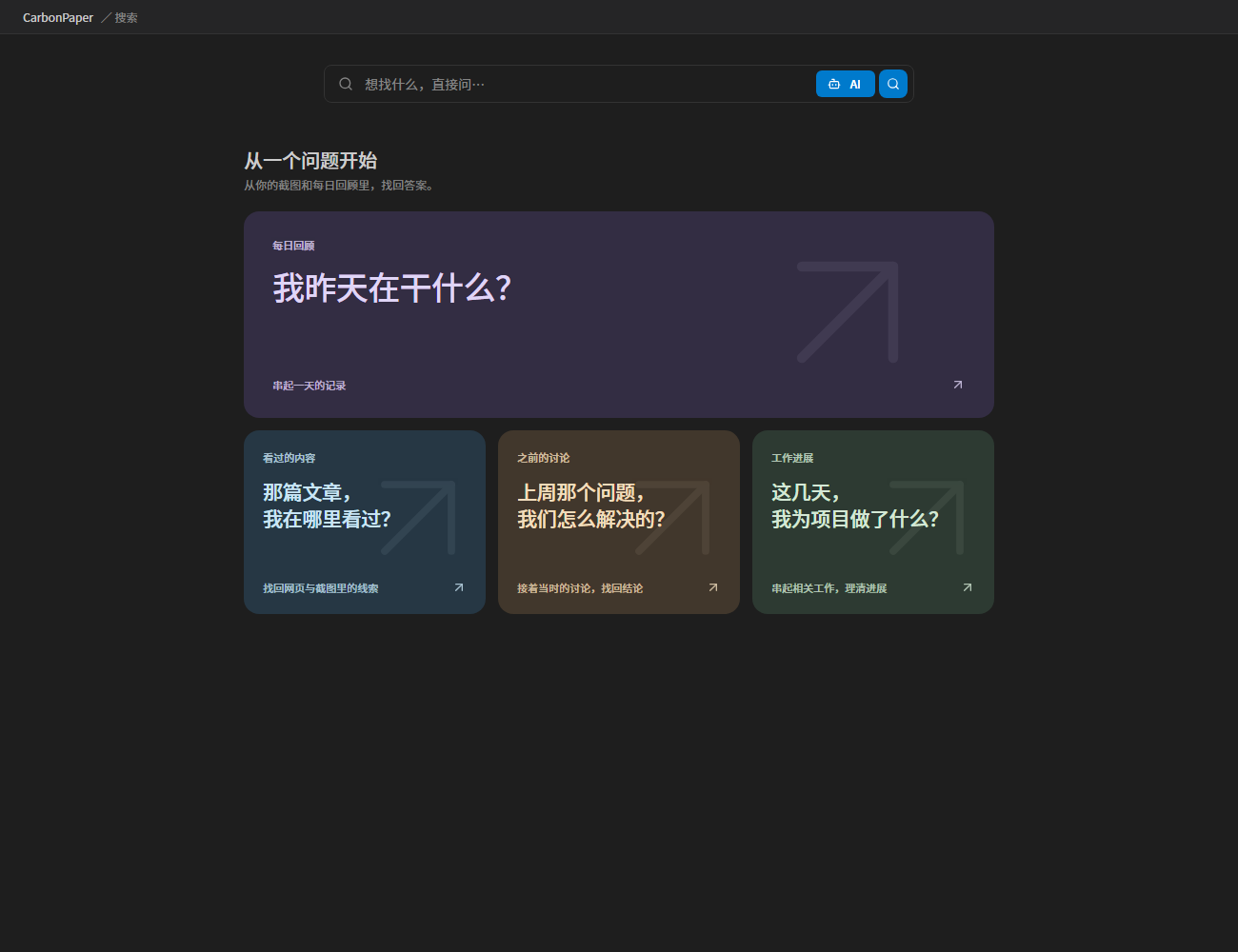
搜索首页现在有更集中的输入框与 AI 入口。进入 AI 搜索后,可以从“我昨天在干什么?”、“那篇文章在哪里看过?”或“这个项目最近有什么进展?”等问题卡片开始。点击卡片会先填入问题,你可以修改后再发送。
The search landing page now has a focused input and a compact AI entry. AI search offers question cards for reviewing yesterday, finding something you read, revisiting a discussion, or following project progress. A card fills the composer so you can edit before sending.
界面组件预览 / Component preview:
更连贯的启动与后台运行 #253 #260 #270
前台启动时,CarbonPaper 会先显示启动画面,再进入准备、解锁或工作界面。首次数据整理会显示进度,并在失败时提供重试。主窗口隐藏或重新打开后,记录、数据整理和索引任务会继续由应用管理,重新打开的窗口可以接续查看进度。
Foreground launches now show a CarbonPaper startup screen before handing over to preparation, unlock, or the workspace. Initial data preparation reports progress and offers retry after failure. Recording, compaction, and indexing remain managed by the application when the main window is hidden or recreated, and a reopened window can observe their progress.
性能与运行体验
记录库更紧凑,后台整理更平稳 #265 #267
我们减少了重复应用图标、文字索引状态与向量数据的存储开销,在开发机器上,这一项优化为主库节省了1/2的存储空间。
后台暂存数据库的空闲空间回收也已修正,能够按既定批次继续缩小文件。
We have reduced the storage overhead associated with redundant application icons, text index states, and vector data; on our development machines, this optimization has cut the storage footprint of the primary database by half.
Additionally, we have fixed an issue with the reclamation of free space in the temporary background database, ensuring that file sizes can now be consistently reduced in designated batches.
画面搜索更稳定,索引恢复更清楚 #251 #262
画面搜索现在会按需重新加载已有的可用索引,减少空闲后再次搜索时退回完整扫描的情况。模型会在资源允许时保留近期会话,减少反复加载,并优化文字查询的处理。
需要恢复索引时,搜索框和画面搜索区域会展示进度,以及等待解锁、节电、空闲或重试等状态。耗时查询的诊断也更加清楚,便于定位模型、索引和数据读取中的等待。
Visual search now reloads usable indexes on demand, reducing fallback to full scans after an idle reader has been reclaimed. Recent model sessions can stay resident within resource limits, reducing repeated loading, and text-query processing has been optimized.
When an index needs recovery, the search box and visual search area show its progress and waiting states, including unlock, power saving, idle scheduling, and retry. Slow-query diagnostics also identify time spent on models, indexes, and data reads.、
升级说明
首次启动此版本时,应用可能需要为既有数据完成加密格式转换与存储整理,并显示准备进度。快照、OCR 文字和已有回顾会保留。升级后的数据库需要兼容新存储格式的版本;请勿再使用旧版本写入同一份记录库。
First launch may need to convert existing derived data to the encrypted format and reorganize storage, with preparation progress shown in the app. Screenshots, OCR text, and saved recaps are preserved. The upgraded database requires a version compatible with its new storage format; older releases must not write to the same archive.
如果配置的 AI 服务会将 API 请求跳转到其他地址,请直接配置最终 API 地址。AI 搜索、回顾生成与连接测试现在会按配置的地址发送请求,并将跳转响应作为错误处理。#258
If your AI provider redirects API requests, configure its final API address directly. AI search, recap generation, and connection tests now send requests to the configured endpoint and treat redirects as errors. #258
修复
- 修补了后台组件离线时,删除、数据替换或密钥初始化可能阻塞记录库就绪的问题。#268
- 修补了服务无响应、安装注册中断及处理任务因 DPAPI 失败停滞后,无法正确恢复的问题。#268
- 修补了从轻量模式同时恢复主窗口时,重复创建窗口或启动代次变化可能导致窗口无法显示的问题。#270
- 修补了恢复备份后,已删除记录仍可能携带原电脑的图片路径,以及截图清理可能越过当前截图目录的问题。#257
- 修补了浏览器页面图标过大或下载迟迟未完成时,拖慢记录并过量占用内存的问题;异常图标会被跳过,截图输入也增加了尺寸与解码限制。#259
- 改进了浏览器原生通信的连接重用、独立通道与重连处理,并加强了通信双方的进程身份验证。#255
- 加强了备份与更新包的 ZIP 文件头一致性验证,并更新了相关依赖。#252
- 修补了回顾删除与更新时影响其他日期待处理任务的问题,并保持原有任务身份与用户修正。#263
Technical Summary for Developers
This release unifies search, adds evidence-backed daily mainlines and native tray controls, makes backups portable, and improves encrypted storage and runtime recovery:
-
Unified text, recap, and visual retrieval through independent latest-task queues. Applied category filters before CLIP pagination, retained query/gallery state, capped inline previews at 10/20 images, and paged the gallery in groups of 50. Extracted the Chinese-CLIP text graph without changing source weights or the vector-space fingerprint, and added bounded semantic-session residency. #251
-
Added bounded, read-only recap evidence tools and a separately encrypted mainline projection over corrected activities. Validated returned evidence and known relationships, retained cumulative token budgets and a 16-request cap, preserved custom budgets, and limited automatic generation to the current local day and its two predecessors. #263
-
Added a resident Direct2D/DirectWrite Win32 tray panel with authenticated thumbnails prepared outside the message loop, session/database-generation fences, timed pauses, and serialized capture-filter changes. #264
-
Added Argon2id/password-protected
.cpbackuppackaging and staged cross-machine restore that rewraps archive/image keys for the destination CNG authority. Cancellation and preparation failure preserve the live archive; legacy ZIP restores retain their original-machine requirements. #257 -
Encrypted derived metadata, vectors, ANN graphs, and checkpoints with purpose-bound AES-256-GCM envelopes. Added restartable legacy conversion, authenticated worker-key transfer, anonymous-memory graph reads, session-bound cache invalidation, and application-owned storage readiness. Retired obsolete migration compatibility while preserving current lazy OCR indexing. #248 #253
-
Replaced the full OCR hash index with
ocr_index_pending, deduplicated encrypted icons, packed ciphertext invector_blocks, and shared fresh OCR-only keys within capture batches. Storage layout version 3 fences incompatible writers. Online rewrites use connection-owned SQLite page I/O and actual thread CPU accounting, with cooldown outside database/maintenance locks. Whole-archive storage savings have not been measured. #267 -
Added indexed broker/history and receipt queues, indexed derived-job candidates, and a verified-caller cache keyed by kernel process identity. Corrected incremental vacuum to drain its result rows and honor the existing staging page budget. #265 #267
-
Moved automatic capture, compaction, and index-upgrade ownership into Rust. Added a static startup-screen handoff and lazy-loaded window entry points, and serialized main-window recreation without blocking page-ready callbacks. #260 #268 #270
-
Reloaded evicted ANN readers on demand, restored counted recovery progress from checkpoints, and added content-free routing/stage diagnostics. Visual queries now have a 60-second end-to-end deadline and warn after 20 seconds. #262
-
Replaced scripted updates with signed native
READY/COMMIThandoffs, validated installation permissions, retained rollback, and restarted with an ordinary user token. Added signed service-component repair packages, offline recovery, durable pending broker work, interrupted-runtime reconciliation, and unused-runtime collection. #256 #261 #268 -
Upgraded native messaging to authenticated protocol-v3 private channels with retained server handles and bounded exchanges. Disabled AI redirects, bounded favicon downloads and PNG decoding, and validated ZIP header consistency before extraction. #252 #255 #258 #259
-
Updated the final dependency stack to Tauri 2.12, upstream RapidOCR 0.3.0, ORT bindings 2.0.0-rc.15, rusqlite 0.42.0, SQLite 3.54.1/SQLCipher 4.20.0, and Rust 1.100.0. Added verified development-runtime staging, limited development debug symbols, and seven-day retention for unused app-bound build caches. #246 #252 #254 #268 #269 #271
-
Added confirmed local date/time selection and a backward-compatible
sort_ordercontract across storage, unified recap search, and visual queries. Chronological ordering precedes pagination, cache identities separate ordering modes, and newest-first visual retrieval scores the visible embedding set. UI order changes cancel stale pages while retaining screenshot-edit refresh invalidation. #275 -
Added authenticated screenshot annotation saves, zoom controls, undo/redo, and unsaved-edit navigation guards. Durable background OCR jobs retain screenshot identity and capture time, fence superseded results by image hash and database generation, and refresh edited thumbnails and search details after publication and recognition. #272
-
Tag builds continue uploading installers, portable packages, and repair assets to a draft release. Publication is now an explicit maintainer action.
Full Changelog: v0.9.1...v0.9.2