Repository navigation
Releases
v0.1.1


Adds Windows and Linux packages next to the macOS one. All packages are built by the release workflow from this tag.
Downloads
| Platform | File | Notes |
|---|---|---|
| macOS 11+ (Apple silicon and Intel) | claude-code-ln-0.1.1-macos-universal.dmg |
Not notarized: open System Settings → Privacy & Security → Open Anyway on first launch, or run xattr -dr com.apple.quarantine "/Applications/Claude Code Session Links.app" |
| Windows 10+ (x64) | claude-code-ln-0.1.1-windows-x64-setup.exe |
Per-user install, no administrator rights. Not code-signed: SmartScreen → More info → Run anyway |
| Ubuntu 22.04+ / Debian 12+ (x86_64) | claude-code-ln-0.1.1-linux-amd64.deb |
sudo apt install ./claude-code-ln-0.1.1-linux-amd64.deb |
| Other Linux (x86_64, glibc 2.35+) | claude-code-ln-0.1.1-linux-x86_64.tar.gz |
Unpack and run the binary |
SHA256SUMS.txt lists the checksums.
Please note
The Windows and Linux builds compile and pass the unit tests in CI, but the app has not been run interactively on those platforms. Locating the desktop app's data directory and detecting whether it is running are untested there. If the session list comes up empty, pass the store explicitly with --root <…/Claude/claude-code-sessions>, and please open an issue.
Changes since v0.1.0
- Windows installer, Linux
.deband.tar.gz, built in CI. - Window icon and app ID on all platforms.
- No changes to how sessions are linked, synced or unlinked.
v0.1.0
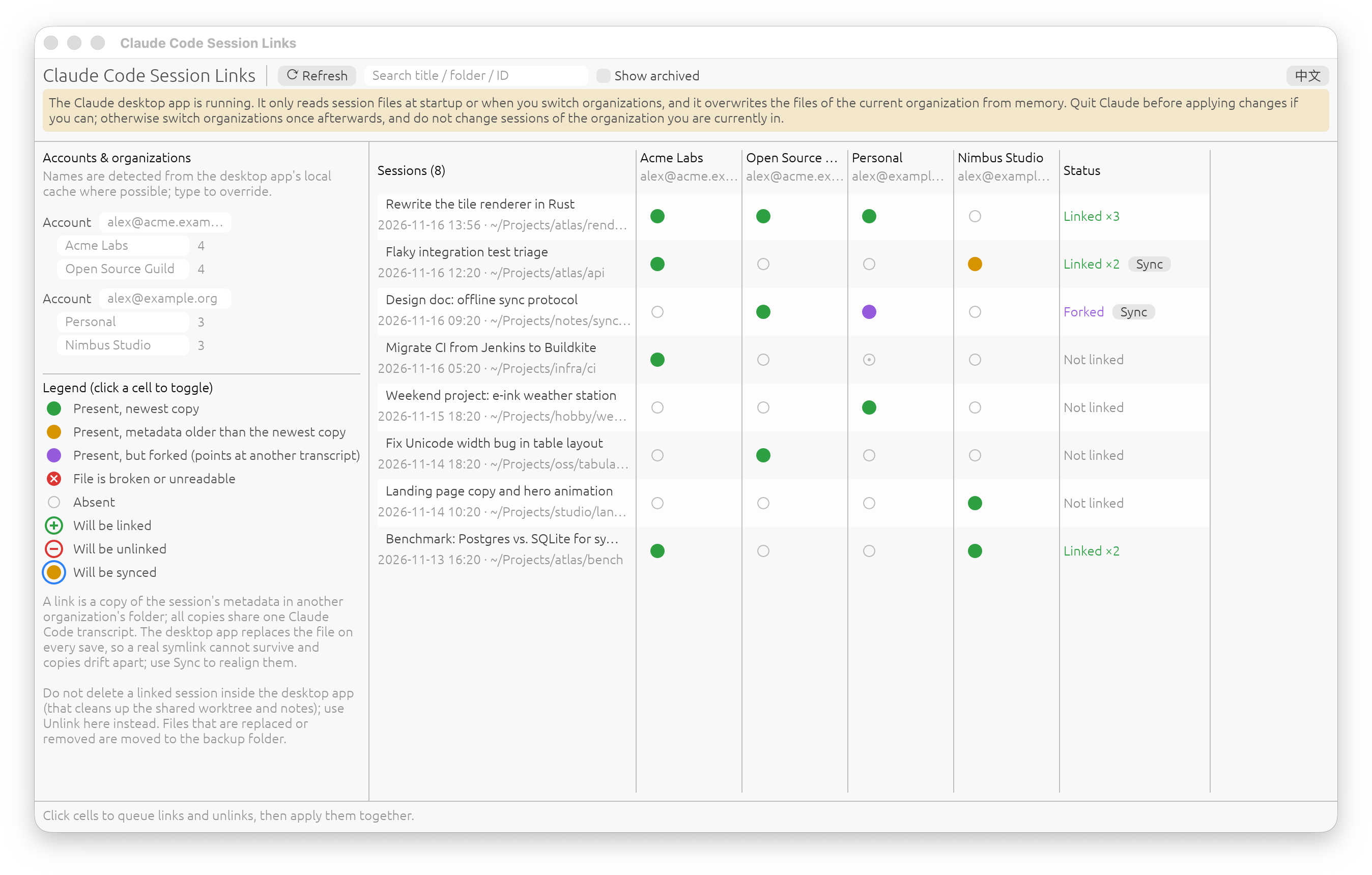
First release of claude-code-ln, a GUI tool for managing "soft links" of Claude Code sessions between organizations in the Claude desktop app.
What it does
- Shows a sessions × organizations matrix; click cells to link a session into another organization or unlink it.
- Sync realigns copies that have drifted apart or forked.
- Detects account e-mails and organization names from the desktop app's local cache.
- Files that are replaced or removed are backed up first, the last readable copy of a session is never removed, and transcripts are never touched.
- English interface by default, with a Chinese toggle.
See the README for how links behave and what to watch out for (quit Claude before applying changes if you can).
Install (macOS)
Download claude-code-ln-0.1.0-macos-universal.dmg below (Apple silicon and Intel, macOS 11+) and drag the app to Applications.
The app is ad-hoc signed and not notarized, so macOS blocks the first launch. Open System Settings → Privacy & Security and click Open Anyway, or run:
xattr -dr com.apple.quarantine "/Applications/Claude Code Session Links.app"SHA-256: 7d2e704829454e539ea87535940a4a82020cbdf770bf4ff31c76458232c3e0f7
Other platforms
No Windows or Linux packages yet: those code paths have not been compiled or run. Building from source with cargo build --release is the only option there for now.