Repository navigation
Prism 1.8.7: It just plays

Prism 1.8.7: It just plays
This release is about one thing: the song you picked plays, and keeps playing. Most of it is work you should never notice. The parts you can see are a check for when playback isn't working, lyrics that stay over a full-screen Canvas, and a reason whenever the DJ leaves a plain change between two songs.
It just plays
- A song no longer skips because the network hiccuped. A timeout in the middle of a song is tried again from the same place, and Prism waits for the network when the phone is offline. Only after that does it move on, and it says why.
- "This song can't be played" on one Wi-Fi network but not on mobile data (#408). Prism also tries over IPv4 only, remembers for each network which way worked, and tries that first.
- A song that stopped seconds in is fixed: two different files of the same kind could be stitched together in the cache.
- Prism closed in the background picks up where it was when you press Play on a headset or on the phone's media card.
- More music videos play as their song with "Songs, not videos: Everywhere". What Prism learns about a video is kept on the phone, so it plays as its song at once the next time, offline too. The version you picked for a song always wins.
- Albums play without a gap. With spatial audio, the headphone correction or the volume leveller on, songs that run into each other made a small click at every change. They carry on across it now.
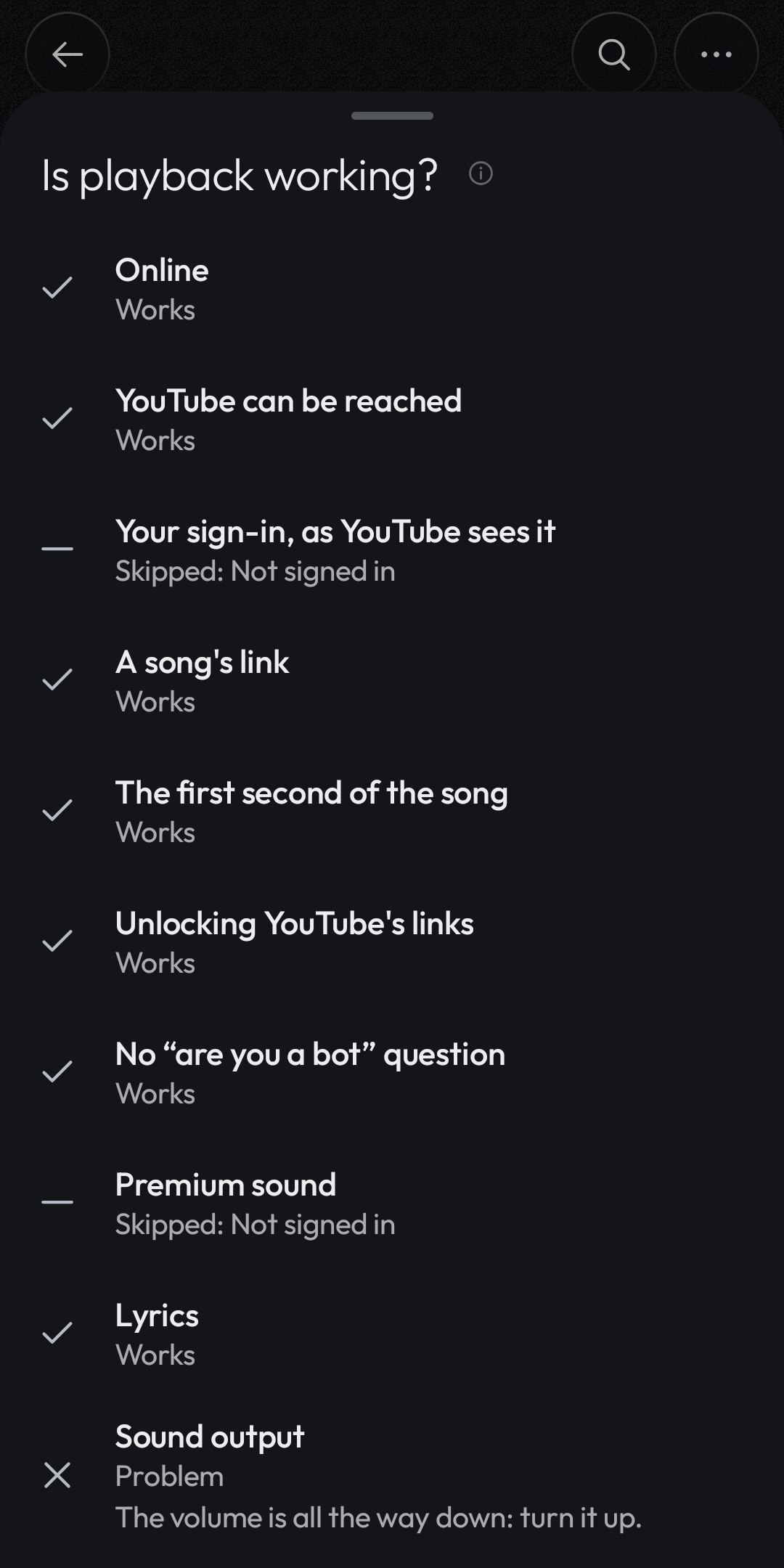
- Is playback working? (Settings → Backup & about → Diagnostics). A check you can run that says, in plain words, what works and what doesn't on your phone and network. The result stays on the phone unless you tap Share.
Lyrics
- The wrong song's lyrics are refused. Every source's answer is checked against the song's title, artist and length. Thanks to @NeeL21YT for the LRCLIB check (#494).
- Missing lyrics come back sooner. Network trouble is no longer remembered as "no lyrics" for a day, one slow source no longer holds up the rest, and the empty state has a "Try again".
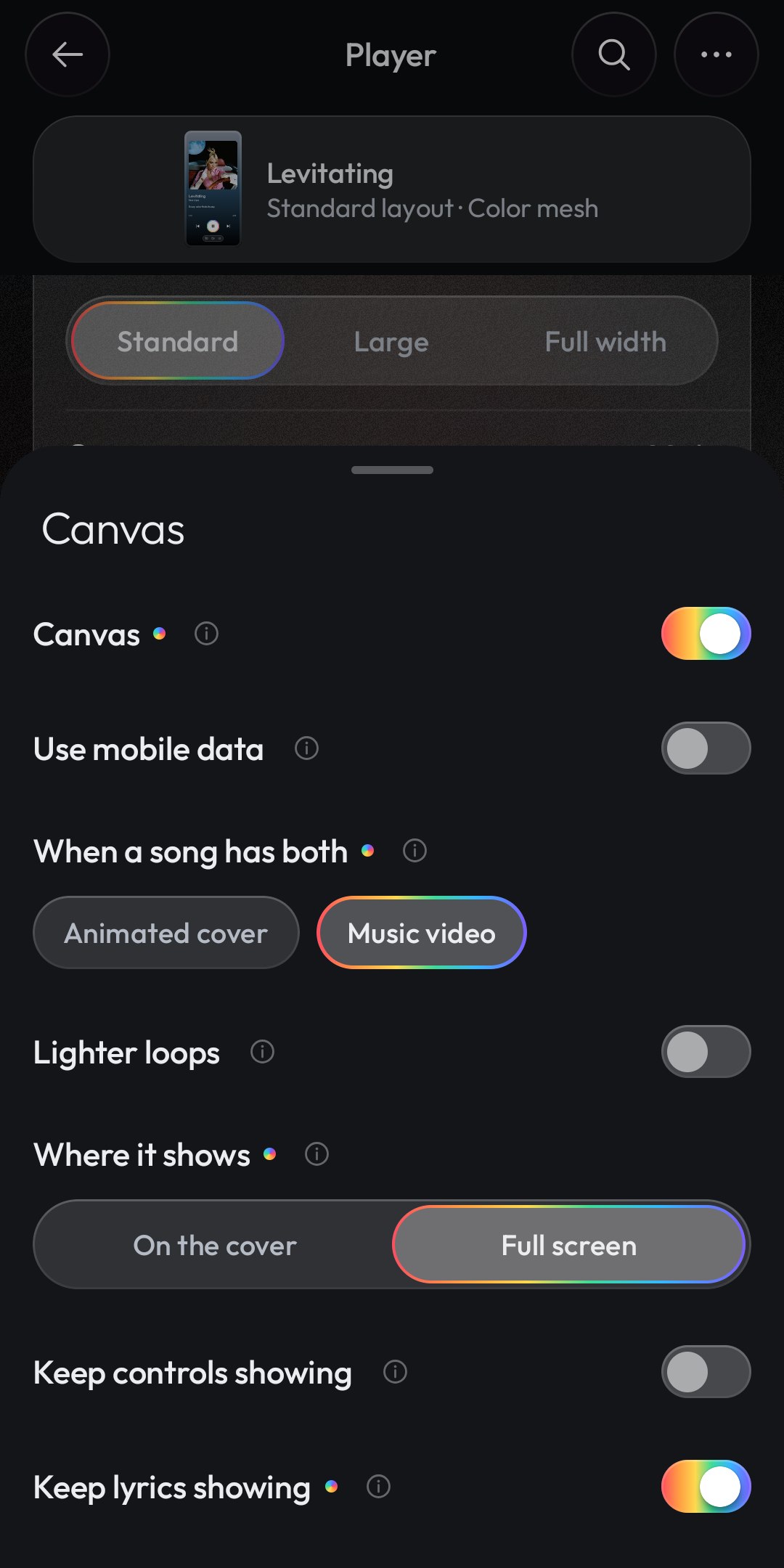
- Keep lyrics showing (Settings → Player → Canvas). With a full-screen Canvas, the line being sung stays over the picture while the controls are away.
Crossfade and the DJ
- Why it didn't blend. When the DJ or crossfade leaves a plain change between two songs, the reason is behind the ⓘ on the DJ chip and on the Crossfade setting.
- Fixed: Repeat one switched on after a blend was planned, a pause or a seek during a blend, and a skip during a blend, which was a hard cut and fades now.
Lighter
- The open player does less work. On a Galaxy A16 with the player open, Prism's processor use went from about 95% of one core to about 68%, and from about 98% to about 76% with a Canvas loop (same phone, same song, both orders).
- A song's Canvas loop comes sooner the first time it is played.
- Smoother scrolling (Settings, under Performance mode, on phones that let an app choose a faster screen speed). Off by default; it uses more battery.
- The download is a little smaller.
Fixed
- Lists that could crash on a repeated row (podcasts, library search, For you, Uploads, the versions sheet, Blend).
- With Pure black, or Frosted pages off, the list's text read straight through the mini player and the tab bar. The bars are solid enough to read again.
- Quick picks on Home are recognised in every language.
- Backups no longer carry this phone's raw settings file, diagnostics, crash logs or Canvas clips (#498).
Full list in the changelog.
⬇ Download Prism.apk · Already on Prism? Tap the update banner on Home.
Android Auto features, including car lyrics, are for passengers and for use while parked only. Do not read lyrics while driving. Keep your eyes on the road and follow local laws.
Contributors

NeeL21YT