Repository navigation
Releases
v1.1: three caption styles and a ComfyUI node for picking the view

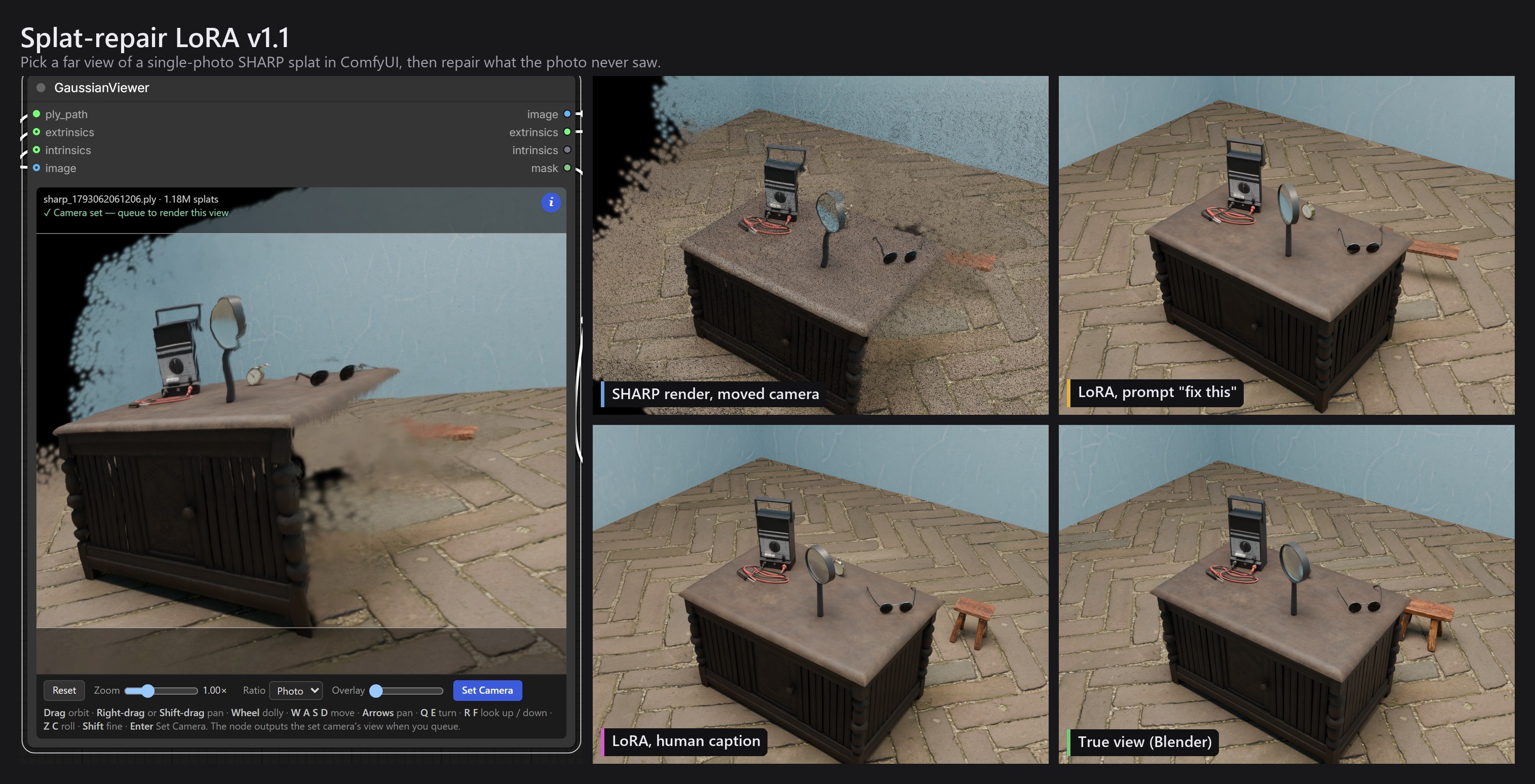
This release adds two things.
- Two more LoRAs. They were trained the same way as the v1.0 LoRA, on different captions, to measure how much the prompt matters. The human-caption LoRA from v1.0 is still the one to use.
- A ComfyUI node for choosing the far view. GaussianViewer (rebuild) is based on CarlMarkswx's GaussianViewer node, rewritten from scratch. You orbit SHARP's splat inside the node and set a camera. The node then outputs that view at the photo's resolution with a hole mask, and a second node, Fill Splat Holes, fills the holes the way the training inputs were filled. Install the pack from ComfyUI Manager.
The three LoRAs
All three use the same 38 training pairs and the same settings (Qwen-Image-2.1, Fizgig, rank 8, alpha 8). Each pair is SHARP's render at a moved camera plus the photo, against the true Blender render. Only the training caption differs, so each LoRA expects a different prompt.
| LoRA | Trained with | Prompt it with | Epoch | Download |
|---|---|---|---|---|
| Human caption (recommended) | a short, plain description of what is broken or hidden and what should be there | the same kind of description, e.g. examples/t2_prompt.txt |
23 of 40 | splat_repair_human_qwen21_e23.safetensors (below) |
| Detail caption | a long, object-by-object description of the whole scene: the camera move, every object, the lighting, and which areas were hidden | the same kind of description, about 300 words, e.g. examples/t2_prompt.detail.txt |
25 (run stopped at 37) | splat_repair_detail_qwen21_e25.safetensors (below) |
| Constant caption | the words fix this on every pair |
exactly fix this |
6 of 16 | splat_repair_min_qwen21_e06.safetensors (below) |
Why three
The three captions measure how much of the repair comes from the prompt.
- Constant caption. The text carries no information, so the LoRA learns everything from the two images.
- Human caption. This is what a user would type.
- Detail caption. It says close to everything text can say about the scene. At 295 words on average against 46, it is about six times as long as a human caption, so it shows whether more text keeps helping.
The scores below answer it. A short description beats fix this on the perceptual measures (LPIPS and DISTS), and by 0.8 dB PSNR on the pixels the photo never saw, though that interval crosses zero. Six times more text adds nothing measurable over the short description.
Using them
Each file is 42 MB. Put it in ComfyUI's models/loras/ and load workflow_api.json with the matching lora_name.
- Image 1 is SHARP's render at the new camera.
- Image 2 is the original photo.
- Sample with 25 steps, CFG 1.0, euler / simple, and LoRA strength 1.0.
This is the human-caption prompt for test scene t2:
The right end of the cabinet table and the floor behind it got smeared. There's a little rustic wooden stool with an orange-brown top just past the table's right end, and the herringbone brick floor and pale blue walls carry on around it and on the left side of the room.
Example images
Each sheet shows, left to right, the Blender ground truth, SHARP's render, then the constant, detail and human-caption LoRAs. These are test scenes at sampling seed 1. No training run or selection step used them.





The README compares v1.0 with the previous setup (Qwen-Image-Edit-2511 with dx8152's Gaussian-Splash LoRA) on the same scenes, and shows the validation scenes.
Scores over three sampling seeds
Each cell averages the seeds per scene, then averages the scenes. PSNR is in dB, given as whole frame / only the pixels the photo never saw. Higher is better for PSNR and SSIM, lower for LPIPS (VGG) and DISTS.
| Method | Test PSNR | Test SSIM | Test LPIPS | Test DISTS | Validation PSNR | Validation LPIPS |
|---|---|---|---|---|---|---|
| SHARP render (input) | 19.78 / 19.65 | 0.588 | 0.482 | 0.177 | 19.26 / 17.52 | 0.475 |
| Qwen-Image-2.1, no LoRA, human prompt | 17.09 / 17.76 | 0.472 | 0.510 | 0.181 | 16.23 / 14.94 | 0.512 |
| Constant caption, e6 | 19.09 / 20.26 | 0.522 | 0.432 | 0.131 | 18.66 / 17.72 | 0.402 |
| Detail caption, e25 | 19.74 / 20.10 | 0.529 | 0.426 | 0.119 | 19.03 / 18.18 | 0.400 |
| Human caption, e23 | 19.63 / 21.09 | 0.545 | 0.397 | 0.118 | 19.53 / 18.66 | 0.382 |
The next table pairs the human caption with each other style on the test scenes. Wins count scene-seed pairs (5 scenes × 3 seeds). The 95% interval is over the 5 scenes.
| Human caption vs | Metric | Wins | Mean difference | 95% interval |
|---|---|---|---|---|
| Detail caption | PSNR, unseen | 12/15 | +0.99 dB | −0.24 to +2.22 |
| Detail caption | PSNR, whole frame | 9/15 | −0.11 dB | −2.71 to +2.48 |
| Constant caption | PSNR, unseen | 10/15 | +0.83 dB | −0.20 to +1.85 |
| Constant caption | LPIPS | 14/15 | −0.035 | −0.059 to −0.011 |
| Constant caption | DISTS | 14/15 | −0.014 | −0.021 to −0.007 |
How to read these:
- The human caption is best or level on every measure, on both the test and the validation scenes. Against the detail caption no interval clears zero, and over the whole frame the two are level. Against the constant caption only the perceptual distances are clearly better.
- The detail and constant captions are level with each other.
- The evidence is small. There was one training run per style and there are 5 test scenes. A scene's PSNR moves 0.4 to 1.2 dB from seed to seed, about the size of the gaps between styles.
- The validation columns are optimistic, because the epochs were picked on the validation scenes. The runs also differ in length: constant ran 16 epochs, detail stopped at 37 and human ran 40.
- A detail prompt is hard to write. It describes the camera move and every object, hidden ones included, so writing one takes knowing the scene well.
- All scored scenes are synthetic (Blender and Poly Haven). The real photo below has no ground truth, so it has no score.
GaussianViewer (rebuild) node, v2.0.0
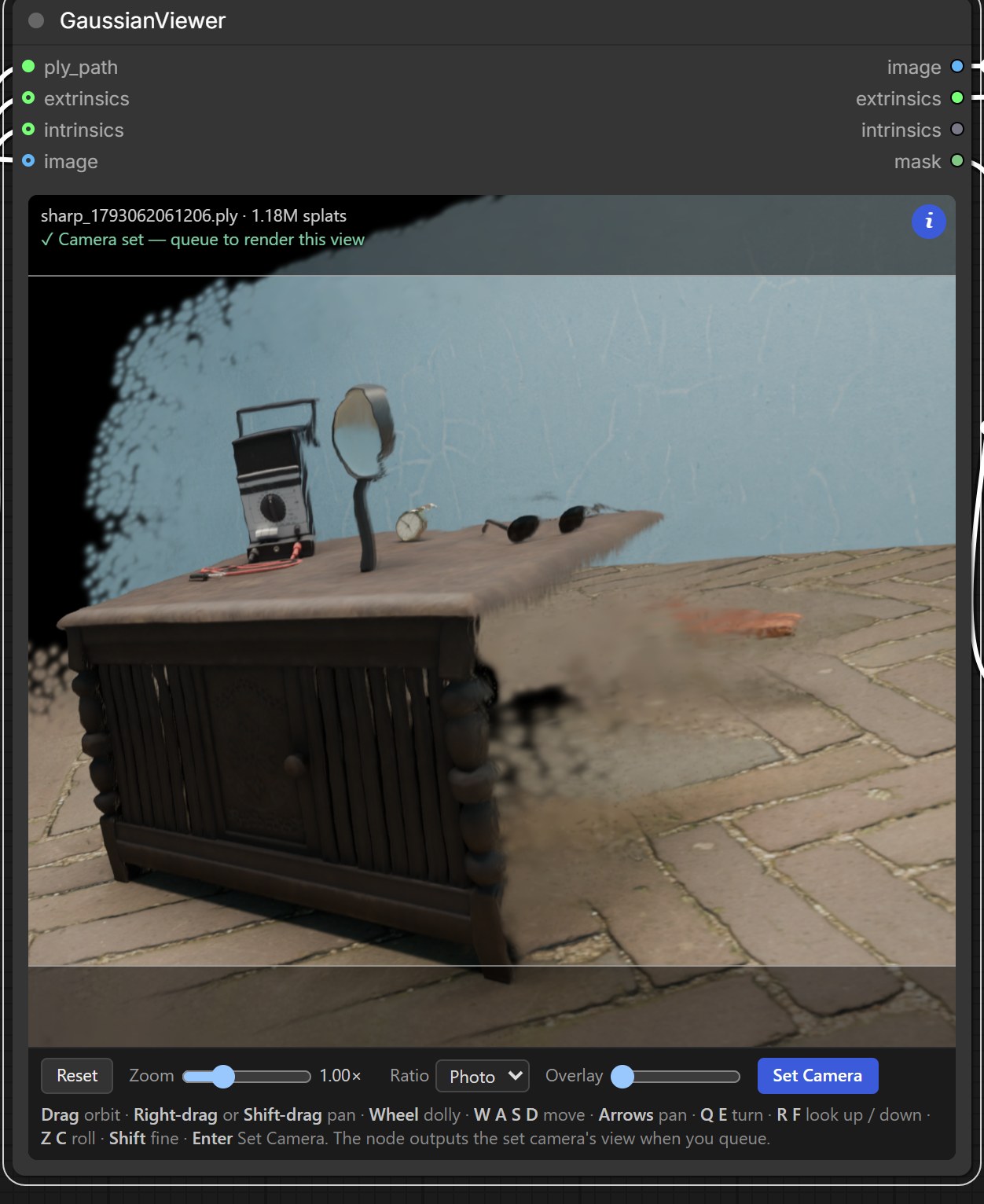
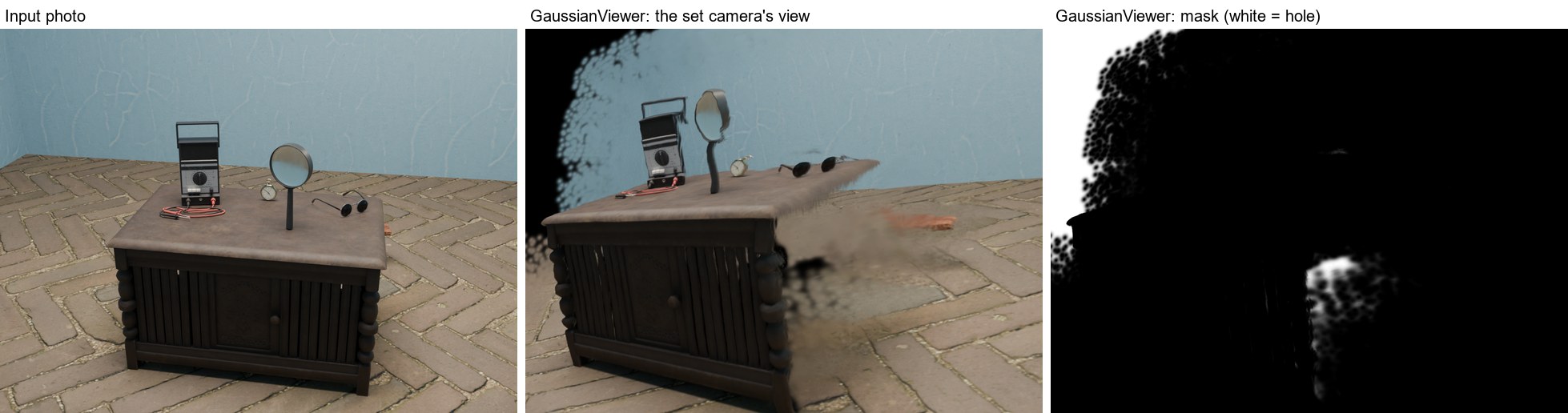
The node is based on CarlMarkswx/comfyui-GaussianViewer and keeps its node name and inputs. Everything else is new. It has its own WebGL2 renderer, parses the PLY in a background worker, and redraws only when the view changes. A 1.18M-splat SHARP file parses in 199 ms, against 663 ms in the original, and a redraw takes 2 to 3 ms. Its output matches a reference PyTorch 3DGS rasteriser to 55.5 dB PSNR.
Install
Disable or uninstall the original GaussianViewer first, because both packs register the node GaussianViewer. Then pick one:
- In ComfyUI Manager, search for GaussianViewer (rebuild) and install it.
- Run
comfy node install gaussian-viewer-rebuild. - Download
comfyui-gaussian-viewer-2.0.0.zipbelow and unpack it intoComfyUI/custom_nodes/.
Restart ComfyUI afterwards. The pack needs no extra Python packages. To make the splat from a photo, also install ComfyUI-Sharp. The pack ships an example workflow (photo → SHARP → GaussianViewer) in ComfyUI's template browser.
Use
Feed it SHARP's PLY, extrinsics and intrinsics, then:
- Queue once. The splat loads in the node.
2...
Splat-repair LoRA v1.0 (Qwen-Image-2.1)
Download splat_repair_human_qwen21_e23.safetensors below and put it in ComfyUI's models/loras/.
Rank 8, alpha 8, epoch 23, trained with human-written captions. It is meant to be prompted: describe what the hidden or broken parts should look like (see examples/).
SHA-256: d787311f92249c380f60542af9d0e678523f491b9b6ba1cc689a3269ab5c2b30