Repository navigation
Releases
Hourmint v1.0.2

Fixed
- Fields in "Add time manually" and other dialogs no longer lose focus while you type. On the Today screen, focus jumped back to the Project field every second or so. (#10, #11) Thanks @fastner for reporting and fixing it.
- Delete and restore confirmations now start on Cancel, so pressing Enter straight away cancels instead of deleting an entry, client, project or invoice, or restoring a backup over your data. (#12)
For contributors
npm installnow stops with a clear message on an unsupported Node version, and the setup steps mentionnvm use. (#9) Thanks @O1sumitkumar.
Existing installs will offer this update automatically, or use Settings > Check for updates.
Download the .dmg below and drag Hourmint to Applications.
First launch: if macOS can't verify the developer, open System Settings > Privacy & Security and click Open Anyway.
Contributors


Assets 7
v1.0.1

Fixes "Discard idle time" on the idle prompt.
Clicking it showed a database error ("cannot start a transaction within a transaction"), and the idle time stayed on the timer. It now works as intended: the timer entry ends when you went idle, and a new timer for the same project and description starts from now. "Keep" and "Discard and stop timer" were not affected. (#4)
Existing installs will offer this update automatically, or use Settings > Check for updates.
Download the .dmg below and drag Hourmint to Applications.
First launch: if macOS can't verify the developer, open System Settings > Privacy & Security and click Open Anyway.
Hourmint v1.0.0
The first release of Hourmint: a free, open source time tracker for Mac. Track client work from the menu bar, keep an honest work log, and turn your hours into PDF invoices with a detailed timesheet. Local-first, no account, and your data stays on your Mac.
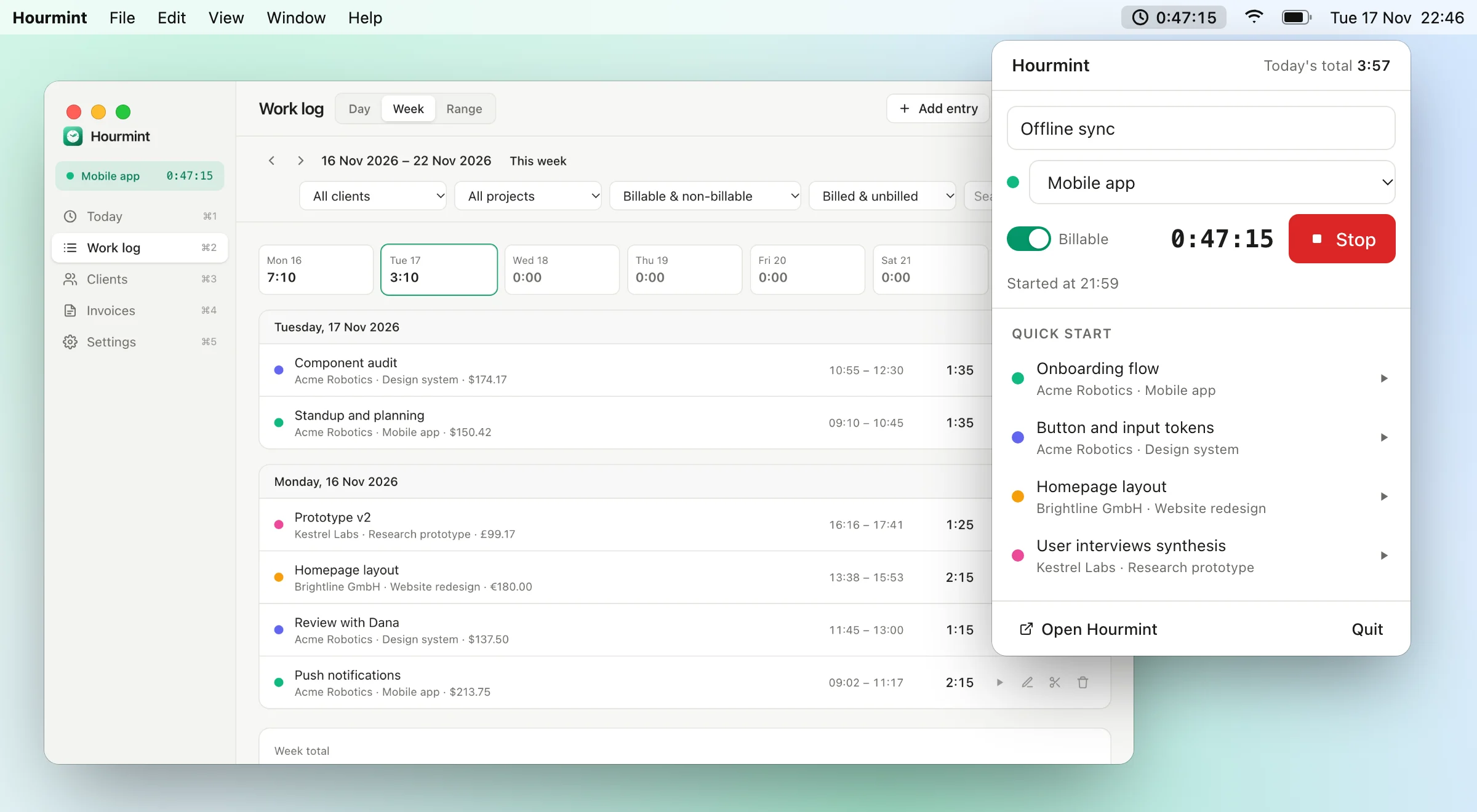
What's in 1.0
- Menu bar timer. The elapsed time sits next to your clock. Start, stop or switch projects from a small popover.
- Survives everything. Quit, restart or sleep your Mac and the running timer is still right.
- Work log. Day, week and custom views with totals per client and project. Manual and edited entries are labelled.
- Timesheets and PDF invoices. Pick the hours to bill, group them per entry, day or project, and export a PDF with the timesheet attached. Hours on an invoice are locked, so nothing is billed twice.
- Any currency, any rate. Per-client currency and hourly rate, with per-project overrides. Invoices keep the rate they were made with.
- Rounding, tax and discounts, your own invoice numbering, and sent, paid and overdue tracking.
- Idle detection and reminders for when you walk away or forget to start.
- Backups. A daily backup, plus export to CSV or JSON at any time.
- Private. No account, no cloud, no analytics. The only network request is the update check against GitHub Releases.
- In-app updates from GitHub Releases.
Install
Download Hourmint.dmg below (macOS 13 or later, Apple Silicon and Intel), open it and drag Hourmint to Applications.
First launch: Hourmint isn't notarized by Apple yet, so macOS may say it can't verify the developer. Open System Settings > Privacy & Security and click Open Anyway.
Found a bug or have an idea? Open an issue or start a discussion.