Repository navigation
Releases
Holm 1.10.0

Holm 1.10.0 makes adding friends as easy as sharing a short code, and stops friends from disappearing.
Download
| File | For whom |
|---|---|
| Holm-1.10.0-win-x64.zip | Unzip and run Holm.exe; also used by Holm's updater. |
| Holm.exe | Run the self-contained app directly; no .NET installation needed. |
Requires Windows 10 (2004 or newer) or Windows 11, x64.
Holm is not code-signed. Windows SmartScreen may warn on first launch; Smart App Control may block an unsigned app.
Added
- Invite codes. Open Add a friend (in the Holm window, the + beside the chat search, or Friends › Add a friend… in the right-click menu) and you get a short code like
HOLM-7KQ2X-9XF4M. Send it, paste it into a chat or read it out. A friend who types it into their Add a friend page is your friend right away: nobody has to accept anything. A code works for everyone you give it to for 12 hours; New code makes another. - Copied codes pop out. Copy someone's invite code from a chat and the notch offers to add them.
- Requests in one place. Add a friend lists the requests you can accept or decline, and the ones you sent (Withdraw).
Fixed
- Friends no longer disappear. A friend request that wasn't answered within 2 minutes used to be withdrawn, and could take a friend who had already said yes off their list again. Requests now stay open until they're answered, and a late yes still makes you friends.
Invite codes need your friend on Holm 1.10 too. A friend on an older Holm can still use your long friend code: Add a friend › Copy my long friend code, and their long code works in the same box.
Holm 1.9.5

Holm 1.9.5 lets you send files from a chat and brings update controls into Settings.
Download
| File | For whom |
|---|---|
| Holm-1.9.5-win-x64.zip | Unzip and run Holm.exe; also used by Holm's updater. |
| Holm.exe | Run the self-contained app directly; no .NET installation needed. |
Requires Windows 10 (2004 or newer) or Windows 11, x64.
Holm is not code-signed. Windows SmartScreen may warn on first launch; Smart App Control may block an unsigned app.
Added
- Files in chat. Click + at the left of the message box and choose one or more files to send to that friend. Beam asks them to accept and shows progress in the notch. If Send later is on, files for an offline friend wait until their Holm is back. Beam must be on.
Changed
- Updates in Settings. Settings › Updates shows your version and lets you check for a release, update and restart, or turn automatic checks on or off. Checks are on by default; the existing update notifications stay in the notch. The old right-click submenu is gone.
- The message box. The GIF picker is beside the send arrow, and the file button has a round hover highlight.
Fixed
- GIF search. The 1.9.5 downloads now include the GIPHY key. If you downloaded 1.9.5 before this fix, download it again to get the corrected app.
Holm 1.9.4
Holm 1.9.4 brings a redesigned chat, makes GIFs crash-proof and closes the notch when you click somewhere else.
Download
| File | For whom |
|---|---|
| Holm-1.9.4-win-x64.zip | Unzip and run Holm.exe; also used by Holm's automatic updater. |
| Holm.exe | Run the self-contained app directly; no .NET installation needed. |
Requires Windows 10 (2004 or newer) or Windows 11, x64.
Holm is not code-signed, so Windows SmartScreen may warn on first launch. Click More info → Run anyway to launch it.
Changed
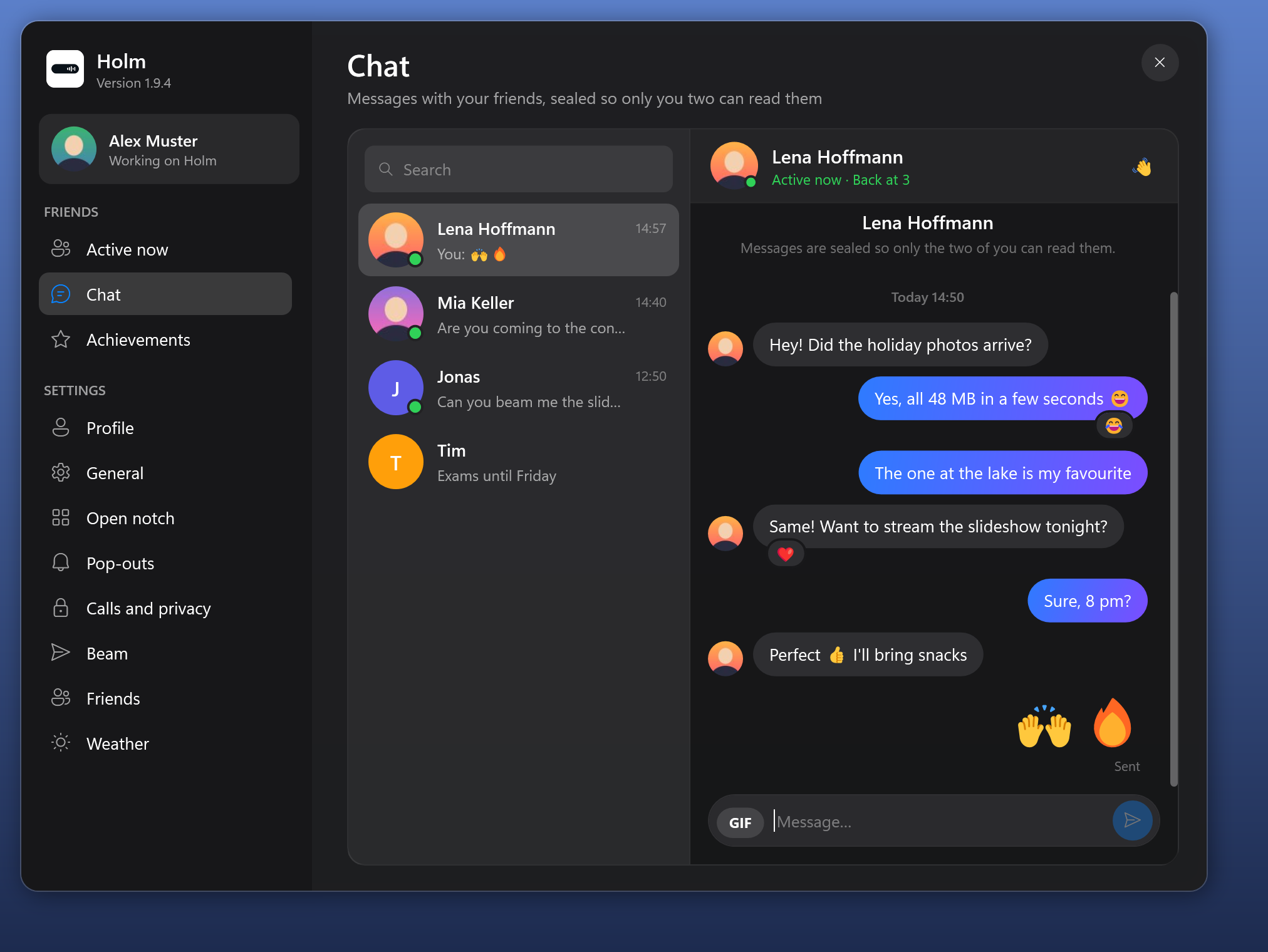
- A new chat. Search your conversations, see when the last message came, and chat in bubbles that run together like in the messengers you know. Your messages get a blue-to-purple gradient, a few emoji alone show big, and the message box is round with GIF and a send button. Wave at a friend or share your screen right from the top of the chat.
- Click away to close. A click anywhere outside Holm closes the open notch and pop-outs like messages or the volume right away. Pop-outs that wait for your answer, like an incoming file, stay.
Fixed
- GIFs can't crash Holm any more. Holm checks every GIF itself before showing it. A broken or oversized GIF just shows as GIF unavailable, and GIFs use less memory.
Holm 1.9.3
Holm 1.9.3 makes GIF search work right away: no GIPHY key to set up any more.
Download
| File | For whom |
|---|---|
| Holm-1.9.3-win-x64.zip | Unzip and run Holm.exe; also used by Holm's automatic updater. |
| Holm.exe | Run the self-contained app directly; no .NET installation needed. |
Requires Windows 10 (2004 or newer) or Windows 11, x64.
Holm is not code-signed, so Windows SmartScreen may warn on first launch. Click More info → Run anyway to launch it.
Changed
- GIF search out of the box. GIF next to Send searches GIPHY straight away; you no longer need to paste an API key first. A key you added yourself keeps working.
Holm 1.9.2

Holm 1.9.2 brings Instagram-style reactions and GIFs to the chat and an equalizer that dances to your music.
Download
| File | For whom |
|---|---|
| Holm-1.9.2-win-x64.zip | Unzip and run Holm.exe; also used by Holm's automatic updater. |
| Holm.exe | Run the self-contained app directly; no .NET installation needed. |
Requires Windows 10 (2004 or newer) or Windows 11, x64.
Reactions and GIFs need your friends on Holm 1.9.2 too; on older versions a GIF shows as its link and reactions don't show.
Holm is not code-signed, so Windows SmartScreen may warn on first launch. Click More info → Run anyway to launch it.
Added
- Reactions. Hover a message and click the smiley for ❤️ 😂 😮 😢 😡 👍, or + for every emoji; double-click a message for a heart. You and your friend both see the reactions. React right from the notch when a message pops out, and change your quick reactions with Customize reactions.
- GIFs. GIF next to Send: search GIPHY or pick a recent GIF, or paste any GIF link. GIFs play in the chat, in the conversation list and in the notch. (Search needs a free GIPHY API key, pasted into the picker once.)
- Equalizer that follows the music. The bars in the closed notch now move with the beat of what plays. Only the loudness is read, nothing is recorded. Settings › General switches back to the classic bounce.
Holm 1.9.1
Holm 1.9.1 keeps the weather visible during playback and tidies up text fields, the Holm icon and screen sharing.
Download
| File | For whom |
|---|---|
| Holm-1.9.1-win-x64.zip | Unzip and run Holm.exe; also used by Holm's automatic updater. |
| Holm.exe | Run the self-contained app directly; no .NET installation needed. |
Requires Windows 10 (2004 or newer) or Windows 11, x64.
Holm is not code-signed, so Windows SmartScreen may warn on first launch. Click More info → Run anyway to launch it.
Added
- Weather during playback. The open media notch keeps the weather icon and temperature at the top right. Hover for conditions and click anywhere in the weather area to change the city.
Changed
- Screen sharing. The button in a chat now says Share my screen.
- Holm icon. The settings and friends sidebar uses the same white Holm icon as the app.
Fixed
- Text fields. The cursor sits to the left of the placeholder in chat, profile and other Holm window inputs.
- Changing the weather city. During media playback, the small clock and weather stay visible while choosing a city, without a second large clock. The top toolbar stays centered.
Holm 1.9.0
Holm 1.9.0 brings chat, Active now, screen streaming and achievements for you and your friends, in a redesigned Holm window.
Download
| File | For whom |
|---|---|
| Holm-1.9.0-win-x64.zip | Unzip and run Holm.exe; also used by Holm's automatic updater. |
| Holm.exe | Run the self-contained app directly; no .NET installation needed. |
Requires Windows 10 (2004 or newer) or Windows 11, x64.
Holm is not code-signed, so Windows SmartScreen may warn on first launch. Click More info → Run anyway to launch it.
Added
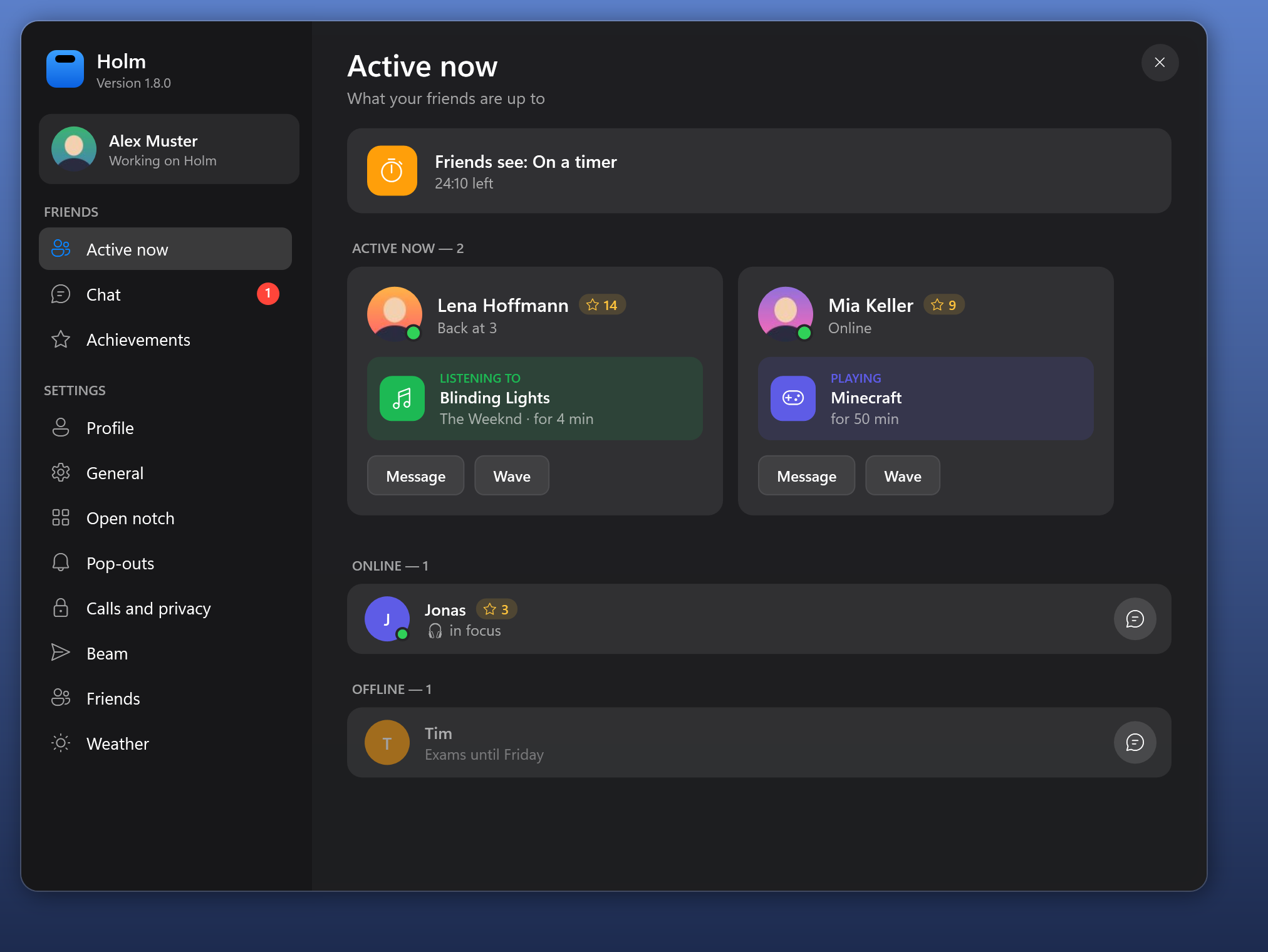
- The Holm window. Settings… and Friends and chat… open one window with a sidebar: your profile card, Active now, Chat and Achievements on top, then the settings one page at a time, each switch with an icon and a line of help.
- Chat. Message your friends from the Holm window. Messages are sealed so only the two of you can read them, and reach a friend whose Holm is closed when it starts (within about 12 hours). A new message pops out of the notch with Reply.
- Active now. See what your friends are up to: the song they listen to, a call, the game they play, a timer, or that they're live, with Message, Wave and Stream to. Settings › Friends › Share my activity turns sharing yours off.
- Streaming. Invite a friend to watch your screen (Friends › Stream my screen to, or from a chat). They click Watch and see your screen in a window; you see a LIVE badge with Stop. Your notch, the badge and the Holm window stay out of the stream, so your messages and chats don't go along.
- Achievements. 21 of them, from your first friend to 30 days in a row, with a trophy in the notch when one unlocks. Friends only see how many you have.
Chat, activity and streaming need your friends on Holm 1.9 too; older versions simply ignore them.
Holm 1.8.0
Holm 1.8.0 adds profiles: a picture, a name, a status and a color that your friends see.
Download
| File | For whom |
|---|---|
| Holm-1.8.0-win-x64.zip | Unzip and run Holm.exe; also used by Holm's automatic updater. |
| Holm.exe | Run the self-contained app directly; no .NET installation needed. |
Requires Windows 10 (2004 or newer) or Windows 11, x64.
Holm is not code-signed, so Windows SmartScreen may warn on first launch. Click More info → Run anyway to launch it.
Added
- Profiles. Choose a picture, a name, a status line and a color for your initials, at the top of Settings… or with Friends › Edit my profile…. Your friends see your picture wherever they used to see your initials (sharing, file offers, waves), and your status in their Friends menu. It goes only to your friends, sealed like every friend note. Friends on an older Holm keep seeing your initials until they update.
- Friends in the Friends menu. Each friend with their picture, status and whether their Holm is online.
Changed
- The name in your profile is also the one people nearby and friends see when you send files; empty means your Windows name, as before.
- The settings window scrolls when it would be taller than the screen.
Holm 1.7.9
Holm 1.7.9 lets you open a beamed file straight from the notch.
Download
| File | For whom |
|---|---|
| Holm-1.7.9-win-x64.zip | Unzip and run Holm.exe; also used by Holm's automatic updater. |
| Holm.exe | Run the self-contained app directly; no .NET installation needed. |
Requires Windows 10 (2004 or newer) or Windows 11, x64.
Holm is not code-signed, so Windows SmartScreen may warn on first launch. Click More info → Run anyway to launch it.
Added
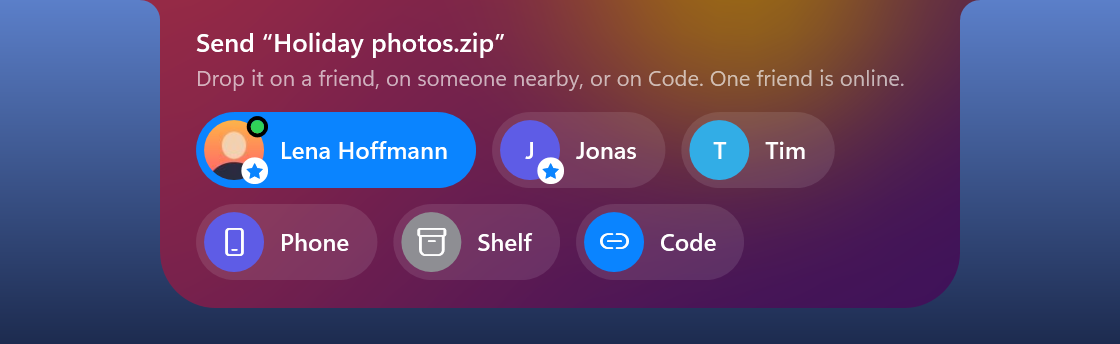
- Open a beamed file from the notch. After you accept a Beam transfer, the saved pop-out offers Open as well as Show, like a finished browser download – so you can open the file without going through Downloads in Explorer.
Holm 1.7.8
Holm 1.7.8 uses about 106 MB less memory, can step aside over browser tabs and makes color picking pixel-exact.
Download
| File | For whom |
|---|---|
| Holm-1.7.8-win-x64.zip | Unzip and run Holm.exe; also used by Holm's automatic updater. |
| Holm.exe | Run the self-contained app directly; no .NET installation needed. |
Requires Windows 10 (2004 or newer) or Windows 11, x64.
Holm is not code-signed, so Windows SmartScreen may warn on first launch. Click More info → Run anyway to launch it.
Added
- Hide over browser tabs. A new switch in Settings › General: while a maximized browser is in front on the notch's screen, the resting notch (idle, music, unread badge, a timer) steps aside so the tabs under it can be clicked. A Beam offer, a message, the volume, a download or a call bring it back at once; unlike fullscreen, nothing is declined meanwhile. Off by default. Knows Chrome, Edge, Firefox, Brave, Opera (GX), Vivaldi, LibreWolf, Waterfox, Floorp, Zen, Thorium, Chromium and Arc.
- Pixel-exact color picking. While the color picker is out, the arrow keys move the cursor one pixel (ten with Shift) and Enter picks the color under it.
Changed
- About 106 MB less memory. The release exe is no longer a compressed single file, so Windows reads the parts of .NET and WPF straight from the exe instead of Holm unpacking them into its own memory. Measured idle on a clean Windows, three runs each: 148 MB private memory before, 42 MB now; the peak while starting drops from 256 to 130 MB, and starting takes about a third less CPU. On a PC in daily use the totals are higher, but the saving is the same: about 260 MB before, 150 MB now. The exe on disk grows from 86 to 219 MB; the download (the zip) only from 79.6 to 80.9 MB.