Repository navigation
Releases
v0.72.2 — Ending fixed · Smoother area changes · Less video memory held

Install the game on an SSD or NVMe drive for area changes without stutters.
🏁 Ending Fixed: No Stretched Textures, No Close Before the Intro
At the end of the game, the game gives texture memory back while it is still drawing those textures. Once another texture took that memory, the port loaded the new bytes into the texture still on screen: stretched or smeared textures, flicker in the castle fight, and the game closing between the ending and the title intro (an old bug, also in v0.72.1).
• Those textures now keep what was uploaded for 400 frames, then refresh as usual.
• Two full ending runs went through to the intro without a glitch or a crash.
• On by default (SOTC_POOL_FREEZE=0 turns it off).
🌲 Area Changes: Smoother
• The hard FPS drop that v0.72 brought back at area changes is gone: High and Maximum textures are back at mip 2 (as in v0.71). The finer mips copied up to 1.1 GB of textures in one frame at the forest entrance.
• Area-change memory releases no longer wait for all the GPU work: 68 ms → 1.6 ms in the slow frames.
• Faster memory table lookups and a per-frame cap on deferred texture uploads.
• With 24 GB of RAM or more: new textures are read by the GPU straight from the game's memory (no CPU copy on the first entry to an area). The game's memory is imported at boot (about 2.5 s) and stays pinned, so it is off below 24 GB.
🎮 Video Memory
• Large textures (2048×2048 and up) now get memory of their own and give it back as soon as they go. Before, up to 1.8 GB stayed reserved and empty after an area change, going over the budget on 8 GB cards. In the test: peak 6.35 of 6.5 GB, never over the budget.
🧹 Launcher
• Updating the port clears the shader cache once (shaders from the previous version could conflict with the new one). The first start after an update stutters a little while the cache is rebuilt. "Clear shader cache" is still in the settings.
• The window title shows the port version and the play time: SHADOW OF THE COLOSSUS™ · v01.01 · Port v0.72.2 · 60 FPS · 0:12:34
• The forest entrance still loses some frames, more at 60 FPS.
• With the game's debug menu on, rare crashes can happen (0xa469b7 and others). Keep it off for normal play.
• Dust from footsteps can flash white on AMD Vega/GCN integrated GPUs (still under investigation).
v0.72.1 — Light video memory profile for 6 GB cards · Card memory quick setting
Install the game on an SSD or NVMe drive for area changes without stutters.
💾 Light Video Memory Profile for 6 GB Cards
The texture improvements turned on in v0.72 (Maximum at mip 0 with texture banks kept for 3 seconds, High at mip 1) used 5–7 GB of video memory on an 8 GB card, which overflowed cards with 6 GB. Cards with less than 8 GB now get a lighter set automatically:
• Maximum Textures: Mip 1 instead of mip 0, without the 3-second bank linger, and with the page pool safety switch back on. Still sharper than High in v0.71.
• High Textures: Mip 2, as in v0.71.
• Video Memory Use: "High" and "Maximum" (the Extreme play mode's setting) act as "Default".
• Staging Reserve: No reserve is kept in video memory.
Cards with 8 GB or more keep every v0.72 improvement.
🎛️ New Quick Setting: "Card Memory"
• Found on the Play page, right below Textures: Automatic (by the card, default), Light (cards up to 6 GB) or Full (8 GB cards or more).
• A line below it says which profile applies to the card the launcher found.
• The session log now shows the profile, which helps when sending a report.
• Shortcuts that start the game directly (--play, Steam) also detect the card.
• Area changes still lose some frames, worst at the forest entrance (see the v0.72 notes).
• Dust from footsteps can flash white on AMD Vega/GCN integrated GPUs (still under investigation).
v0.72 — Improvements on by default · AMD FSR 4.1 upscaler · PS4 grass in play modes
Install the game on an SSD or NVMe drive for area changes without stutters.
🚀 Improvements Now On by Default
The page pool fix of v0.71 (T38) removed the cause behind several features that used to crash the game or bring back the colour mosaic. Tested on every Time Attack colossus at Maximum textures with PS4 Pro mode, with no crash and no mosaic, so they are now on by default (the update also turns them on for existing installs):
• Fast GPU Readbacks: About 25% more FPS at the Shrine.
• Sharper Textures: The port now measures which mips are on screen, and streams finer mips (High uses mip 1, Maximum uses mip 0; both used mip 2 before).
• Maximum Textures: Texture banks stay sampled for 3 seconds before leaving, so they no longer drop out and stream back in.
• Heap Guard Shortcuts: Restored (they had been off since v0.70 for a crash that came from the same double free).
🎨 New Upscaler: AMD FSR 4.1 (Experimental)
• Uses the official AMD FSR SDK 2.4.0 on Vulkan, with AMD's signed DLLs shipped next to bb-probe.exe (AMD's license is in bin/licenses-amd).
• The SDK picks what your GPU runs: FSR 4.1 (machine learning) on Radeon RX 6000, 7000 and 9000 cards and recent Ryzen AI processors; FSR 3.1.6 on every other GPU (NVIDIA, Intel, older Radeons).
• It uses the same inputs, render sizes and sharpening as DLSS. Select it in the launcher: Upscaler > "AMD FSR 4.1".
• Tested with FSR 3.1.6 on an RTX 2060 SUPER. FSR 4.1 itself still needs testing on a Radeon RX 6000 or newer: reports are welcome!
🌿 Play Modes Keep the Grass as on PS4
• Normal, Pro and Extreme no longer change grass detail, distance, height, weeds, grass shadows or fade; only Custom does.
• The update puts saved grass settings back to "As on PS4".
🔧 Fixes & Optimizations
• Fewer Area Change Stutters: The staging area for GPU uploads now keeps a small reserve (128 MB system memory, 64 MB video memory), made ahead at startup. Before, it was released after a few idle seconds and rebuilt in the middle of the next area change, which once cost 95 ms in a single frame. (SOTC_STAGING_KEEP_MB / SOTC_STAGING_KEEP_VRAM_MB, 0 = as before.)
• Faster Texture Copies: Large texture copies now map their memory pages in one call instead of one page fault per 4 KiB page. At the forest entrance, a 311 MB burst took 6,500 page faults instead of 59,000 for 175 MB before. (SOTC_COPY_PREFETCH=0 turns it off.)
• Integrated GPUs (AMD/Intel): The video memory budget is now at least the memory the driver reports, instead of a 2 GB floor meant for dedicated cards (3.9 GB instead of 2 GB on a Ryzen 7 5700U). (Set it manually with SOTC_IGPU_BUDGET_MB.)
• Launcher: The Advanced page buttons now wrap into two rows ("Clear shader cache" no longer falls off narrow windows); extra variables typed with a leading "=" still apply; "Clear shader cache" warns when the game is still running.
🧪 Diagnostics (Off by Default)
• SOTC_RB_AGE=1: Shows which game instructions wait for GPU readbacks, and which shader wrote the page.
• SOTC_CLEAN_GUEST_READS=1: Plain game reads of bytes the GPU did not write are served from memory without waiting for the GPU (experimental).
• SOTC_FORMAT_LOG=1, SOTC_FORMAT_FALLBACK=1, SOTC_NAN_GUARD=1, SOTC_AMD_AS_NV=1: Tests for the dust flashing on AMD Vega/GCN integrated GPUs. Each shader test switch gets its own shader cache folder, so there is no need to clear the cache.
• Area changes still lose some frames, worst at the forest entrance. The cause was traced this release: the game scans a visibility bitmap that compute shaders rewrite every frame and needs the current frame's bits. A deeper fix is planned.
• Dust from footsteps can flash white on AMD Vega/GCN integrated GPUs (still under investigation).
v0.71 — Time Attack mosaic and crash fix · New launcher
Install the game on an SSD or NVMe drive for area changes without stutters.
🔧 Fixes & Optimizations
Crash & Texture Corruption Fixes
• Time Attack Stability: Resolved a critical bug (T38) causing consistent crashes around the 5th colossus across all versions.
• Color Mosaic Fix: Fixed a major issue where color-corrupted mosaic textures appeared after loading a save.
• The Root Cause: The game's 64 KiB page pool freed specific physical pages twice (sceKernelVirtualQuery), leading to memory corruption and heap crashes.
• The Solution: The port now tracks the last address each physical page was mapped to, safely skipping pages already allocated to another block. Tested on Maximum settings with zero crashes. (Disable via SOTC_POOL_OWNER=0).
• Flexible Memory Management: Fixed a flaw where splitting a flexible mapping left its right half pointing incorrectly to the left half's storage.
• New Diagnostic Tools: Added advanced tracking variables (disabled by default): SOTC_POOL_FREE_TRACE=1, SOTC_WRITE_TRACE=1, SOTC_ALIAS_LOG=1, and SOTC_VIEW_CHECK=1.
Visuals & Stutter Reduction
• Motion Blur Disabled: Native motion blur is now turned off by default to eliminate "shadow trails" in dark areas. (Re-enable via Effects > "Motion blur").
• Sharper DLSS: Upgraded to DLSS Preset E with a current-frame bias for sharper imagery during fast movement. (Adjustable via SOTC_DLSS_PRESET and SOTC_DLSS_BIAS, default 0.4).
• Smoother Area Transitions: Reduced stuttering during map changes using optimizations adapted from developer Oussama268's fork (opt12):
• New shader files now take priority over the older v0.70 cache pack.
• Small CPU-written textures are now verified as a whole instead of in fragments.
• Contended game mutexes now spin for 20 µs before sleeping to eliminate CPU bottlenecks. (Disable via SOTC_MUTEX_SPIN_US=0).
• Large staging buffers are now preserved between frames. (Disable via SOTC_STAGING_LARGE_POW2=0).
• Note: The shader cache will be fully rebuilt upon your first launch.
🖥️ New Launcher
An entirely redesigned interface inspired by the Bloodborne PC launcher. It features a custom Shadow of the Colossus aesthetic with a night-stone theme, golden Cinzel typography, sword-light highlights, and smooth fade transitions.
Key Launcher Features
• 4 Tailored Play Modes (Play Page):
• Normal: The authentic, baseline PS4 experience.
• Pro: Enhanced PS4 Pro quality mode.
• Extreme: Pro mode locked at 60 FPS, maxed-out textures, extended grass/shadow rendering distance, and DLSS enabled for RTX graphics cards.
• Custom: Full control over every configuration toggle.
• Save Manager: Displays your game progression percentage and total playtime. Import or export saves via .zip, local folders, or directly from shadPS4. Features one-click manual backups and automatic backups whenever the game closes or crashes.
• Global Search (Ctrl+F): A sidebar search utility that lets you instantly find any setting by name, description, or everyday keywords, jumping straight to its menu location.
• Help Page: A dedicated troubleshooting section featuring common issues with direct shortcuts to the correct settings.
• First-Time Setup: A thematic 5-step interactive guide (The Awakening, The Shrine, The Ancient Sword, Agro, The Forbidden Land) featuring a built-in PC hardware check (CPU, RAM, GPU, Storage) that automatically recommends the ideal Play Mode for your setup.
• Controller Tester: A visual gamepad diagram on the Controls page that lights up buttons in real time as you press them.
• Additional Features: Multi-monitor selection, a Report button (generates a log .zip for debugging), a "What's New" window, a custom title bar, an Expert View switch (reveals Advanced and Debug options), minimize-to-tray support, and a smooth-scrolling layout.
• Backward Compatibility: Future updates will automatically apply performance improvements to configurations saved by older versions (e.g., HUD-less frame generation, skipping logos, and disabling motion blur).
➕ Miscellaneous
• Experimental HDR10 Output: Added an experimental HDR10 output option for the base SDR game. (Enable via SOTC_HDR=1 — Currently untested on native HDR displays).
• Input Remapping: Custom key and mouse remapping within the sotc.ini file is now fully documented.
v0.70.0 — Performance Optimization & Bug Fixes
Caution
Attention: Install the game on an SSD (preferably an NVMe). Every new area loads hundreds of MBs of textures and models from the game folder; on an HDD, area transitions stutter heavily and can freeze for several seconds. Place both the game folder (the dump) and, if possible, the port folder on an SSD.
🚀 Release Notes & Performance Updates
⚡ Performance Optimizations
- Area Transitions: Fixed the severe FPS drops when moving between zones.
- Before: Every area change tanked the FPS, sometimes forcing 1–3 second loading screens with frame-times exceeding half a second (534 ms).
- Now: Worst-case scenarios stay between 58–75 ms without any forced loading screens. The endgame now runs smoothly all the way to the credits.
- Note: The game still drops 1–6 frames during transitions; addressing this will be the next focus.
- LOD Feedback: Experimental feature (
SOTC_LOD_FEEDBACK=1) has been optimized and no longer costs ~7 FPS.
🛠️ Bug Fixes & Stability
- Game Allocator Crash (
0x49800): Resolved a rare critical crash after loading. Two shortcuts in the game's memory protection could allow the GPU to write to a memory block that had just been freed. - DLSS Jitter Fix: Fixed image jittering when using DLSS in PS4 Pro mode at 30 FPS. Repeated frames now correctly display with DLSS applied.
- Frame Generation (F8): Fixed an issue where the HUD would freeze or remain static when using FSR 1.
⚙️ Advanced Configuration (Toggles)
The root causes for the transition stutters involved memory table locks, massive gigabyte remappings, constant GPU region lookups, and excessive single-frame texture streaming (now limited to a 32 MB budget per frame, meaning deferred textures may briefly appear black).
If needed, every single optimization can be disabled individually by setting its respective key to 0 in your configuration:
SOTC_LOCK_WAKE=0
SOTC_VIEW_CHUNK_MB=0
SOTC_REGION_LOG=0
SOTC_REGION_FAST=0
SOTC_PROTECT_FAST=0
SOTC_WRITE_FAST=0
SOTC_BATCH_SPLIT=0
SOTC_GUARD_DEDUP=0
SOTC_UPLOAD_BUDGET_MB=0
Note on Crash Fix: The memory protection shortcuts come disabled by default. If you still encounter issues, you can manually re-enable them using:
SOTC_GUARD_STALE=1
SOTC_GUARD_USER_POINTER=1
Tested during a 36-minute session with 6 consecutive loads and zero crashes. If it crashes for you, please submit your log.
🔍 Diagnostics
- Draw Thread Analysis: Enable
SOTC_DRAW_SPLIT=1along with the on-screen FPS counter to log exactly where the draw thread is spending its processing time.
v0.60.6-C3 — Barra de stamina com DLSS e limite de 30 FPS
- Barra de stamina com DLSS (correção da C2): a área da barra passou a usar a largura de uma
tela de 1080 linhas na proporção da saída (1080 × L/A) em vez da largura de renderização. Com
DLSS a renderização é menor (1704x720 em 2560x1080) e a barra amarela voltava a parar longe do
círculo; em 16:9 com DLSS sem o modo PS4 Pro a C2 também a quebrava. - Limite de 30 FPS: "30" (menu F1 ou F7) segura 30 FPS mesmo quando o jogo pede para não
limitar (modo PS4 Pro); antes ficava em ~42.
🤖 Generated with Claude Code
v0.60.6-C2 — Barras em tela larga, vibração, mais FPS no santuário
- Tela larga (21:9, 32:9): barras de vida e stamina certas (#301, #202). A barra de vida
tinha um pedaço cinza a mais e a amarela da stamina parava longe do círculo e enchia ao
contrário. O aspecto do objeto de tela do jogo fica 16:9 (o jogo desenha a barra de vida com
ele) e dois retângulos de 1920 de largura da interface passam a usar a largura da tela. - Vibração do controle pode ser desligada (#292, Lucas-blip-png): no lançador (Controles) e
no menu F1 (seção Controle), na hora. - Mais FPS no Santuário (Lucas-blip-png): a barreira de imagens de armazenamento GENERAL é
feita uma vez por fence em vez de antes de cada desenho (cada uma encerrava o passe de
renderização, ~20 mil por segundo), e o buffer de profundidade lido enquanto o stencil é escrito
fica num layout só.SOTC_GENERAL_SYNC=0/SOTC_DEPTH_RO=0desligam. - Geração de quadros sem a interface (opção do Lucas-blip-png, experimental): Imagem e FPS →
"Geração de quadros sem a interface". As letras e as barras não tremem mais com o FSR 3
(funciona também no modo PS4 Pro). Pode desbotar o logo da tela de título. - DLSS Ultra Desempenho (3×) (#306); o DLSS só amplia 2× + FSR 1 quando nenhum modo aceita a
escala (modo Pro em 4K). - Testes:
SOTC_RENDER_KEEP,SOTC_RENDER_EXTRAeSOTC_WIDE_ASPECT(achar valores de tamanho
de tela do jogo).
Créditos: Lucas-blip-png (vibração, barreiras, geração de quadros sem a interface), tabnul, Oussama268.
🤖 Generated with Claude Code
v0.60.6-C1 — Comunidade: Máxima no modo Pro estável, DLSS (também Pro e 4K), grama, versão US
Versão da comunidade: correções e recursos do tabnul, do Oussama268, do NathanMBR e do
JihedMrouki, testados com texturas Máxima + modo PS4 Pro + 60 FPS (RTX 2060 SUPER).
- Correção do alocador de páginas do jogo (tabnul, PR #288 / fork #112): o contador de
páginas livres do jogo se descolava do mapa real e o jogo lia antes do início do mapa (queda
0x1a371). Com a correção e a reserva de memória de texturas em 0 (também no modo PS4 Pro), o
streamer não derruba mais todas as texturas para o nível 3 a cada segundo. Resultado: uma
hora em Máxima + Pro sem queda e quase todo o lixo colorido depois dos carregamentos sumiu. - Textura Máxima no modo PS4 Pro (experimental): voltou a valer (o lançador trocava por Alta).
SOTC_MAX_IN_PRO=0volta ao comportamento antigo. - NVIDIA DLSS (RTX 20 ou mais nova), do tabnul (fork PR #81): o jogo renderiza menor e o
DLSS amplia; a interface é desenhada na resolução de saída, TAA do jogo desligado, vinheta
depois da ampliação. Novo aqui: funciona no modo PS4 Pro (a composição final do Pro tem a
cena e a interface em outra ordem e tamanho) e em 4K (o DLSS amplia 2x e o FSR 1 completa;
antes a tela ficava preta). No menu F1 o upscaler aparece como "NVIDIA DLSS" e só troca no
lançador (antes gravava "fsr1" por cima). Arquivossl.dlss.dllenvngx_dlss.dll(NVIDIA
Streamline 2.14.16) incluídos. - Grama (tabnul): distância, altura e detalhe da grama e do mato mudam na hora no menu F1;
sombras e esmaecimento da grama no lançador; buffers de grama 4x maiores (a grama distante não
some em faixas). - Mais FPS: leituras rápidas da GPU (experimental), nova opção nos Ajustes rápidos, com a
checagem final e o travamento por página do Oussama268 (SOTC_RB_HOT=1). Desligada por padrão. - Reutilização de binds ligada de novo por padrão (Oussama268; a correção do chão de areia
foi conferida). Do Oussama268 também: o processador de comandos não espera filas vazias e a
memória fria das arenas volta sem esperar a GPU. - Versão americana CUSA08034 (NathanMBR, PR #270) — detalhes abaixo.
- CPUs fracas e GTX 10xx (JihedMrouki, PR #258): posição invariante nos pipelines com
emulação de baricêntricas (diferença de textura/profundidade no chão) e o cache de shaders não lê
do disco arquivos que não existem. O cache de shaders é refeito na primeira abertura. - F7 passa por 30 → 60 → ilimitado (antes só ligava/desligava o limite de 30).
- Aba Debug do lançador: menu de debug da Bluepoint (F6 ou Start+Select no controle; o
Select sozinho continua abrindo o mapa), pular os logotipos de abertura, ir direto para o
jogo (+nointro, pula também a tela Start), vigia da memória de texturas, F5 (captura das
texturas do quadro, limitada a 1 GB) e F9 (recarrega as texturas; com "Comparar DLSS" ligado,
troca DLSS / FSR 1). - Menu F1: sombras e esmaecimento da grama mostram o valor do jogo quando ainda não foram salvos.
Versão americana (CUSA08034), NathanMBR
- O dump americano CUSA08034 (1.00, a única versão americana) funciona. O executável é o
mesmo da versão europeia 1.01 (código e dados idênticos byte a byte; os arquivos.psarc
também), então todas as correções, os modos de patch (60 FPS, filtro 16x, tamanho de
renderização) e a proteção da red zone valem para os dois. Só os logos e telas legais mudam
(o jogo escolhe a região pelogameversion.txt). Testado até o segundo colosso. - As correções da GPU antes restritas ao CUSA08809 (barreiras LDS, wave64, tabelas de T#,
testes de profundidade antecipados dos decalques, flush periódico) agora valem para os dois
seriais (IsSotc()). Sem os testes antecipados, os decalques atrás de um objeto pintavam a
caixa inteira por cima dele (bordas e texturas do fundo na frente). O log mostra
SOTC early fragment tests: on. - Saves separados por versão (
user/savedata/1/CUSA08034) e cache de shaders próprio
(user/cache/CUSA08034). DLCs só da mesma região (pastaaddcont/CUSA08034, content ID
UP9000-CUSA08034_00-...). - Lançador: acha o dump americano pelo
TITLE_IDdoparam.sfo, com qualquer nome de pasta
(comoCUSA08034-app), mostra "✓ CUSA08034 versão 01.00: todos os modos disponíveis" e não
marca mais o dump como não suportado. Com os dois dumps, o europeu vem primeiro. - Ferramentas (
tools/) e o modelo de save dos benchmarks aceitam os dois seriais. Testes novos
(tests/test_games.py) falham se algum código voltar a testar um serial só. - A versão americana não tem os 3 textos em árabe da atualização europeia 1.01.
Primeira abertura: o cache de shaders é refeito (carregamento mais lento e pequenas travadas na primeira visita a cada área).
Créditos: tabnul (alocador de páginas, DLSS, grama), Oussama268 (leituras rápidas, binds, otimizações), NathanMBR (versão americana), JihedMrouki (CPUs fracas, GTX 10xx).
🤖 Generated with Claude Code
v0.60.6 — Fim do ruído arco-íris e das quedas do nada, menu F1 ao vivo, HD sem travadas
Novidades da 0.60.6
- Fim do ruído arco-íris nas texturas e das quedas "do nada" (
0x49500). Depois de carregar um
save ou uma área nova, pedras e chão podiam ficar com manchas coloridas e listradas, e o jogo às
vezes fechava sozinho. A causa eram as leituras "quentes" da GPU: junto com cada leitura, o port
escrevia na memória do jogo, por especulação, regiões lidas antes; o jogo já tinha reaproveitado
essa memória para texturas novas e para os seus heaps, e o desenho antigo da GPU caía por cima.
Agora vêm desligadas (o FPS médio do demo cai cerca de 4%). - Sem pontos pretos no chão de areia (0.60.5): a otimização de binds da PR #232 sai desligada
por padrão. - Menu do jogo (F1) limpo: só o que funciona no SotC. FPS (30/60/ilimitado), Upscaler e
Nitidez agora mudam na hora. Textura Máxima desativada no modo PS4 Pro (fechava em minutos). - Disco rígido (HD): depois que o jogo carrega, os arquivos do jogo (13,7 GB) são lidos uma vez
em ordem e ficam na RAM: lugares novos não travam mais esperando o disco. - Carregamentos: a cada save ou área nova, as texturas sem uso são descartadas.
- Log de eventos
user/events.log: configuração por extenso, sistema (CPU, RAM, HD ou SSD),
mudanças no menu, teclas, controle, carregamentos, desempenho por minuto e erros explicados. Ao
relatar um problema, anexe esse arquivo. - PRs: #215 (depois de atualizar o driver da placa: 106 s → 7 s de carregamento), #198 (CPUs de 4
threads), #205 (provável correção dos personagens brancos na AMD GCN), #207, #212. - A PR #219 (vazamento de memória) fica desligada por padrão: com ela o ruído aparecia muito mais.
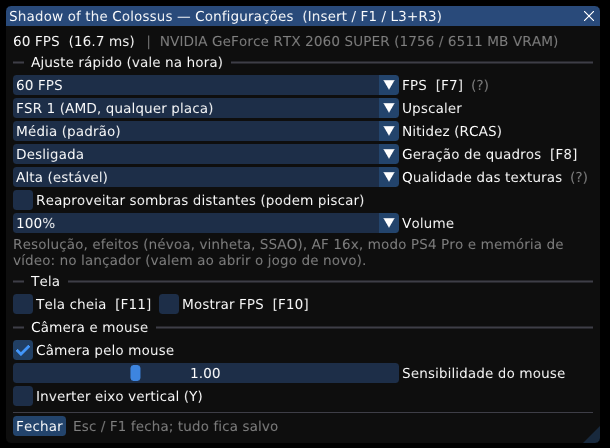
Atalhos: F1 (ou Insert / L3+R3) menu · F7 limite de 30 FPS · F8 geração de quadros · F10 painel
de desempenho · F11 tela cheia.
Atenção: a primeira abertura depois de atualizar recompila o cache de shaders do driver: cerca
de 2 minutos de tela de carregamento e pequenas travadas na primeira visita a cada lugar.
What's new in 0.60.6
- No more rainbow garbage on textures and far fewer "out of nowhere" crashes (
0x49500). After
loading a save or a new area, stones and floors could show colored, striped noise and the game
sometimes closed by itself. The cause: speculative "hot" GPU readbacks, written into guest memory
along with every readback; the game had already reused that memory for new textures and for its
heaps, and the old GPU picture landed on top. They are off now (~4% lower average FPS in the demo). - No more black dots on sandy ground (0.60.5): the descriptor bind reuse of PR #232 is off by
default. - In-game menu (F1) cleaned up: only what works in SotC. FPS (30/60/unlimited), upscaler and
sharpening now change at once. Maximum texture quality is not available in PS4 Pro mode
(it closed within minutes there). - Hard disks: once the game runs, its archives (13.7 GB) are read once, in order, and kept in
RAM: new areas no longer stall waiting for the disk. - Loads: on every save or new area, unused textures are dropped.
- Session event log
user/events.log: settings in words, system (CPU, RAM, HDD or SSD), menu
changes, keys, controllers, loads, a performance line every minute and explained errors. Please
attach it when reporting a problem. - PRs: #215 (after a GPU driver update: 106 s → 7 s of loading), #198 (4-thread CPUs), #205 (likely
fix for white characters on AMD GCN), #207, #212. - PR #219 (memory leak fix) is off by default: with it the garbage showed up much more often.
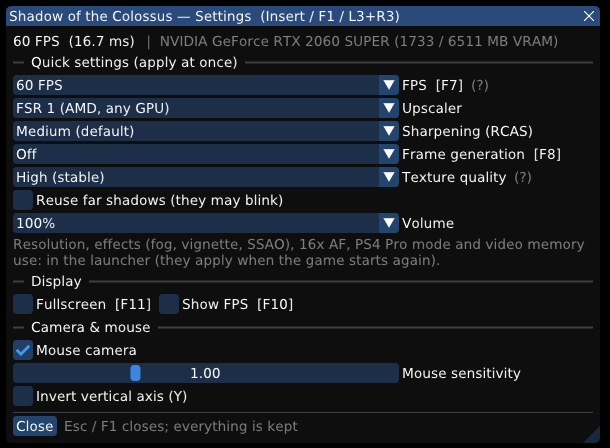
Shortcuts: F1 (or Insert / L3+R3) menu · F7 30 FPS cap · F8 frame generation · F10 performance
overlay · F11 fullscreen.
Note: the first start after updating rebuilds the GPU driver's shader cache: about 2 minutes of
loading screen and short stalls the first time each area is visited.
Sony firmware (libSceNgs2/libSceUlt) is not included: use the files from your own console.
v0.60.5 — Seletor de texturas, menu F1, +FPS, vazamento de memória
Novidades da 0.60.5
- Seletor de qualidade das texturas: Desligada / Alta / Máxima (#235). Veja a tabela abaixo.
- Vazamento de memória corrigido (~60 MB por minuto, mais de 7 GB em meia hora: engasgos em
sessões longas). PR #219, Oussama268. - Mais FPS: +3% na média e +12% na mínima (descritores reaproveitados entre desenhos
iguais). PR #232, Tadomikaari312-Hy. - Carregamento depois de atualizar o driver da placa: 106 s → 7 s. PR #215, Oussama268.
- AMD GCN (RX 470–590, Vega, APUs): provável correção dos personagens e da fumaça brancos.
PR #205, Lucas-blip-png. Conte nas issues se resolveu na sua placa. - CPUs com 4 threads não ficam mais presas no carregamento. PR #198, Lucas-blip-png.
- Engasgos curtos não piscam mais uma tela preta de carregamento; vigia de travamento (as pilhas
das threads vão para o log depois de 15 s sem quadro); correções de uma revisão de código;
lançador mais robusto (PRs #207 e #212).
Menu dentro do jogo (F1)
Aperte F1 (ou Insert, ou L3+R3 no controle) durante o jogo. O mouse fica livre com o
menu aberto; Esc ou F1 fecha.
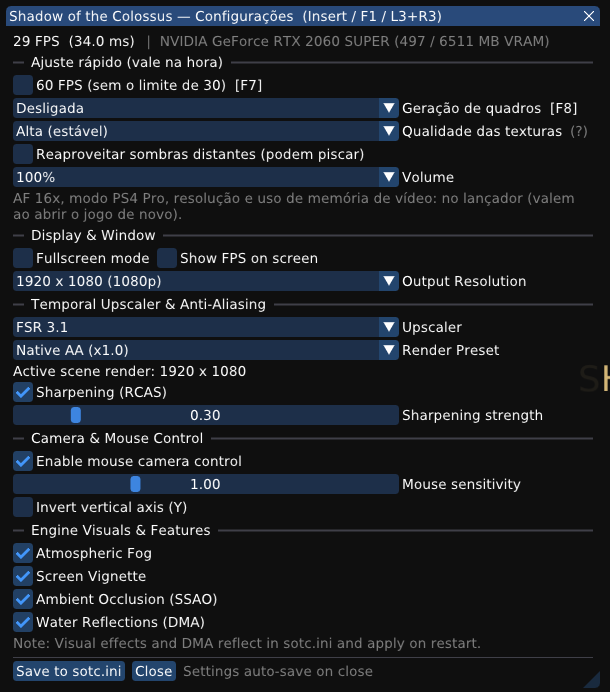
- Ajuste rápido (vale na hora): 60 FPS, geração de quadros, qualidade das texturas,
reaproveitar sombras distantes, volume. Também ficam salvos como escolha do lançador. - Tela e janela: tela cheia, contador de FPS, resolução de saída.
- Upscaler e nitidez: upscaler, preset, força da nitidez (RCAS).
- Câmera e mouse: câmera pelo mouse, sensibilidade, inverter eixo Y.
- Efeitos do motor: névoa, vinheta, oclusão ambiente (SSAO), reflexos da água (valem ao
abrir o jogo de novo). - No topo: FPS, tempo de quadro, a placa e a memória de vídeo em uso.
Atalhos
| Tecla | O que faz |
|---|---|
| F1 / Insert / L3+R3 | Abre ou fecha o menu do jogo |
| F7 | Liga/desliga o limite de 30 FPS (60 FPS sem o limite) |
| F8 | Geração de quadros: desligada → DLSS-G → FSR 3 (se a placa suportar) |
| F10 | Painel de desempenho (FPS e tempo de quadro) |
| F11 | Janela / tela cheia |
Qualidade das texturas
No lançador (Ajustes rápidos → Texturas) e no menu do jogo (muda na hora):
| Nível | O que faz | Problemas possíveis |
|---|---|---|
| Desligada | Só as versões 256×256 das texturas (como antes da 0.58.1). | Chão, pedras e folhas borrados. Para placas com pouca memória de vídeo. |
| Alta (estável), o padrão | O jogo carrega as texturas em alta resolução. Quando a memória de texturas do jogo está acabando, elas pedem um nível mais grosso e o jogo libera espaço antes de faltar. | Um pouco menos nítida em áreas grandes e abertas: ali essa memória fica quase sempre cheia e o nível mais grosso continua (#235). |
| Máxima (nítida) | Texturas sempre no nível mais fino, sem essa proteção. | Pode fechar o jogo em vistas muito amplas (espada erguida contra o sol, Santuário, área do último colosso; falha 0x1a371, #186), principalmente no modo PS4 Pro. Não aconteceu nos nossos testes de 5 a 10 minutos, mas já foi relatado. Se acontecer, volte para Alta. Usa mais memória de vídeo. |
Quem tinha "Texturas em alta qualidade" marcada passa para Alta; desmarcada, para Desligada.
What's new in 0.60.5
- Texture quality selector: Off / High / Maximum (#235), see the table below.
- Memory leak fixed (~60 MB per minute, over 7 GB in half an hour: stutter in long sessions).
PR #219, Oussama268. - More FPS: +3% average, +12% minimum (descriptor binds reused between identical draws).
PR #232, Tadomikaari312-Hy. - Loading after a GPU driver update: 106 s → 7 s. PR #215, Oussama268.
- AMD GCN (RX 470–590, Vega, APUs): likely fix for the white characters and smoke. PR #205,
Lucas-blip-png. Please report in the issues whether it helps on your card. - 4-thread CPUs no longer stuck loading. PR #198, Lucas-blip-png.
- Short hitches no longer flash a black loading screen; a hang watchdog (thread stacks in the log
after 15 s without a frame); code review fixes; sturdier launcher (PRs #207 and #212).
In-game menu (F1)
Press F1 (or Insert, or L3+R3 on the controller) while playing. The mouse is free while
the menu is open; Esc or F1 closes it.
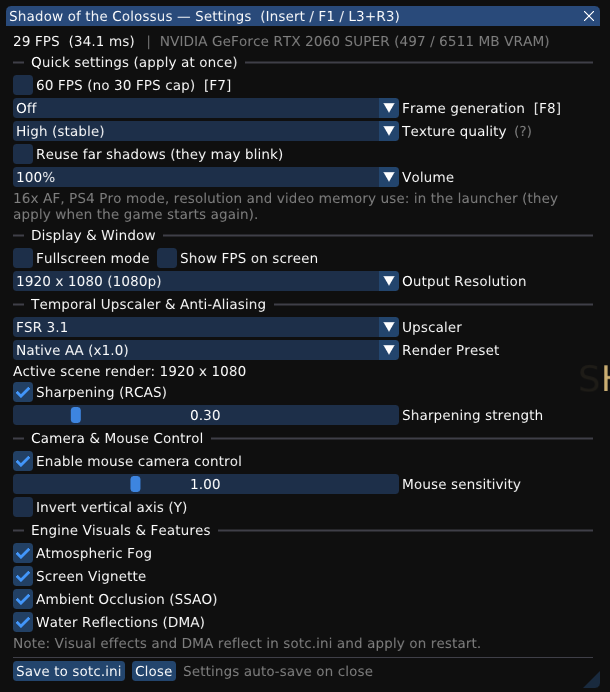
- Quick settings (apply at once): 60 FPS, frame generation, texture quality, far shadow
reuse, volume. Also saved as the launcher's choice. - Display & Window: fullscreen, FPS counter, output resolution.
- Upscaler & sharpening: upscaler, render preset, RCAS sharpening strength.
- Camera & Mouse: mouse camera, sensitivity, invert Y.
- Engine visuals: fog, vignette, ambient occlusion (SSAO), water reflections (apply on the
next start). - The header shows FPS, frame time, the GPU and its video memory in use.
Shortcuts
| Key | What it does |
|---|---|
| F1 / Insert / L3+R3 | Opens or closes the in-game menu |
| F7 | 30 FPS cap on/off (60 FPS without the cap) |
| F8 | Frame generation: off → DLSS-G → FSR 3 (when the GPU supports it) |
| F10 | Performance overlay (FPS and frame time) |
| F11 | Window / fullscreen |
Texture quality
In the launcher (Quick settings → Textures) and in the in-game menu (changes at once):
| Level | What it does | Possible problems |
|---|---|---|
| Off | The game's 256×256 textures only (as before 0.58.1). | Blurry ground, rocks and leaves. For GPUs short of video memory. |
| High (stable), default | The game streams its high resolution textures. When its texture memory runs low, they ask for a coarser level so the game frees space before it runs out. | A little less sharp in large open areas: that memory is almost always full there, so the coarser level stays (#235). |
| Maximum (sharp) | Always the finest level, without that protection. | May close the game in very wide views (sword raised against the sun, the Shrine, the last colossus' area; fault 0x1a371, #186), mostly in PS4 Pro mode. Not seen in our 5–10 minute runs, but reported before. If it happens, go back to High. Uses more video memory. |
"High quality textures" on becomes High; off becomes Off.
Sony firmware (libSceNgs2/libSceUlt) is not included: use the files from your own console.