Repository navigation
Material Painter 0.1.4: custom bake maps and live bake preview


Material Painter is free and open source. If it saves you time, a donation on Ko-fi keeps development going.
New in 0.1.4
Custom bake maps
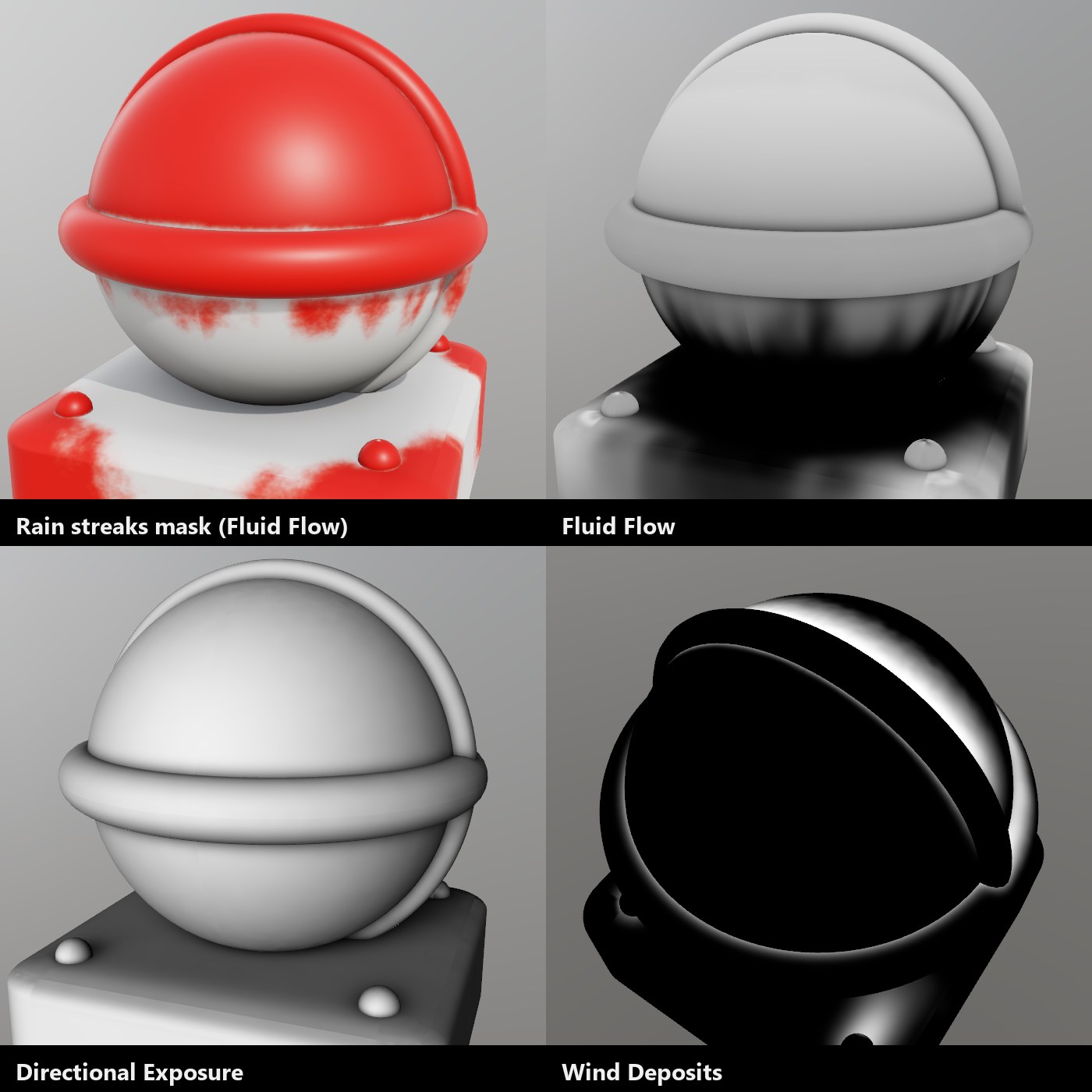
Bake what happens around your model, not just its shape. Add up to four custom maps in the bake window:
- Fluid Flow: fluid lands on the surfaces facing where it comes from and runs over the model, down walls and around edges. Gives you rain streaks below ledges and bolts, rust runs and leaks, from any direction.
- Directional Exposure: wind and sand erosion, sandblasting, sun bleaching on the side facing a direction.
- Wind Deposits: sand, snow and dust drifting in behind walls and into corners.
- Contact: grime and rust where separate parts meet.
- Distance from Point: impact damage, scorching, heat tint.
Use them in any mask with the new Custom Bake Map preset (or the Custom inputs of a smart mask), in Mesh Map graph nodes, and in the views.
Live bake preview and 3D gizmos
- Live preview: while the bake window is open, every setting you change bakes a fast preview that shows up in the views and masks right away, then sharpens once you stop. Bake when you like what you see.
- Gizmos: drag an arrow in the 3D view to set where the rain or wind comes from; drag a marker over the model for a point.
- Choose which maps to bake: leave out the ones you don't need for faster bakes; masks that read a missing map tell you so.
Also new since 0.1.3
- Asset library: thousands of free materials from Poly Haven and ambientCG, plus a community browser to share your own.
- Smart materials from your layers: save a layer folder as a smart material and share it.
- Path tool: lay a brush along a curve for stitches, seams and panel lines, with stitch brush tips.
- Preview shaders: build the 3D view's look (toon, clay, rim light...) as a node graph.
- Better bakes on meshes cut into many UV islands: no blotches, no lines along UV seams.
- UV wireframe toggle for the 2D view.
Download
Windows
MaterialPainter-0.1.4-setup.exe: installer with Start menu shortcut and uninstaller.MaterialPainter-0.1.4-windows-x64.zip: portable; unpack anywhere and runMaterialPainter.exe.
The Windows builds are not code-signed yet, so SmartScreen may warn on first launch: choose More info → Run anyway.
macOS (11 Big Sur or newer, Apple Silicon or Intel)
MaterialPainter-0.1.4-macos-universal.dmg: open it and drag Material Painter into Applications. The app isn't notarized yet, so the first time, right-click it and choose Open, then Open again. After that it starts normally.
Linux (x64, glibc 2.35+: Ubuntu 22.04, Fedora 36, Debian 12 and later)
MaterialPainter-0.1.4-linux-x64.tar.gz: unpack, run./material-painter, and optionally./install.shto add it to your app menu.
Needs a GPU with DirectX 12 (Windows), Vulkan (Linux) or Metal (macOS) support.
Early access: expect rough edges. Questions and bug reports are welcome on Discord or as GitHub issues.