Repository navigation
Releases
v0.16.0: Argus

The emulator has a name now: Argus.
Argus is the hundred-eyed giant from Greek myth who sees everything, which felt right for an emulator whose whole point is Hardware X-Ray: seeing what the GBA is doing while a game runs.
What changed
- The app, window and downloads are called Argus (
Argus.app,argus.exe,argus-0.16.0-x86_64.AppImage). Trainer cards now say "Argus · Pokémon Companion". - The repo moved to github.com/amyanger/argus. Old
gba-emulatorlinks still redirect. - Your settings and game library come with you. On first launch Argus moves them from the old "GBA Emulator" settings folder. Saves, savestates and cheats live next to your ROMs, so they're untouched.
Updating
- macOS: drag Argus into Applications, then delete the old "GBA Emulator" app. macOS treats it as a new app, so you'll need to allow it once in System Settings > Privacy & Security, like the first time.
- Windows: extract the new zip and run
argus.exe. You can delete the old folder. - Linux: the AppImage file name changed, so AppImageUpdate in older versions won't find this one. Download it once by hand; updates work again from here on.
Downloads
macOS (Apple Silicon) .dmg, Linux .AppImage, Windows .zip below. See docs/usage.md for setup.
v0.15.1
A small fix release.
Fixed
- Pasting cheats works again after clicking the Cheats tab. Clicking Cheats in the Settings sidebar moved focus off the paste box, so Ctrl+V (or ⌘V) did nothing. A paste on the Cheats page now always lands in the box. Thanks to the viewer who reported it.
- The paste box hint now says Ctrl+V on Windows and Linux instead of the Mac-only ⌘V.
Also in this release
- Trainer cards (C / Shift+C) save to your Desktop, falling back to the ROM folder.
- Fast-forward can be toggled with the backtick key (
`) as well as held with Tab. The README now says so, and a one-time tip shows the first time you hold Tab.
Downloads
macOS (Apple Silicon) .dmg, Linux .AppImage, Windows .zip below. See docs/usage.md for setup.
v0.15.0
A randomizer for Pokemon Emerald, and zipped ROMs open directly.
Randomizer (Emerald)
- Turn it on in Settings > Randomizer. It is off by default and set per save.
- Your starters, every wild Pokemon (grass, water, fishing, Rock Smash, Safari Zone) and every trainer's team, gym leaders and Elite Four included, become random Pokemon. Levels stay the same.
- Legendaries are never touched: they stay where they are and never show up anywhere else.
- Each starter is guaranteed a damaging move by level 5, so the first rival battle can be won. Shedinja never appears on a trainer's team.
- Trainers with hand-picked movesets give their new Pokemon its own level-up moves.
- Your
.savand.gbaare never edited. The seed lives in a small<save>.randofile next to your save, and the change takes effect the next time you open the game. Savestates still load with it on or off. - The Pokemon Companion pages (Route, Search, Hunt, Run) show the randomized Pokemon.
- Not randomized yet: one-off scripted Pokemon (Wally's Ralts, Beldum, fossils, gift eggs), in-game trades and the Battle Frontier. Full details are in docs/randomizer.md.
Other changes
.zipROMs open directly, from the game library, drag and drop or the command line. A zip shares its save only with its own unzipped copy.- The README has a beginner download guide, explains the unsigned-app warnings on macOS and Windows, and has a contributing section.
Downloads
- macOS (Apple Silicon):
gba_emulator-0.15.0-macOS-arm64.dmg - Linux:
gba_emulator-0.15.0-x86_64.AppImage - Windows:
gba_emulator-0.15.0-Windows-AMD64.zip
v0.14.0
Following Pokemon comes alive, and the Battle page handles double battles properly.
Following Pokemon
- It reacts to the world with HeartGold-style emote bubbles: when a trainer spots you, when you start talking to someone, when you pick up an item, and when the weather changes. The bubble it picks depends on its mood, friendship, HP and status.
- Stand still and it does things on its own: looks around, turns to face you, hops, spins, or dozes off.
- It no longer trails Mr. Briney's boat across the water.
- After it evolves, it shows its new form right away instead of the old one.
- Its bubbles stay over its head when you stand just north of it.
Battle page in double battles
- Both opposing Pokemon get a tab. Press [ or ] to pick which one the page shows, and every number below is for that one.
- Both of your Pokemon show up too, in a Your side row. Press , or . to pick one, and its moves, damage numbers and HP are used against the chosen opponent.
- When a Pokemon faints, the one sent in shows up in its place. If nobody replaces it, the page shows the one still standing.
Other fixes
- The ladders on Granite Cave B1F no longer drop you through the floor when playing without a BIOS file.
- Several emulation fixes for other games: BIOS decompression into work RAM, and 16/32-bit writes to save chips.
Downloads
- macOS (Apple Silicon):
gba_emulator-0.14.0-macOS-arm64.dmg - Linux:
gba_emulator-0.14.0-x86_64.AppImage - Windows:
gba_emulator-0.14.0-Windows-AMD64.zip
v0.13.1
A bug fix release.
Following Pokemon
- No more flash of your Pokemon on the black screen when you go through a door or warp.
- It follows you into doors now, instead of waiting outside while the screen fades.
- Like in HeartGold, it goes back into its Poke Ball while a Pokemon Center nurse heals your team, and comes out with the ball burst on your next step.
- When someone walks onto its tile, it returns to its ball instead of standing inside them, then comes back out behind you when you move.
Other fixes
- Unpatched ROMs failed to load in v0.13.0. Fixed.
- The Pokemon Companion panel now grows with the game at sizes above
--scale 3.
Downloads
- macOS (Apple Silicon):
gba_emulator-0.13.1-macOS-arm64.dmg - Linux:
gba_emulator-0.13.1-x86_64.AppImage - Windows:
gba_emulator-0.13.1-Windows-AMD64.zip
v0.13.0
ROM patches
Play ROM hacks, translations and fix patches without making a patched copy of the game. IPS, UPS and BPS patches are applied in memory when the game starts, and neither file on disk is changed.
- Give the patch the same name as the ROM (
emerald.gbaandemerald.bps) and open the ROM as usual. - Or open or drop the patch itself, and it plays on the ROM with the same name next to it.
- Or pass
--patch <file>on the command line.
A patched game keeps its own save, save states, cheats and logs, named after the patch (emerald.bps.sav), so a hack never touches your original save. UPS and BPS patches check that they were made for your ROM. See ROM patches.
Roamer Radar
Gen 3 never tells you where Latias, Latios or the legendary dogs are. The Companion's Route page now shows the roaming Pokemon's level, HP, status and the route it is on right now, in Emerald, FireRed and LeafGreen. When it is on your route the row turns blue and shows the real odds of meeting it.
Move Relearner
The Party page now shows the next level-up move and the exact list of moves the game's move relearner would teach each Pokemon right now, with where to find the relearner and what it costs.
Fixes
- The Route, Nuzlocke and Berries pages showed the wrong place on the title and Continue screens, before the map loads.
Downloads
- macOS (Apple Silicon):
gba_emulator-0.13.0-macOS-arm64.dmg - Linux:
gba_emulator-0.13.0-x86_64.AppImage - Windows:
gba_emulator-0.13.0-Windows-AMD64.zip
See docs/pokemon-companion.md for the full Companion guide.
v0.12.2
A bug fix release about keeping your saves safe.
Loading a savestate no longer rolls back your save
A savestate holds a full copy of the game's save. Loading an older one (or rewinding) and then quitting wrote that older copy to your .sav, so the newest in-game save was lost. The emulator now writes the save on quit only when the game itself saved, so peeking at an old slot leaves your progress alone.
Link cable: one ROM file per window
Both link cable windows used to run the same ROM file and so shared one .sav, and whichever saved last wiped the other's trade. Each window now needs its own copy of the ROM, and a second window on the same file refuses to start with a message saying so. The Link Cable section in docs/usage.md shows the two-copy setup. A mistyped --link-master path also can no longer delete a real file.
Safer writes on a full disk
A savestate written to a nearly full disk could replace a good slot with a cut-off one. Every file the emulator writes (saves, savestates, settings, keys, cheats) now goes through one shared routine that checks the data reached the disk before replacing the old file.
Linux AppImage name and updates
The Linux download is now named gba_emulator-0.12.2-x86_64.AppImage and carries update info, so AppImage update tools can find new versions.
Downloads
- macOS (Apple Silicon):
gba_emulator-0.12.2-macOS-arm64.dmg - Linux:
gba_emulator-0.12.2-x86_64.AppImage - Windows:
gba_emulator-0.12.2-Windows-AMD64.zip
v0.12.1
A bug fix release.
Linux app no longer crashes on launch
The Linux AppImage crashed as soon as it opened when started without a game. The SDL version bundled for Linux (2.0.20) has a bug in one call the emulator made while setting up the game screen. That call is gone and nothing looks different. The release workflow now also opens the AppImage on a virtual screen and fails if the window doesn't stay up, so this can't ship again.
Safer savestates and ROM loading
A savestate with a damaged section partway through could leave the running game half loaded. Every section is now checked before anything is applied, so a bad file is rejected cleanly. Files too short to be a GBA ROM are rejected instead of being read past their end.
Following Pokémon parsers rewritten in Rust
The code that reads sprites, frames, fonts and text from your HeartGold or SoulSilver ROM for Following Pokémon (F1) now lives in a small Rust library with its own tests. It also rejects malformed archive entries that the old code accepted. Building from source now needs a Rust toolchain (see docs/development.md).
Downloads
- macOS (Apple Silicon):
gba_emulator-0.12.1-macOS-arm64.dmg - Linux:
gba_emulator-0.12.1-Linux-x86_64.AppImage - Windows:
gba_emulator-0.12.1-Windows-AMD64.zip
v0.12.0
Pokémon Companion now works with FireRed and LeafGreen
The F9 panel (now called Pokémon Companion) supports Pokémon FireRed and LeafGreen alongside Emerald. Battle with damage and catch odds, Party, the Daycare block, Route, Search, Nuzlocke, Run and the trainer card all work on the Kanto games. Emerald-only pages (Berries, Hunt) are hidden there. ROM hacks and other revisions get a clear "not supported" screen instead of wrong data.
Real badge art
The Run page's badge strip and both trainer card styles now show each badge's own art, read from your ROM. Earned badges are in colour, missing ones are a dark silhouette. The art is drawn at whole-pixel sizes so it stays crisp at any window size.
Journey key
The Run page footer now explains the Journey dot colours: badge, story, catch, gift, faint, whiteout, evolved and ace KO.
Downloads
- macOS (Apple Silicon):
gba_emulator-0.12.0-macOS-arm64.dmg - Linux:
gba_emulator-0.12.0-Linux-x86_64.AppImage - Windows:
gba_emulator-0.12.0-Windows-AMD64.zip
See docs/pokemon-companion.md for the full feature guide.
v0.11.0
Emerald Companion can now make a trainer card: one key saves a picture of your team that's ready to share. The Pokemon sprites come straight from your own ROM, shiny colors included.
Trainer card
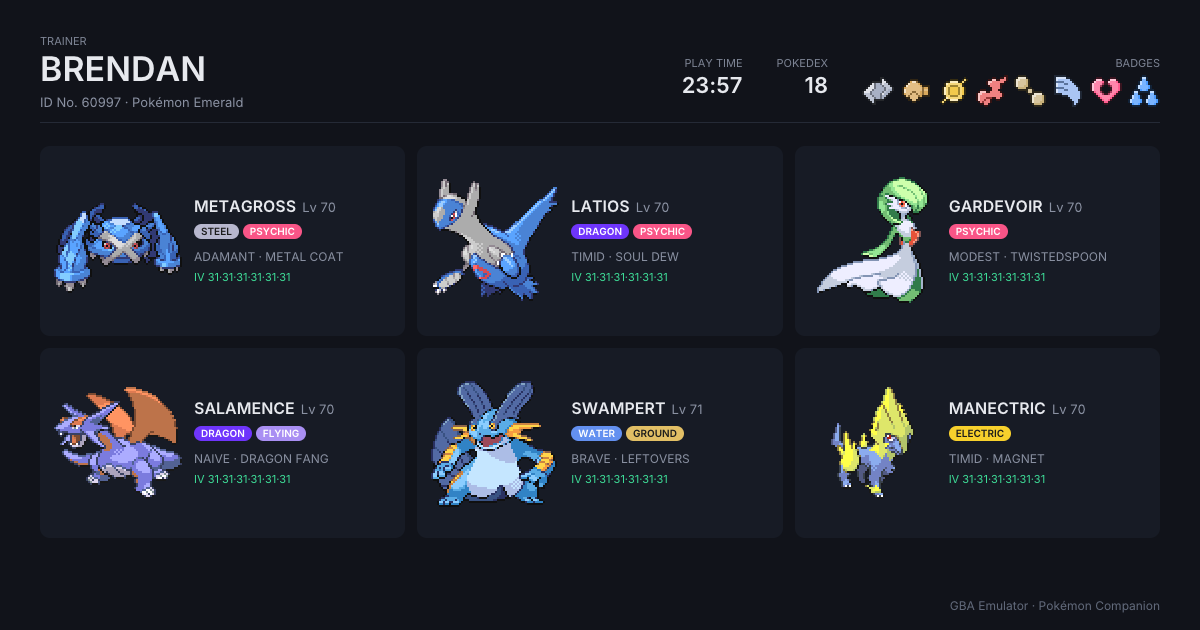
Press C while playing Pokemon Emerald to save a team grid card. Press Shift+C (the left Shift key) to save an ace showcase card instead. The card is saved next to your ROM as a 1200x630 PNG, and a toast tells you the file name. It works with the side panel open or closed, and while paused. This needs the original Pokemon Emerald (US/English) ROM.

Team grid. Your name, ID No., play time, Pokedex count and badges across the top, then all six Pokemon with their types, nature, held item and IVs.

Ace showcase. One Pokemon gets the spotlight with its stats, and the rest of the team is listed beside it. To choose the ace, open the panel with F9, go to the Party page and select it with [ ] before pressing Shift+C. Otherwise the ace is the MVP from the Run page, or your lead Pokemon.
Eggs stay a surprise and show only as an egg. Only your public ID No. is printed. The card isn't made in the Battle Frontier, the Battle Tents, Trainer Hill, or partner and link battles, where the party isn't your own team. The details are in the Trainer card section of the guide.
Fixes
- Nuzlocke: if the emulator closed before the first write, the empty run file was treated as someone else's and the run was never saved again.
- Route page: Altering Cave now shows the right encounters after the Mystery Event changes them, the same as the Hunt page.
- Savestates on Windows: a crash at the wrong moment while saving could lose the slot. Saves now replace the old file in one step, like battery saves.
- A few smaller fixes for reading damaged log and slot-label files, and a file handle that stayed open after picking a new HeartGold/SoulSilver ROM.
Download and play
- macOS (Apple Silicon, macOS 11 or newer): open
gba_emulator-0.11.0-macOS-arm64.dmgand drag GBA Emulator into Applications. - Windows (64-bit): extract
gba_emulator-0.11.0-Windows-AMD64.zipand double-clickgba_emulator.exein thebinfolder. - Linux (x86_64): download
gba_emulator-0.11.0-Linux-x86_64.AppImage, make it executable and double-click it.
The apps still aren't signed with a paid certificate, so macOS and Windows ask you to confirm the first time. The install guide walks through it. The full Emerald Companion guide is in docs/emerald-companion.md.
For developers
--card-out FILE [--card-style grid|ace]renders a trainer card headless;--panel-select Npicks the ace like the Party page does.- Internal cleanup from a refactoring audit: one core source list for the emulator and tests, shared session log code, shared pret offsets in
emerald_layout.h, and smallerio_write8and OBJ decode paths. Goldens are unchanged.