Repository navigation
Releases
PES6 HD Text 1.0.1.2

Menu text now stays sharp in long sessions, such as Master League, and HD_original_font draws its symbols in HD.
- Fixed: after a match and some time in the menus (player growth, line-up), menu items and player names could lose the sharp letters and come out blurry. Now they stay sharp.
- Changed:
HD_original_fontnow draws its twelve symbols (℃ ← ↑ → ↓ □ ■ △ ▲ ○ ● ★) in HD instead of upscaling the game's 16 px ones.hdtext.exerecognises the previous version and updates it when you press Apply. - Changed: one more hooked function,
0x0095A6C0(the game releases a letter from a letter sheet). Mod makers: see For mod makers. - Make your own HD font: Pes6FontCreator turns any TTF or OTF font into an HD font for PES6 HD Text, in your browser.
The zip is the full mod, not a patch. Already have an earlier version (1.0, 1.0.1 or 1.0.1.1)? Copy the zip's Kitserver folder over your old files and keep the pes6_hd_text.dll line you already have in kload.cfg. Then open hdtext.exe and press Apply. New install: see Install.
Everything else is as in 1.0.1. Full list in the changelog.
SHA-256 of PES6_HD_Text_v1.0.1.2.zip: 81106be30897b9d760580efe46997178ba615f2cdd002442b87d3e482f0972a7
PES6 HD Text 1.0.1.1
PES6 HD Text now works together with PesAssetLoader (Dmitri-F's Plugin Loader + Asset Loader).
- Fixed: with 1.0.1, PES6 HD Text turned itself off when the Asset Loader was installed (with an HD font, the text came out huge). Now both mods work together.
- Changed: if another mod already hooked one of the same game functions with a plain jump, PES6 HD Text now hooks on top of it instead of turning off.
Updating from 1.0.1: just replace pes6_hd_text.dll in your Kitserver folder. New install or updating from 1.0: see Install.
Everything else is as in 1.0.1. Full list in the changelog.
SHA-256 of PES6_HD_Text_v1.0.1.1.zip: a6bcfbda519ac9a8161f5b42602257a6d20f67192736c4be1de753e8496491e7
PES6 HD Text 1.0.1
Sharper PES 6 text: 35 HD fonts drawn at your screen's resolution, plus a settings tool to pick one.
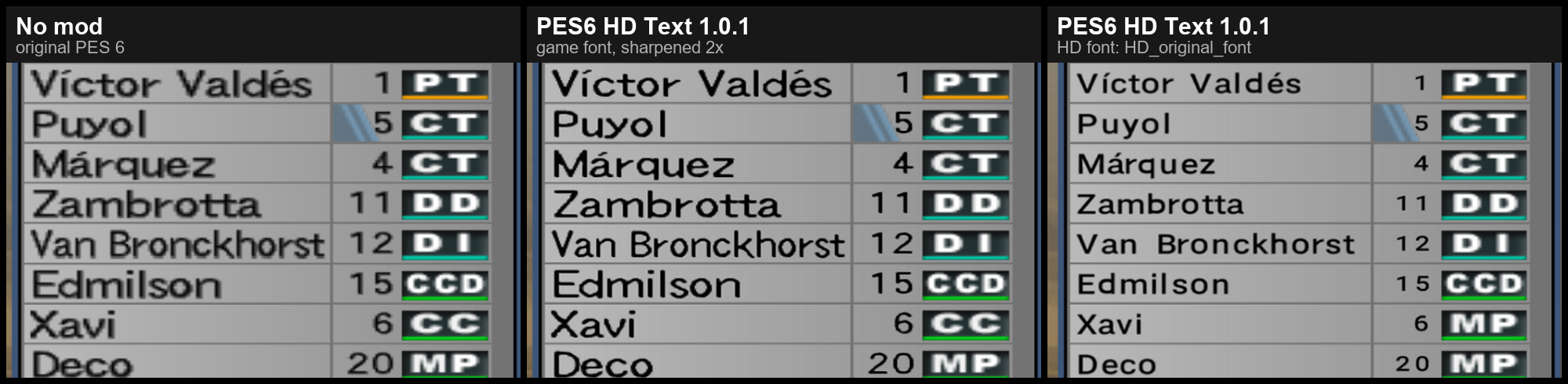
Added
- HD fonts: with an HD font installed, the text is drawn at the resolution of your screen instead of being stretched from 640x480 (tested at 1920x1080).
- 35 HD fonts in
Kitserver\GDB\fonts.HD_original_fontkeeps the original PES 6 look. hdtext.exe, a settings tool: mod on/off, font list with preview, "Add font..." with a format check, the installed font checked by its contents, backups, and a way back to the font you had before.hdtext.cfg(mode = hdormode = original).- HD fonts made by modders work at other scales too, with grey, coloured or black-outlined palettes, for any of the game's fonts.
Changed
- More text is sharp: menu items, help texts, the match clock, shrunk and italic labels.
- Cleaner letters with the game's own 16 px fonts: thin fonts keep their strokes, broken letters are repaired, round letters come out symmetric.
- With 4x HD fonts (all the included ones), letters no longer stick together.
- Menus load more smoothly.
Fixed
- Club crests, flags, team badges, shirts and button icons are no longer processed by mistake.
With your patch's font
Keep it and make it sharp (leave HD and press Apply), swap it for an HD font, or bring it back exactly as it was with Original (mod off). See Using it with your patch's font.
Install
Updating from 1.0: copy the zip's Kitserver folder over your old files and keep your existing kload.cfg line (don't add a new one). Then run hdtext.exe and press Apply.
New install:
- Copy everything inside the zip's
Kitserverfolder into your game's Kitserver folder (the one withkload.cfg). - Add
DLL.N = "kitserver\pes6_hd_text.dll"tokload.cfg(next number) and increaseDLL.numby 1. - Run
Kitserver\hdtext.exe, pick a font and press Apply.
Before removing the DLL, switch the tool to Original (mod off) and press Apply: the game can't load an HD font on its own.
Requires Kitserver 6 with afs2fs.dll. Tested on the original PES 6 + Kitserver 6 and on PES 6 The Den Patch 2026. In "Original" mode the DLL hooks nothing. Full details in the README and the changelog.
MIT License, plus a credit requirement: "Mod PES6 HD Text Original creado por PityCharly." The included fonts are modified versions of free fonts (SIL OFL and Apache 2.0); their licenses are in Kitserver\GDB\fonts. HD_original_font is based on work by SimoneZ. The 35 fonts are also in the repo's fonts folder.
SHA-256 of PES6_HD_Text_v1.0.1.zip: b72966f12134e296eadbf48868338078c8015b63b3a74b2274e4ac22262112e3
PES6 HD Text 1.0
First release: sharp in-game text with the original fonts. See the README for install steps.