Repository navigation
Releases
0.6.4

Changed
- Export diagnostics also says, for a deleted glided word, where its replacement stood among the words the stroke could have been (bands only, never the words)
- Switching between letters, symbols, emoji and the clipboard is instant again: the fade added in 0.6.3 is gone
Fixed
- The microphone stays in the bar in symbols mode, and switching to symbols no longer stops dictation
- A form field in a browser (Firefox) opens on letters instead of symbols
- The emoji and clipboard panels show their content the first time they open, instead of an empty grid or the "nothing copied" message for a moment
0.6.3
Changed
- The keyboard opens on letters every time it comes up, instead of the symbols you left it on; terminals still remember code mode
- Switching between letters, symbols, emoji and the clipboard fades quickly instead of jumping (instant when Android's animations are off)
Fixed
- The keyboard no longer crashes when something is copied after you switch to another keyboard
- Diagnostics no longer count a sentence deleted by holding backspace as glides read wrong, nor what you write after it as a replacement
0.6.2
Changed
- Export diagnostics also counts, for a glided word deleted on its own, whether the next word written was the same word, one the strip offered for it, or another word (counts only, never the words)
Fixed
- A host name typed in a plain text box (test.neat.fish in a DNS form) is no longer split into sentences: a second full stop typed straight onto the part after a split puts the parts back together, and a glide after a dotted name's full stop continues it
0.6.1
Changed
- Exported diagnostics now say, for recent glides, how far each stroke went and how long it took (in coarse bands, never the stroke or the word), with one- and two-letter words counted apart, to tell a glide made on purpose from a tap that slid
Fixed
- The keyboard no longer crashes when you switch to another keyboard while it is open, and keeps what it learned in that last field
0.6.0
Added
- A Slang and abbreviations dictionary (lol, idk, tbh, brb and more), offered after every other word until you use them, and kept as you type them; turn it off in Settings > Dictionaries
Changed
- Words are ranked by how common they are, whichever dictionary they come from, and move up as you use them; your imported word lists start with the rarest everyday words, or by their frequency column if the file has one ('word,1234')
- Release APKs are built reproducibly from their version tag: two clean builds of the same tag give the same bytes, and the release workflow publishes their checksums, so a downloaded APK can be checked against the source
- The settings screens' text now comes from string resources, so the app can be translated; counts read correctly in the singular (1 sample, 1 pack)
- The keyboard's own text (what a screen reader says for keys, panels and bar items, the clipboard panel, word pack names and messages) also comes from string resources, ready for translation
- Built for Android 17 (API 37), with the current Compose, core, lifecycle and activity libraries
- Saved email addresses are offered as cards only once you start typing one, so a password manager's card is not covered when the field opens; every saved address that matches shows (scrolling sideways at full size), and only once what you type can no longer be an ordinary word
- Chips above the keys that scroll now stop at the end of the row; a second swipe from there puts them away
- Commas, exclamation and question marks, colons and semicolons typed straight onto a word put a space in front of the next letter you type (a space you type yourself is the only one), and the letter after a sentence's end is capitalised even before its space appears
- A full stop typed straight onto a word gets its space when the next word ends, unless the two joined are a name the word lists know (node.js, e.g., example.com, notes.txt) or one you kept joined: backspace right after the space goes in puts it back and remembers the name in your personal words
Fixed
- Backspace in a web terminal (tmux or a shell in a browser) no longer sometimes goes missing on slower phones: it is sent as a key press
- The setup screen and the settings pages no longer leave a blank band between their content and the keyboard
- In code mode with bracket pairing on, a quote that closes one the paragraph already opened goes in alone, after a space or a full stop too, instead of starting a new pair
- Dictionaries settings: the word counts keep their space before each pack's description again
- Punctuation typed right after picking a word from the strip takes the place of the word's space even when the app is slow to report the cursor
0.5.5
Added
- Two words typed without the space between them are offered as two words on the strip ('ataco' offers 'a taco'), and common pairs are split on space ('thankyou' becomes 'thank you'); backspace right after puts back what you typed
- Export diagnostics can include the last 10 fields the keyboard opened in (which app, and what kind of field it said it was, never its text), to look into a problem in one app: turn on Include recent fields in Settings > About
Changed
- The enter key shows what it will do: the return arrow for a new line, a magnifier in search boxes, and an arrow where it goes, sends or finishes; screen readers say the action
Fixed
- Settings > About > Credits names every library the app ships, including the ones its libraries bring in, and says that five strokes from the FUTO swipe dataset are kept for tests
- Enter runs the search in search boxes that allow several lines, such as the Play Store's, instead of adding a second line
- The paste chip stays after you press space; it gives way when you start typing or gliding the next word, and does not come back for that copy
- A glide that starts on the edge of backspace or the space bar no longer selects and deletes text: their swipes now only work while your finger stays in the bottom row, and the space-bar slide selects only when you turned shift on yourself
- Web terminals and other web pages that ask for no autocorrect (tmux or a shell in a browser) get exactly what you type: no autocorrect, no moved punctuation, and backspacing into a word no longer sends it again
Download
- Shebang-DevBoard-0.5.5-release-signed.apk: the keyboard (Android 8.0 or newer). Installs over 0.5.4 and keeps your settings and learned words.
- Shebang-Voice-0.5.5-release-signed.apk: the optional voice typing add-on.
Both are signed with the same key as every release. SHA-256 certificate fingerprint:
c9338a9404890ff7694bfb21aa58e3e3369a2f0c70b78a6a70b1ca22ef246644
0.5.4
Shebang DevBoard 0.5.4: the first public release
An Android keyboard for developers. It glides like a phone keyboard, has every symbol a programmer needs on one page, and gives terminals real Esc, Tab, Ctrl and arrow keys. Everything it learns stays on your phone: its only permission is vibration, and it has no network code at all.
 |
 |
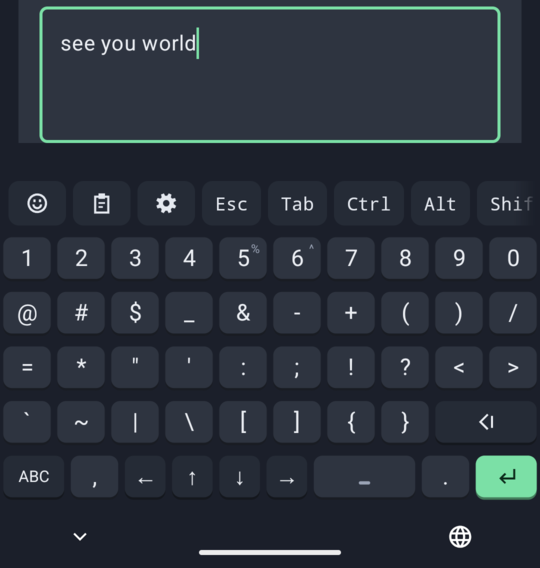 |
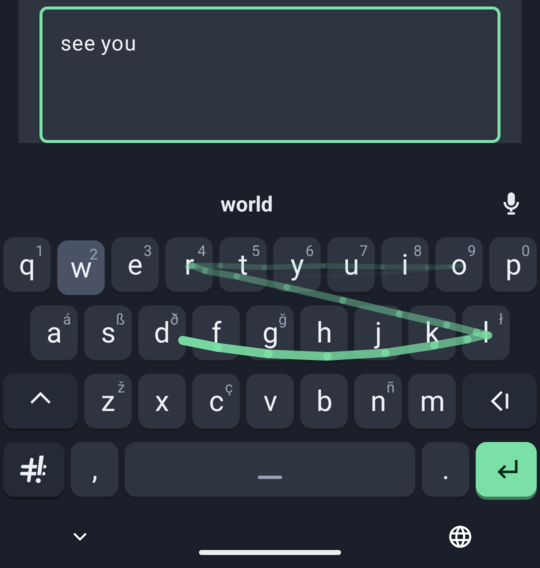
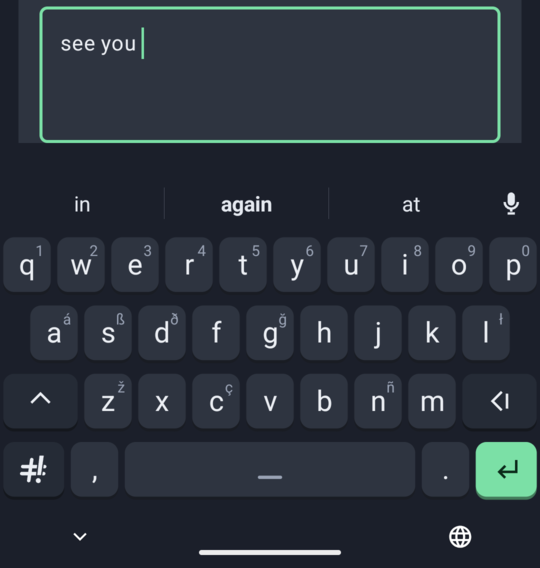
| Glide typing, with the word shown before you lift | Next-word suggestions from the whole sentence | Code mode: every symbol on one page |
Download
| File | What it is |
|---|---|
| Shebang-DevBoard-0.5.4-release-signed.apk | The keyboard. Android 8.0 or newer. |
| Shebang-Voice-0.5.4-release-signed.apk | Optional voice typing add-on. Install it only if you want to dictate. |
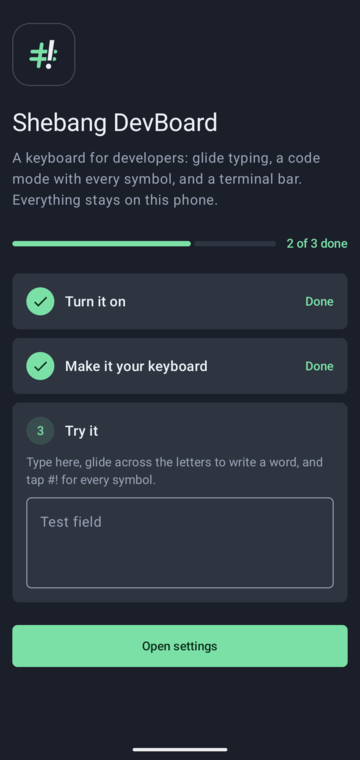
Open the APK on your phone and allow the install. Then open Shebang DevBoard from the app drawer and follow its three steps: turn it on, make it your keyboard, and try it. Later releases install over this one and keep your settings and learned words.
Both apps are signed with the same key. Its SHA-256 certificate fingerprint is:
c9338a9404890ff7694bfb21aa58e3e3369a2f0c70b78a6a70b1ca22ef246644
What it does
Typing and glide
- Glide typing reads the word while your finger moves, uses the word before it, and learns how your swipes land on each key.
- Autocorrect that knows where you tapped. A slip is weighed by where your finger came down, and the keyboard learns your own lean on each key.
- Next-word suggestions after every space, from word statistics and a small on-device neural model.
- Fix a word in place. Tap inside a word, or backspace back to it, and the strip offers what else it could be. Glide again to replace it.
- Long-press alternates with the capital first, hold shift for caps lock, swipe left from backspace to delete whole words, and drag the space bar to move the cursor.
- Phrase gliding, off by default: dip into the space bar to glide several words in one stroke.
Built for code and terminals
- Code mode (the #! key) puts every digit and printable ASCII symbol on one page, with arrow keys. Brackets and quotes pair themselves.
- Terminal bar above the keys sends real key events, so Termux and SSH apps get Esc, Tab, Ctrl+C, arrows and F1 to F12. Ctrl and Alt are sticky. Add your own snippets in the bar editor.
- Undo, Redo, Select all, Cut, Copy and Paste on the bar, done by the app itself so a terminal never gets a stray Ctrl+Z.
- Field-aware. Terminals get raw characters, password fields get no suggestions or learning, number fields get a number pad, and address bars and email fields type exactly what you tap.
- Code-aware words. Identifiers already in the text are suggested, and words glided in a row can be joined as camelCase or snake_case.
- Per-app memory. Each app keeps its own mode, text or code, and can have its own bar.
 |
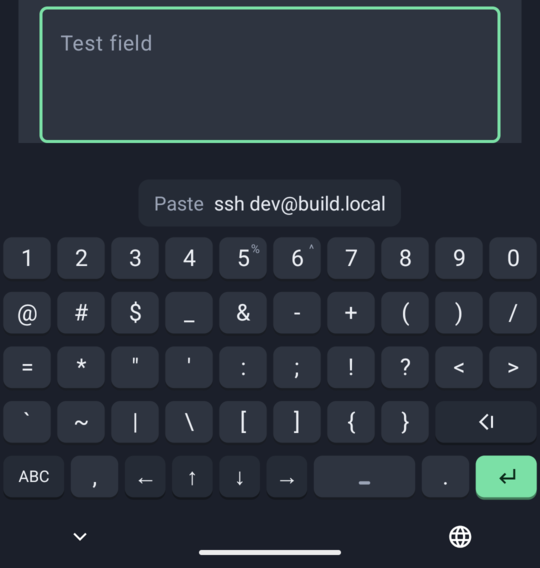 |
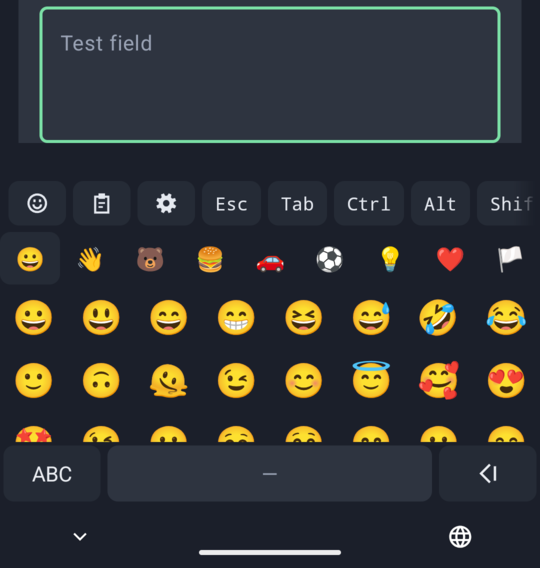 |
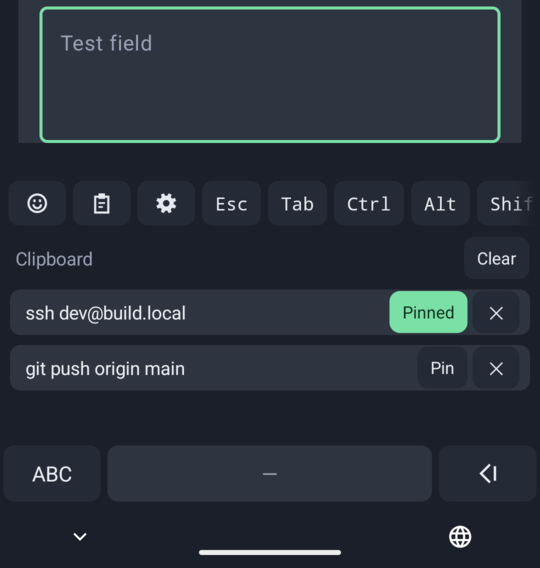
| Clipboard history with pins | A chip offers what you just copied | The emoji panel |
Dictionaries you choose
- 62,000 everyday words, plus packs of brands and names, development and terminal words, and computer terms. Turn any pack off.
- Import your own word lists from a text file or CSV.
- Personal words. The keyboard learns your words on the phone. Review, add or delete them, and undo recent learning by day.
- Words in Android's personal dictionary can be glided too.
Comfort
- Twelve original themes, plus Auto and Wallpaper colours.
- One-handed mode, docked left or right, with adjustable keyboard height and an optional number row.
- Clipboard history with text and pictures, pins, and a chip that offers what you just copied. Password copies show as dots.
- Emoji panel, autofill chips from your password manager on Android 11 and newer, and TalkBack support.
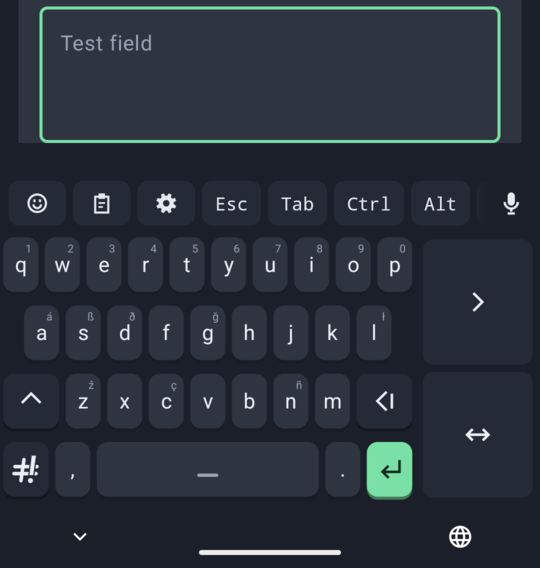 |
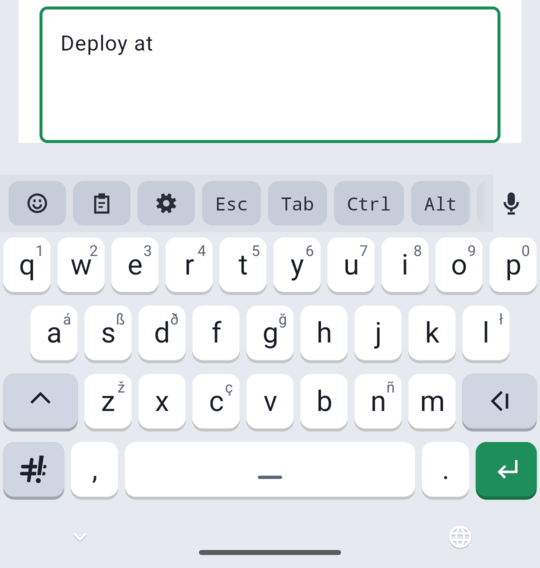 |
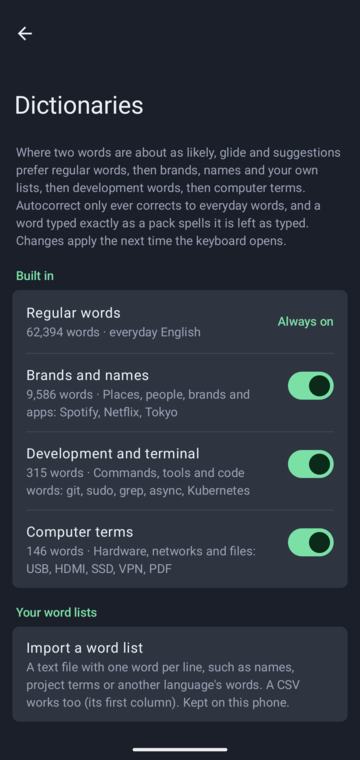 |
| One-handed mode, docked left | The Day theme | Dictionaries you can turn on or off |
Voice typing, as a separate add-on
Shebang Voice turns speech into text on the phone with OpenAI's Whisper model. It holds the microphone permission so the keyboard never has to, and it has no network access either. Tidy dictation drops um and uh and handles spoken corrections such as "Tuesday, no wait, Wednesday". Once it is installed, a mic appears at the end of the keyboard's strip.
Privacy
- The keyboard's only permission is vibration. It has no network code and no analytics.
- What it learns stays in the app's private files: word counts, word pairs, and how your taps and swipes land. You can review and delete all of it in Settings.
- Nothing is learned from password, number, email, web address or terminal fields.
- Export diagnostics saves a file you can choose to send. It leaves out your words and anything else personal.
Full policy: PRIVACY.md
Settings
 |
 |
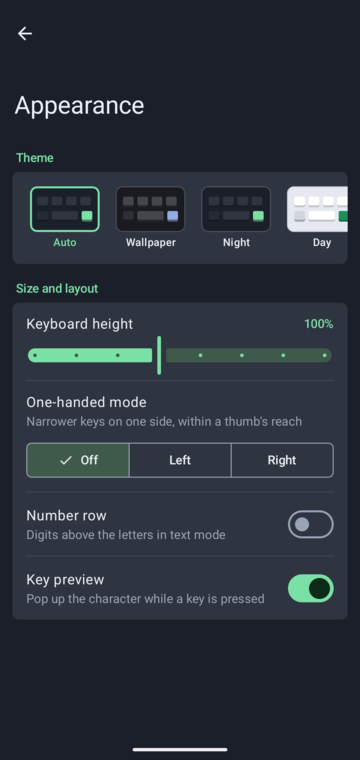 |
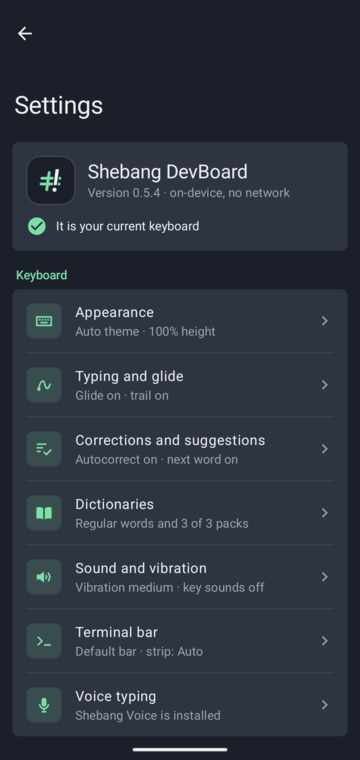
| Setup in three steps | Every settings page at a glance | Themes, height and one-handed mode |
More
- The wiki explains each feature.
- Open source under the MIT licence. Credits for the data and libraries it builds on are in THIRD_PARTY_NOTICES.md.
- Report problems on the issue tracker.