Repository navigation
Releases
Oxfords v2.1

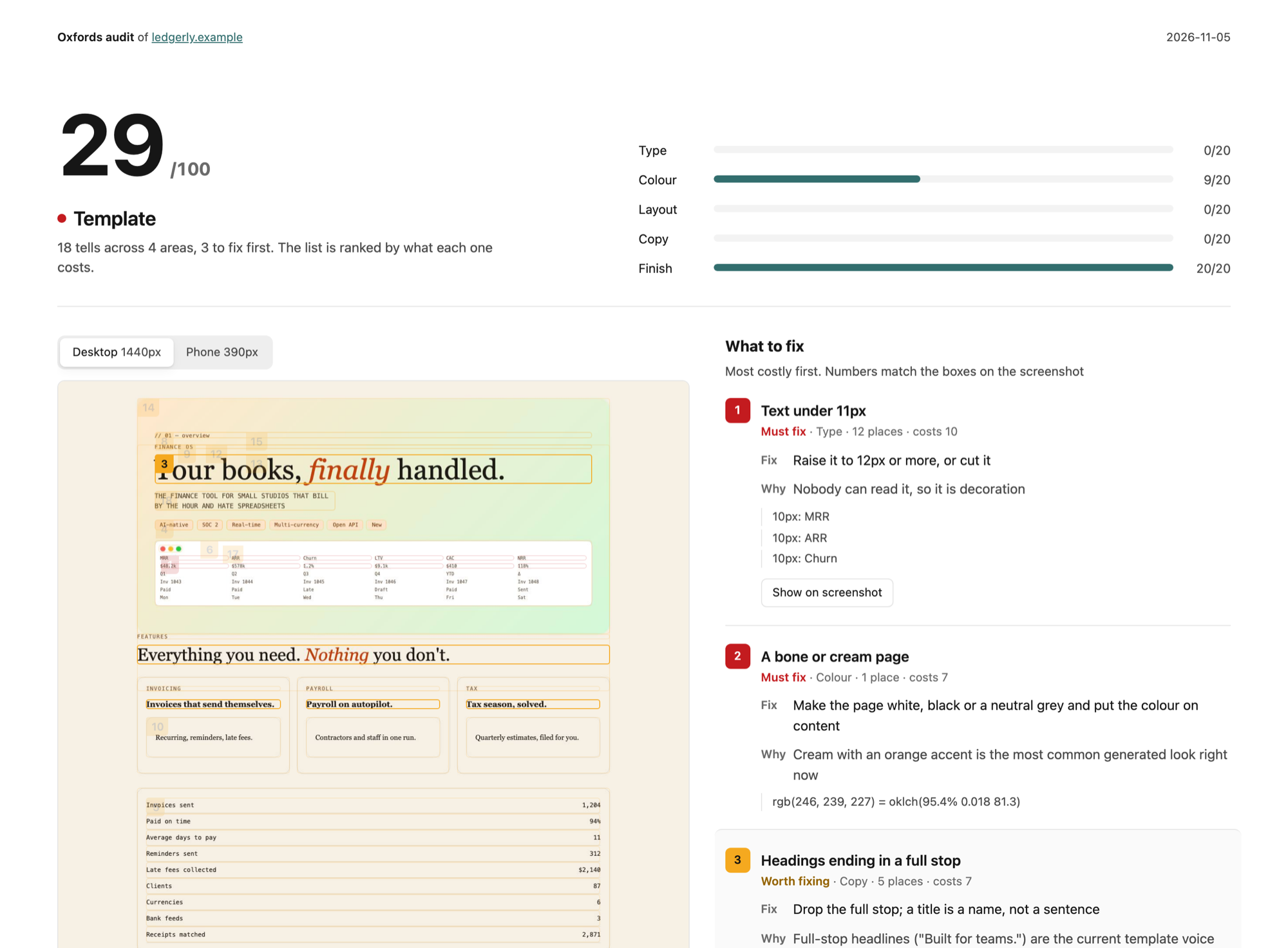
Oxfords can audit a site now. Point it at a URL and it tells you how AI-generated the page looks, with a score and the page's own screenshots marked up so you can see exactly what to fix.
What's new
audit. Ask "audit my site for AI slop" or runnode skills/oxfords/scripts/audit.mjs https://yoursite.com. You get a score out of 100, a bar each for type, colour, layout, copy and finish, and the site's screenshots at desktop and phone size with every tell boxed and numbered, ranked by what it costs. It's one HTML file, so you can send it to a client.- The agent looks too. A script can't tell that your subtitle says the heading again or that the hero mock is unreadable, so the agent looks at the screenshots and adds those. If something is actually the brand's thing, like a purple gradient they've had for ten years, it gets marked as kept and stops costing points.
- New tells. Tags and pills on everything, a divider under every row, an italic word in every headline, monospace labels, ALL CAPS subtitles, gradient backgrounds, headings that end in a full stop,
// featurescode breadcrumbs, fake traffic-light window frames and over-detailed mock dashboards. They're in the ban list,check.mjscatches them in code, and the audit catches them on the live page. - Commands.
SKILL.mdhas a command table now (build, redesign, review, audit, fix), each with its own reference file, so the agent knows which job it's doing.
Is the score fair?
I calibrated it on real sites before shipping. gov.uk scores 89, the test page built from every tell on purpose scores 29, and the clean fixture scores 100. The first version flagged CSS rules that weren't even used on the page, so everything structural is now measured on what actually renders. The report also passes Oxfords' own checks, both the code check and the render check, in light and dark.
Upgrading
Same install as before. If you copied the folder, copy skills/oxfords again. The audit needs Playwright like shoot.mjs does, and tells you if it's missing.
Thanks to Charles Liu, whose "20 AI Design Slop Indicators" list is where most of the new tells came from.
Oxfords v2
The big one this time was colour. v1 told the AI how to pick colours and it still picked them by hand, and you could tell. So now it doesn't pick them at all. A script makes them.
What's new
- Colours come from a script.
palette.mjshas 26 palettes, or you give it your client's brand colour and it builds the rest around it. Text colours, button states, chart colours and the dark mode values all come out already checked for contrast, so nothing gets hand-written. - Dark mode gets its own values. Fills keep their hue, layers get lighter as they rise and the colour calms down a bit, instead of everything just getting inverted.
- It looks at the page now.
shoot.mjsopens what it built in a real browser at phone and desktop size, light and dark, and measures text contrast (even over images and gradients), tap targets, keyboard focus, clipped or overlapping text and how much of the screen is colour. If you don't have Playwright it tells you it couldn't check. - Redesign mode. You write down what has to stay, and
keep.mjschecks the new screen didn't lose a link, a nav label, a form field or a number people rely on. Your brand colour stays, the cream background and the tinted sidebar go. - Delete is always red. Delete, revoke and cancel plan use the danger colour even when your brand is red, so a delete never looks like the main button.
- A proper review. It looks at the screenshots first and runs the checkers after, so the tools don't steer what it sees. Every finding gets a P0 to P3 and there's a point where it stops polishing.
- The checker got stricter.
check.mjsnow catches cream and bone pages, hand-written colours, see-through text and delete buttons in the brand colour, and it throws a lot fewer false alarms. - A bunch of smaller rules. Tabular numbers in tables, labels that get shortened before they get cut off, dialog buttons that stay on one row, FAQ answers that stay open, counts like "Late 1" that work as filters, and one bar in a chart marked without dragging in a new colour.
Did it actually get better?
I tested it blind. Four briefs, the same model built each one twice, once with v1 and once with v2, then a judge on a different model picked one without knowing which was which.
v2 won three out of four and the checker warnings went from 49 to 0. v1 won the landing page, mostly because of a muddy brown that came from a bug in the colour engine, and that's fixed now. Everything the judges picked on, on both sides, is a rule now, and I haven't re-run those yet. Every brief and build is in docs/test-run and the numbers are in the README.
Upgrading
Same install as before. If you copied the folder, copy skills/oxfords again. references/palettes.md is gone, references/colour.md replaces it. Playwright is optional, shoot.mjs just uses it if it's there.
Thanks to Kole Jain and Sajid, whose colour videos started this round.