Repository navigation
v1.1.0 - Crystal works now!


 STAHL'S SPRITE SWAPPER MOD


This is a pretty small update that mainly fixes the known issue of Crystal breaking the mod. I updated the way the mod detects which gen of game is loaded, so now it uses the modding API's new official method! This didn't exist back when I started making the mod, and I'm glad it's no longer needed to use a kind hack-y workaround instead.
I also changed the way the backsprite scale is set in the Pokemon data, the way I was originally doing it was done with the assumption that players would want to change the backsprite scale all the time, but the updated options for that setting should now make that no longer necessary anyway to change it unless in some specific situations.
One last thing I changed was that the default for the backsprite scale option is now "gen1 2x", as this basically mimics the recomp's default behavior. So, someone who installs this mod and then forgets about it won't experience a strange shrinkage of the backsprites in gen1 games.
How to Install
- Download the ST_SPRITESWAPPER_1-1-0.zip from the "assets" below.
- Open gen1recomp.
- Use the mod manager to import the zip and make sure the mod is enabled for your games.
- Also install any Sprite Pack Mod(s) you plan on using.
- After loading into the game, make sure the Sprite Swapper Mod loaded correctly (there should be no ! next to its name in the list of mods in your start menu).
How to Use
- Go into the mods menu in your start menu and check the Sprite Swapper's options.
- You should see the names of the Sprite Pack(s) you installed in the list of options for which sprite pack to use.
- You should now see the swapped sprites that are included in that pack. You can change the selected sprite pack at any time.
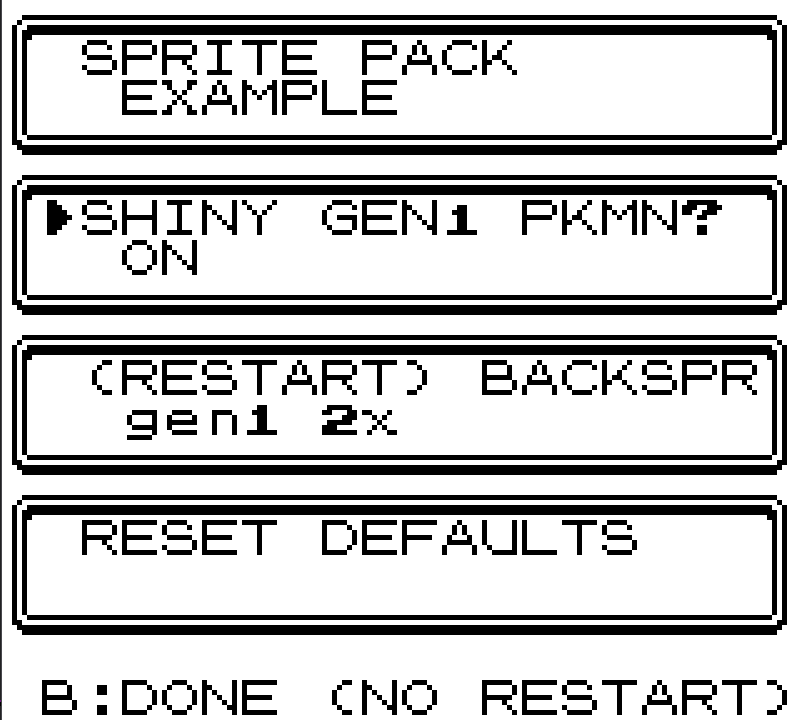
- Change the shiny setting if you are playing a gen1 game and if you want to use shinies or don't want to use them. Other gens are unaffected by this setting as they have shiny functionality by default.
- Change the backsprite scale setting if a sprite pack you installed has its backsprites showing up at the wrong scale. The option is called (RESTART) BACKSPR.SCALE and like the name suggests, after you changed this option to a different scale setting, you need to save your game and restart it from the recomp launcher or the change won't apply.
This is what Sprite Swapper's mod options menu looks like in gen1&2 and gen3, respectively:

How to Update
Starting with this version, you should be able to update this mod from within the gen1recomp launcher. There isn't any need to update or re-install the Sprite Packs you have installed. No changes were made to the functionality of the Sprite Packs in this update.
If you are updating from version 1.0.0, ou can simply delete the mod from the launcher's mod manager, download the zip below and re-install through the mod manager. Make sure to check the mod options again afterwards, as you most likely have to change them to your preferred ones again, or at least re-select the sprite pack you want to use.
Known Issues
- Crystal support is no longer broken! Yippie!
- Emerald has borked animations. Unlike with Crystal, static sprites that are swapped in by sprite packs will only replace the first frame of the animated sprites. So the remaining frame(s) will still show the old vanilla sprite instead. I'll be looking into this as soon as more documentation for Emerald for us modders is available.
- On gen3 games (I tested it on FireRed at least), shiny sprites that are provided by Sprite Packs won't show up and instead the non-shiny version of them is used. Can't figure out why this happens for the same reason as the Emerald animation frames at the moment.
Dear Sprite Pack Makers!
You don't need to change anything about your Sprite Pack mods. Nothing was changed in Sprite Swapper in this update that would require you to change anything about your packs. They will continue to function as before with v1.1.0 of the Sprite Swapper mod, and they will now also work in Crystal.
The Example Sprite Pack is included below again for convenience, but it is identical to the version uploaded previously.
Update 7th October: Recomp now supports swapped icon for gen3 games! They use truecolor sprites only, so greyscale graphics will show up in greyscale in gen3 games. Keep that in mind, but otherwise you don't need to make any adjustments to your existing sprite pack mods, the icons should just start working after the player has updated the recomp launcher if you provided them.