Repository navigation
Releases
v1.0.0 — VMware Hidden Mode

Harden a VMware analysis VM so sandbox-aware malware can't tell it's virtualised — and behaves like it's on real hardware.
The first tagged release of VMware Hidden Mode: a two-layer, cross-architecture toolkit for malware-analysis labs. Patch the .vmx on the host, clean the artifacts inside Windows, and turn a fingerprintable default VM into one that reads as a used, physical workstation.
⚠️ For authorised malware analysis, reverse engineering, and security research only. Run only against VMs you own, and snapshot first. See SECURITY.md.
What's in the box
| Tool | Layer | Target |
|---|---|---|
vmstealth.py |
Host VMX patcher | VMware Workstation / Fusion on Intel |
vmstealth_fusion_arm.py |
Host VMX patcher | VMware Fusion 13+ on Apple Silicon |
clean_guest.ps1 |
In-guest cleaner | Windows 10/11 x86-64 (37 sections) |
clean_guest_arm.ps1 |
In-guest cleaner | Windows 11 ARM64 (+ Apple→Dell SMBIOS) |
Highlights
- 13 host-side detection tiers — CPUID hypervisor bit, backdoor I/O port, RDTSC timing, SMBIOS/DMI host-reflection, ACPI passthrough, VMCI device removal, legacy-port stripping, SVGA VRAM, memory-timing oracles, Hyper-V leaves, time-sync channels, named pipes, VMware logs — plus MAC-OUI randomisation.
--scanaudit mode grades every tier without touching the file;--aggressiveswaps the NIC to e1000e, disables 3D SVGA, and removes the xHCI USB controller.- 37-section guest cleaner — registry, services, drivers, DLLs, PCI/disk/NIC/GPU/audio strings, event logs, firewall, prefetch, scheduled tasks, plus decoy user artifacts and a colour-coded verification report.
- Cross-architecture — first-class Apple Silicon (M1–M4) support alongside Intel.
- Safe by default — automatic
*.vmx.bakbackup; UTF-8 BOM shipped so Windows PowerShell 5.1 parses cleanly.
Verified
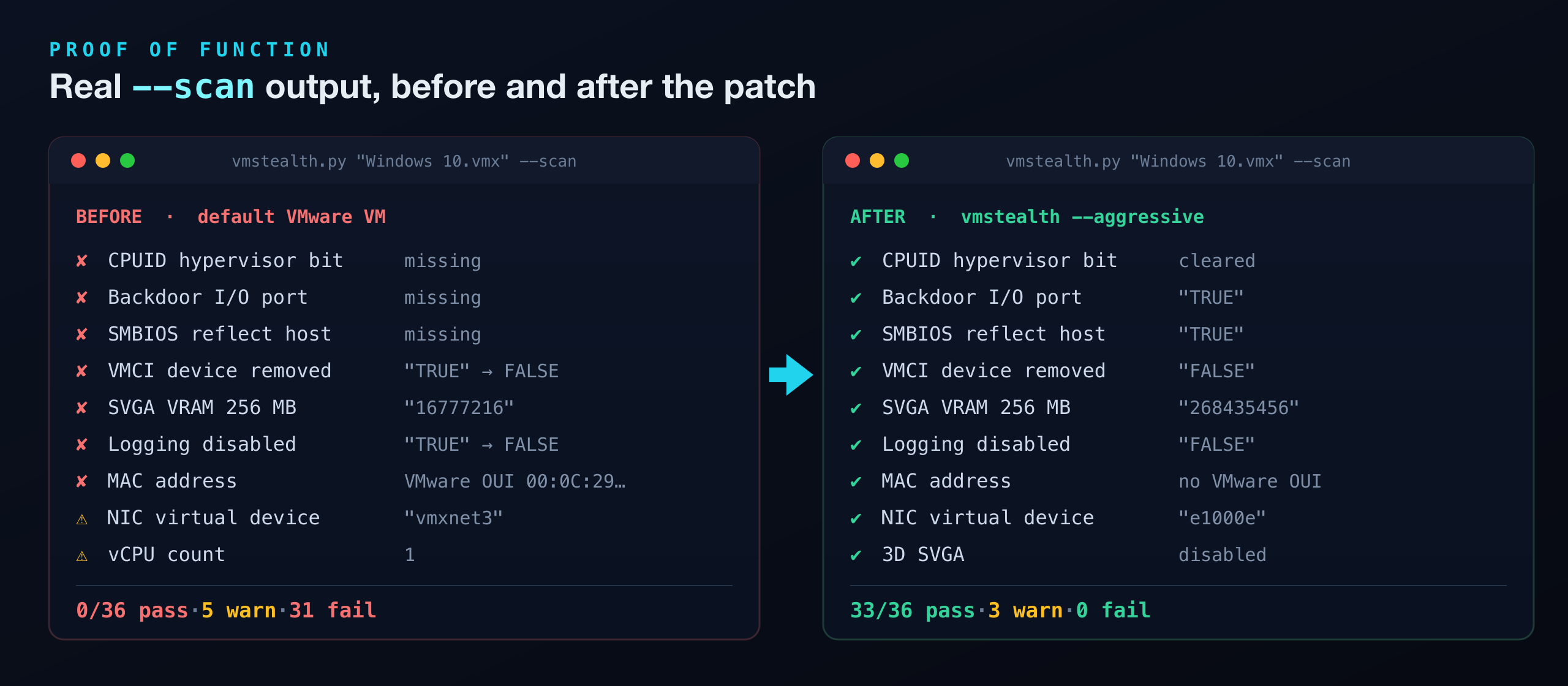
Against a stock VMware "Windows 10" profile, --scan goes from 0/36 → 33/36 checks passing with 0 failures after patching (remaining warnings are VM hardware settings — vCPU count, RAM, SCSI type — set in the VMware UI).
Quick start
# Host — VM shut down
python3 vmstealth.py "Windows 10.vmx" --scan
python3 vmstealth.py "Windows 10.vmx" --aggressive --guest-script clean_guest.ps1
# Guest — Administrator PowerShell
powershell -ExecutionPolicy Bypass -File .\clean_guest.ps1Full workflow, capability map, and troubleshooting in the README.
Full changelog: CHANGELOG.md