Repository navigation
Releases
Cinema 1.4.3

Cinema 1.4.3: no more green screen on x86, and the video keeps filling the window when it is resized.
Fixed
- Green screen while a video plays. Some x86 graphics drivers accept a video overlay and then show only its green key color, the picture coming back only when the video is paused. The overlay is now off by default on x86, where the processor draws the picture easily, and on by default on 32-bit ARM, where it spares the processor of machines like the Toshiba AC100. It can be turned on or off in the settings, and O switches it while a video plays.
- Resizing the window. After the window was resized during a video, the overlay kept its old size and a green frame showed around it until a seek. The video now follows the window at once, and so do the subtitles.
Changed
- Tighter, more regular spacing in the tiles and on the home: the channel and the views follow the title directly, and shelves of what you were watching, downloads and favorites no longer keep an empty line.
If Cinema ever stops answering, ~/config/cache/Cinema/freeze-reports.txt says what each part of it was doing: please attach it to a report.
Packages
| File | For |
|---|---|
cinema-1.4.3-1-x86_64.hpkg |
Haiku x86_64 (not yet installed on a machine) |
cinema-1.4.3-1-x86_gcc2.hpkg |
32-bit Haiku and RenkuOS (the 1.4.1 package was tested on RenkuOS hrev60107+501 in QEMU) |
cinema-1.4.3-1-arm.hpkg |
RenkuOS on 32-bit ARM, ARMv7 with VFPv3-D16 and no NEON (Toshiba AC100, tested on hrev60107+644) |
pkgman install cinema-1.4.3-1-x86_64.hpkgOn x86_64 and 32-bit x86, pkgman also installs Python, the yt-dlp module and FFmpeg 6 from HaikuPorts. On ARM, the FFmpeg libraries are needed, and the single-file yt-dlp in the PATH:
mkdir -p ~/config/non-packaged/bin
curl -L -o ~/config/non-packaged/bin/yt-dlp https://github.com/yt-dlp/yt-dlp/releases/latest/download/yt-dlp
chmod +x ~/config/non-packaged/bin/yt-dlp
SHA-256
5d5c3bdfa6a77a8f4befc95477a9c6fd51cd1ac7af2c294aabed74263550c49c  cinema-1.4.3-1-arm.hpkg
5b084ba83547bce7be4f0f3b9ba9c5f2e6ea820c85019c51aefa2813dbed3231  cinema-1.4.3-1-x86_64.hpkg
c812f84d16642431ce9c69e48d61de76ff868757e293dddfb6b832fc2ff75cea  cinema-1.4.3-1-x86_gcc2.hpkg
Cinema 1.4.2
Cinema 1.4.2: a fix for videos that show only a green background, channel pages, views and dates on every video, an even volume, and a package for 32-bit Haiku.
What's new
- Only a green background instead of the video? Some graphics drivers accept a video overlay and then do not show it. Press O while a video plays to switch the overlay off (the video goes on from where it was), or turn off "Use the video overlay of the graphics card" in the settings. The choice is kept.
- Channel pages. A click on a channel's name shows its picture, name, followers and description above its videos, with Follow, which keeps it among the tabs and its latest videos on the home, and a star, which keeps it among the favorites as a card of its own.
- Views and dates. Every video shows how many views it has and how long ago it came out, "26.1K views · yesterday", and its page has a Follow button next to the channel.
- Even volume. Films and TV are mastered well below music, so they sounded faint next to other players, on Bluetooth speakers above all. A new setting, on by default, brings them to the level of music and keeps an explosion from drowning the dialogue after it. It costs about half a percent of one core of a Toshiba AC100. The volume itself is upright now, at the right of the player, and the mouse wheel changes it too.
- 32-bit x86. A package for 32-bit Haiku and RenkuOS (
x86_gcc2, built for the gcc 13 side of the hybrid), tested on RenkuOS hrev60107+501. - The cache tidies itself, dropping old thumbnails, lists and video addresses.
Fixed
- A 5.1 soundtrack was turned down by 7.6 dB when it was mixed to stereo, dialogue included.
- A late "end" or "error" from a video just closed could close the next one or mark it as watched.
- The last frames of a video were lost.
- With many downloads, the window was held while every download picture was decoded.
- A tab whose name starts with
#disappeared; long TV list addresses were cut in two.
If Cinema ever stops answering, ~/config/cache/Cinema/freeze-reports.txt says what each part of it was doing: please attach it to a report.
Packages
| File | For |
|---|---|
cinema-1.4.2-1-x86_64.hpkg |
Haiku x86_64 (not yet installed on a machine) |
cinema-1.4.2-1-x86_gcc2.hpkg |
32-bit Haiku and RenkuOS (the 1.4.1 package was tested on RenkuOS hrev60107+501 in QEMU) |
cinema-1.4.2-1-arm.hpkg |
RenkuOS on 32-bit ARM, ARMv7 with VFPv3-D16 and no NEON (Toshiba AC100, tested on hrev60107+644) |
pkgman install cinema-1.4.2-1-x86_64.hpkgOn x86_64 and 32-bit x86, pkgman also installs Python, the yt-dlp module and FFmpeg 6 from HaikuPorts. On ARM, the FFmpeg libraries are needed, and the single-file yt-dlp in the PATH:
mkdir -p ~/config/non-packaged/bin
curl -L -o ~/config/non-packaged/bin/yt-dlp https://github.com/yt-dlp/yt-dlp/releases/latest/download/yt-dlp
chmod +x ~/config/non-packaged/bin/yt-dlp
SHA-256
b392669be33026ba3753b58c0bd73202012e83b301b4a688ea1c937df17ec853  cinema-1.4.2-1-arm.hpkg
d16238069739ab9ee4f39c2d8b4e8640488604c8b2700468142ee28b0b007fda  cinema-1.4.2-1-x86_64.hpkg
8f3274f4c4d2bc6bac2b16bee3da882b3a5d537cf188a284a9d418356f1d762d  cinema-1.4.2-1-x86_gcc2.hpkg
Cinema 1.4.0
Cinema 1.4.0: YouTube videos open in a few seconds, and Cinema no longer freezes when one video follows another.
What's new
- YouTube opens much faster. yt-dlp skips the page of the video and keeps its extractors ready between videos. On the Toshiba AC100 a video is found in about 3 seconds instead of 12 to 15, and a video opened before plays at once, after a restart too. If YouTube refuses an address it had given, on another network say, Cinema asks for a new one by itself.
- A star in the player. The button next to CC, or S, adds the video playing to the favorites, as on its page.
- 1080p on capable machines. On a Core i3 laptop, 1080p at 60 frames per second from YouTube plays without dropping a frame when the network keeps up. Choose it in the settings; Automatic stays at 720p on x86_64 and 360p on ARM.
Fixed
- Cinema could freeze when a video was opened while another one was showing. This was the most common hang on the AC100.
- Cinema could quit by itself after its helper stopped, and the helper is now started again if it stops, with its downloads going on.
- Quitting during a download left
aria2corffmpegrunning. - When the sound of a file ended before its picture, the last seconds crawled one frame at a time.
- A network failure in the middle of a video marked it as watched and went on to the next one. Cinema now finds the video again and resumes it.
- After a moment of slow network, the decoding stayed at reduced speed for the rest of the video.
- A TV channel switching from 5.1 to stereo could crash the player.
- Settings, history, positions and tabs could be emptied by a power cut; thumbnails cut short by a timeout stayed broken; the settings window could undo the volume chosen meanwhile.
- File names that are not UTF-8 no longer leave a page or a shelf waiting.
If Cinema ever stops answering, ~/config/cache/Cinema/freeze-reports.txt says what each part of it was doing: please attach it to a report.
Packages
| File | For |
|---|---|
cinema-1.4.0-1-x86_64.hpkg |
Haiku x86_64 (the same code ran on hrev60314; this package not yet installed on a machine) |
cinema-1.4.0-1-arm.hpkg |
RenkuOS on 32-bit ARM, ARMv7 with VFPv3-D16 and no NEON (Toshiba AC100, tested on hrev60107+644) |
pkgman install cinema-1.4.0-1-x86_64.hpkgOn x86_64, pkgman also installs Python, the yt-dlp module and FFmpeg 6 from HaikuPorts. On ARM, the FFmpeg libraries are needed, and the single-file yt-dlp in the PATH:
mkdir -p ~/config/non-packaged/bin
curl -L -o ~/config/non-packaged/bin/yt-dlp https://github.com/yt-dlp/yt-dlp/releases/latest/download/yt-dlp
chmod +x ~/config/non-packaged/bin/yt-dlp
SHA-256
a3de3b65fd1f5c83d3d473319976e9171435b7f78324a4bf627d2c7749495db3  cinema-1.4.0-1-arm.hpkg
48ee2292ac6932595abe1ff650d251652034fe2f4c6408e41c652e8fe273673f  cinema-1.4.0-1-x86_64.hpkg
Cinema 1.3.0
Cinema 1.3.0: every video now plays through the hardware overlay, so playback is smoother and lighter on small machines.
What's new
- One player for everything. Local files, YouTube, PeerTube, the Internet Archive and live TV are all played by FFmpeg, with the picture sent to the hardware overlay and timed from the stream itself. On the Toshiba AC100, a 360p YouTube video now takes about a third of the processor instead of about half, and 480p plays smoothly. Seeking, resuming, subtitles and the end of a video all work as before. Whatever FFmpeg cannot open still plays with the Media Kit.
- Downloads at 480p on 32-bit ARM when the quality is set to Automatic. Watching online stays at 360p, which starts much sooner.
- Subtitles remember the language you chose, or that you turned them off, for the next videos.
- The pointer hides after 10 seconds without moving over a video that plays, and comes back as soon as the mouse moves.
- Paused videos show in screenshots. With the overlay, a screenshot of a playing video shows a plain color where the picture is. Paused, Cinema now draws the frame itself.
Fixed
- Seeking or changing channel could fall back to the slower player.
- On the AC100, seeking could shrink the picture to half size when memory was fragmented.
Packages
| File | For |
|---|---|
cinema-1.3.0-1-x86_64.hpkg |
Haiku x86_64 (built as 1.2.1, which was tested on hrev60314; this one not yet tried on a machine) |
cinema-1.3.0-1-arm.hpkg |
RenkuOS on 32-bit ARM, ARMv7 with VFPv3-D16 and no NEON (Toshiba AC100, tested on hrev60107+642) |
pkgman install cinema-1.3.0-1-x86_64.hpkgOn x86_64, pkgman also installs Python, the yt-dlp module and FFmpeg 6 from HaikuPorts. On ARM, the FFmpeg libraries are needed, and the single-file yt-dlp in the PATH:
mkdir -p ~/config/non-packaged/bin
curl -L -o ~/config/non-packaged/bin/yt-dlp https://github.com/yt-dlp/yt-dlp/releases/latest/download/yt-dlp
chmod +x ~/config/non-packaged/bin/yt-dlp
SHA-256
2e2914b87f8766fc6d028c47c2da8c9e70cbeca653393d207777e738b542cb4e  cinema-1.3.0-1-x86_64.hpkg
61ee966f1f6b4dcd2613d329fd04b828215b248e8aa36e88773a37522834263a  cinema-1.3.0-1-arm.hpkg
Cinema 1.2.2
Cinema 1.2.2: subtitles that work, a volume you can hear change, a star and the Trash on the page of a video, and fixes.
What's new
- Volume: the arrow keys up and down change it in even steps of 3 dB, shown at the top right of the player, and Cinema remembers it.
- The page of a video has a star next to Back for the favorites (or S), and Move to Trash for a downloaded video (or Delete), which asks first.
- YouTube subtitles: only the tracks YouTube really gives are listed. The ones it translates by itself are refused by YouTube and are left out.
- The home shows its shelves at once from the last time, and refreshes them in the background.
- Translations brought up to date in all ten languages; Portuguese is Brazilian throughout.
Fixed
- Embedded subtitles kept their whole text (a colon or a comma cut them), and are timed from the start of the file.
- A subtitle that could not be fetched is asked again, instead of staying empty.
- The subtitles are kept when a video has to go on without the overlay.
- Live TV is decoded in software when the hardware refuses a channel.
- 1080p is offered on screens a little under 1080 lines high.
- Opening Cinema from the Desktop or the Deskbar no longer starts MediaPlayer.
Packages
| File | For |
|---|---|
cinema-1.2.2-1-x86_64.hpkg |
Haiku x86_64 (built as 1.2.1, which was tested on hrev60314; this one not yet tried on a machine) |
cinema-1.2.2-1-arm.hpkg |
RenkuOS on 32-bit ARM, ARMv7 with VFPv3-D16 and no NEON (Toshiba AC100, tested on hrev60107+639) |
pkgman install cinema-1.2.2-1-x86_64.hpkgOn x86_64, pkgman also installs Python, the yt-dlp module and FFmpeg 6 from HaikuPorts. On ARM, the FFmpeg libraries are needed, and the single-file yt-dlp in the PATH:
mkdir -p ~/config/non-packaged/bin
curl -L -o ~/config/non-packaged/bin/yt-dlp https://github.com/yt-dlp/yt-dlp/releases/latest/download/yt-dlp
chmod +x ~/config/non-packaged/bin/yt-dlp
SHA-256
9d18a27ba858a4f9dab937ea3851d7753106afc998d0d972c0272205869721d8  cinema-1.2.2-1-x86_64.hpkg
885f1a9063df9158565240e38c0b448f704079f98bcf154362941f85d6f6862f  cinema-1.2.2-1-arm.hpkg
Cinema 1.2.1
Cinema 1.2.1: the sound and the pictures together again, and two fixes for quitting and the thumbnails.
Fixed
- Sound and pictures in sync. The first pictures of every video were lost while Cinema asked the decoder for a picture format, so the video ran about a third of a second ahead of the sound. After a resume or a seek, YouTube above 360p started the picture up to seconds before the sound; the relay now starts both at the same key frame. Checked by eye and ear with a flash-and-beep clip on Haiku x86_64 and on the Toshiba AC100.
- Quitting while a video played could hang Cinema.
- A crash while the thumbnails loaded (segment violation in the worker thread).
Packages
Use the packages of revision 2. Those of revision 1 gave the program the type of a plain file, so opening Cinema from the Desktop or the Deskbar started MediaPlayer, which said that none of the files were media files; the code is the same.
| File | For |
|---|---|
cinema-1.2.1-2-x86_64.hpkg |
Haiku x86_64 (tested on hrev60314) |
cinema-1.2.1-2-arm.hpkg |
RenkuOS on 32-bit ARM, ARMv7 with VFPv3-D16 and no NEON (Toshiba AC100, tested on hrev60107+620) |
pkgman install cinema-1.2.1-2-x86_64.hpkgOn x86_64, pkgman also installs Python, the yt-dlp module and FFmpeg 6 from HaikuPorts. On ARM, the FFmpeg libraries are needed, and the single-file yt-dlp in the PATH:
mkdir -p ~/config/non-packaged/bin
curl -L -o ~/config/non-packaged/bin/yt-dlp https://github.com/yt-dlp/yt-dlp/releases/latest/download/yt-dlp
chmod +x ~/config/non-packaged/bin/yt-dlp
SHA-256
b4cfc5f0aea0760252e83851443603a139f7fe085736ce3eca91e38e8f13faaa  cinema-1.2.1-2-x86_64.hpkg
a07be4c1f3648c0ea906220097f764ce9a445bc9829f0f5d47c11a59d99e0110  cinema-1.2.1-2-arm.hpkg
Cinema 1.2.0
Cinema 1.2.0: subtitles, live TV, favorites, video quality, and smooth playback with far less memory on small machines.
What's new
- Subtitles: the tracks of YouTube, the subtitle files next to a video and the text tracks inside it. The CC button chooses one, V turns them on and off.
- Live TV: the free channels of your country, from the public lists of iptv-org, or any M3U list; played with FFmpeg, with the hardware overlay where there is one.
- Favorites: S or a right click gives a channel or a video a star.
- Video quality, in the settings: Automatic (360p on 32-bit ARM, 720p elsewhere), or 360p to 1080p.
- Settings in three tabs, to fit a 1024x600 screen.
- Smoother local videos: the pictures are timed by counting them, as Haiku's FFmpeg add-on gives their times in the wrong unit; on the Toshiba AC100 a local video went at about 4 frames a second, now at 25.
- Less memory: the pictures are made as small as they are shown; on the AC100 Cinema leaves about 200 MB more free.
- Faster YouTube on ARM: the single-file yt-dlp is kept unpacked and compiled (the helper starts in 3 s instead of 8 on the AC100), and one extraction serves the page of a video, playing it and its subtitles.
- The thumbnails are fetched several at a time and no longer get lost between the shelves of the home.
Packages
| File | For |
|---|---|
cinema-1.2.0-1-x86_64.hpkg |
Haiku x86_64 (cross-built, not yet tried on a machine) |
cinema-1.2.0-1-arm.hpkg |
RenkuOS on 32-bit ARM, ARMv7 with VFPv3-D16 and no NEON (Toshiba AC100, tested on hrev60107+620) |
pkgman install cinema-1.2.0-1-x86_64.hpkgOn x86_64, pkgman also installs Python, the yt-dlp module and FFmpeg 6 from HaikuPorts. On ARM, the FFmpeg libraries are needed, and the single-file yt-dlp in the PATH:
mkdir -p ~/config/non-packaged/bin
curl -L -o ~/config/non-packaged/bin/yt-dlp https://github.com/yt-dlp/yt-dlp/releases/latest/download/yt-dlp
chmod +x ~/config/non-packaged/bin/yt-dlp
SHA-256
b230433670960fa5cc8af2b323eb06a574fc87aab8e99e1ca42a268ed212c974  cinema-1.2.0-1-x86_64.hpkg
cdfbc84b208634c68238c4bfa8ee81e8b2e403ca864d53d143c59511a011fe21  cinema-1.2.0-1-arm.hpkg
Cinema 1.1.0
Cinema 1.1.0: a home of shelves, a page for every video, gamepad control and four more languages.
What's new
- Home: shelves with what you were watching, your downloads and every tab, each with See all.
- A page for every video, with its details, views and the buttons to play or download it.
- Gamepad: the D-pad or the left stick chooses, A plays, B goes back, X downloads, Y toggles full screen, L1, Select or Start goes to the top tabs. Tested with a Bluetooth pad on RenkuOS.
- Keyboard: Tab or F6 goes to the top tabs; tabs that do not fit are behind ».
- Languages: Ukrainian, Korean, Japanese and Simplified Chinese, besides English, Italian, German, French, Spanish and Portuguese. Korean, Japanese and Chinese need a CJK font, such as
noto_sans_cjk_jp. - The media sources are behind providers, to make room for others than YouTube.
Packages
| File | For |
|---|---|
cinema-1.1.0-1-x86_64.hpkg |
Haiku x86_64 (built and tested on hrev60314) |
cinema-1.1.0-1-arm.hpkg |
RenkuOS on 32-bit ARM, ARMv7 with VFPv3-D16 and no NEON (Toshiba AC100) |
pkgman install cinema-1.1.0-1-x86_64.hpkgOn x86_64, pkgman also installs Python and the yt-dlp module from HaikuPorts. On ARM, put the single-file yt-dlp in the PATH first:
mkdir -p ~/config/non-packaged/bin
curl -L -o ~/config/non-packaged/bin/yt-dlp https://github.com/yt-dlp/yt-dlp/releases/latest/download/yt-dlp
chmod +x ~/config/non-packaged/bin/yt-dlp
SHA-256
3af7a007be58e40145faf535493e5c93532e270da43f14487345aa871595241e  cinema-1.1.0-1-x86_64.hpkg
b9c76e2f80e85780f40e7ce8e48f3edfcd61ef0a5e79da3d7e3358bd7dad8a79  cinema-1.1.0-1-arm.hpkg
Cinema 1.0.0
The first release of Cinema: YouTube videos on Haiku and RenkuOS, found with yt-dlp and played by MediaPlayer.
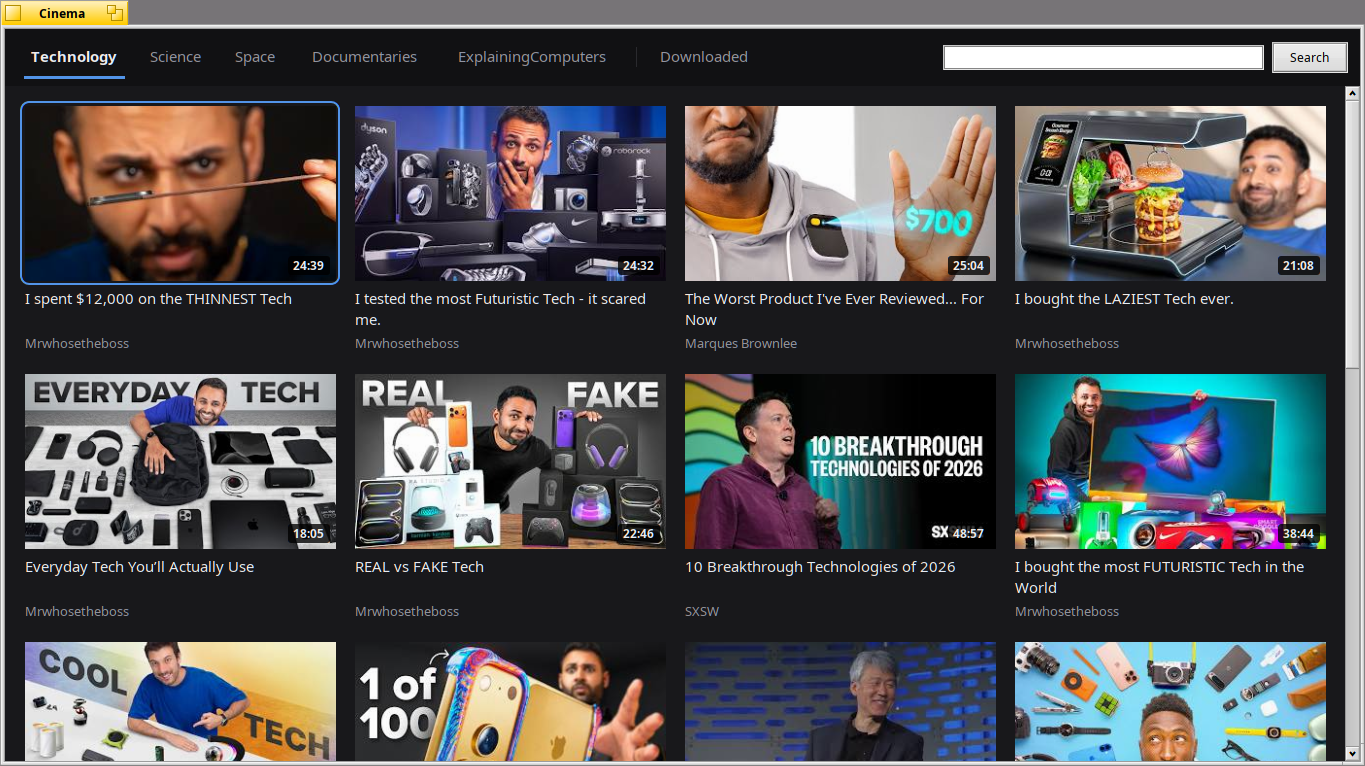
What it does
- Videos as big pictures, in tabs: searches, or channels whose latest videos are shown.
- The channel of each video under its title: a click shows its latest videos, and the + button (or a right click) keeps it among the tabs.
- Downloads to watch offline: D or a right click, with a progress bar and a notification. The files go to
~/Cinemaand are listed in the Downloaded tab, which works without the network. - Enter or Space to play, F for full screen, Esc to go back.
- English, Italian, German, French, Spanish and Portuguese.
Packages
| File | For |
|---|---|
cinema-1.0.0-1-x86_64.hpkg |
Haiku x86_64 (built and tested on hrev60314) |
cinema-1.0.0-1-arm.hpkg |
RenkuOS on 32-bit ARM, ARMv7 with VFPv3-D16 and no NEON (Toshiba AC100) |
pkgman install cinema-1.0.0-1-x86_64.hpkgOn x86_64, pkgman also installs Python and the yt-dlp module from HaikuPorts.
On ARM, put the single-file yt-dlp in the PATH first:
mkdir -p ~/config/non-packaged/bin
curl -L -o ~/config/non-packaged/bin/yt-dlp https://github.com/yt-dlp/yt-dlp/releases/latest/download/yt-dlp
chmod +x ~/config/non-packaged/bin/yt-dlp
YouTube changes often: when videos stop being found, a newer yt-dlp usually helps.
SHA-256
7900383d4b0a4353857d3f847e354d883ce39db6619afc2f12413bbfab8562be  cinema-1.0.0-1-x86_64.hpkg
3687354ceedefb72d37b9e60adc833e9ab5ac70563f0882e1fa2e562f6bc5fa8  cinema-1.0.0-1-arm.hpkg