Repository navigation
Releases
Audio2MIDI 1.0.0

First stable release.
- Smoother preview: while the preview plays, the piano roll repaints only the playhead instead of every note, so long transcriptions no longer cost CPU in the plugin window.
- Smaller download: the plugin binaries are about 17 % smaller.
Universal (Apple Silicon + Intel), macOS 11+. Validated with pluginval (strictness 10, VST3 + AU), auval -strict, the unit tests and a real transcription run. The installer is not notarized: allow it once under System Settings → Privacy & Security → Open Anyway.
Audio2MIDI 0.5.0
- Languages: the plugin now speaks English, German, Spanish and French. It follows your macOS system language and falls back to English. Buttons, menus, instrument names, status and error messages are translated; MIDI file names, saved settings and model choices stay language-neutral.
Universal (Apple Silicon + Intel), macOS 11+. Validated with pluginval (strictness 10, VST3 + AU), auval -strict and the unit tests, including a check that every language table covers every UI string. The installer is not notarized: allow it once under System Settings → Privacy & Security → Open Anyway.
Audio2MIDI 0.4.0
- Themes: pick Default or Graphite in the top-right menu. Graphite is a near-black look with outlined rounded controls, card-style part rows and softer note colours. The choice applies to every instance and is remembered.
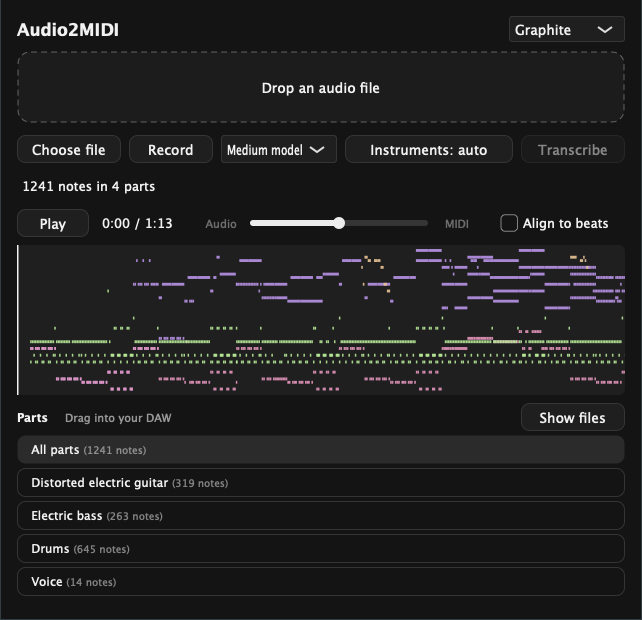
Universal (Apple Silicon + Intel), macOS 11+. Validated with pluginval (strictness 10, VST3 + AU), auval -strict and the unit tests. The installer is not notarized: allow it once under System Settings → Privacy & Security → Open Anyway.
Audio2MIDI 0.3.0
- Model size: choose Small, Medium or Large next to Instruments. Medium stays the default. Small is faster; Large is more accurate but slower and needs more memory. The choice is saved with your project.
- Each size downloads its own weights on first use (Small about 0.4 GB, Large about 5.5 GB). Accept the licence for muscriptor-small or muscriptor-large on Hugging Face before using them.
- Switching the size restarts the local engine once no transcription is running. An engine started by another program keeps its model.
Universal (Apple Silicon + Intel), macOS 11+. Validated with pluginval (strictness 10, VST3 + AU), auval -strict, a real transcription run switching from Small to Medium, and an installer run. The installer is not notarized: allow it once under System Settings → Privacy & Security → Open Anyway.
Audio2MIDI 0.2.0
- Preview: press Play to hear the source audio and the transcription through the track. A slider mixes audio and MIDI; the MIDI plays on macOS's built-in General MIDI sounds, so nothing extra downloads.
- Piano roll: see every note, coloured per instrument, with a playhead you can click or move with the arrow keys.
- Align to beats: switch the parts to a version snapped to the detected beat grid, or keep the performance as played.
- Session restore: the transcription is saved with your project and comes back when you reopen it.
- Installer:
Audio2MIDI-macOS.pkginstalls the VST3 and AU into your user Library without an admin password and without thexattrstep. It is not notarized: allow it once under System Settings → Privacy & Security → Open Anyway. - Recording pauses while the DAW transport is stopped and tells you about empty takes, gaps and the 250 MB limit.
- Engine: the local MuScriptor server now exits when the DAW crashes instead of staying in the background.
- Part drags start as a system file drag immediately.
Universal (Apple Silicon + Intel), macOS 11+. Validated with pluginval (strictness 10, VST3 + AU), auval -strict and a real transcription run. Tested in the Standalone app; Logic, Ableton and FL Studio still need a hands-on check.
Audio2MIDI 0.1.0 – self-hosted alternative to Mirelo Audio-to-MIDI
First release.
- VST3, AU and Standalone, Universal (Apple Silicon + Intel), macOS 11+
- Drop, choose or record audio, optionally limit instruments, transcribe, drag per-instrument MIDI (or all parts) into your DAW
- Runs MuScriptor 0.4.0 locally: the plugin installs and starts the engine with uv on first use. Needs uv and a Hugging Face login with the accepted CC BY-NC 4.0 model licence (see README)
- Validated with pluginval (strictness 10, VST3 + AU) and auval
Not signed or notarized: run xattr -dr com.apple.quarantine on the installed plugins (see README). Windows builds from source but is untested.