Repository navigation
Releases: awesomezun/claude-statusline
Release list
v3.6.0 — Mods (beta): the statusline in the Claude desktop app, and a 1top-style cockpit

Why
The Claude desktop app's Code tab doesn't run a statusLine command, so the statusline never showed there. Claude Code mods (early access) can draw in the band above the prompt and in a pane beside the chat — on the terminal and in the desktop app alike. This release puts the statusline there, and adds a cockpit pane modelled on 1top's menu bar.
What's new
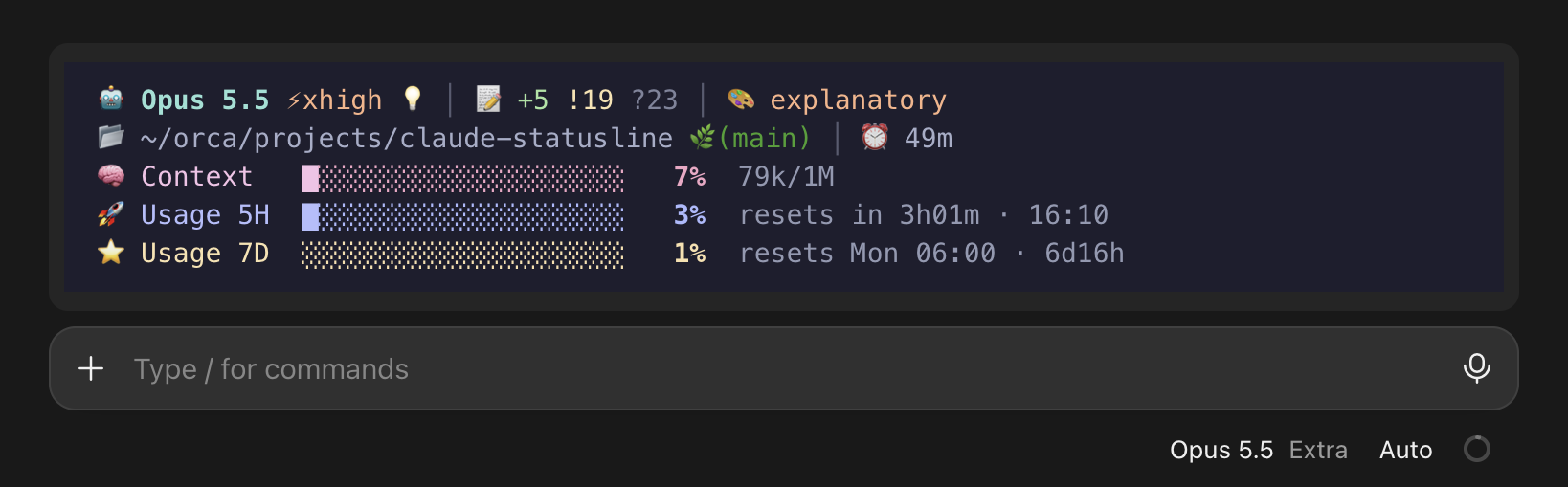
Mods (beta): the statusline in the Claude desktop app
- Pick Mods when the installer asks where it should show, or add
--mods:curl -fsSL https://raw.githubusercontent.com/awesomezun/claude-statusline/main/install.sh | bash -s -- large --mods - The mod runs the same renderer, so all 15 presets draw in the band above the prompt, in the terminal and in the desktop app's Code tab.
- In the terminal it stays out of the way while a
statusLineis set (optionterminal:auto·show·hide); the installer removes an Awesome StatuslinestatusLineso nothing shows twice. - A 5-hour window that passed its reset reads as a fresh
0%, so Pro / Max never flip to the Ultra layout in between. - macOS / Linux; tested on Claude Code 2.1.316 and on 2.1.309, the one the desktop app ships.
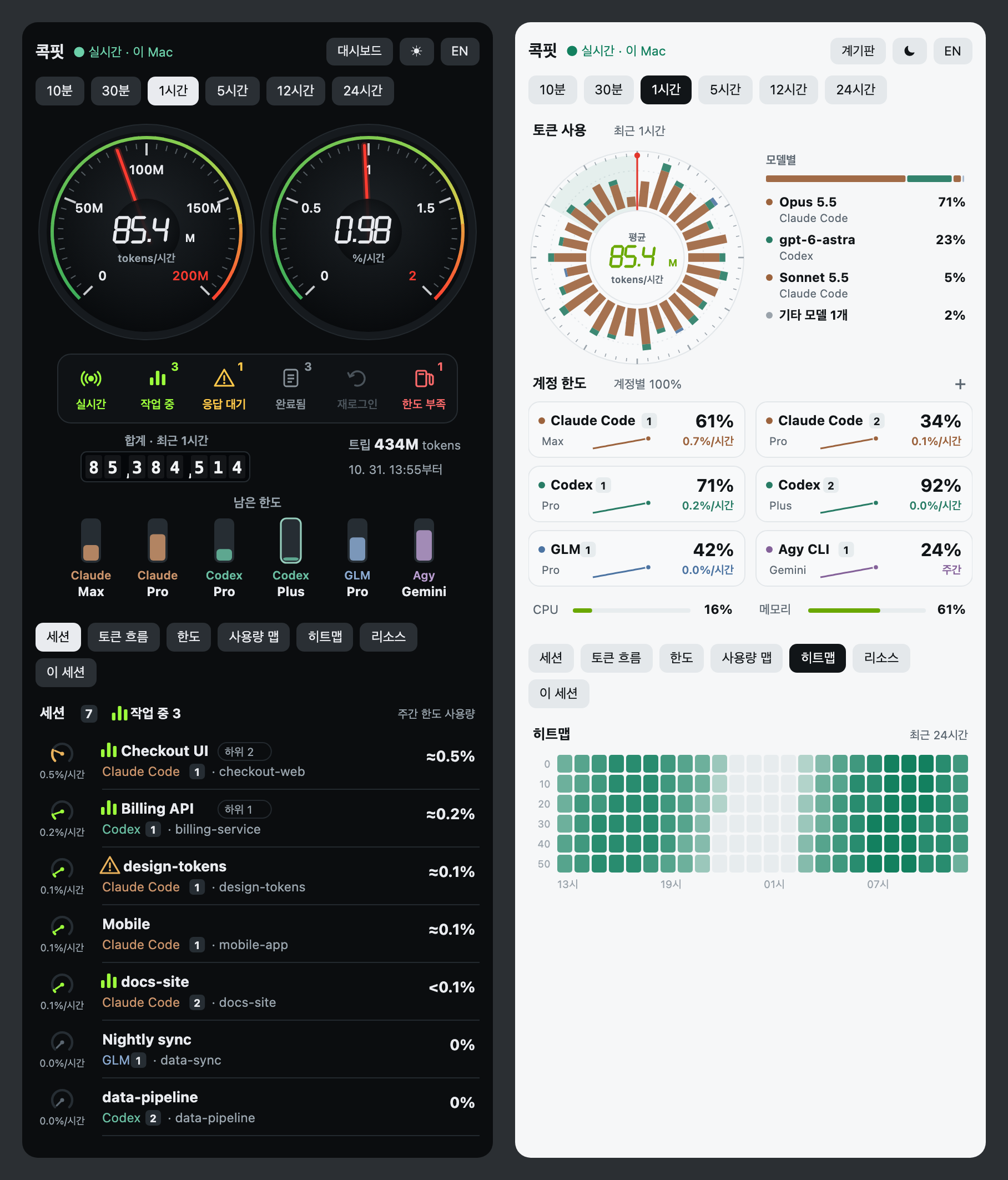
Cockpit pane (prototype): /cockpit
- Cluster: two dials (tokens per hour, weekly limit used per hour), a status strip (working · waiting · done · sign-in · low limit), an odometer with a trip counter, and what's left of each limit as fuel gauges.
- Dashboard: a radial token chart, the model mix, and account cards with use per hour and a day's trend.
- Below either: sessions ranked by weekly limit used, token flow, limits, usage map, heatmap, resources, and this session (context, where each limit ends up at the pace so far, tools running now, Compact now).
- Dark and light themes, periods from 10 minutes to 24 hours, Korean / English; your choices stay for the next session. The desktop app draws it as graphics, the terminal as text.
- With the 1top app running on the same computer, it reads 1top's local read-only API and shows every AI and account it tracks (Claude Code, Codex, …); 1top's write token is dropped on arrival. Without 1top, it shows this computer's resources and the Claude Code sessions running the mod.
AWESOME_STATUSLINE_ONETOP=offleaves 1top alone. - While the cockpit is open, the band above the prompt steps aside. Set the mod's
cockpitoption toautoto open it at every session start.
README
- The 15 presets shown size by size, three images each, with Ultra's automatic switch called out up front; a new motion reel at the top.
- Images are rebuilt from the renderer itself (
docs/build.py,docs/cockpit.ts,docs/shoot.py).
Upgrade
Give your AI agent the repo URL and ask it to reinstall with your preset — add "as a mod" for Mods — or re-run the installer (--mods for Mods). Update the plugin to 3.6.0. Then start a new session; in the desktop app, use its Code tab.
v3.5.1 — Ultra plan ready: weekly-only limits, 5 sizes × 3 styles, clean gradients in tmux
Why
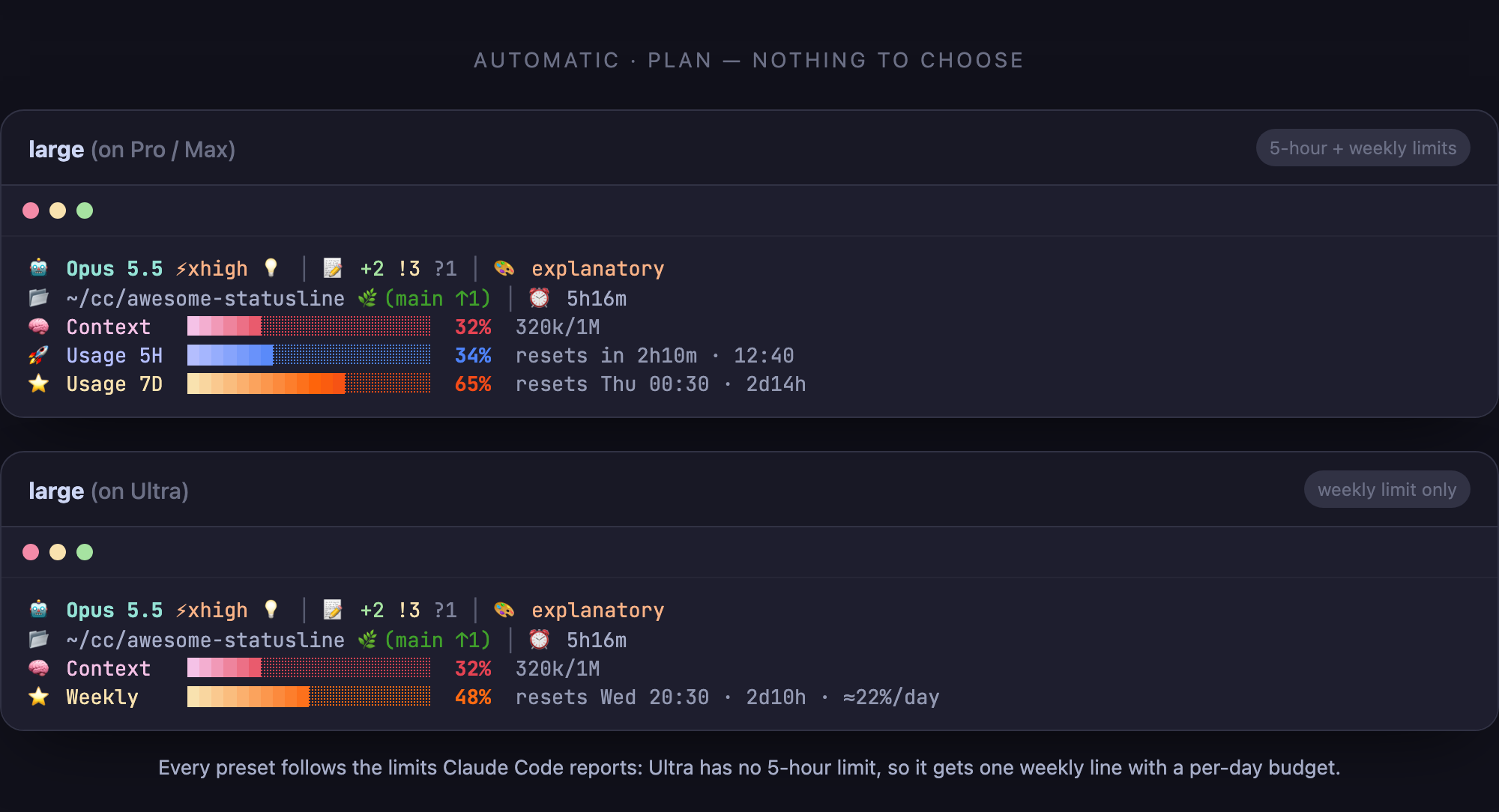
On 2026-10-31 the plan lineup changed: the new Ultra plan has no 5-hour limit — only a weekly one. For Ultra, Claude Code sends rate_limits with seven_day only, but every renderer drew both usage bars only when five_hour was present, so Ultra users saw 5H and 7D frozen at 0% (loading..) for the whole session. This release fixes that and, while at it, redesigns the presets.
What's new
Ultra plan support
- Each limit window (
five_hour,seven_day) is now read on its own and only the windows that are present are drawn — Claude Code documents that either may be absent. - Ultra gets a Weekly bar with a per-day budget (
≈22%/day= how much you can use per day and still stay under the weekly limit). Pro / Max keep 5H + 7D. loading..now shows only before the first response of a session, whenrate_limitsis missing altogether.- Sturdier parsing: fractional or numeric-string percentages, ISO-8601
resets_at, values clamped to 0–100.
5 sizes × 3 styles
| Size | Lines | Style | Example | |
|---|---|---|---|---|
xsmall (xs) |
2 | emoji (default) | large |
|
small (s) |
2 | -plain — same layout, no emoji |
l-plain |
|
medium (m) |
4 | -simple — text only, no bars |
l-simple |
|
large (l) |
5 | |||
xlarge (xl) |
5 |
- Every size redesigned ("classic refined"): aligned columns, fixed-width percentages so nothing jitters, resets shown relative + absolute (
resets in 2h10m · 01:50), empty fields (no env,no git, default style) hidden. -simpleis a text ledger with limit values coloured by pace (usage vs. time elapsed in the window);xs-simplefits on one line. The aliasessimple/onelinefrom the first text presets still work.

The plan is not a setting: every preset switches on its own between Pro / Max (5H + 7D) and Ultra (Weekly + per-day budget).
Clean gradients in tmux and on light themes
- Inside tmux, Claude Code downgrades every colour to 256 unless
CLAUDE_CODE_TMUX_TRUECOLORis set, rounding each RGB channel separately — gradients collapsed into uneven bands and yellow/orange turned olive. The statusline now detects this and draws hand-picked 256-colour ramps instead; the installer turns onCLAUDE_CODE_TMUX_TRUECOLOR=1when it runs inside a tmux that passes 24-bit colour. Override withAWESOME_STATUSLINE_COLOR=256|truecolor. - On terminals that enforce a minimum contrast on light themes (VS Code, Orca and other xterm.js terminals), a label coloured like the first bar cell merged with it and darkened that cell — fixed.
Under the hood
- One renderer for every preset (
scripts/awesome-statusline.sh, bash 3.2+): onejqcall instead of ~15, onegit status --porcelain=v2 --branchwith--no-optional-locksinstead of five git calls, no subshell per bar cell — about 4–5× faster per refresh (large 315 → 82 ms, xlarge 499 → 102 ms). - Windows renderer rewritten to the same presets with byte-identical output; reset countdowns are now computed in UTC (local-time math was off by an hour across a DST change).
- The installers ask size, then style; the AI install rules (installer headers,
CLAUDE.md,/statusline-setup) follow the same two questions. - Screenshots regenerated (Opus 5.5) from a reproducible demo repo.
Upgrade
Give your AI agent the repo URL and ask it to reinstall with the preset you want (e.g. large, l-plain, l-simple), update the plugin to 3.5.1, or re-run the installer. Then restart Claude Code.
v3.3.3 — Windows UTF-8 input on non-English locales + context overflow guard
Minor update.
- Windows PowerShell 5.1 on non-English locales (e.g. Korean / CP949): the renderer now reads the stdin JSON as UTF-8, so non-ASCII text in the payload (such as a Korean session name) no longer breaks parsing and leaves the status line on defaults (
Unknownmodel, 0% gauges). (#20, thanks @eject80) - Windows installer: an existing
settings.jsonis now read as UTF-8, so non-ASCII text already in it no longer aborts the install withConvertFrom-Json : Invalid array passed in. (#20) - Context gauge (all presets): if usage ever exceeds the reported context window (a stale report), the denominator falls back to 1M instead of showing more than 100%. (#19, thanks @yigitkonur)
Update the plugin to 3.3.3 or re-run the installer.
Contributors


Assets 2
v3.3.2 — pwsh small colours match Bash + xsmall emoji spacing
- Windows PowerShell small preset: Context/5H/7D labels and percentages were uncoloured; they now follow the Bash colour rules (pink/lavender/yellow labels, percentage in the bar's gradient end-colour, bold).
- xsmall (Bash and PowerShell): one space added after the 🤖 model emoji and after the 🧠 context emoji.
Update the plugin to 3.3.2 or re-run the installer.
v3.3.1 — large is option 1 + Recommended (no reorder)
Follow-up to 3.3.0. The 2-step size picker and the verbatim question text were being honored, but the assistant still reordered the options (medium first) and re-labeled medium as recommended — AskUserQuestion's built-in "recommended option goes first" convention, plus the model's own judgment, overrode the written order.
Fix: stop fighting the tool convention — align with it.
largeis now option 1 and explicitly (추천 / Recommended).- The rule is imperative: do NOT reorder; the recommendation is always large; never substitute medium.
- New order:
large(추천) ·xlarge·medium·small/xsmall(option 4 still asks once more to picksmallvsxsmall, soxsmallis never dropped). - Applied byte-consistently in all four copies:
CLAUDE.md,commands/statusline-setup.md, and the header comments ofinstall.sh/install.ps1.
Update the plugin to 3.3.1, or re-run the installer.
v3.3.0 — 2-level size picker, rules embedded in the installer scripts
Why
The real install path is "paste the GitHub URL, ask the AI to install it." In that path the assistant WebFetches install.sh without cloning the repo, so CLAUDE.md and the plugin command are never in its context. With no rules loaded, the assistant improvised the size menu — using AskUserQuestion (capped at 4 options) and dropping/merging xlarge/xsmall with the order reversed. Editing the docs never helped because those docs weren't loaded.
What changed
- 2-level size picker. The size prompt now uses AskUserQuestion in two steps so all five presets fit the 4-option limit:
- Q1:
xlarge·large(recommended) ·medium·small / xsmall - Picking the 4th asks a short Q2:
smallvsxsmall largeis recommended, but the prompt is mandatory — it never silently installslargewithout asking (auto-accept / "Auto" mode included).
- Q1:
- Rules embedded in the installer scripts. The full, identical size/install rules now live as a header comment in
install.shandinstall.ps1— the one file the assistant always reads in the URL flow — and are mirrored byte-identically inCLAUDE.mdandcommands/statusline-setup.md(verified 4/4). - Auto-mode guidance retained: if blocked, run via the
!prefix orshift+tabout for the one step.
To get it: update the plugin to 3.3.0, or re-run the installer.
v3.2.9 — Windows divider fix + self-contained size menu (no dropped xlarge)
Bug-fix release closing gaps that earlier "fixes" (3.2.5–3.2.8) missed because they only touched part of the surface.
Windows divider — actually fixed now
v3.2.5 switched the dividers to box-drawing │, but only in the Bash renderers. The Windows native renderer (awesome-statusline-windows.ps1) still used the ASCII pipe |, which renders with a center gap on common Windows fonts — so Windows kept showing "broken" dividers. The Windows renderer now uses │ too (the real PowerShell pipeline operator is left untouched).
Size menu — stop dropping xlarge
On the plugin install path, the command doc deferred to the repo CLAUDE.md, which is not loaded when the command runs from the installed plugin in another project. With no menu to copy, the agent improvised — using AskUserQuestion (capped at 4 options) and silently dropping xlarge. The command doc is now self-contained: it embeds the full 5-size plain-text menu verbatim and explicitly forbids AskUserQuestion.
Mandatory size prompt — auto mode is not an excuse
Closed the loophole where "automation / Auto mode" let the installer silently default to large. Auto-accept / "Auto" mode does not mean the user is absent; the size is always asked. Only a truly headless run (claude -p, hook, cron) may fall back to large, and it must say so.
Docs
TROUBLESHOOTING.md: corrected the "Any OS" divider section to cover the Windows renderer too (+ a note that the divider lives in two renderers and both must change together); added an "auto mode blocks the install" section with!-prefix /shift+tabworkarounds.README/README.ko: preview art uses│to match the renderers.- Trimmed the
xlargemenu line.
To get it: update the plugin to 3.2.9, or re-run the installer.
v3.2.8 — cleaner size menu + GitHub star CTA
Changes
- Size prompt is shown as a clean plain-text menu (no tool/widget chatter). It now includes the GitHub link for size examples and marks large as the recommended default.
- Changing size later is now natural-language: just ask your AI agent to reinstall at the size you want — no more copy-pasting a curl/CLI one-liner.
- Both installers and the post-install message now show a GitHub star call-to-action, so it's easy to support the project if you find it useful.
- Plugin version bumped
3.2.7→3.2.8.
Full changelog: v3.2.7...v3.2.8
v3.2.7 — install size menu
Changes
- The install size prompt now uses a fixed 5-option plain-text menu (xsmall / small / medium / large / xlarge), shown in a consistent order with no option ever dropped. Previously the prompt could appear with a random set of 4 sizes (sometimes xsmall missing, sometimes xlarge) because the picker tool caps at 4 options.
- The install flow no longer surfaces internal instructions on screen — it just shows the menu.
- Defaults to English; Korean is used only for Korean-speaking users.
- Plugin version bumped
3.2.6→3.2.7.
Note: Installer scripts are unchanged.
Full changelog: v3.2.6...v3.2.7
v3.2.6 — Claude Code must ask install size (no silent Large)
Changes
- Claude Code now MUST ask the install size via the
AskUserQuestiontool before installing. The previousCLAUDE.mdwording ("ask ... If they don't have a preference, default to Large") let the model skip the question and silently announce "defaulting to Large" — observed on a fresh Windows install. The escape clause is now closed. - Claude only falls back to Large without asking when interaction is genuinely impossible (
claude -p, hooks, automation), and must say so explicitly. - A size already named in the request (e.g. "install the XL one") skips the question and is passed straight to the installer.
- Plugin version bumped
3.2.5→3.2.6.
Note: Installer scripts are unchanged — their non-interactive fallback to Large is intended.
Full changelog: v3.2.5...v3.2.6