Repository navigation
SnapMark v0.1.0 (beta)

The first public release of SnapMark, a fast, private screenshot and markup tool for designers.
Install on macOS
Option A: Homebrew (no security warning)
brew tap azaanmunir/tap
brew trust --tap azaanmunir/tap   # Homebrew 7+ only
brew install --cask snapmark
Option B: DMG (SnapMark-0.1.0-arm64.dmg for Apple Silicon M1–M4, SnapMark-0.1.0.dmg for Intel)
- Open the DMG and drag SnapMark into Applications.
- Open SnapMark. macOS says it "could not verify SnapMark is free of malware". Click Done.
- Go to System Settings → Privacy & Security, scroll down and click Open Anyway, then confirm.
(Right-click → Open only works on macOS 14 and older. Sequoia and newer removed it.)
Or run this one command in Terminal:xattr -dr com.apple.quarantine /Applications/SnapMark.app - Press ⌘⇧2 and allow Screen Recording, then reopen SnapMark.
If SnapMark isn't in the Screen Recording list, click + and add it from Applications.
The warning appears because SnapMark isn't notarized yet (that needs a paid Apple Developer account). The code is open
source, has no network access, and the SHA-256 checksums of every file are listed below.
Install on Windows
Run SnapMark.Setup.0.1.0.exe (or the portable SnapMark.0.1.0.exe). If SmartScreen appears, click More info → Run anyway.
Capture with PrintScreen or Ctrl+Shift+2.
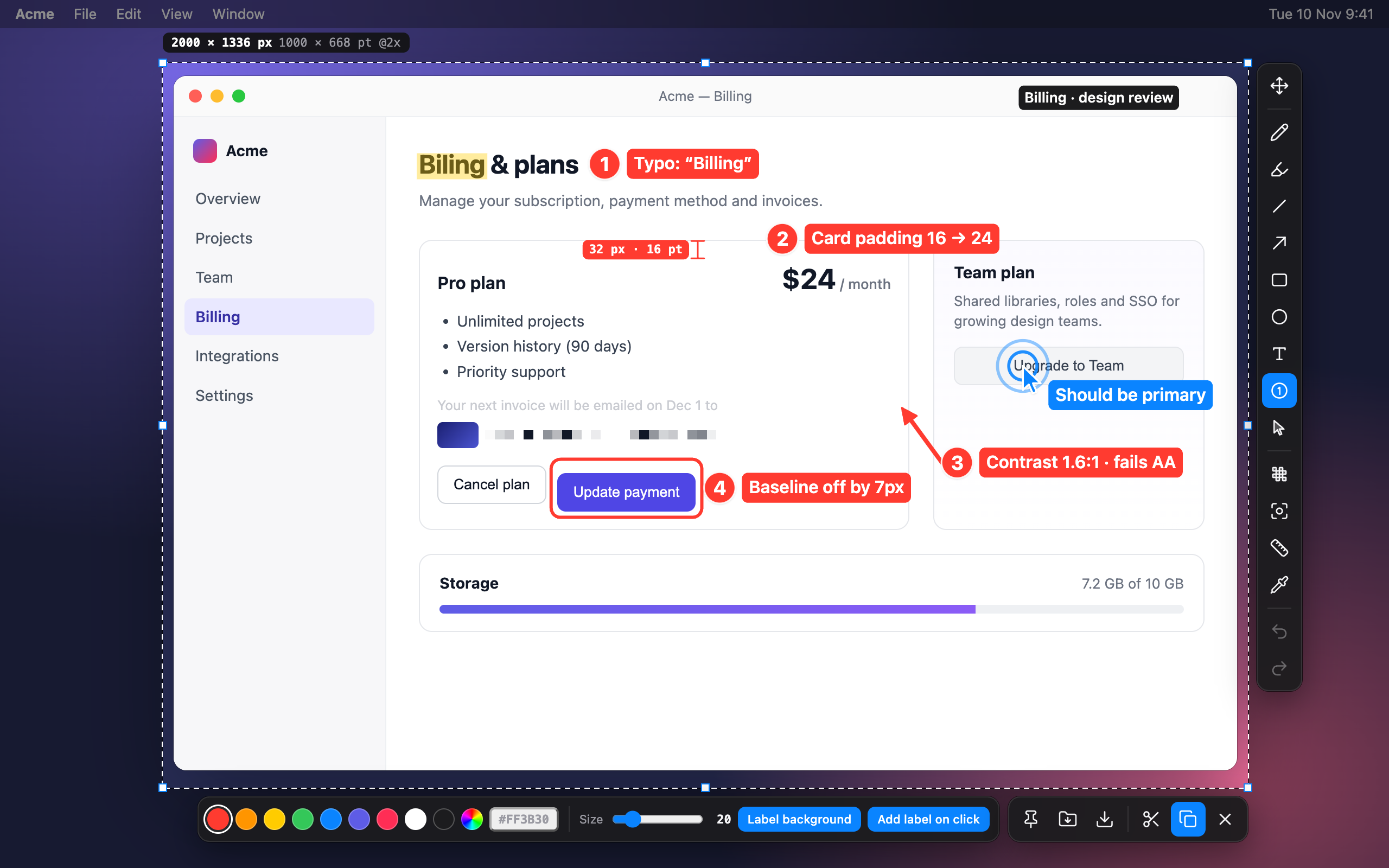
Highlights
- A Lightshot-style flow: hotkey → drag → mark up → copy
- A pixel magnifier with HEX copy, a size badge in px and pt, and Retina-aware export
- Pen, highlighter, line, arrow, rectangle, ellipse, text, step numbers with labels, cursor pointers, blur/pixelate,
spotlight, measure and a color picker - Everything stays editable until you copy or save (drag, resize, recolor, edit text again)
- Copy, save PNG/JPG, quick save, and pin screenshots on top of other windows
- No network code, no analytics, no uploads
Known limitations
- The Windows build hasn't had much real-world testing yet. Please open an issue
if anything misbehaves. - No window snapping or capture history yet (they're on the roadmap).