Repository navigation
Releases
Offline Backup 0.10.0 - a new window

A new, easier window. How copies work and what lands on your drives stay the same.
New
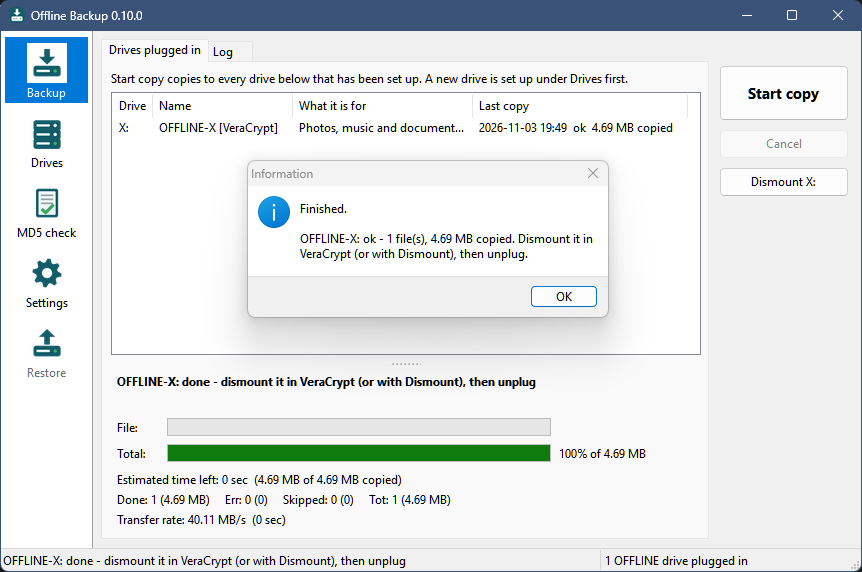
- A new window: a sidebar with one area each - Backup, Drives, MD5 check and Settings - and a
status bar at the bottom. Drives, MD5 check and Settings are pages of the main window now instead of separate
windows. The tray icon and its menu work as before. - Progress under the drive list, with two bars: the file being copied and the whole run.
- Changes on the Drives and Settings pages wait for Save; Undo changes goes back, and leaving a page with
unsaved changes asks first. - Recording checksums after a copy shows its progress (file, files and bytes done, rate, time left).
- New setting on the MD5 check page: Record checksums after each copy (on by default). Off, a copy ends
sooner, and Verify drive records the missing checksums later. Nothing is lost. - Checksums are about 1.6 times faster in the download (built with full optimization).
- With the window open, plugging in a drive says so in the status bar and flashes the taskbar button; a drive that
goes away is said too. - The window opens when Offline Backup starts, so it is plain that it is running; closing it keeps it in the
tray. Start it with/trayto start in the tray only./showis no longer needed. - About Offline Backup... in the window's title-bar menu (the icon at the top left, or Alt+Space).
Full list: CHANGELOG.
Install or update
Download OfflineBackup-0.10.0-win64.zip below. To update, exit Offline Backup from its tray icon and replace
OfflineBackup.exe with the new one - your settings (OfflineBackup.ini next to it) and your drives stay as they
are. New installs: see README.txt in the zip or the README.
Windows 10 or 11, 64-bit. Still a beta - keep more than one backup. MIT license.
SHA-256 of the zip: 6631b283eb5ec1f9374abf0220f69ef2105a499e5bc9dd744048958aad91360f
Offline Backup 0.9.2 - VeraCrypt drives
Better support for backup drives encrypted with VeraCrypt. Nothing changes for other drives.
New
- OFFLINE drives that are mounted VeraCrypt volumes are marked
[VeraCrypt]in the window. - A Dismount button (also on the tray menu) asks VeraCrypt to dismount them - never forced, so if a file is still
open on the drive you're told, and the drive stays as it was. - After a copy, such a drive says "dismount it in VeraCrypt (or with Dismount), then unplug" instead of
"safe to unplug". - New setting: Dismount VeraCrypt drives after a copy that went well (off by default) - then the drive can be
unplugged straight away. A portable VeraCrypt can be named withVeraCryptExe=inOfflineBackup.ini. - Dismount results go to the log file too.
VeraCrypt stays a separate program: it opens the drive and asks for the password - Offline Backup never sees or
stores it. How to set up an encrypted backup drive:
Encrypted backup drives with VeraCrypt
in the README.
Install or update
Download OfflineBackup-0.9.2-win64.zip below. To update, exit Offline Backup from its tray icon and replace
OfflineBackup.exe with the new one - your settings (OfflineBackup.ini next to it) and your drives stay as they
are. New installs: see README.txt in the zip or the README.
Windows 10 or 11, 64-bit. Still a beta - keep more than one backup. MIT license.
SHA-256 of the zip: be937a91fd61836a2bd401a326c3e2c1df7bbfb47e61b2a426f864c0ff4201bc
Offline Backup 0.9.1 - fix for exFAT / FAT32 drives
A fix for USB drives formatted exFAT or FAT32 - which is how most USB sticks come out of the box. Please update if you use 0.9.0.
Fixed
- On exFAT and FAT32 drives, about a third of the copied files got no checksum, so they were left out of Verify drive and of the
.md5files, and moved files were copied again instead of moved. These file systems keep file times in 2-second steps; checksums and move detection now allow for that, the same way robocopy does. - Your backups themselves were never affected. Files copied by 0.9.0 without a checksum get one at the next Verify drive (Drives... > Verify drive...).
Also
- Tested with a VeraCrypt volume labelled
OFFLINE-X: encrypted drives work like any other OFFLINE drive. Better VeraCrypt support (dismount from the app) is planned.
Screenshots
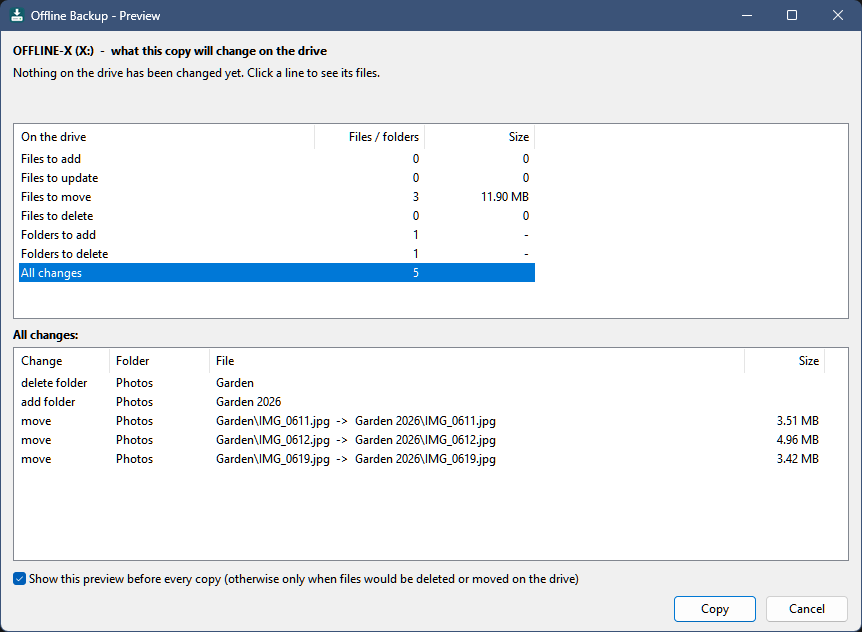
The preview before a copy - here with moved files, which are moved on the drive instead of copied again:
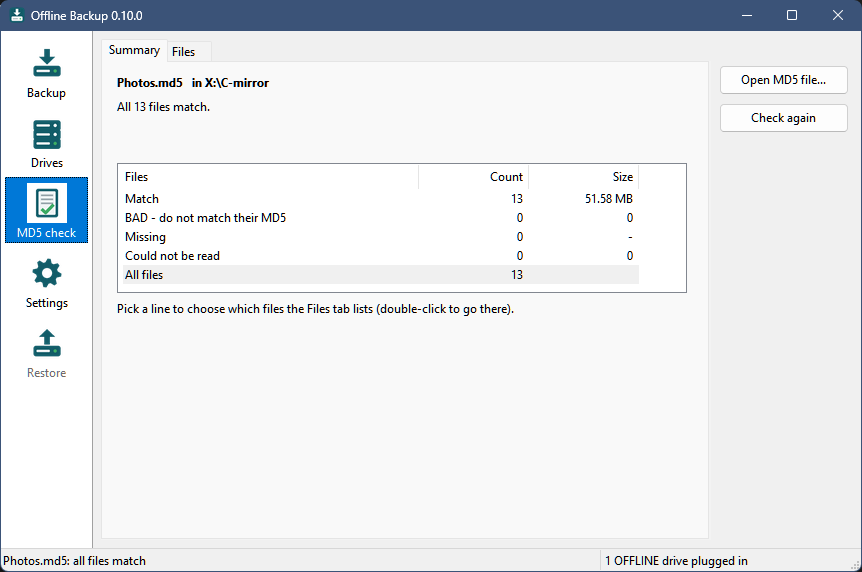
Check MD5 reads the files back from the drive and checks them:
More in the README.
Install or update
Download OfflineBackup-0.9.1-win64.zip below. To update, exit Offline Backup from its tray icon and replace OfflineBackup.exe with the new one - your settings (OfflineBackup.ini next to it) and your drives stay as they are. New installs: see the steps in the 0.9.0 release or README.txt in the zip.
Windows 10 or 11, 64-bit. Still a beta - keep more than one backup. MIT license.
SHA-256 of the zip: d0f3fa379c2407e52db97a787159316f4bd9cc9c712f12be1ca58909863ca7fa
Offline Backup 0.9.0 - first public beta
First public beta of Offline Backup: a Windows tray app that copies the folders you choose onto USB drives you keep unplugged, so ransomware, a failed disk or a mistake on the PC can't reach them.
Download and install
- Download OfflineBackup-0.9.0-win64.zip below and unzip it to a folder you can write to (for example
Documents\OfflineBackup). - Start
OfflineBackup.exe- it sits in the tray. Windows may say the program is unknown (it is not code-signed): More info > Run anyway. - Name a USB drive
OFFLINE-Ain File Explorer, plug it in, set it up under Drives..., then Start copy.
Needs Windows 10 or 11, 64-bit. The zip contains a short how-to (README.txt).
What's in 0.9.0
- Each drive knows what it is for: its own folder list, description and history are kept on the drive.
- A preview before every copy (files to add, update, move, delete) - nothing changes until you click Copy.
- Moved and renamed files are moved on the drive instead of copied again.
- Old versions of changed and deleted files are kept in
_versionson the drive, and pruned after a number of days or when the drive gets full. - CRC32 and MD5 of every copied file are kept on the drive, plus an ExactFile-style
.md5per folder. Verify drive and Check MD5... read everything back and check it. - A safety check asks first when an unusually large part of a folder would change or be deleted.
This is a beta: it has been tested well, but on few PCs. Keep more than one backup. MIT license.
SHA-256 of the zip: caa232d18ea1b8cb5b2ec02cb527f09e28332d197ea73adbaf13d90c112e65b3