Repository navigation

SF2Recomp 0.2.0 adds a desktop conversion window and fixes FFmpeg packaging on Windows.
What's new
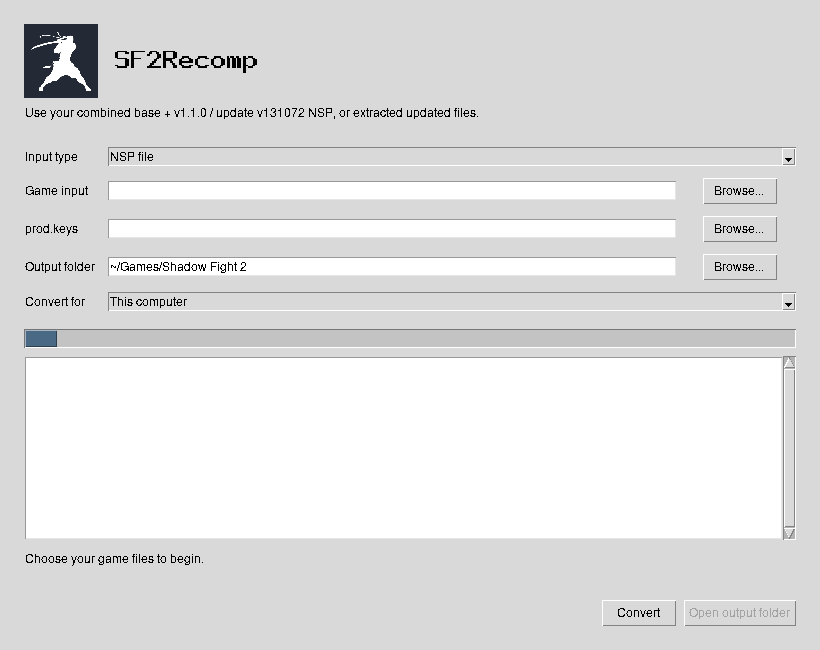
- SF2Recomp converter UI. Browse for your game files, keys, and output folder. Follow progress and errors in the window, then open the finished folder. Full logs are saved under
build/logs/. - FFmpeg DLL fixes. Windows releases now collect the decoder's recursive DLL dependencies and copy them beside
ffmpeg.exein converted games. - Decoder verification. Release checks start the bundled decoder without developer tools on
PATH. Linux video and audio playback was also verified using a relocated game folder and its bundled FFmpeg libraries. - Quieter conversion logs. Fixed the Windows compiler's misplaced linker search flag and suppressed repeated Clang unused-argument warnings.
- Project icon and documentation. Added the project icon, a shorter setup guide, a complete feature and screenshot guide, and clearer INI configuration examples. Removed repeated links and repaired stale references.
- macOS CI fix. Corrected the compiler test fixture; the fresh macOS package build and verification passed.
Get started
Desktop archives will be attached automatically when the release workflow finishes.
- Download the archive for your computer and extract the entire folder.
- Open
sf2recomp.cmdon Windows,SF2Recomp.commandon macOS, orsf2recompon Linux. - Choose your game input,
prod.keys, and output folder, then click Convert. Extracted game folders do not need keys. - Click Open output folder, then run
sf2.exeorsf2to play.
Desktop releases bundle Python, the compiler, and FFmpeg. Command-line conversion remains available; use --cli for terminal prompts. Android APK conversion is available through Convert for and downloads its build tools on first use.
Supported input and requirements
You must supply your own combined base + v1.1.0 / update v131072 NSP, including its CNMT XML sidecars and tickets, or already extracted updated game files. Separate base/update NSPs, NSZ, and other game versions are not supported. No game code, game assets, or keys are included.
Desktop requirements are Windows 10/11 x64, Linux x86-64 with glibc 2.39+, or macOS 15+ on Apple Silicon, plus a compatible Vulkan 1.3 GPU and driver. macOS gameplay and GPU compatibility remain experimental.
Setup guide · Complete feature gallery · INI configuration · Full changelog