Repository navigation
Releases
v0.1.9

What's Changed
- Immigration workspace for 33 case types: H-1B, H-4, L-1/L-2, O-1, TN, E-3, F-1/OPT, J-1, EB-1/EB-2/EB-5, I-130, I-485, I-751, K-1, N-400 and more, each with its own questionnaire and evidence checklist.
- People & documents: every person on your immigration documents, with how their passport, I-94, I-797, visa, LCA, PERM, I-140, EAD and green card connect, and the problems found between them (name or date mismatches, I-94 shorter than the approval, passport expiring first, missing documents for the case).
- Family links: spouses from marriage certificates, children from birth certificates and the I-130 relationship box. A dependent's status (H-4, L-2, …) is checked against the principal's.
- New clients from documents: an uploaded passport or USCIS form proposes a client; you approve before it is created.
- Filled USCIS PDF forms are read from their form fields.
- Green cards are classified correctly, with permanent residence shown as having no end date and card expiry as an I-90 renewal reminder.
- Every correction you make to a fact, link or problem needs a reason and is kept in the change history.
- Cleaner pages: shorter titles, no filler subtitles or emoji, and a restyled Immigration area (cases list, clients board, tracker, forms, e-signature, reports).
Downloads
- macOS Lite (Apple Silicon, ~1.3 GB):
unidocverse_0.1.9_arm64.dmgbelow. On first launch choose a built-in model, your own Ollama, or a cloud key. macOS 14+, M1 or later, 16 GB memory. - macOS Full (offline, ~4.8 GB): everything bundled, no downloads after install. Download Full v0.1.9 (also on unidocverse.com).
- Docker (Windows, Mac, Linux):
docker pull bommavj/unidocverse:v0.1.9-lite.
Verify the download: shasum -a 256 unidocverse_0.1.9_arm64.dmg and compare with the attached .sha256. Signed with a Developer ID and notarized by Apple.
Contributors
- @bommavj — design, development and release
Full Changelog: v0.1.8...v0.1.9 · All versions since v0.1.0
Contributors

Assets 4
v0.1.8
What's Changed
- New Statistics page: documents processed, pages read, questions answered, answer quality and documents by type — for 7 days to 12 months, counts only.
- New Share your experience (Help): rating, comment and optional usage counts, with a preview of exactly what is sent. Nothing is sent until you press Send.
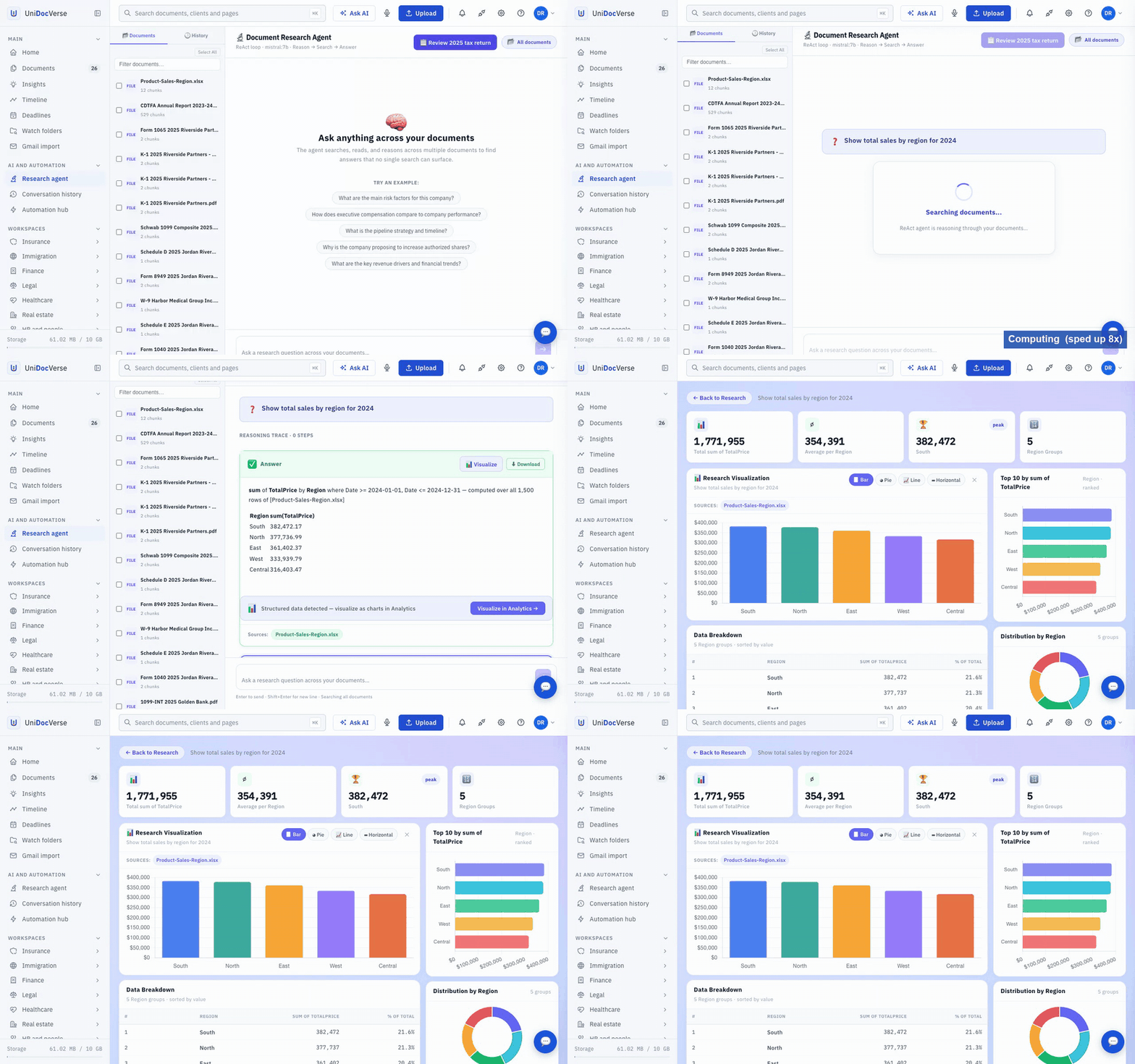
- Spreadsheets answer change between periods questions: "which sector had the largest % drop between March and April 2020" → General merchandise stores, −63.95%, computed over every row.
- Spreadsheets with a title row above the real column headers are now read correctly.
- "Excluding totals" now leaves the Total / ALL rows out instead of selecting them.
- Spreadsheet answers grouped by a column carry a chart, so Visualize opens them in Analytics.
- Fixed: after choosing Send to a cloud model, the same consent question could appear again. Your choice now applies to every step of the answer, and notes such as "Answered by Google Gemini" are shown.
- The Research header shows the cloud model when one is active.
- Refresh models in Integrations (and automatically when you return to the app) — models pulled with Ollama appear without reopening the page.
Answers you can share
0.1.8 makes it easy to see — and show others — what UniDocVerse is doing for your organisation. Statistics summarises usage and answer quality for any period, and one click shares it: with your team as a summary, PDF or data file, or with us through Share your experience. Every share is opt-in and previewed first; the app still sends nothing on its own. See the privacy note.
Downloads
- macOS Lite (Apple Silicon, ~1.3 GB):
unidocverse_0.1.8_arm64.dmgbelow — on first launch choose a built-in model, your own Ollama, or a cloud key. macOS 14+, M1 or later, 16 GB memory. - macOS Full (offline, ~4.8 GB): everything bundled, no downloads after install — download Full v0.1.8 (also on unidocverse.com).
- Docker (Windows, Mac, Linux):
docker pull bommavj/unidocverse:v0.1.8-lite.
Verify the download: shasum -a 256 unidocverse_0.1.8_arm64.dmg and compare with the attached .sha256. Signed with a Developer ID and notarized by Apple.
Contributors
- @bommavj — design, development and release
Full Changelog: v0.1.7...v0.1.8 · All versions since v0.1.0
Contributors
Assets 4
v0.1.7
What's Changed
- One macOS installer for every setup — Full, Lite and Starter are now a single 1.3 GB download.
- Models download on first launch from the UniDocVerse server, checked against a pinned SHA-256 and resumed if interrupted.
- New Built-in model option on Home: one click downloads phi3:mini with a progress bar — no Terminal needed.
- PaddleOCR is now included in every macOS setup, so scans and phone photos are read accurately everywhere.
- Added private web search through a bundled SearxNG; only the question's general topic is sent and every search is written to the audit trail.
- Added the Pilot report (Governance → Pilot report) for 30/60/90-day early-adopter reviews.
- Fixed data separation between organisations across documents, research history, the morning brief and industry modules.
- Upload, job and brief routes now require sign-in.
- Fixed report questions being answered from an unrelated spreadsheet that shared a column name.
- Docker Lite rebuilt as
v0.1.7-litefor amd64 and arm64.
One installer, your choice of engine
Until now you had to pick between a 4.8 GB Full download, a 2.4 GB Lite download and a Starter build before you even knew which you needed. 0.1.7 ships one notarized installer. On first launch, UniDocVerse asks how it should answer questions:
| Choice | What downloads | Best for |
|---|---|---|
| Built-in model | search model (1.3 GB) + phi3:mini (2.1 GB) | Getting started with nothing else installed |
| Your own Ollama | search model only | Using mistral:7b, gemma4 or any model you already run |
| Cloud model | search model only | Anthropic, OpenAI, Gemini and others with your own key (asks before sending, masks identifiers) |
Every choice keeps your documents on your machine. You can switch later in Integrations.
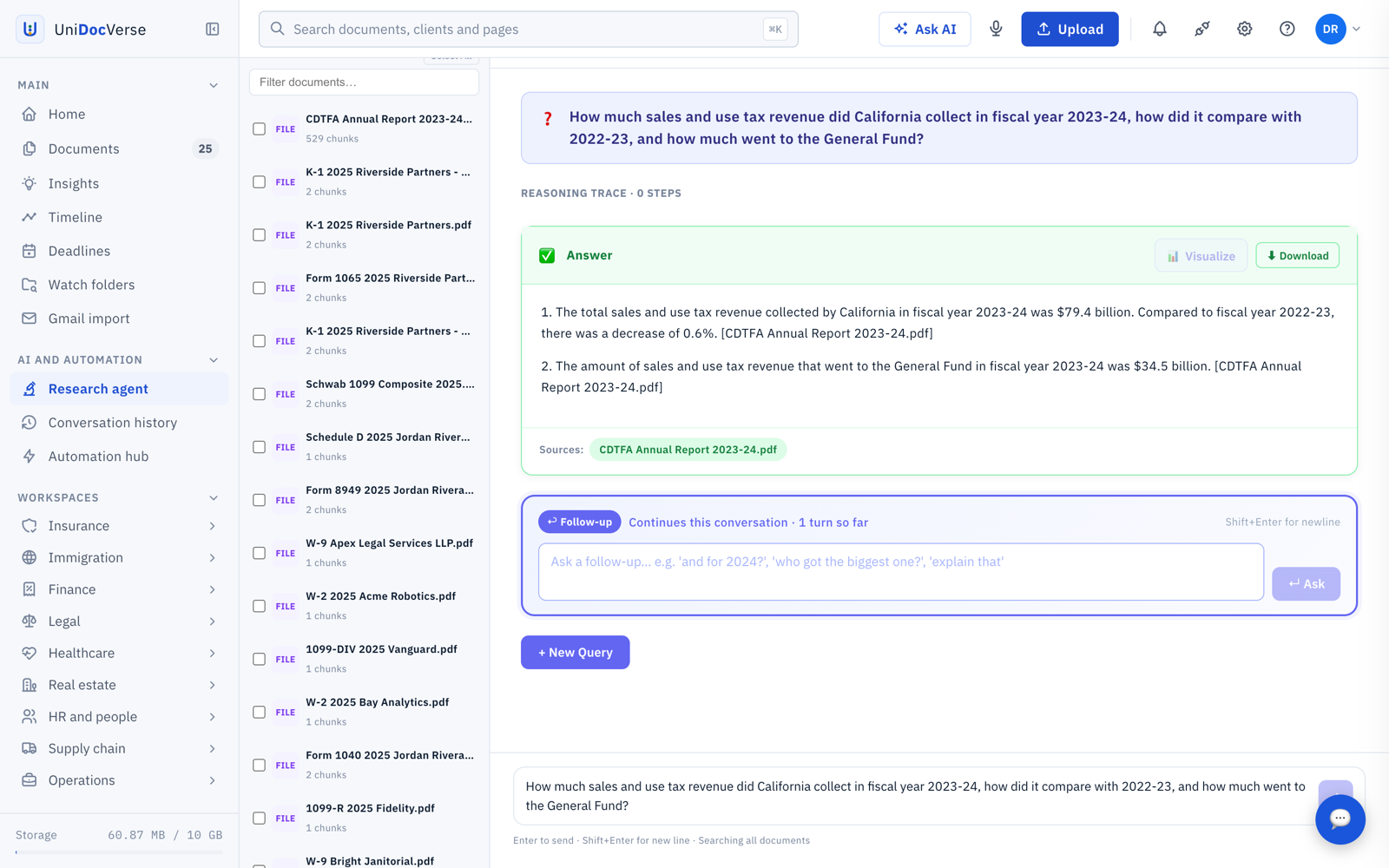
A three-part question answered from the 104-page CDTFA 2023-24 Annual Report — $79.4 billion in sales and use tax, down 0.6%, with $34.5 billion to the General Fund — every figure cited to the report.
Downloads
- macOS Lite (Apple Silicon, 1.3 GB):
unidocverse_0.1.7_arm64.dmgbelow — macOS 14+, M1 or later, 16 GB memory. - macOS Full (offline, 4.8 GB): everything bundled — no downloads after install, for air-gapped or offline Macs. Download from unidocverse.com.
- Docker (Windows, Mac, Linux):
docker pull bommavj/unidocverse:v0.1.7-lite— see the README for the fulldocker runcommand.
Verify the download: shasum -a 256 unidocverse_0.1.7_arm64.dmg and compare with the attached .sha256. Signed with a Developer ID and notarized by Apple.
Contributors
- @bommavj — design, development and release
Full Changelog: v0.1.6...v0.1.7 · All versions since v0.1.0
Contributors
Assets 4
v0.1.6
What's Changed
- Added private web search for the Research Agent through a bundled SearxNG — off until an admin turns it on.
- Search queries carry only the question's general topic: names, ID numbers, amounts and document text are removed first.
- Every web search is written to the audit trail with the exact words sent and the links returned.
- Added the Starter edition: a small installer that downloads its search model on first launch.
- Added chart reading: values drawn in chart images are read by a local vision model and checked against the page.
- Added Model roles: choose a different model for planning, answering, extraction and vision.
- Every page is now stored with its real page number; scans and phone photos (including HEIC) are read with PaddleOCR.
- Answers say when a chart's values couldn't be read instead of guessing.
- Docker Lite rebuilt for amd64 and arm64 with SearxNG included.
Web search that never sees your documents
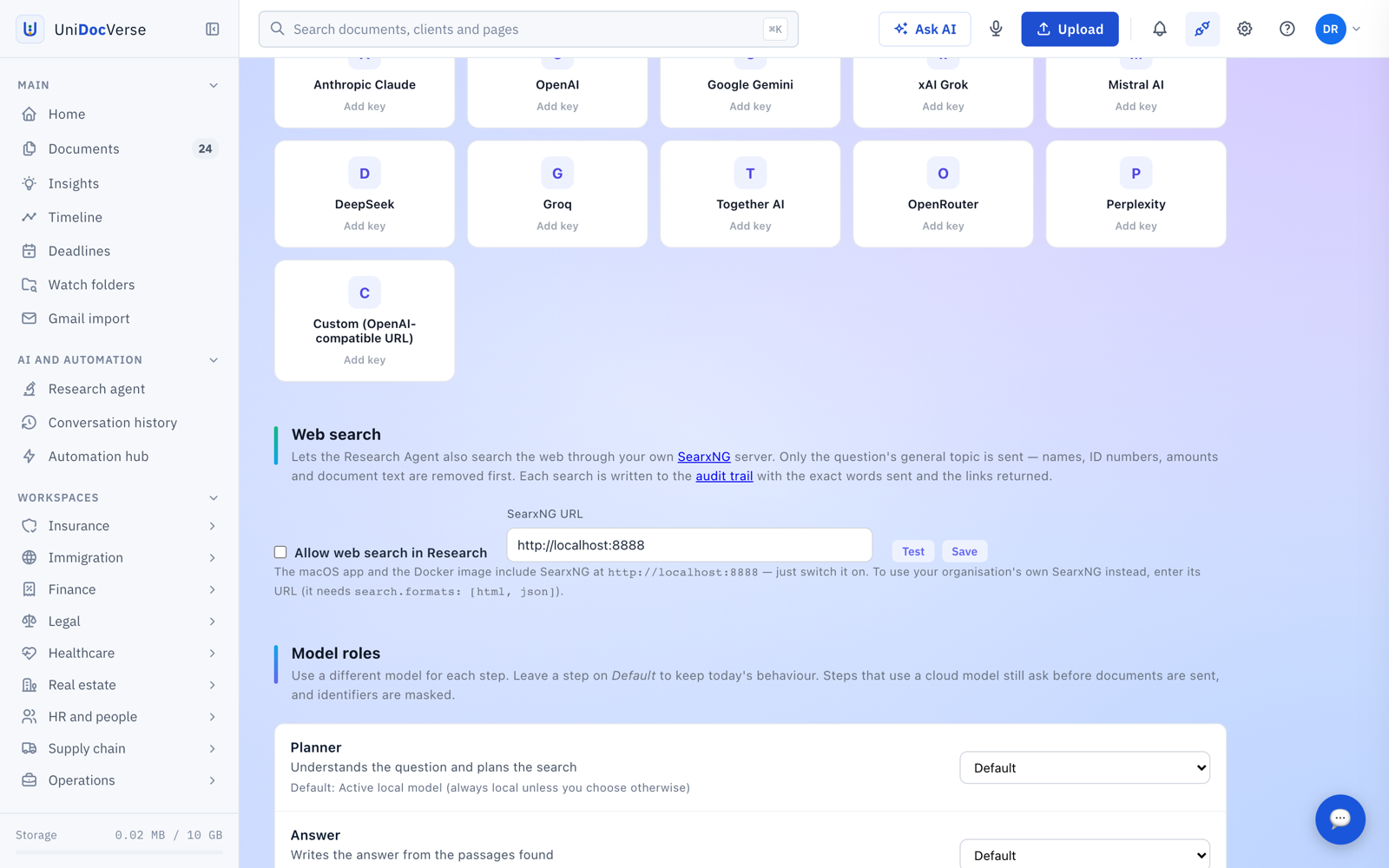
Some questions need both your documents and the outside world — "is this W-2 over the 2026 Social Security wage base?". 0.1.6 lets the Research Agent search the web through your own SearxNG, bundled in the app and the Docker image.
The search text is written on your machine by the local model and stripped of names, ID numbers, amounts and document text before it leaves. Web results appear in a separate From the web section with numbered links, and every search is logged in the audit trail as research.web_search.
Downloads
- macOS Starter (Apple Silicon):
unidocverse_0.1.6_starter_arm64.dmgbelow. - Docker (Windows, Mac, Linux):
docker pull bommavj/unidocverse:v0.1.6-lite.
Newer release available: v0.1.7 ships one installer for every setup.
Contributors
- @bommavj — design, development and release
Contributors
Assets 4
UniDocVerse v1.0.0 - RPM LITE Edition
Privacy-first AI document intelligence platform
UniDocVerse v1.0.0 DEB - LITE Edition
Privacy-first AI document intelligence platform
UniDocVerse v1.0.0 - LITE Edition
Privacy-first AI document intelligence platform