Repository navigation
TailSocks v5.4.0

✨ Highlights
🧦 TailSocks in the device list
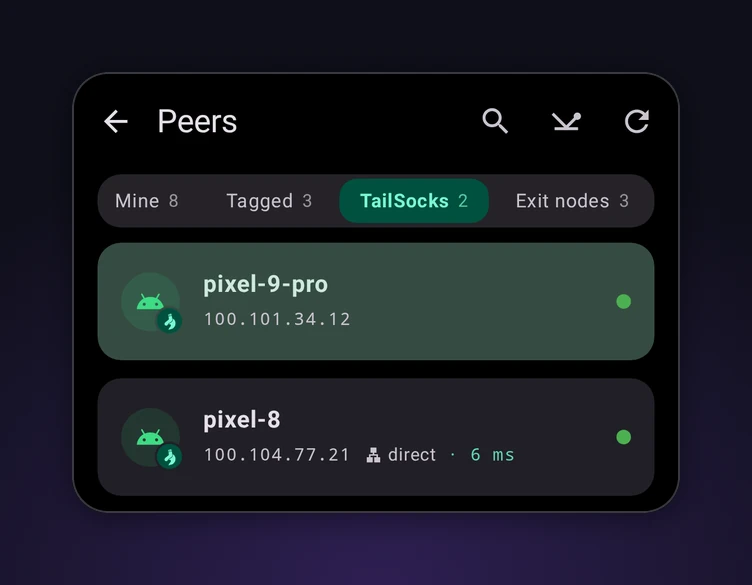
Devices that run TailSocks carry its sock on their icon, get a tab of their own and a TailSocks chip on their page; the official client shows as "Tailscale". The search finds a device by the client it runs — tailsocks, aperture, tsidp.
TailSocks now names itself to the coordinator: besides the OS, it is the one detail every peer receives. Devices on 5.3 or earlier are recognised only if they report Linux. Manage this device asks only devices that run TailSocks.
🔑 Tailscale SSH in Root Mode
ssh root@phone or ssh shell@phone — shell is the user adb runs as, with its groups. An interactive shell, commands, scp and SFTP.
- Who gets in, and as which user, is set by the
sshrules of the tailnet policy. A new tailnet's default policy already lets members in after a confirmation in the browser (check mode). - Settings → Account & connection → Tailscale SSH. Off by default, Root Mode only.
Tested on Android 16 with APatch and on Android 14 with KernelSU (thanks, @Genxster1998 — #16).
🗂 Also
- Settings → Appearance → Language lists every language translated on Weblate, each under its own name: Traditional Chinese and Korean so far.
- New profiles report the real OS — Android, with the device's model. Existing profiles keep what they registered as.
🇷🇺 Что нового
🧦 TailSocks в списке устройств
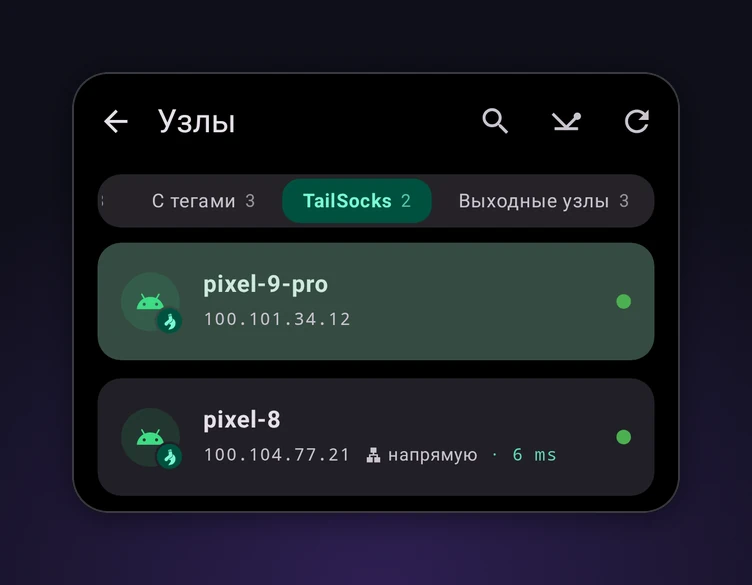
Устройства с TailSocks отмечены носком на иконке, у них своя вкладка и чип TailSocks на странице устройства; официальный клиент подписан «Tailscale». Поиск находит устройство по клиенту — tailsocks, aperture, tsidp.
TailSocks теперь называет себя координатору: кроме ОС, это единственное, что о нём получает каждый пир. Устройства на 5.3 и раньше узнаются, только если сообщают Linux. Управлять устройством спрашивает только устройства с TailSocks.
🔑 Tailscale SSH в Root Mode
ssh root@телефон или ssh shell@телефон — shell это пользователь adb, с его группами. Интерактивный терминал, команды, scp и SFTP.
- Кого пускать и под каким пользователем, решают правила
sshв политике сети. Политика новой сети уже пускает участников после подтверждения в браузере (режим check). - Настройки → Аккаунт и подключение → Tailscale SSH. По умолчанию выключен, только в Root Mode.
Проверено на Android 16 с APatch и на Android 14 с KernelSU (спасибо @Genxster1998 — #16).
🗂 Ещё
- Настройки → Оформление → Язык показывает все языки, переведённые на Weblate, каждый под своим названием: пока традиционный китайский и корейский.
- Новые профили сообщают настоящую ОС — Android с моделью устройства. Существующие профили остаются такими, какими зарегистрированы.
📋 Changelog
Added
- Devices that run TailSocks carry its sock on their icon, a TailSocks chip on their page and a Client row in the Device card; the official client reads "Tailscale". TailSocks now names itself to the coordinator (App
tailsocks), the one detail besides the OS that every peer receives. Devices on 5.3 or earlier are recognised only if they report Linux. - Devices: a TailSocks tab, and the search finds a device by the program it names (tailsocks, aperture, tsidp).
- Settings → Appearance → Language: every language translated on Weblate, each by its own name — Traditional Chinese and Korean so far, beside English and Russian.
- Tailscale SSH in Root Mode:
ssh root@phoneorssh shell@phone(adb's user), scp and SFTP, as the tailnet policy's ssh rules allow, check mode included — Settings → Account & connection. Off by default.
Changed
- New profiles report the real OS (Android, with the device's model); the box is ticked when a profile is added and on first start. Existing profiles keep what they registered as.
- "Manage this device" asks only peers that run TailSocks; an older TailSocks that reports Android shows the button once updated, or if already paired.
