Repository navigation
Releases
Studio 9:41 v1.1.2

Studio 9:41 v1.1.2
This is the largest Studio 9:41 update since launch. Design one campaign, adapt it across Apple and Android devices, localize the copy, review it, and export every store-ready asset from one project.
What's new
- Master, iOS, and Android designs: Create a shared Master and override only what each platform needs.
- Localization Studio: Translate, review, approve, preview, and export 21 languages.
- Android and Google Play workflows: New Android devices, controls, layouts, wallpapers, and export targets.
- Expanded iPad workflows: Dedicated starter project plus portrait and landscape App Store sizes.
- Expanded Mac workflows: Mac starter project, MacBook layouts, configurable macOS chrome, and Mac App Store exports.
- Studio credits or your own key: Choose Studio translation or a private session-only OpenAI key.
- Multi-platform batch export: Export selected platforms, sizes, languages, and slides in one organized job.
- More precise editing: Direct on-canvas text editing, more fonts, better color handling, and stronger layer controls.
- Reliable local projects: Improved autosave, project names, restoration, duplication, and deletion.
One project, every platform
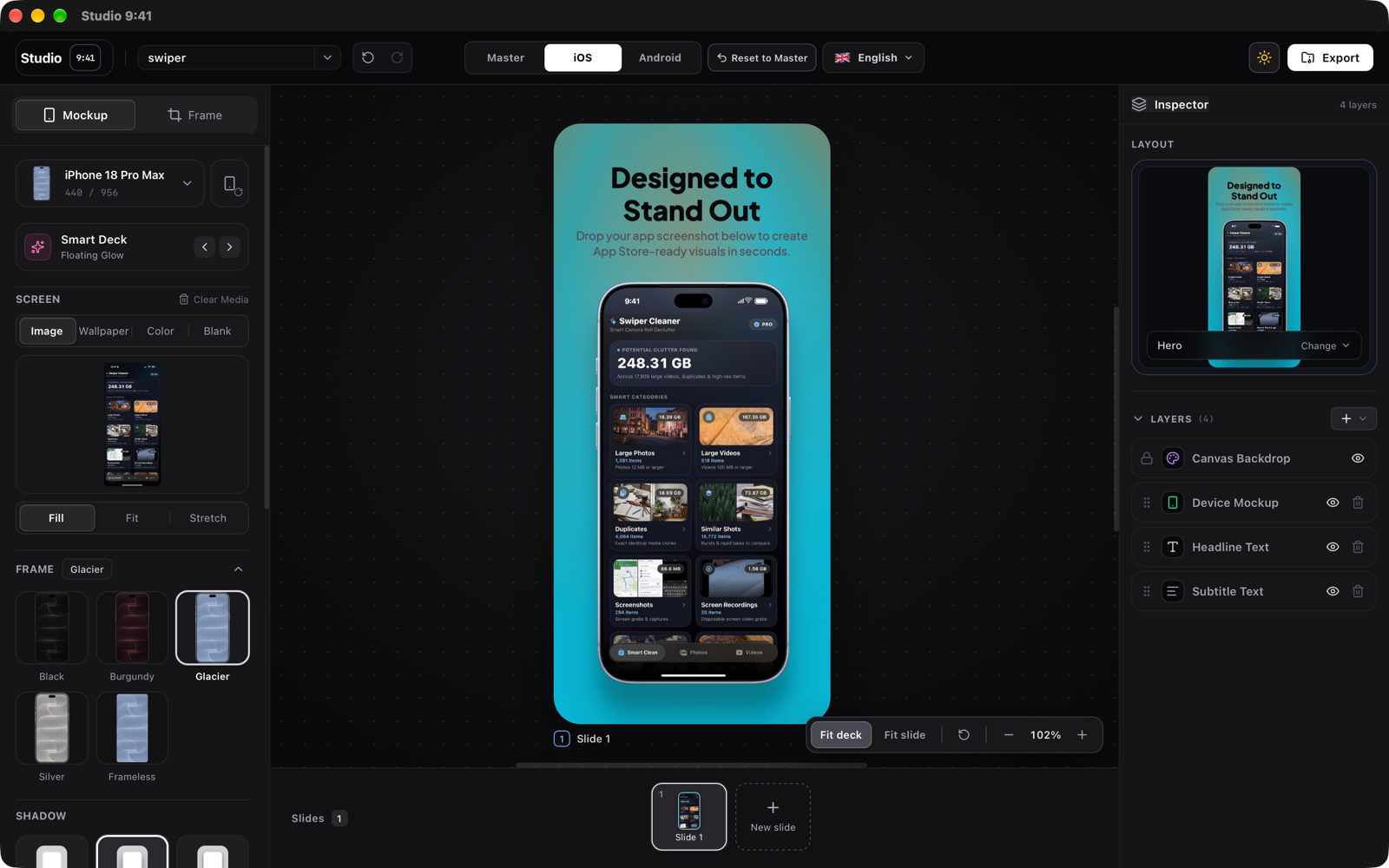
Create a shared Master design, then add linked iOS and Android versions. Master changes continue flowing to both platforms until you customize a device, layout, screenshot, text field, system treatment, or style for one platform.
- Switch between Master, iOS, and Android from the editor header.
- Add or remove a linked platform without affecting the other version.
- Reset an individual platform slide back to Master.
- Keep platform-specific screenshots, devices, copy, layouts, and backgrounds.
- Preserve linked multi-slide compositions across both platforms.
Localization Studio
Translate and manage store copy without leaving the project.
- Add several target languages in one flow.
- Translate all missing strings or retranslate the currently selected language.
- Keep shared translations plus iOS- and Android-specific wording.
- Detect missing and stale translations when source copy changes.
- Mark generated translations unreviewed until you explicitly approve them.
- Preview any language directly in the editor.
- Require reviewed, current translations before localized export.
- Retain completed languages when part of a batch fails, with retry messaging for the remainder.
Supported presets: English, French, Spanish, German, Japanese, Simplified Chinese, Traditional Chinese, Italian, Portuguese, Korean, Arabic, Dutch, Russian, Turkish, Hindi, Indonesian, Vietnamese, Thai, Polish, Swedish, and Hebrew.
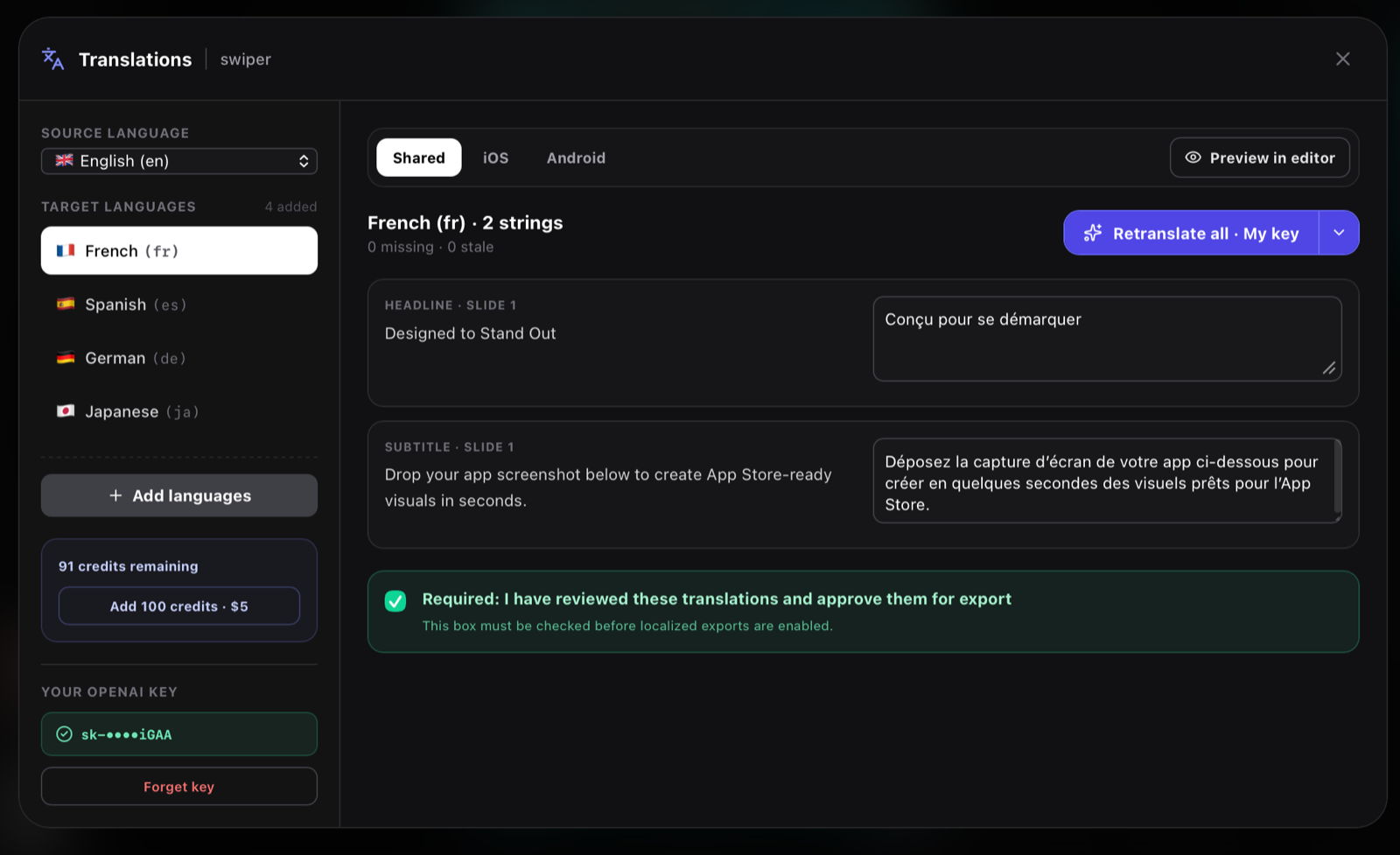
Translate the source design, then preview the localized result directly in the editor before export.
|
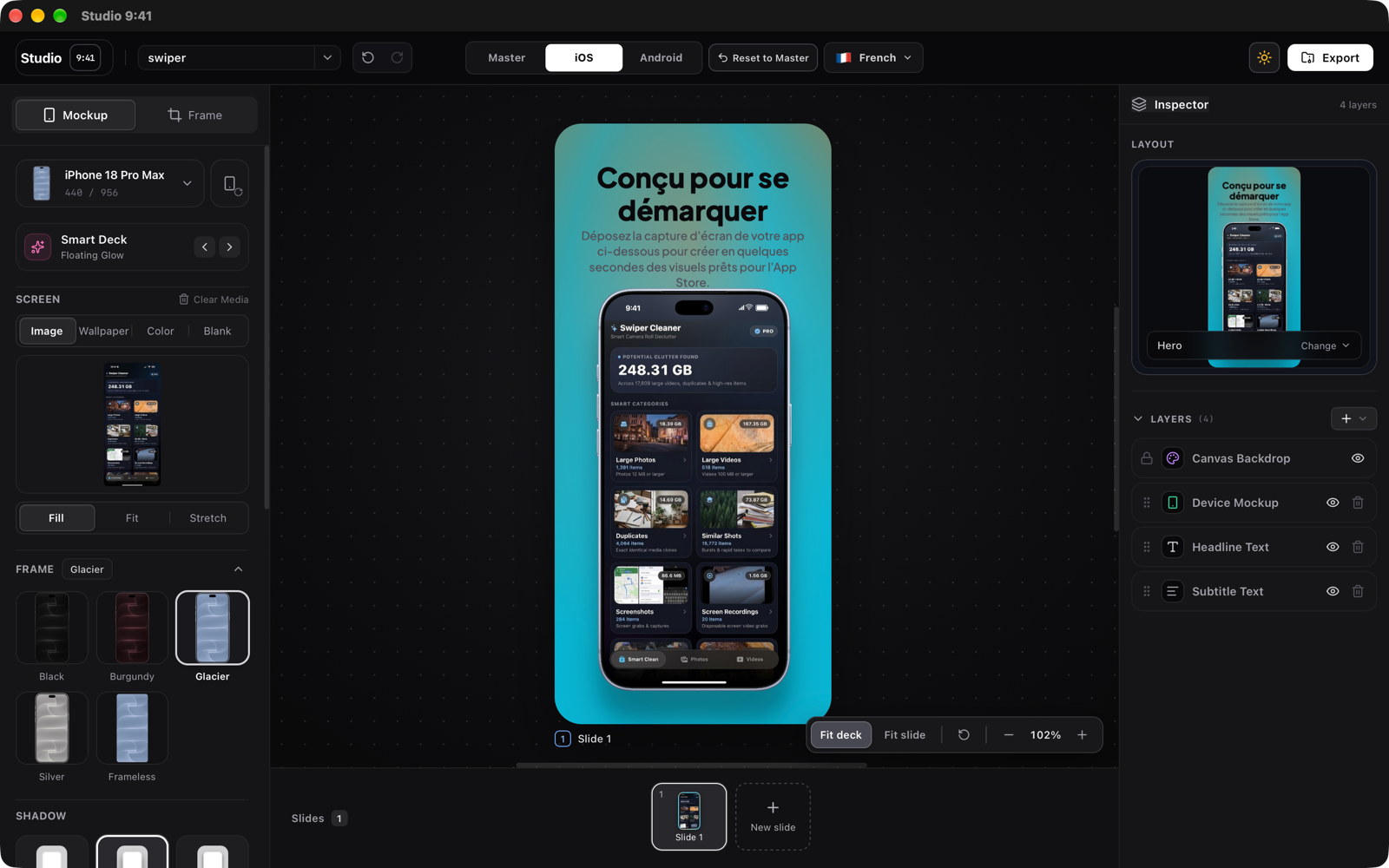 |
| English source design | French localized design |
Android and Google Play
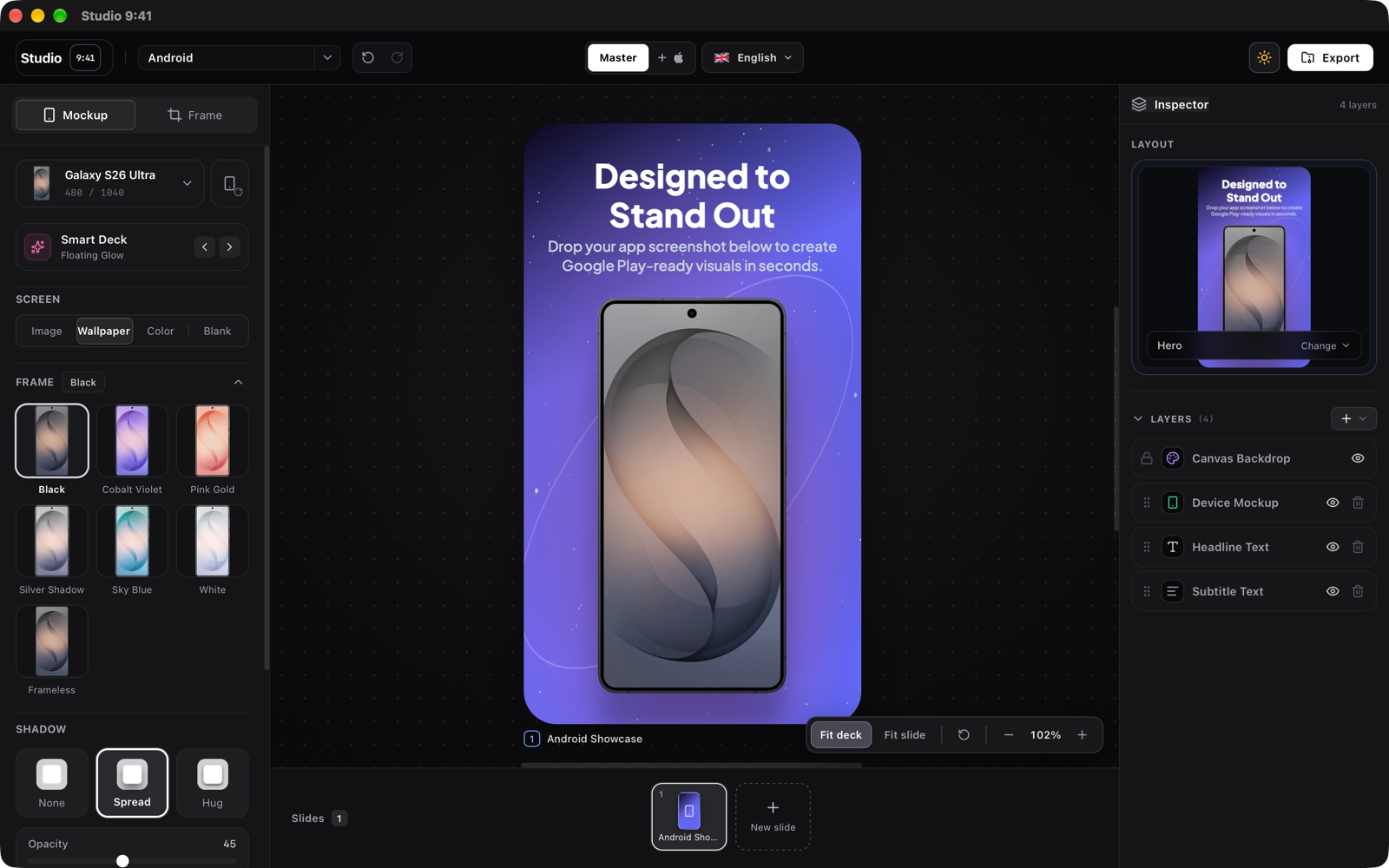
v1.1 introduces a complete Android creation and export workflow.
- Pixel 11 Pro with Canyon, Fog, Obsidian, and Olive finishes.
- Galaxy S26 Ultra with Black, Cobalt Violet, Pink Gold, Silver Shadow, Sky Blue, and White finishes.
- Nothing Phone (4a) Pro with Black, Silver, and Pink finishes.
- Portrait and landscape frames with matching device wallpapers.
- Android-aware layouts and a dedicated Android starter project.
- Gesture navigation, three-button navigation, or no navigation bar.
- Configurable time, battery, Wi-Fi, cellular signal, and network-type labels.
- Google Play phone portrait, phone landscape, and feature-graphic export presets.
iPad workflows
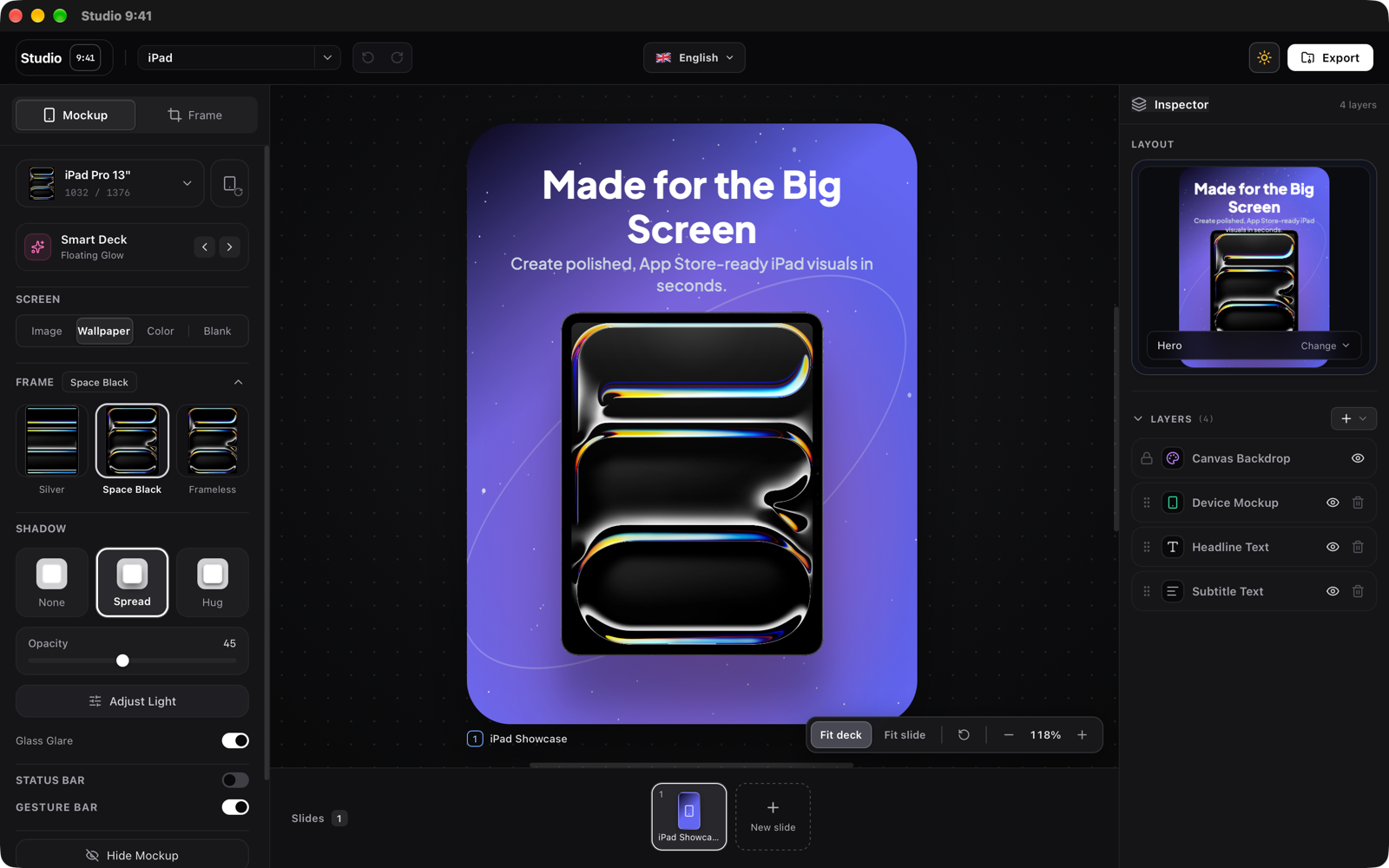
- Dedicated iPad starter project with an adaptive large-screen composition.
- iPad Pro, iPad Air, standard iPad, and frameless iPad presentations.
- 13-inch, 12.9-inch, 11-inch, and iPad mini export sizes.
- Portrait and landscape App Store outputs.
- iPad-specific device controls, finishes, shadows, lighting, status bars, and gesture-bar options.
MacBook, iMac, and Mac App Store workflows
Mac support now goes beyond placing a desktop frame on a generic canvas.
- New Mac starter project using a Mac App Store canvas and desktop composition.
- New MacBook Hero, Desktop Editorial, and Workspace Pair layouts.
- MacBook Pro 14/16-inch, MacBook Air 13/15-inch, MacBook Neo, and iMac 24-inch catalogue support.
- Configurable macOS menu bar with app name, time, Wi-Fi, battery, Siri, background, and theme controls.
- Configurable window header with title, traffic lights, background, and theme controls.
- Dedicated 1280 × 800, 1440 × 900, 2560 × 1600, and 2880 × 1800 Mac App Store exports.
- Corrected MacBook screen geometry and screenshot alignment.
Translation methods
- Studio credits: Translate through the Studio 9:41 service with credit balance and confirmation shown before work begins.
- My OpenAI key: Validate a key for the current desktop session and translate directly from the Rust app to OpenAI. The key stays in zeroizing memory and is never written to the project, browser storage, OS vault, logs, or Studio 9:41 servers.
- Choose the translation method from the split action buttons without starting a translation immediately.
- Closing the app or selecting Forget key removes the session key.
Redesigned export workflow
- Export iOS/App Store and Android/Google Play decks from the same project.
- Select or disable each platform deck independently.
- Select multiple device sizes per platform.
- Export the source language plus every reviewed localization; languages already added to the project are selected by default.
- Export all slides or only selected slides.
- Preview platforms, languages, sizes, and individual slides before rendering.
- Choose PNG or JPG.
- Package output as a ZIP or write it directly to a selected folder where supported.
- Organize localized output by store, language, and target size.
- Flatten store artwork to prevent unsupported alpha channels.
- Show accurate image counts and live export progress.
New and expanded targets include:
- iPhone App Store portrait and landscape sizes.
- iPad 13, 12.9, 11-inch, and mini portrait and landscape sizes.
- Mac App Store 1280, 1440, 2560, and 2880 widths.
- Google Play phone portrait, phone landscape, and 1024 × 500 feature graphic.
- Existing social, launch, and general aspect-ratio outputs.
Editor and design improvements
- Direct double-click text editing on the canvas without changing the selected typeface.
- Faster inline headline, subtitle, and custom-text updates with a single history commit.
- Expanded typography library from six to sixteen bundled typefaces.
- User-selected text colors—including black—now remain unchanged in the editor and exported images.
- Quick black, white, red, green, blue, yellow, cyan, and magenta color presets.
- Improved color-picker positioning in small windows and scrolled panels.
- Fill, fit, and stretch behavior for screenshots inside device screens.
- Adjustable frameless corner radius and optional phone camera cutout.
- Toggle the iPhone/iPad gesture bar independently.
- Delete the selected layer without accidentally deleting its slide.
- Text layouts applied to blank slides now create the required headline and subtitle layers.
- Improved font loading and consistent typography metrics between previews and exports.
- Cleaner Android wallpapers, symmetrical device overlays, and corrected Pixel/Nothing/Samsung screen masks.
Projects, templates, and Pro
- New Android, iPad, and Mac starter projects alongside iPhone and blank projects.
- Local Save now, autosave, project restoration, renaming, duplication, switching, and deletion.
- Active projects save when the app is hidden or closed.
- Free devices remain available for each major family: iPhone catalogue, Pixel 11 Pro, iPad Pro 13, MacBook Air 13, and frameless modes.
- Studio 9:41 Pro unlocks the complete Android, iPad, and Mac catalogues; advanced Android controls; macOS chrome; linked platform generation; and Localization Studio.
- Licence activation, validation, deactivation, signed entitlements, and translation credit balances are integrated into the desktop app.
Reliability fixes
- Project names and active-project state now persist correctly.
- Black typography no longer renders or exports as white.
- Double-clicking text enters editing mode instead of changing the font.
- Localized content stays aligned with shared and platform-specific source strings.
- Linked layouts keep their companion slides and independent text layers.
- Translation confirmation is shown inside the app, including first-use privacy disclosure for customer keys.
- Failed Studio-credit translations return the reserved credit.
- Successful repeated translation requests are replayed without charging twice.
...
Studio 9:41 v1.1.1
Studio 9:41 v1.1.1
This is the largest Studio 9:41 update since launch. Design one campaign, adapt it across Apple and Android devices, localize the copy, review it, and export every store-ready asset from one project.
What's new
- Master, iOS, and Android designs: Create a shared Master and override only what each platform needs.
- Localization Studio: Translate, review, approve, preview, and export 21 languages.
- Android and Google Play workflows: New Android devices, controls, layouts, wallpapers, and export targets.
- Expanded iPad workflows: Dedicated starter project plus portrait and landscape App Store sizes.
- Expanded Mac workflows: Mac starter project, MacBook layouts, configurable macOS chrome, and Mac App Store exports.
- Studio credits or your own key: Choose Studio translation or a private session-only OpenAI key.
- Multi-platform batch export: Export selected platforms, sizes, languages, and slides in one organized job.
- More precise editing: Direct on-canvas text editing, more fonts, better color handling, and stronger layer controls.
- Reliable local projects: Improved autosave, project names, restoration, duplication, and deletion.
One project, every platform
Create a shared Master design, then add linked iOS and Android versions. Master changes continue flowing to both platforms until you customize a device, layout, screenshot, text field, system treatment, or style for one platform.
- Switch between Master, iOS, and Android from the editor header.
- Add or remove a linked platform without affecting the other version.
- Reset an individual platform slide back to Master.
- Keep platform-specific screenshots, devices, copy, layouts, and backgrounds.
- Preserve linked multi-slide compositions across both platforms.
Localization Studio
Translate and manage store copy without leaving the project.
- Add several target languages in one flow.
- Translate all missing strings or retranslate the currently selected language.
- Keep shared translations plus iOS- and Android-specific wording.
- Detect missing and stale translations when source copy changes.
- Mark generated translations unreviewed until you explicitly approve them.
- Preview any language directly in the editor.
- Require reviewed, current translations before localized export.
- Retain completed languages when part of a batch fails, with retry messaging for the remainder.
Supported presets: English, French, Spanish, German, Japanese, Simplified Chinese, Traditional Chinese, Italian, Portuguese, Korean, Arabic, Dutch, Russian, Turkish, Hindi, Indonesian, Vietnamese, Thai, Polish, Swedish, and Hebrew.
Translate the source design, then preview the localized result directly in the editor before export.
|
|
| English source design | French localized design |
Android and Google Play
v1.1 introduces a complete Android creation and export workflow.
- Pixel 11 Pro with Canyon, Fog, Obsidian, and Olive finishes.
- Galaxy S26 Ultra with Black, Cobalt Violet, Pink Gold, Silver Shadow, Sky Blue, and White finishes.
- Nothing Phone (4a) Pro with Black, Silver, and Pink finishes.
- Portrait and landscape frames with matching device wallpapers.
- Android-aware layouts and a dedicated Android starter project.
- Gesture navigation, three-button navigation, or no navigation bar.
- Configurable time, battery, Wi-Fi, cellular signal, and network-type labels.
- Google Play phone portrait, phone landscape, and feature-graphic export presets.
iPad workflows
- Dedicated iPad starter project with an adaptive large-screen composition.
- iPad Pro, iPad Air, standard iPad, and frameless iPad presentations.
- 13-inch, 12.9-inch, 11-inch, and iPad mini export sizes.
- Portrait and landscape App Store outputs.
- iPad-specific device controls, finishes, shadows, lighting, status bars, and gesture-bar options.
MacBook, iMac, and Mac App Store workflows
Mac support now goes beyond placing a desktop frame on a generic canvas.
- New Mac starter project using a Mac App Store canvas and desktop composition.
- New MacBook Hero, Desktop Editorial, and Workspace Pair layouts.
- MacBook Pro 14/16-inch, MacBook Air 13/15-inch, MacBook Neo, and iMac 24-inch catalogue support.
- Configurable macOS menu bar with app name, time, Wi-Fi, battery, Siri, background, and theme controls.
- Configurable window header with title, traffic lights, background, and theme controls.
- Dedicated 1280 × 800, 1440 × 900, 2560 × 1600, and 2880 × 1800 Mac App Store exports.
- Corrected MacBook screen geometry and screenshot alignment.
Translation methods
- Studio credits: Translate through the Studio 9:41 service with credit balance and confirmation shown before work begins.
- My OpenAI key: Validate a key for the current desktop session and translate directly from the Rust app to OpenAI. The key stays in zeroizing memory and is never written to the project, browser storage, OS vault, logs, or Studio 9:41 servers.
- Choose the translation method from the split action buttons without starting a translation immediately.
- Closing the app or selecting Forget key removes the session key.
Redesigned export workflow
- Export iOS/App Store and Android/Google Play decks from the same project.
- Select or disable each platform deck independently.
- Select multiple device sizes per platform.
- Export the source language plus every reviewed localization; languages already added to the project are selected by default.
- Export all slides or only selected slides.
- Preview platforms, languages, sizes, and individual slides before rendering.
- Choose PNG or JPG.
- Package output as a ZIP or write it directly to a selected folder where supported.
- Organize localized output by store, language, and target size.
- Flatten store artwork to prevent unsupported alpha channels.
- Show accurate image counts and live export progress.
New and expanded targets include:
- iPhone App Store portrait and landscape sizes.
- iPad 13, 12.9, 11-inch, and mini portrait and landscape sizes.
- Mac App Store 1280, 1440, 2560, and 2880 widths.
- Google Play phone portrait, phone landscape, and 1024 × 500 feature graphic.
- Existing social, launch, and general aspect-ratio outputs.
Editor and design improvements
- Direct double-click text editing on the canvas without changing the selected typeface.
- Faster inline headline, subtitle, and custom-text updates with a single history commit.
- Expanded typography library from six to sixteen bundled typefaces.
- User-selected text colors—including black—now remain unchanged in the editor and exported images.
- Quick black, white, red, green, blue, yellow, cyan, and magenta color presets.
- Improved color-picker positioning in small windows and scrolled panels.
- Fill, fit, and stretch behavior for screenshots inside device screens.
- Adjustable frameless corner radius and optional phone camera cutout.
- Toggle the iPhone/iPad gesture bar independently.
- Delete the selected layer without accidentally deleting its slide.
- Text layouts applied to blank slides now create the required headline and subtitle layers.
- Improved font loading and consistent typography metrics between previews and exports.
- Cleaner Android wallpapers, symmetrical device overlays, and corrected Pixel/Nothing/Samsung screen masks.
Projects, templates, and Pro
- New Android, iPad, and Mac starter projects alongside iPhone and blank projects.
- Local Save now, autosave, project restoration, renaming, duplication, switching, and deletion.
- Active projects save when the app is hidden or closed.
- Free devices remain available for each major family: iPhone catalogue, Pixel 11 Pro, iPad Pro 13, MacBook Air 13, and frameless modes.
- Studio 9:41 Pro unlocks the complete Android, iPad, and Mac catalogues; advanced Android controls; macOS chrome; linked platform generation; and Localization Studio.
- Licence activation, validation, deactivation, signed entitlements, and translation credit balances are integrated into the desktop app.
Reliability fixes
- Project names and active-project state now persist correctly.
- Black typography no longer renders or exports as white.
- Double-clicking text enters editing mode instead of changing the font.
- Localized content stays aligned with shared and platform-specific source strings.
- Linked layouts keep their companion slides and independent text layers.
- Translation confirmation is shown inside the app, including first-use privacy disclosure for customer keys.
- Failed Studio-credit translations return the reserved credit.
- Successful repeated translation requests are replayed without charging twice.
...
Studio 9:41 v1.1.0
Studio 9:41 v1.1.0
This is the largest Studio 9:41 update since launch. Design one campaign, adapt it across Apple and Android devices, localize the copy, review it, and export every store-ready asset from one project.
What's new
- Master, iOS, and Android designs: Create a shared Master and override only what each platform needs.
- Localization Studio: Translate, review, approve, preview, and export 21 languages.
- Android and Google Play workflows: New Android devices, controls, layouts, wallpapers, and export targets.
- Expanded iPad workflows: Dedicated starter project plus portrait and landscape App Store sizes.
- Expanded Mac workflows: Mac starter project, MacBook layouts, configurable macOS chrome, and Mac App Store exports.
- Studio credits or your own key: Choose Studio translation or a private session-only OpenAI key.
- Multi-platform batch export: Export selected platforms, sizes, languages, and slides in one organized job.
- More precise editing: Direct on-canvas text editing, more fonts, better color handling, and stronger layer controls.
- Reliable local projects: Improved autosave, project names, restoration, duplication, and deletion.
One project, every platform
Create a shared Master design, then add linked iOS and Android versions. Master changes continue flowing to both platforms until you customize a device, layout, screenshot, text field, system treatment, or style for one platform.
- Switch between Master, iOS, and Android from the editor header.
- Add or remove a linked platform without affecting the other version.
- Reset an individual platform slide back to Master.
- Keep platform-specific screenshots, devices, copy, layouts, and backgrounds.
- Preserve linked multi-slide compositions across both platforms.
Localization Studio
Translate and manage store copy without leaving the project.
- Add several target languages in one flow.
- Translate all missing strings or retranslate the currently selected language.
- Keep shared translations plus iOS- and Android-specific wording.
- Detect missing and stale translations when source copy changes.
- Mark generated translations unreviewed until you explicitly approve them.
- Preview any language directly in the editor.
- Require reviewed, current translations before localized export.
- Retain completed languages when part of a batch fails, with retry messaging for the remainder.
Supported presets: English, French, Spanish, German, Japanese, Simplified Chinese, Traditional Chinese, Italian, Portuguese, Korean, Arabic, Dutch, Russian, Turkish, Hindi, Indonesian, Vietnamese, Thai, Polish, Swedish, and Hebrew.
Translate the source design, then preview the localized result directly in the editor before export.
|
|
| English source design | French localized design |
Android and Google Play
v1.1 introduces a complete Android creation and export workflow.
- Pixel 11 Pro with Canyon, Fog, Obsidian, and Olive finishes.
- Galaxy S26 Ultra with Black, Cobalt Violet, Pink Gold, Silver Shadow, Sky Blue, and White finishes.
- Nothing Phone (4a) Pro with Black, Silver, and Pink finishes.
- Portrait and landscape frames with matching device wallpapers.
- Android-aware layouts and a dedicated Android starter project.
- Gesture navigation, three-button navigation, or no navigation bar.
- Configurable time, battery, Wi-Fi, cellular signal, and network-type labels.
- Google Play phone portrait, phone landscape, and feature-graphic export presets.
iPad workflows
- Dedicated iPad starter project with an adaptive large-screen composition.
- iPad Pro, iPad Air, standard iPad, and frameless iPad presentations.
- 13-inch, 12.9-inch, 11-inch, and iPad mini export sizes.
- Portrait and landscape App Store outputs.
- iPad-specific device controls, finishes, shadows, lighting, status bars, and gesture-bar options.
MacBook, iMac, and Mac App Store workflows
Mac support now goes beyond placing a desktop frame on a generic canvas.
- New Mac starter project using a Mac App Store canvas and desktop composition.
- New MacBook Hero, Desktop Editorial, and Workspace Pair layouts.
- MacBook Pro 14/16-inch, MacBook Air 13/15-inch, MacBook Neo, and iMac 24-inch catalogue support.
- Configurable macOS menu bar with app name, time, Wi-Fi, battery, Siri, background, and theme controls.
- Configurable window header with title, traffic lights, background, and theme controls.
- Dedicated 1280 × 800, 1440 × 900, 2560 × 1600, and 2880 × 1800 Mac App Store exports.
- Corrected MacBook screen geometry and screenshot alignment.
Translation methods
- Studio credits: Translate through the Studio 9:41 service with credit balance and confirmation shown before work begins.
- My OpenAI key: Validate a key for the current desktop session and translate directly from the Rust app to OpenAI. The key stays in zeroizing memory and is never written to the project, browser storage, OS vault, logs, or Studio 9:41 servers.
- Choose the translation method from the split action buttons without starting a translation immediately.
- Closing the app or selecting Forget key removes the session key.
Redesigned export workflow
- Export iOS/App Store and Android/Google Play decks from the same project.
- Select or disable each platform deck independently.
- Select multiple device sizes per platform.
- Export the source language plus every reviewed localization; languages already added to the project are selected by default.
- Export all slides or only selected slides.
- Preview platforms, languages, sizes, and individual slides before rendering.
- Choose PNG or JPG.
- Package output as a ZIP or write it directly to a selected folder where supported.
- Organize localized output by store, language, and target size.
- Flatten store artwork to prevent unsupported alpha channels.
- Show accurate image counts and live export progress.
New and expanded targets include:
- iPhone App Store portrait and landscape sizes.
- iPad 13, 12.9, 11-inch, and mini portrait and landscape sizes.
- Mac App Store 1280, 1440, 2560, and 2880 widths.
- Google Play phone portrait, phone landscape, and 1024 × 500 feature graphic.
- Existing social, launch, and general aspect-ratio outputs.
Editor and design improvements
- Direct double-click text editing on the canvas without changing the selected typeface.
- Faster inline headline, subtitle, and custom-text updates with a single history commit.
- Expanded typography library from six to sixteen bundled typefaces.
- User-selected text colors—including black—now remain unchanged in the editor and exported images.
- Quick black, white, red, green, blue, yellow, cyan, and magenta color presets.
- Improved color-picker positioning in small windows and scrolled panels.
- Fill, fit, and stretch behavior for screenshots inside device screens.
- Adjustable frameless corner radius and optional phone camera cutout.
- Toggle the iPhone/iPad gesture bar independently.
- Delete the selected layer without accidentally deleting its slide.
- Text layouts applied to blank slides now create the required headline and subtitle layers.
- Improved font loading and consistent typography metrics between previews and exports.
- Cleaner Android wallpapers, symmetrical device overlays, and corrected Pixel/Nothing/Samsung screen masks.
Projects, templates, and Pro
- New Android, iPad, and Mac starter projects alongside iPhone and blank projects.
- Local Save now, autosave, project restoration, renaming, duplication, switching, and deletion.
- Active projects save when the app is hidden or closed.
- Free devices remain available for each major family: iPhone catalogue, Pixel 11 Pro, iPad Pro 13, MacBook Air 13, and frameless modes.
- Studio 9:41 Pro unlocks the complete Android, iPad, and Mac catalogues; advanced Android controls; macOS chrome; linked platform generation; and Localization Studio.
- Licence activation, validation, deactivation, signed entitlements, and translation credit balances are integrated into the desktop app.
Reliability fixes
- Project names and active-project state now persist correctly.
- Black typography no longer renders or exports as white.
- Double-clicking text enters editing mode instead of changing the font.
- Localized content stays aligned with shared and platform-specific source strings.
- Linked layouts keep their companion slides and independent text layers.
- Translation confirmation is shown inside the app, including first-use privacy disclosure for customer keys.
- Failed Studio-credit translations return the reserved credit.
- Successful repeated translation requests are replayed without charging twice.
...
Studio 9:41 — First Public Release
Your app deserves a great first impression.
Meet Studio 9:41 — a desktop studio for turning app screenshots into polished device mockups and App Store screenshot decks.
Choose a frame. Shape the lighting. Build a panoramic story. Export your finished set, all from one workspace.
See it in action
studio941_lowerquality.mp4

A quick look at device frames, lighting, status bars, panoramic layouts, and the finished deck.
Download Studio 9:41
| Your computer | Download |
|---|---|
| Mac · Apple Silicon — M-series chips | Download for Apple Silicon |
| Mac · Intel | Download for Intel Mac |
| Windows · 64-bit | Download for Windows |
On a Mac, open Apple menu → About This Mac to check your chip or processor. For managed Windows installations, an MSI installer is also available.
Make every slide feel considered
- Find the right frame. Explore device models, finishes, and frameless looks.
- Add depth. Fine-tune shadows, glass glare, and device positioning.
- Clean up the details. Style the status bar for a consistent presentation.
- Tell a story across slides. Start with layout presets or build a continuous panoramic composition.
- Make it yours. Customize headlines, backgrounds, colours, and gradients.
- Export the whole set. Prepare your deck and export multiple sizes together.
Start with one screenshot
- Add your app screenshot and choose a device frame.
- Pick a layout, edit the headline, and adjust the background.
- Build out your deck and export when it feels right.
A closer look
Light workspace — device framing, shadows, and a turquoise backdrop

Dark workspace — the same composition in dark mode

A different finish — Cosmic Orange device frame with a pink background

Before you install
Mac: Both versions are Developer ID signed and notarized by Apple.
Windows: The installers are currently unsigned. Windows may show an unknown-publisher or SmartScreen warning, and some security policies may block installation. Windows publisher signing is planned for a later release.
Made something with Studio 9:41? I'd love to see it. Found a rough edge? Share feedback or report an issue.
Version details and early tester updates
This first public release is v1.0.3; earlier version numbers were used during development.
If you tried v1.0.2 or earlier, install this release manually once. This version points future automatic updates to the public downloads repository.
The .sig, .app.tar.gz, and latest.json files in Assets support automatic updates. To install the app, use the download links above.