Repository navigation
Releases
Releases · cantona/xcomm
xcomm 0.1.4

Changes since 0.1.3
- Static Linux binaries: x86_64 and aarch64, linked with musl, attached to this release (below): no shared libraries needed, and less memory than a build linked with glibc (a 32 MiB pty flood peaked at 2.4 MB rather than 4.4 MB on x86_64).
- Faster floods: device output reaches the terminal 3-5 % (text) and 10-12 % (binary) faster through a pty: xcomm writes it through a non-blocking open of its own terminal, leaving the one it shares with the shell blocking.
xcomm ctl runexits 4 when the port goes away while it waits for its match, printing the output that came before it, instead of waiting across the reconnect, where a board that came back could answer a command it never ran.xcomm ctl sendcut by the port going away exits 4 at once, instead of waiting for a reply that never came or sending the rest to the device that came back.
Full list: CHANGELOG.md.
Install
brew install cantona/tap/xcomm      # macOS, Linux
cargo install --locked xcomm        # Rust 1.93+
herdr plugin install cantona/xcomm  # the herdr plugin
xcomm skill install                 # the agent skill
Static binaries (Linux):
v=0.1.4 t=x86_64-unknown-linux-musl    # or aarch64-unknown-linux-musl
u=https://github.com/cantona/xcomm/releases/download/v$v/xcomm-$v-$t.tar.gz
curl -fLO "$u" && curl -fLO "$u.sha256" &&
  sha256sum -c "xcomm-$v-$t.tar.gz.sha256" &&
  tar -xzf "xcomm-$v-$t.tar.gz" && mkdir -p ~/.local/bin &&
install -m 755 "xcomm-$v-$t/xcomm" "xcomm-$v-$t/xcomm-wait" ~/.local/bin/xcomm 0.1.3
Changes since 0.1.2
xcomm manshows the manual page, which is now built into xcomm, so acargo installhas it too; piped, it writes the page's source (xcomm man > xcomm.1).scripts/install.shand the herdr plugin install it forman xcommin~/.local/share/man.- Homebrew:
xcomm uninstallandxcomm doctorrecognise a Homebrew install and name thebrew uninstall xcommthat removes it. xcomm doctorreports an installed xcomm that does not run (for example one built for a newer glibc) instead of reporting nothing.xcomm uninstallunregisters a linked herdr plugin when no herdr server is running, instead of stopping before the binaries.- Hotplug watcher: one per herdr server;
watch status/stopno longer leave an empty state directory behind. - Control socket: a client that closed while its send was stuck on a line that takes nothing is dropped after 30 s instead of holding its place forever (a slow line, or a send waiting behind others, is not affected);
ctl read|wait|run -qleaves out thenext=/end=line. - Sessions: a port opened from the herdr picker comes back on the same USB port after an unplug; a refused break no longer drops flow control;
NO_COLORtakes the dim off the[ctl]marker;XCOMM_NO_LOCK=1. - License: GPL-2.0-only.
Full list: CHANGELOG.md.
Install
brew install cantona/tap/xcomm      # macOS, Linux
cargo install --locked xcomm        # Rust 1.93+
herdr plugin install cantona/xcomm  # the herdr plugin
xcomm skill install # the agent skillxcomm 0.1.2
Changes since 0.1.1
xcomm ctl <dev> status <field>prints one status field's value alone (status offset,status pid, ...), so scripts and the agent skill no longer needjq.--jsonis unchanged.- Agent skill: reads the offset and the session's pid with
status <field>; the run example takes values out with plainrunandsed, and run patterns start at\r?\nso a value does not end in a CR. Its tests run withoutjq. - Man page: an EXAMPLES section, with
--jsonexamples. - Tests: the install tests pass where xcomm is also installed system-wide (Debian's autopkgtest).
Install
brew install cantona/tap/xcomm      # macOS, Linux
cargo install --locked xcomm        # Rust 1.93+
herdr plugin install cantona/xcomm  # the herdr plugin
xcomm skill install # the agent skillxcomm 0.1.1
Changes since 0.1.0
- Builds with Rust 1.93, the cargo in Ubuntu 26.04, and with libc 0.2.186, the version in Debian unstable (was Rust 1.96 and libc 0.2.191).
- herdr picker: after an error, the prompt no longer drops the Enter that closes it, and an arrow key whose bytes arrive split on a busy machine is no longer typed as text (it waits 100 ms for the rest of a key, from its latest bytes).
- Code formatted at 90 columns, with a
rustfmt.toml; CI on Linux and macOS for every push.
Install
brew install cantona/tap/xcomm      # macOS, Linux
cargo install --locked xcomm        # Rust 1.93+
herdr plugin install cantona/xcomm  # the herdr plugin
xcomm skill install # the agent skillxcomm 0.1.0
A serial terminal. Built for speed. Made for engineers. Ready for AI agents.
The first release of xcomm: a clean-room serial terminal for Linux and macOS with minicom's options and keys, a control socket that scripts and AI coding agents can drive while you watch, and a herdr plugin.
Highlights
- Hand the console to an agent.
xcomm ctlsends commands, waits for prompts, reads output by offset, flips DTR/RTS, sends breaks, changes the baud and runs zmodem transfers on a live session. - Built for speed. 434 MiB/s through a pty on 1.84 ms of CPU per MiB, 40× minicom's throughput on a fiftieth of its CPU (benchmarks).
- Agent-ready out of the box.
xcomm skill installadds a skill that teaches a coding agent to stop U-Boot, log in and run commands; a test runs every example in it. - Survives the bench. Unplug the adapter or power-cycle the board: the session waits and reopens the port.
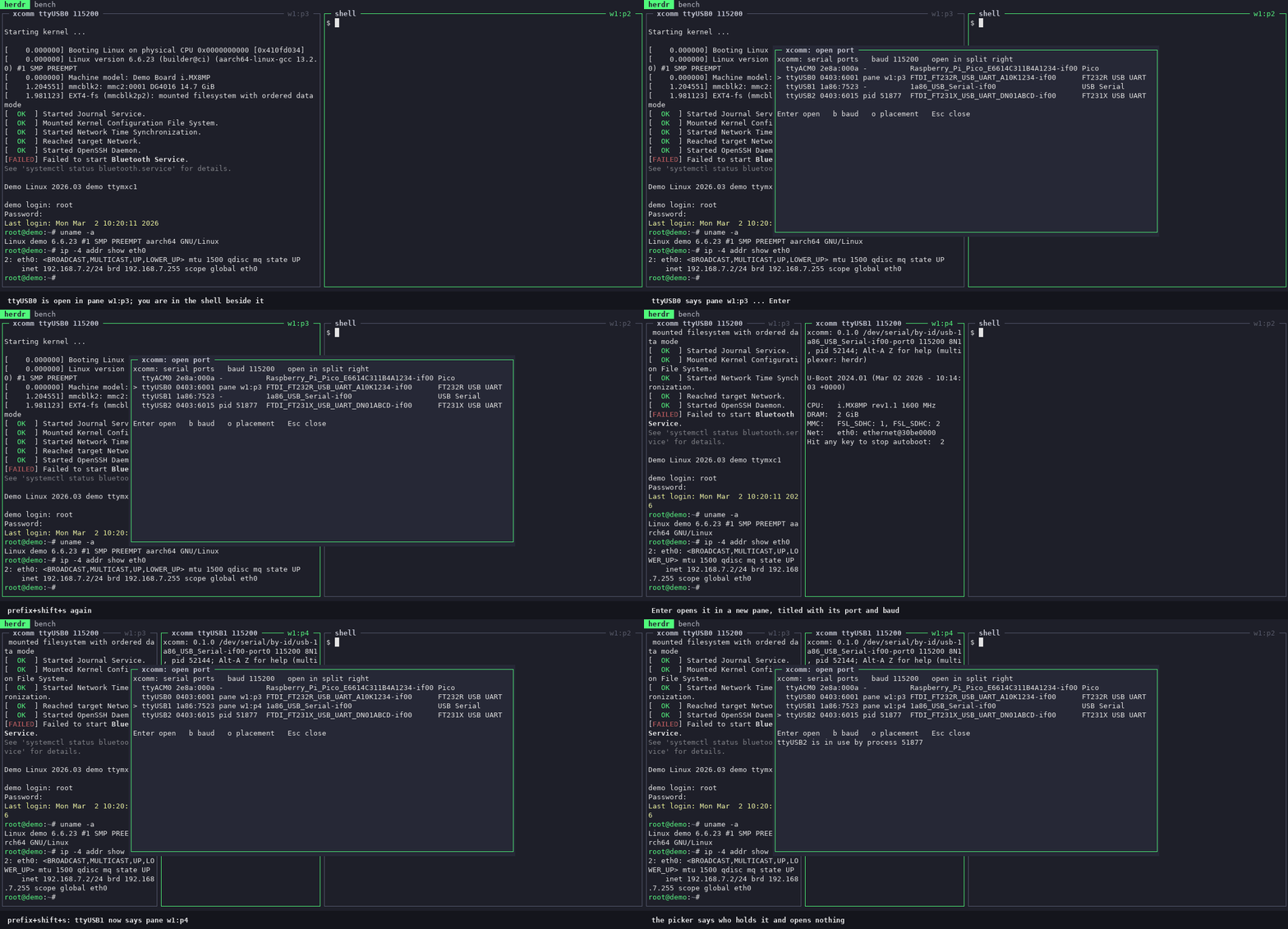
- Plug in a board, get a pane. The herdr plugin's picker opens each port in its own pane, or goes to the pane it is already in.
- Familiar. minicom's options and its
Ctrl-Akeys (Alt-Ainside a multiplexer).
Install
cargo install xcomm                  # needs Rust 1.96+
herdr plugin install cantona/xcomm   # the herdr plugin (builds and installs the binaries too)