Repository navigation
Releases
EOD World Editor 0.1 — Preview (Windows)

EOD World Editor for Windows
A 3D world editor for Test Drive: Eve of Destruction tracks, bundled with the Windows x64 remaster build.
- Fly through any retail track in a hardware-accelerated 3D viewport.
- Place, move, rotate and scale scenery, ramps, props, cars and wrecks; scatter brush.
- Edit AI racing lines (ILIN), collision (SCOL) and invisible walls (SOBL).
- Swap textures with high-resolution PNGs; borrow skies and fog between tracks.
- Play-In-Editor: test your edit in the game from the editor (F5 / Shift+F5).
- Share edits as delta-only
.eodmodpackages that contain no retail game data.
Install
- Unzip
EOD-Recomp-Windows-x64.zip. - Run
eod.exeonce and point it at your own North American PS2 disc image (SLUS_209.10). - Run
Launch EOD World Editor.bat. The first launch sets up the editor's Python environment.
Guides: World Editor · Tutorials · Wiki
Preview release. You need your own copy of the game.
SHA-256 EOD-Recomp-Windows-x64.zip: 2b2bb391913a91d8d3663876ca3c4877d7ff722e59bd62a56475dadd4003d457
EOD Creation Kit 0.3.2 — Customise your ride
EOD Creation Kit — Development Preview
Explore the world of Test Drive: Eve of Destruction, customise supported game assets, and test your changes in a separate game session.
- Browse vehicle and track archives with texture and recovered 3D previews.
- Edit supported vehicle settings and native textures.
- Export textures as PNGs, edit them in an image editor, and import them at their original dimensions.
- Save mods separately from your original game files.
- Launch saved mods in the included test runtime.
Requirements
Apple Silicon Mac running macOS 27 or later, Apple's Command Line Tools, and your own extracted North American PS2 game disc. Game assets are not included.
Get started
Extract the ZIP, move the app to Applications, and choose your extracted game folder with Game Folder. Open or create a project, edit a supported asset, then use Save & Build and Run Mod in Game.
Preview limitations
This is an early editing toolkit. Some asset types and model components remain unsupported. Texture imports retain the original dimensions and palette limits; 4K, PBR, HDR, arbitrary model import and live world editing are not available. This download is for macOS Apple Silicon; a Windows editor is not included.
New in 0.3.2
Bus texture edits now appear in the 3D preview. Saving a Bus body texture also updates the default race paint used by the test session.
EOD Creation Kit 0.3.1 — Development Preview
EOD Creation Kit — Development Preview
Explore the world of Test Drive: Eve of Destruction, customise supported game assets, and test your changes in a separate game session.
- Browse vehicle and track archives with texture and recovered 3D previews.
- Edit supported vehicle settings and native textures.
- Export textures as PNGs, edit them in an image editor, and import them at their original dimensions.
- Save mods separately from your original game files.
- Launch saved mods in the included test runtime.
Requirements
Apple Silicon Mac running macOS 27 or later, Apple's Command Line Tools, and your own extracted North American PS2 game disc. Game assets are not included.
Get started
Extract the ZIP, move the app to Applications, and choose your extracted game folder with Game Folder. Open or create a project, edit a supported asset, then use Save & Build and Run Mod in Game.
Preview limitations
This is an early editing toolkit. Some asset types and model components remain unsupported. Texture imports retain the original dimensions and palette limits; 4K, PBR, HDR, arbitrary model import and live world editing are not available. This download is for macOS Apple Silicon; a Windows editor is not included.
A newer preview is available: download 0.3.2.
Eve of Destruction Remaster 1.0
Eve of Destruction Remaster 1.0
The 2004 demolition racer on PC and Mac.
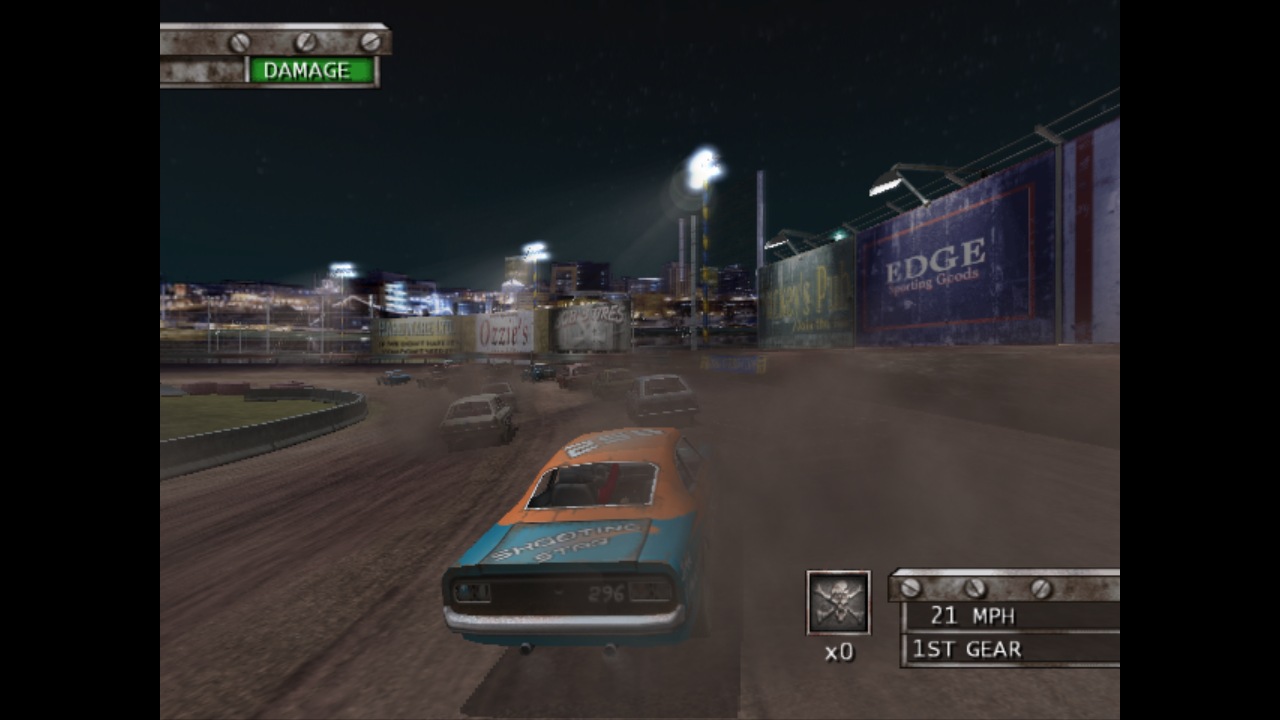
Pick your game ISO, choose a car, and head for the dirt oval. Play local split screen, host an online lobby, or take the school bus into Battle.
- PC and Mac. Windows x64 and Apple Silicon downloads.
- Choose your ISO. The app installs the game files automatically and remembers them for your next launch.
- Controller navigation. D-pad menus, shoulder-button tabs and controller confirmation after entering a join code.
- Online lobbies. Host, join by Garage Code or LAN, choose your car and paint, and return for a rematch.
- Your screen name. Choose a nickname or use a random callsign.
- Host-controlled rules. Set gameplay modifiers for everyone before the race.
- Your soundtrack. Play MP3, AAC, FLAC and WAV files, with separate music volume.
- Display options. Widescreen, original 4:3 and adjustable internal resolution.
Bring your own North American PS2 copy of Test Drive: Eve of Destruction. Unzip the download for your platform and open the app.
Online play preview (preview-2026-11-08-online)
Experimental macOS Apple Silicon build. Requires the owner's North American game disc. The public app is ad-hoc signed and starts in retail-content mode. Personal disc-derived mods are excluded.
Online changes include lobby track/car selection, automatic Arcade prompt handling, a non-pausing overlay, and voice integration. In a two-process localhost race the host and guest initially exchanged positions, then guest terrain placement failed and fresh guest updates stopped. Internet racing, physical microphone behavior and cross-platform performance remain unverified.
Windows x64 preview from commit 86bca90 includes the game, setup utility, Direct3D 11 and Opus. Cross-compiled on macOS. Windows hardware gameplay and frame-time parity are untested.
Online lobby and rematch preview
Online lobby and rematch preview for the North American retail disc. Apple Silicon macOS uses an ad-hoc signature and retail content. Personal disc-derived mods are excluded.
A host and guest on one Mac each selected Trailer2, raced at Anoka, returned to the same lobby and started a second race. All four race-to-lobby returns completed in 0.18–0.22 seconds. The native Arcade launch and Eve cleanup now select the intended screen across rematches. The Online tab shows the current phase, pins the host code and player list, shows editable options only in the lobby, and distinguishes unavailable microphone capture from an enabled preference.
This is a preview. The previous remote-car synchronization defect, physical voice on different machines and Windows performance parity are still open. The local 19 FPS symptom in Career free roam has not been reproduced in the repaired build.
Online rematch and controller preview
Apple Silicon macOS and Windows x64 preview. Requires the North American retail disc. Mac ZIP runs with retail content and uses a local ad-hoc signature. Windows ZIP includes eod.exe and eodsetup.exe.
- Host and guest keep their party across race exits and rematches. The Online tab keeps the code and roster in view. Controller focus stays on the selected action as the roster changes.
- Native Mac and Windows x64 through CrossOver on an M2 Pro completed two-race localhost rematches in both hosting directions. A scripted controller also hosted, started, ended and returned without using a keyboard. These are bounded compatibility tests.
- Admission allows 16 occupants including the host. Race seats depend on the event. Battle has at most 10 total cars. Opus supports player IDs 0–3. Host-adjustable room size is not implemented.
See the illustrated README and host and guest acceptance matrix. Long-race remote-car drift, WAN behavior, physical microphone coverage and native Windows GPU performance remain open.