Repository navigation
Releases: chaunceygardiner/weewx-nws
Release list
Release v6.1.2

weewx-nws 6.1.2
The seven-day chart now says which half is the station's own record and which
is the forecast, every color in the sample report clears two contrast
measures in both light and dark, alert cards say what NWS recommends doing
and where the alert applies, and three alert mistakes are fixed.
Nothing to configure and no tag changed. There is a schema change, but the
database rebuilds itself on the first start, as it has since 6.1. Install
over the top and restart WeeWX.
What's new
-
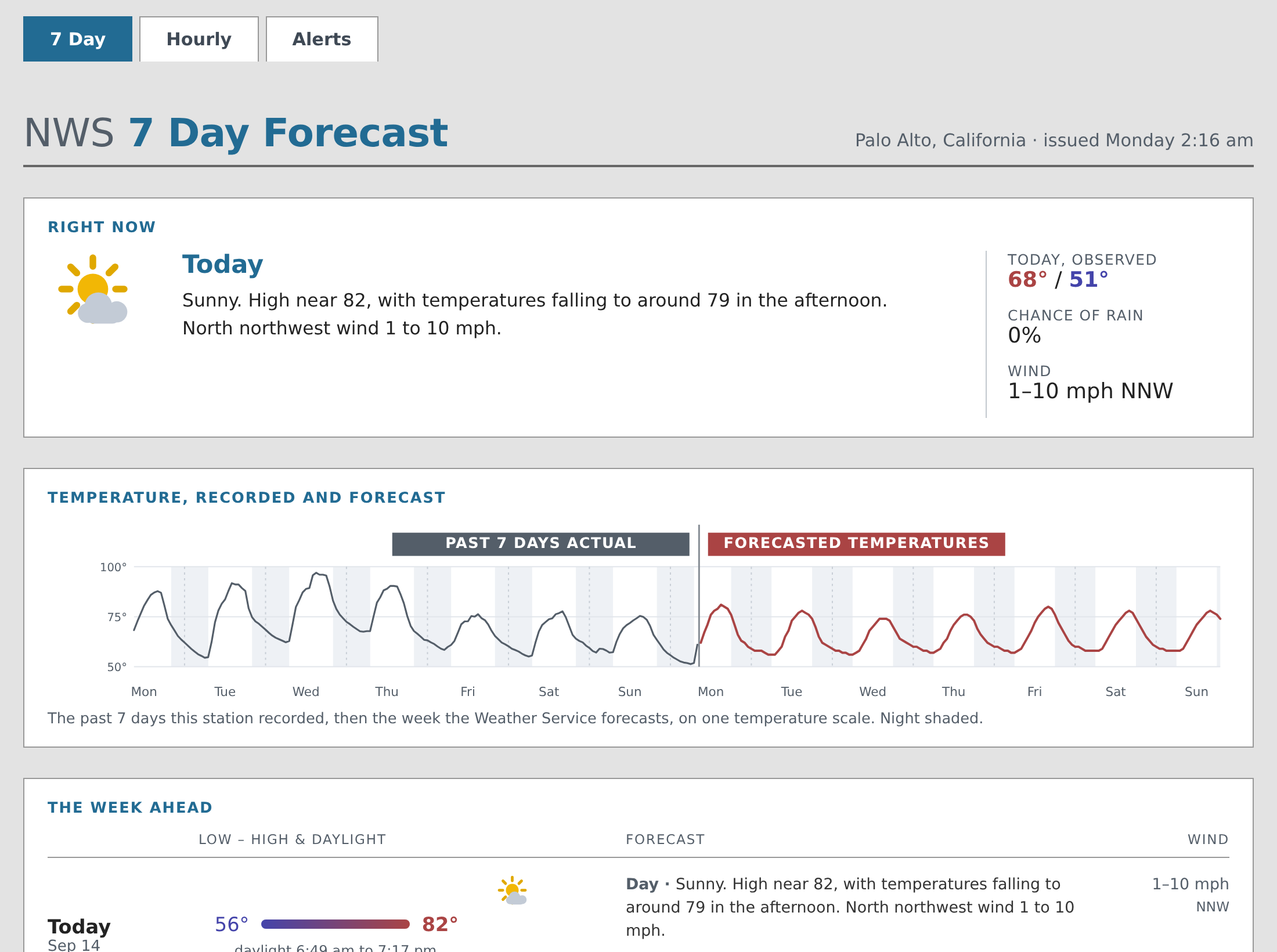
The seven-day chart names its two halves. A filled label each side of
the dividing rule —PAST 7 DAYS ACTUALin the recorded curve's gray,
FORECASTED TEMPERATURESin the forecast curve's red — so each label is
also the key to its line. The bare wordsOBSERVEDandFORECASTthey
replace read as one phrase at chart size.The labels count what the station actually recorded. One that has been up
three days says three days; one whose sensor died counts only the hours it
has, while the chart still draws the whole week, hole and all. A station
with under about five and a half days behind it gets no labels at all, and
the caption names the halves instead. -
A screen reader can read those labels. They used to be text inside the
chart, which is marked up as a single image with one description, and that
hides everything drawn inside it. They are ordinary text beside the chart
now. -
Every color clears two contrast measures, in both themes. Text reaches
a WCAG 2 contrast ratio of 4.5 and an APCA Lc of 60 on every ground it
can land on, whatever its size; chart lines and markers a reader has to
find reach 3.0 and Lc 30. The WCAG ratio alone had passed the whole dark
palette while APCA, the model written to replace it, scored most of its
text too faint — the dimmest gray at Lc 35.In dark mode the text, the alert severity colors and the chart colors are
all noticeably lighter as a result. In light mode two colors moved: the
page title's blue is a shade darker, and the chart axes and the dividing
rule are a darker gray.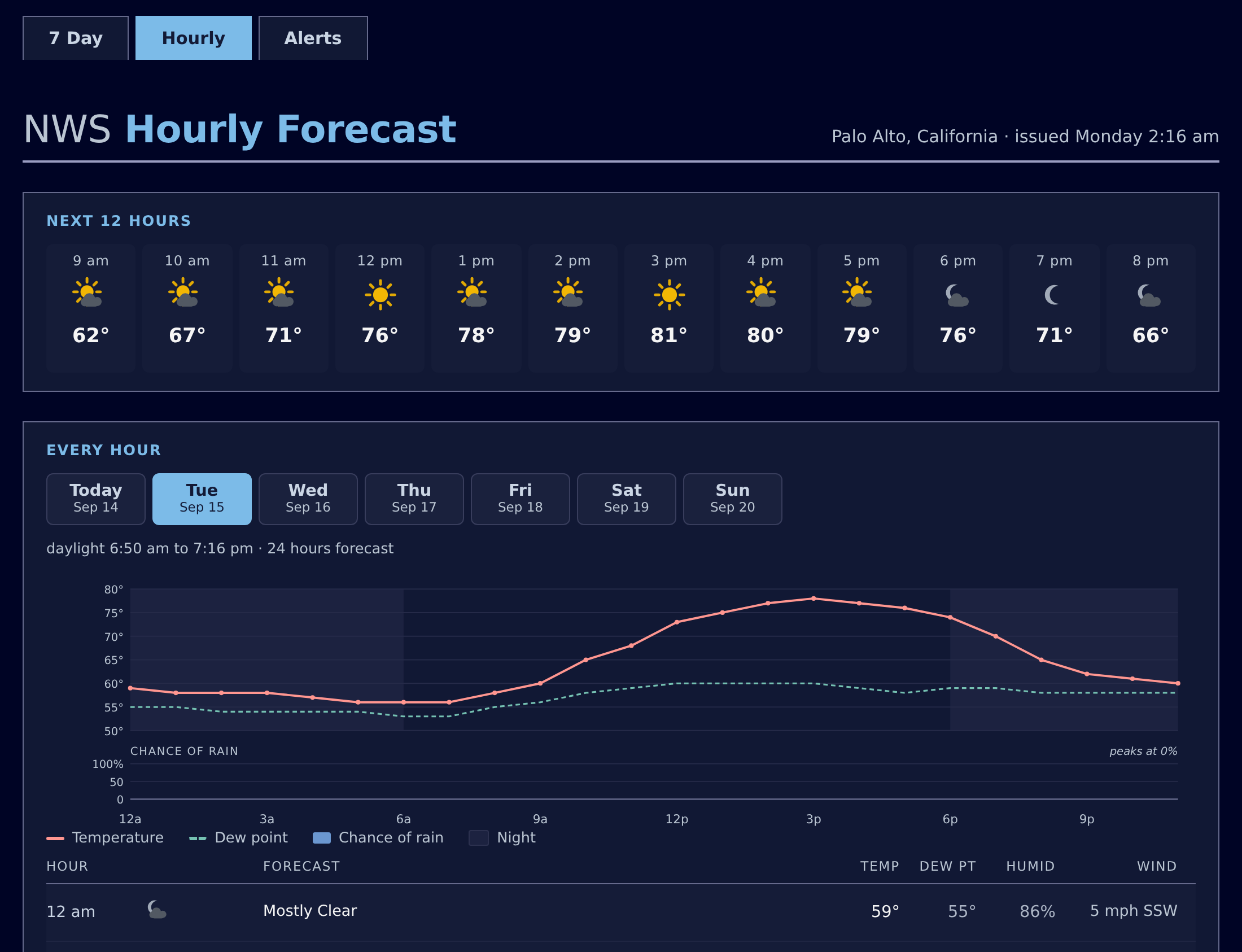
-
Alert cards say what to do and where. A second, uncolored chip beside
the severity gives NWS's recommended action in plain words —ACT NOW,
TAKE SHELTER,AVOID— and a line under the headline names the areas the
alert covers. About four alerts in ten, nearly all marine, have no WHERE
section in their description, so that line is often the only place the
areas appear. A long list (a marine alert can name dozens of zones) folds
behind its count.For your own skin,
$nwsforecast.alerts()now returnsareaDesc,
responseandparameters— the last NWS's whole parameters object as a
dict, stored for whatever use comes later.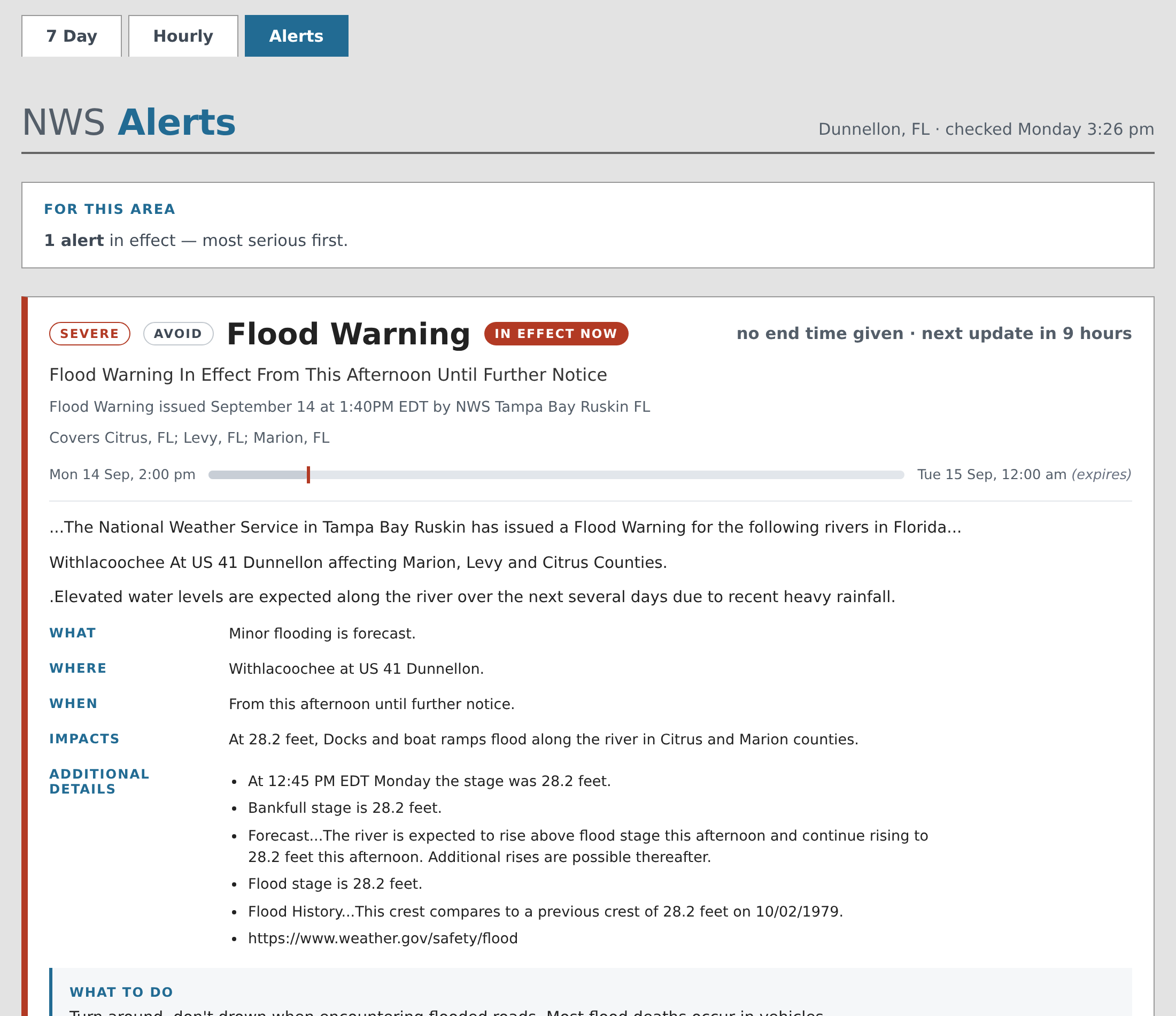
-
The caption under the seven-day chart no longer promises dew point and
rain. It ended with a link to the Hourly page reading "Hour by hour, with
dew point and rain", which, sitting under a temperature-only chart, read as
a claim about that chart. The menubar already carries Hourly on every page.
What's fixed
-
An alert with no onset no longer shows its start as
N/A. NWS does not
always say when the weather starts. Such an alert was already treated as in
effect from the moment its message took effect, and its window bar was drawn
from that time — but the time printed at the start of the bar was the
missing onset. It now prints the effective time, marked(effective), the
way a missing end has always been marked(expires). -
An alert with more than one headline keeps them all. NWS sends its
headline as a list; only the last entry was kept, and an alert whose list
was empty was dropped as malformed. -
An alert whose end falls at or before its start shows both times.
Nothing NWS means to send, but the card used to say "no end time given",
which was false.
Requirements
- Python 3.9 or later
- WeeWX 5 (WeeWX 4 users: weewx-nws 4.5.7 was the last release to support
WeeWX 4) - The python
requestsanddateutilpackages (see the README)
Installing/upgrading
Restart WeeWX after every upgrade, whatever version you are coming from.
WeeWX loads the extension's code only at startup, and the sample report's
templates expect the code they shipped with.
Installing replaces the bundled skin (skins/nws/), as it always has. If you
customized it, copy your changes before upgrading.
-
Download
weewx-nws.zipfrom this release. -
Install it right over the existing version. On a pip install
weectl
lives in the virtual environment, so activate it first (yours may sit
elsewhere;~/weewx-venvis the usual place):source ~/weewx-venv/bin/activate weectl extension install weewx-nws.zipOn a Debian or Red Hat package install there is no environment to activate
andweectlis already on the path:weectl extension install weewx-nws.zipNo
sudo: that install put your account in theweewxgroup, which owns
the files. -
Restart WeeWX.
Release v6.1.1
weewx-nws 6.1.1
A small follow-up to 6.1: the seven-day chart's dividing rule is drawn where the
boundary actually is, its temperature scale no longer loses a digit on a phone,
and a database weewx-nws cannot use now says so instead of stopping WeeWX.
Nothing to configure, no schema change, and no tag changed. Install over the
top.
What's fixed
-
The rule between the two weeks sits between them. It was drawn on the
first forecast hour, which put it against one curve while leaving it a full
hour clear of the other — so the gap read as a mistake on one side. It now
falls midway between the last reading and the first prediction, equidistant
from both.It also runs the full height of the chart now, through the label band rather
than stopping at the top of the plot. With nothing between them,OBSERVED
andFORECASTread as one phrase — which is worse than the bare line they
were added to explain. The line is what makes them two labels. -
A hundred-degree afternoon no longer loses its leading digit. On a
narrow screen the chart scales its axis labels up, and the space reserved for
them had been sized for a two-digit reading. Three digits are wider, so the
top of the scale could render as.00— not an untidy chart but a wrong one,
since nothing on the page then said the scale reached 100.The room is now measured rather than estimated, and measured with margin: the
width of a label depends on which font the reader's machine actually
substitutes, and that is not knowable from here. -
A non-SQLite database is refused, by name. weewx-nws keeps its forecasts
in a SQLite database of its own and cannot use any other kind — its schema
declares column types that MySQL does not have. Pointing[NWS] data_binding
at a MySQL database used to produce a raw SQL syntax error while the service
was starting, which stopped weewxd itself: the whole station, not just
this extension. It now logs what is wrong and what to change, and WeeWX
carries on running.Every station the installer set up uses SQLite, so this changes nothing for
anyone whose forecasts are working.
Requirements
- Python 3.9 or later
- WeeWX 5 (WeeWX 4 users: weewx-nws 4.5.7 was the last release to support
WeeWX 4) - The python
requestsanddateutilpackages (see the README)
Installing/upgrading
Download weewx-nws.zip from this release and install right over the existing
version. On a pip install weectl lives in the virtual environment, so
activate it first (yours may sit elsewhere; ~/weewx-venv is the usual place):
source ~/weewx-venv/bin/activate
weectl extension install weewx-nws.zip
On a Debian or Red Hat package install there is no environment to activate and
weectl is already on the path:
weectl extension install weewx-nws.zip
No sudo: that install put your account in the weewx group, which owns the
files.
Restart WeeWX. As always, installing replaces the bundled skin
(skins/nws/) — if you customized it, copy your changes before upgrading.
Release v6.1
weewx-nws 6.1
The seven-day page now shows two weeks of temperature: the week your station
recorded, then the week the National Weather Service forecasts, on one shared
scale. Your own back yard beside NWS's grid square, hour by hour, with the
join between them marked and named.
One scale for both halves is the point. A cold snap last week rescales the
forecast half, and warm for the week and warm for the fortnight are
different claims — only a shared scale can tell them apart.
It also fixes two bugs that had been there for as long as the code has: one
alert with no onset time threw away every alert for your station, and a report
set to metric got Fahrenheit and miles per hour.
Upgrading is install-over-the-top and needs no weewx.conf edits. The database
schema changed, and for the first time that costs you nothing — weewx-nws
notices an out-of-date database at startup and rebuilds it, where earlier
releases told you to delete nws.sdb yourself and did nothing at all until you
did. As always, installing replaces the bundled skin (skins/nws/) — if you
customized it, save a copy first.
What's new
-
Two weeks of temperature on the seven-day page. Every hour your station
recorded for the past week, then every hour NWS forecasts for the week
ahead, night shaded, on one temperature scale. Point at the chart to read
any hour; the reading says whether it is observed or forecast. The two
curves are deliberately not joined across the seam: NWS forecasts a grid
square and your station measures its own back yard, so the last reading and
the first forecast hour seldom agree exactly, and that step is worth seeing
rather than smoothing away.
→ The sample report -
It draws the history you have, not the history it wishes you had. A
station that has been running three days draws three days — not a week, four
sevenths of which would be invented. A station with no archive at all,
which is every fresh install, gets exactly the forecast-only chart of 6.0.
And an hour your station recorded nothing in leaves a gap in the line rather
than a confident stroke across it, so an outage reads as an outage instead
of as weather. -
A report set to metric now gets metric. Every value the
$nwsforecast
tags returned came back in the units NWS serves — °F and mph — whatever your
[Units]settings said, so a metric page printed a Fahrenheit number beside
a °C label and an mph number beside a km/h one. The tags now build their
values with your report's own converter and formatter, like every other
WeeWX tag, so.raw,.format()and a bare tag all give your units. See
the action-required note below if you print these tags in a skin of your
own.
→ Values, and formatting them -
The chart's temperature scale is readable on a phone. The axis labels
are drawn in the chart's own coordinates and scale up as the chart is
squeezed, and the gutter left for them was sized for a desktop — so a narrow
screen clipped the leading digit off every one of them, showing0°, 7°, 5°
for an axis reading 90, 67 and 45. That was a wrong chart, not an untidy
one. All three charts now reserve room for the largest label at the largest
size. -
An alert's severity is now written on the card. It sits in a chip beside
the event —SEVERE,MODERATE— where there used to be a bare colored dot.
Severity had been reaching you as color and nothing else: a rail color and
that dot, with the word itself appearing once, sixth in a six-item gray
footer. Color alone says nothing to a reader who cannot see the difference,
and it mattered more here than that rule suggests — the cards are sorted by
severity and the line above them says "most serious first", so the page
announced that the order meant something while hiding the key. The rail now
reinforces the chip instead of carrying the meaning alone. -
One alert with no onset no longer discards every alert for your station.
NWS does not have to say when an event begins, and the sanity check treated a
missing onset as a malformed reply — so the whole batch went in the bin and
the alerts page went on showing the previous one until NWS happened to send a
batch without one. In a national snapshot that was 3 alerts of 356, two of
them Evacuation Immediate. The failure was silent by design: a rejected
reply logs and keeps the old data, so the page still looked current.The rule behind the fix, measured against that snapshot: NWS always says when
it spoke —sent,effectiveandexpireswere present on all 356 — and
does not always say when the weather starts or stops (onsetabsent on 3,
endson 23). Message times are required; event times may be absent, and are
now stored as the nothing NWS sent rather than as a message time wearing an
event's name.An absent event time then falls back to the message time that answers the same
question, and it happens inalert_window()rather than in the database: no
onset means in effect fromeffective, which is CAP's own reading. That
half matters more than it sounds — without it, an alert with no onset never
reads as active, so an Evacuation Immediate in effect right now would be
badged "Not yet begun". -
The database rebuilds itself. The schema has changed several times over
this extension's life, and the instruction was always the same: stop WeeWX,
deletenws.sdb, start it again — with the extension doing nothing at all,
no polling and no tags, until you did. It now notices at startup, says what
differs, and rebuilds the table. Nothing is lost that was ever read: no page
looks at a row older than the current forecast, and the next poll refills it. -
A forecast that does not say it is in US units is rejected rather than
stored. weewx-nws sends no units parameter and api.weather.gov answers
us, but a forecast URL pasted intoweewx.confcan carry?units=si— and
such a reply used to be stored in a way nothing downstream read, so Celsius
would have been served as Fahrenheit. The log line names the cause and says
what to change.
Action required
Only if you print these tags in a skin of your own. An unmodified
NWSReport needs nothing, and neither does a skin that never appends a unit
label by hand.
-
Delete any
$unit.label.…you append after.format(). Until 6.1 these
tags carried no formatter, so.format('%.0f')returned a bare71and
every example in the manual told you to add the label yourself. It now
returns71°F, and the old idiom prints71°F°F.$hour.outTemp.format('%.0f')$unit.label.outTemp ## was 71°F, now 71°F°F $hour.outTemp.format('%.0f') ## 71°FFor a range, suppress the first label rather than the second:
$hour.windSpeed.format('%.0f', add_label=False) to $hour.windSpeed2.format('%.0f') -
If your skin reads
$alert.endsdirectly, test.raw. For an alert NWS
gave no end for,$alert.ends.rawis nowNonewhere it used to be a copy
of the alert's expiry;$alert.onset.rawcan likewise beNone. The tags
are always ValueHelpers, so#if $alert.ends is not Noneis always true and
always was — ask.raw.$nwsforecast.alert_window()is unchanged and
remains the right way to ask: it still hands back
(onset, finish, open_ended)withfinishfalling back to the expiry, so a
skin using it needs nothing. -
If you worked around the metric bug, drop the workaround. Asking for a
conversion explicitly —$hour.outTemp.degree_C,$hour.windSpeed.km_per_hour
— is still correct and needs no change, because converting Celsius to Celsius
does nothing. But a hard-coded °F label, or your own arithmetic on.rawto
reach metric, will now convert twice.
The manual's Tags, Fields and Recipes pages are updated throughout.
Requirements
- Python 3.9 or later
- WeeWX 5 (WeeWX 4 users: weewx-nws 4.5.7 was the last release to support
WeeWX 4) - The python
requestsanddateutilpackages (see the README)
Installing/upgrading
Download weewx-nws.zip from this release and install right over the
existing version. On a pip install weectl lives in the virtual environment,
so activate it first (yours may sit elsewhere; ~/weewx-venv is the usual
place):
source ~/weewx-venv/bin/activate
weectl extension install weewx-nws.zip
On a Debian or Red Hat package install there is no environment to activate
and weectl is already on the path:
weectl extension install weewx-nws.zip
No sudo: that install put your account in the weewx group, which owns the
files.
Restart WeeWX. The two-week chart fills in as your archive does — a station
with a week behind it shows a full week on the first report cycle after the
restart.
Release v6.0
weewx-nws 6.0
The forecast pages are redesigned, and they follow your device's light or
dark setting. Three pages — seven day, hourly and alerts — rebuilt from the
ground up: a week you can take in at a glance, charts you can point at, a day
at a time you can tab through, and alerts that read like alerts instead of
like teletype. One responsive page serves a phone and a desktop, so there is
no mobile twin to keep in step.
The themes are the part worth seeing. The pages honor prefers-color-scheme
— the appearance setting on the reader's own device — so someone whose phone
switches at sunset gets a dark page at their sunset, with no toggle to click
and no preference to store.
The pages fetch nothing — no request to api.weather.gov, no font or script
from anywhere else, and no reloading of themselves.
Upgrading is install-over-the-top and needs no weewx.conf edits. As always,
installing replaces the bundled skin (skins/nws/) — if you customized it,
save a copy first.
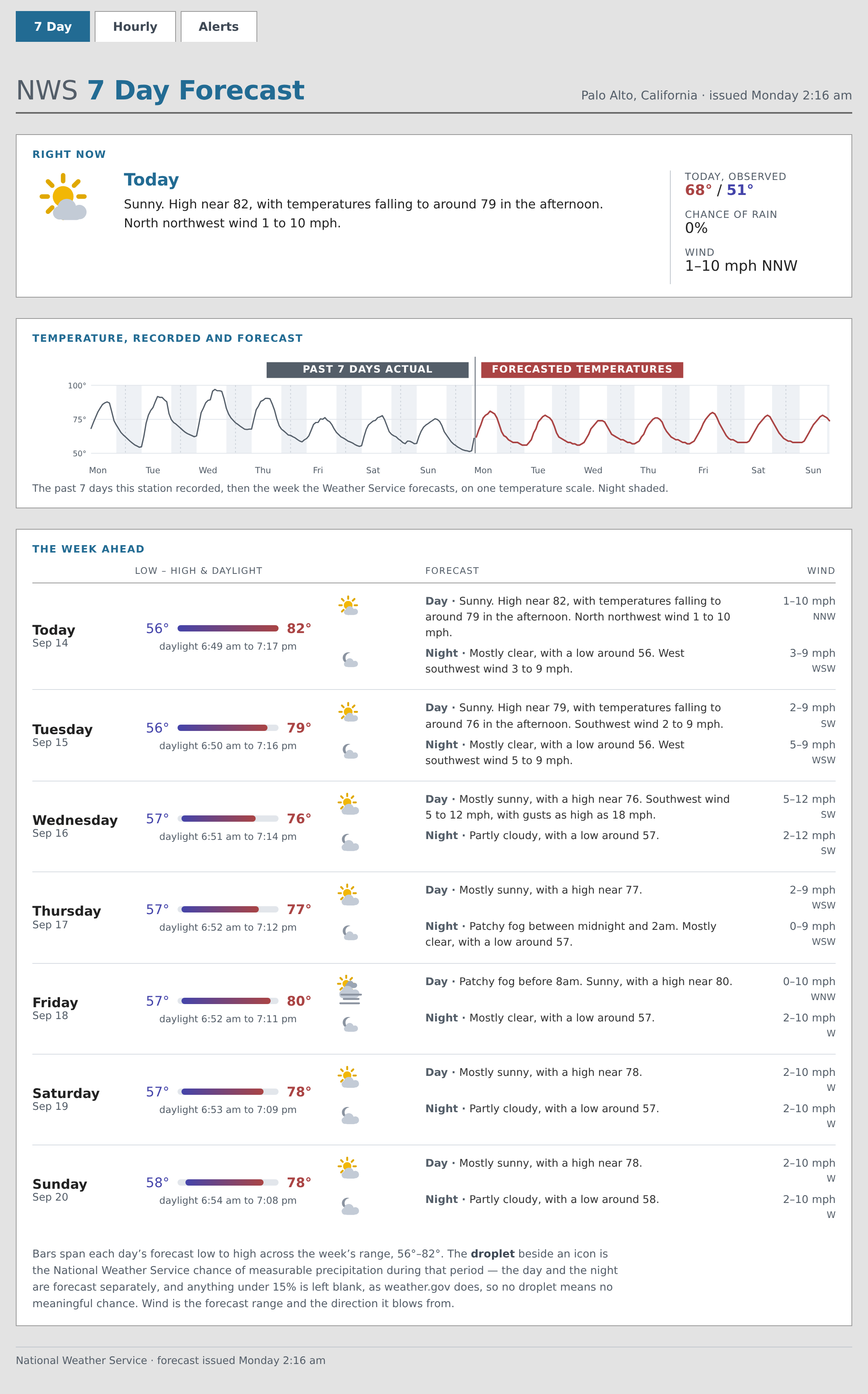
The whole seven-day page:
An alerts page with weather on it — a tropical storm warning, with the
description's own sections as real structure and a bar showing where now
falls in the alert's window:
The hourly page, at a reader whose device is set to dark:
And on a phone — one responsive page, not a second mobile skin to maintain:
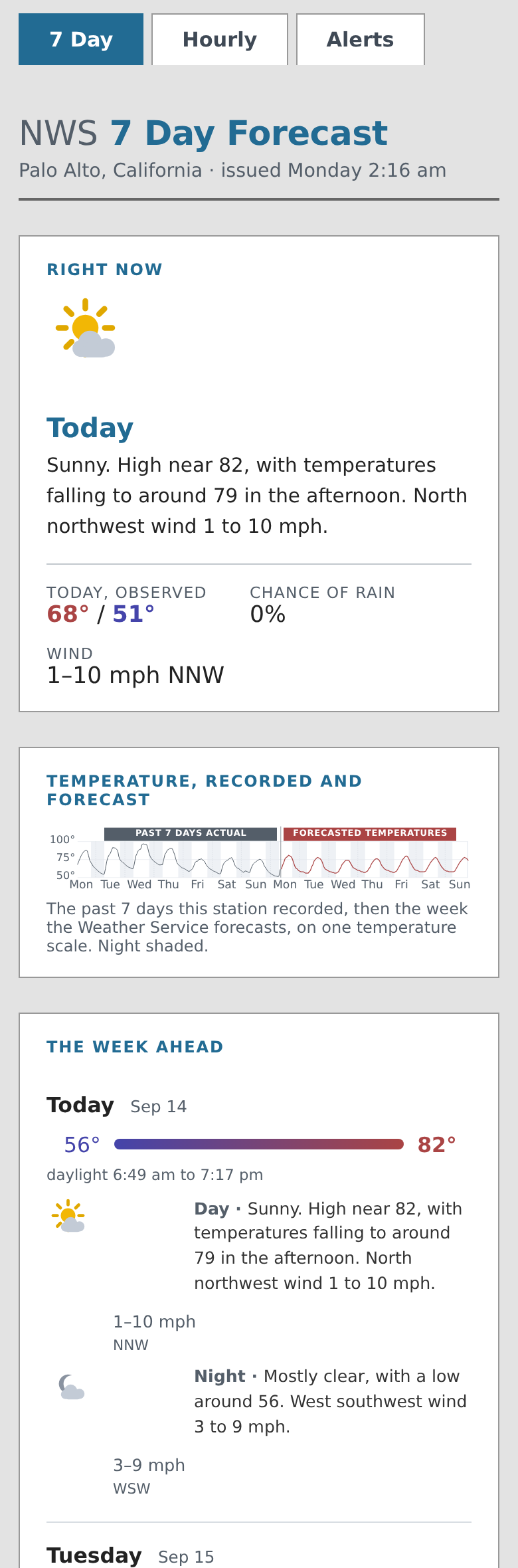
What's new
-
A sample report worth putting on your site. The seven-day page leads
with a "Right now" card and a sparkline of the week, then gives one row per
calendar day carrying that day's low-to-high bar against the week's
range, its daylight, and each period's icon, chance of rain, forecast and
wind. The hourly page gives the next twelve hours at a glance, then a tab
per day carrying that day's chart — temperature, dew point and rain — and
its hour table; the whole week is one curve at the foot. Point at a chart,
or drag a finger across it, to read any hour — or reach it with Tab
and walk it with the arrow keys, since a forecast should not need a mouse. The alerts page gives each
alert a card with a severity-colored rail, a status badge, a bar showing
where now falls in the alert's window, and the description's own sections
as real structure.
→ The sample report -
No theme toggle, deliberately. A toggle needs javascript, storage and
a visible control, and everyone who copied this skin would inherit a widget
they might not want — so the reader's own device setting is the whole
input. Every color on the page is a custom property, so a copy of the
skin can restyle any part of it by redefining a property rather than by
editing rules. -
Alert text that reads like text. A CAP description is now turned into
the structure NWS actually writes. Starred lines whose label is shouted
(* WHAT...,* LOCATIONS AFFECTED) become labeled sections; starred
lines whose text is ordinary prose (* Until 730 PM EDT.) become bullets,
where they used to reach the page with the asterisk still in them; bare
HAZARD...,SOURCE...andIMPACT...labels, which is how severe
thunderstorm and flash flood products are written, become sections too.
Measured across the whole national feed: 391 active alerts, 697 labeled
sections, 904 bullets, and no stray punctuation reaching a page. -
weewx-nws draws its own weather icons.
$nwsforecast.icon()turns a
period's icon URL into an<svg>naming one of 68 drawn symbols — 34 NWS
conditions, day and night. Drawn icons stay crisp at any size, take their
colors from your stylesheet, and avoid the split "X then Y" composites the
photographs produce, which read as rendering glitches at the size a
forecast table uses. The pages make no request to NWS at all. Three sets
of names are a contract and will not change without a major version: the
symbol ids, the css classes on the emitted markup, and the--wx-*custom
properties that color the drawings.
→ Drawn icons -
An
unknownicon no longer discards the whole forecast. NWS sometimes
gives a period the icon nameunknown, meaning it has none for that
period. That used to fail the entire reply in the sanity check — throwing
away up to 156 periods of good data over one missing glyph, and leaving the
site serving the previous forecast until NWS sent a clean one. Such
periods are now stored, logged once per reply with a count, and rendered as
an empty icon box. -
Ten new tags, returning data rather than markup.
days()and
hour_days()group periods by the calendar day each one starts in;
points()unwraps hourly records into the plain numbers a chart needs;
week_range()gives one shared temperature scale;line_label()keeps
NWS's period name only where it says something the row does not;
ordered(),is_active(),alert_state()andalert_window()rank
alerts and reckon an alert's window, including the one in ten that never
ends;parse_description()turns a CAP description into labeled sections;
andnice_caps()title-cases NWS's shouted headlines without flattening
its acronyms. Nothing existing changed — the tag surface only gained.
→ Report tagsEach one answers a question the feed makes harder than it looks. Grouping
by walking day/night pairs, for instance, puts one date on two consecutive
rows and labels the leading one "Tonight" at dawn; and an alert has ended
when its finish has passed whatever its onset says, which is not the same
as "started but not active", because NWS does not always send an onset. -
The installer explains itself. The
[NWS]section written into
weewx.confnow carries a comment for every option, and any option that
merely selects a default is written commented out — so the extension's own
value goes on governing, including a better one a later release might
bring. Uncomment a line to pin your station to it. -
The dark palette is derived, not picked. Every color reproduces its
light counterpart's prominence against the ground it actually sits on, so a
severe alert still reads as more urgent than an ordinary one and a cloud
still reads as a cloud. -
A user manual. Installation, configuration, every tag and field, the
sample report, gridpoints, the command-line utilities and troubleshooting,
with search. The README is now a summary that links to it.
→ weewx-nws manual
Upgrading notes
None of this needs action, but three things are worth knowing.
-
The bundled skin is replaced. As with any release, installing
overwritesskins/nws/. Copy anything you customized before upgrading.
→ Making it your own -
Two files are left behind.
weectladds and overwrites but never
removes, soskins/nws/style.incsurvives from an earlier install, and a
5.1-or-earlier install also leaves the 204 icon photographs in
skins/nws/nws_icons/and in the report'sHTML_ROOT. Nothing reads any
of them. Delete at leisure:rm -f /home/weewx/skins/nws/style.inc rm -rf /home/weewx/skins/nws/nws_icons /home/weewx/public_html/nws/nws_icons -
The database is unchanged. There is no schema change in this release,
sonws.sdbcarries over untouched.
Requirements
- Python 3.9 or later
- WeeWX 5 (WeeWX 4 users: weewx-nws 4.5.7 was the last release to support
WeeWX 4) - The python
requestsanddateutilpackages (see the README)
Installing/upgrading
Download weewx-nws.zip from this release and install right over the
existing version. On a pip install weectl lives in the virtual environment,
so activate it first (yours may sit elsewhere; ~/weewx-venv is the usual
place):
source ~/weewx-venv/bin/activate
weectl extension install weewx-nws.zip
On a Debian or Red Hat package install there is no environment to activate
and weectl is already on the path:
weectl extension install weewx-nws.zip
No sudo: that install put your account in the weewx group, which owns the
files.
Restart WeeWX. The pages appear at <HTML_ROOT>/nws/ on the first report
cycle after the restart.
Release v5.1
weewx-nws 5.1
WeeWX could fail to shut down if the stop signal arrived while weewx-nws
was fetching forecasts at startup or saving them at the end of an archive
period. Nothing else changes: no weewx.conf edits. This is a drop-in
upgrade.
What's new
- Shutdown can no longer be swallowed by NWS code. WeeWX stops by
raising an exception from its TERM signal handler, inside whatever code
is running when the signal lands. If that was weewx-nws's startup
forecast fetch or its end-of-archive-period database save, the broad
error handlers there logged the shutdown exception and continued, and
weewx failed to stop. Those handlers now pass the shutdown through, so
weewx stops promptly. (The steady-state forecast polling runs in
weewx-nws's own worker threads and was never affected.)
Requirements
- Python 3.9 or later
- WeeWX 5 (WeeWX 4 users: weewx-nws 4.5.7 was the last release to support
WeeWX 4) - The python
requestsanddateutilpackages (see the README)
Installing/upgrading
Download weewx-nws.zip from this release, then:
weectl extension install weewx-nws.zip
Restart WeeWX. No weewx.conf changes are needed when upgrading from 5.0.
Note that upgrading replaces the bundled skin (skins/nws/) — if you
customized it, save a copy first.
Release v5.0
weewx-nws 5.0
weewx-nws 5.0 is a modernization release: it requires WeeWX 5 and Python 3.9,
folds the grid-check utility into the extension itself (no more matplotlib),
adds a comprehensive automated test suite, and fixes two long-standing bugs —
ENE wind directions were reported 10 degrees off, and ranged wind speeds
("2 to 9 mph") rendered as raw template text on the sample report's hourly
page.
WeeWX 4 users: weewx-nws 4.5.7 remains available and is the last release
to support WeeWX 4.
What's new
- WeeWX 5 and Python 3.9 or later are now required (hence the major
version bump). --check-gridis built in. The standalonecheck_grid.pyutility has
been folded into nws.py, so it no longer requires matplotlib and works on
any installed system (previously it required a checkout of the repository).
It checks whether NWS maps your latitude/longitude to the correct forecast
gridpoint and, if not, prints the weewx.conf lines that hard code the
correct one:python /home/weewx/bin/user/nws.py --check-grid --latitude 37.431495 --longitude -122.110937- A test suite (pytest, 77 tests, no network needed): the forecast and
alert parsers against real captured NWS responses, the sanity checks'
accept/reject rules, the service's save/dedupe/delete logic against a real
database, the$nwsforecastsearch list, HTTP error handling, and full
Cheetah renders of all three sample-report pages. A companion harness,
tests/verify_cli.py, runs every nws.py command-line option against live
NWS and reports PASS/FAIL per option. See the README's "Testing and
development" section. - Forecast sanity checking now validates the response's geometry (the
gridpoint polygon). A forecast without one was already rejected, but late
and without logging the raw response; now it is rejected up front with the
response text in the log. --test-servicenow honors the--bindingoption (it was accepted but
ignored since it was introduced in 2020).- README overhaul: a complete configuration reference for the
[NWS]
section (including previously undocumented options), documentation for
every nws.py command-line utility, and a testing guide.
What's fixed
- ENE wind directions were 10 degrees off: forecasts with an
east-northeast wind reportedwindDiras 77.5 degrees; ENE is 67.5
degrees. - Ranged wind speeds on the sample report's hourly page: a forecast wind
of "2 to 9 mph" rendered literal template text instead of the upper speed,
due to a missing$in hours.html.tmpl.
Requirements
- Python 3.9 or later
- WeeWX 5
- The python
requestsanddateutilpackages (the README's installation
instructions cover installing them — they are not WeeWX dependencies)
Installing/upgrading
Download weewx-nws.zip from this release, then:
weectl extension install weewx-nws.zip
Restart WeeWX. No weewx.conf changes and no database changes are needed when
upgrading from 4.5.4 or later. Upgrading from a version earlier than
4.5.4: you must delete the nws database (nws.sdb) after installing and
before restarting WeeWX — the schema changed in 4.5.4. Note that upgrading
replaces the sample skin (skins/nws/) — if you customized its templates,
save a copy first.
Release v4.5.7
Account for NWS sending forecasts with temperatureTrend = null
Add more detail to log when sanity check fails.
Release v4.5.6
Release v4.5.6 returns to being more strict when sanity checking forecasts.
Release 4.5.5
Release 4.5.5 is a small release that logs extra information for a couple of cases where the json returned from NWS is malformed.
Release v4.5.4
Release v4.5.4 is more forgiving of malformed forecasts from NWS.