Repository navigation
Releases
Crescendo 1.4.5

Crescendo 1.4.5
Crescendo is a guided circuit optimizer for Cadence Maestro. Each release contains the window, the optimization engine, the Virtuoso menu loader and a synthetic demo.
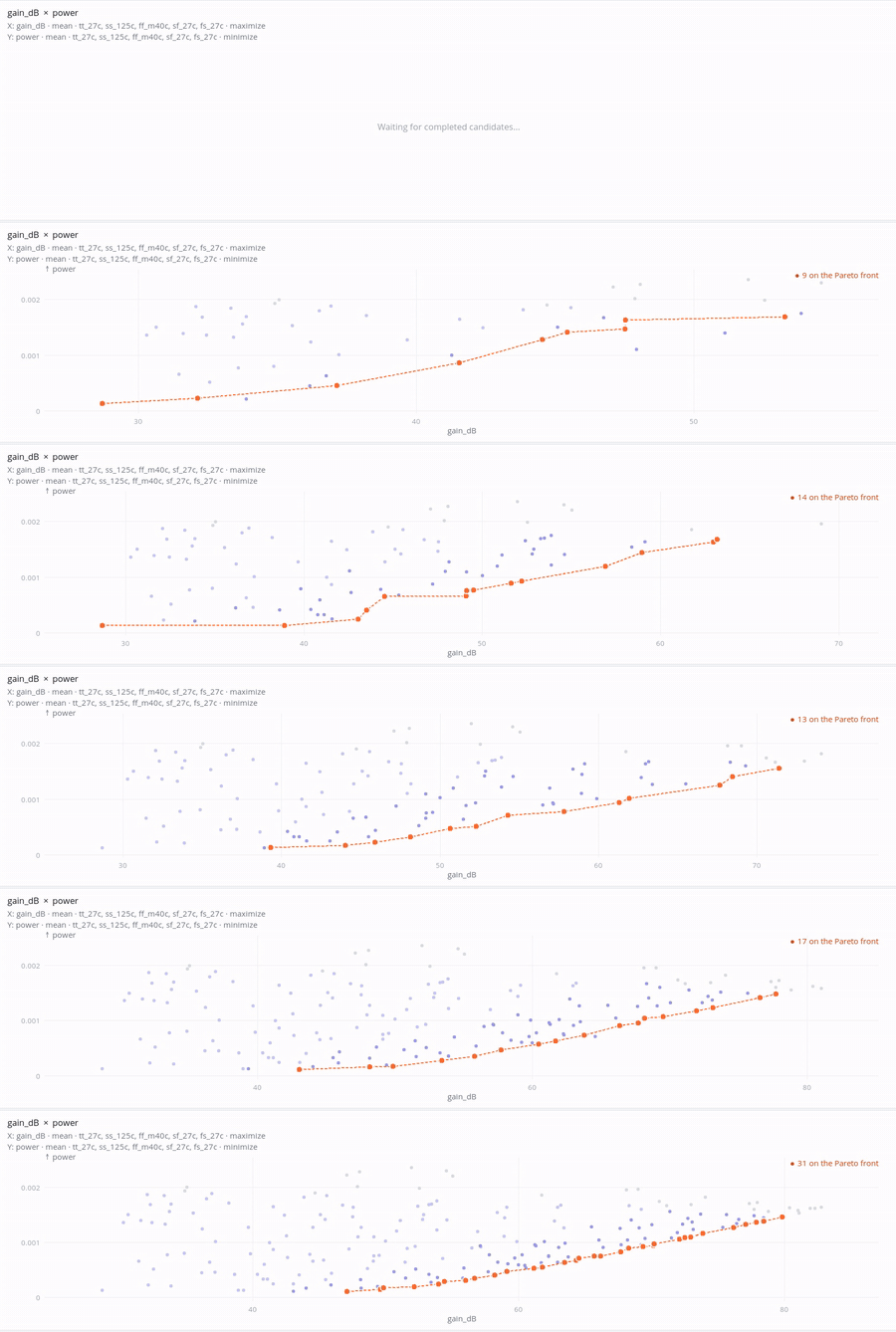
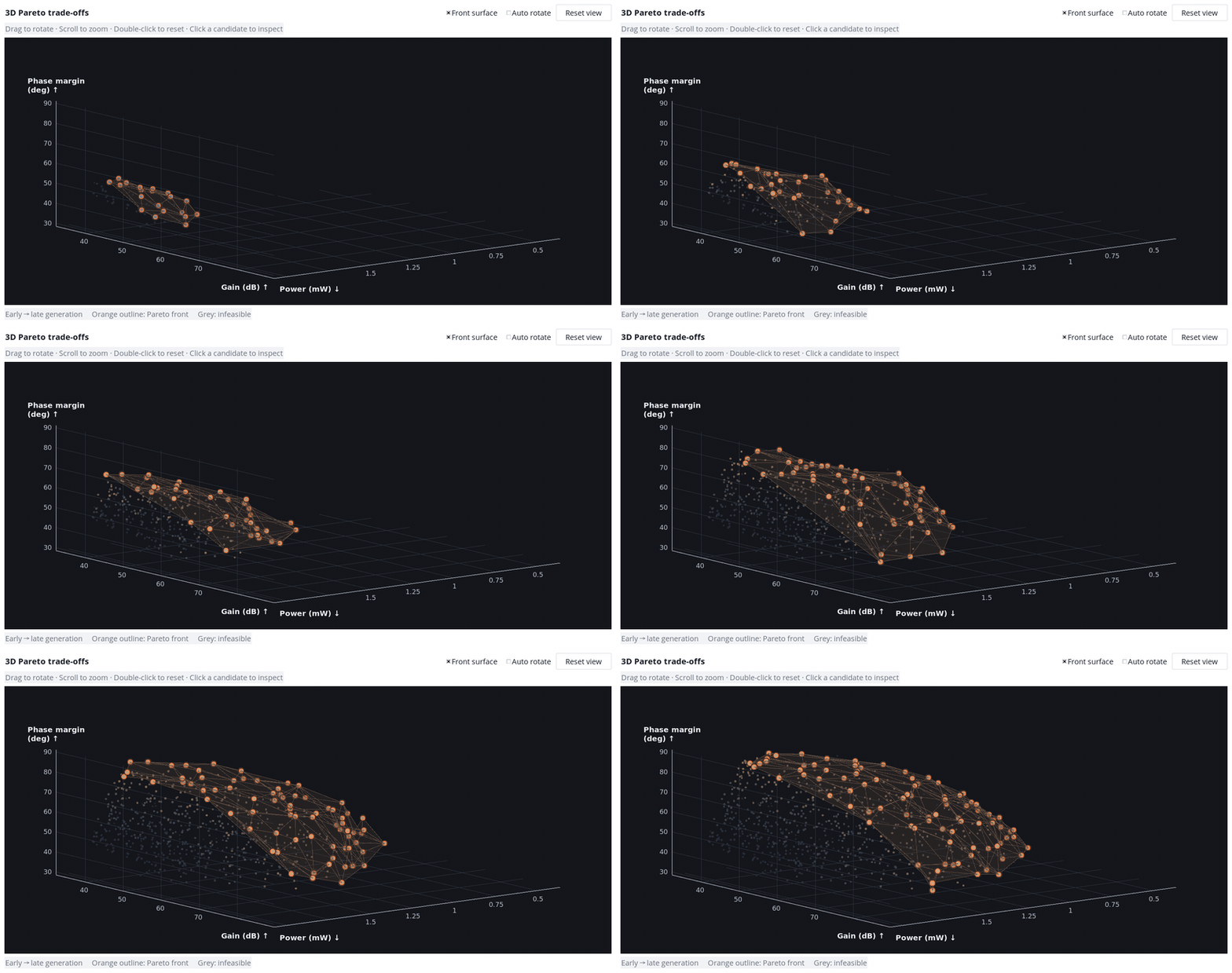
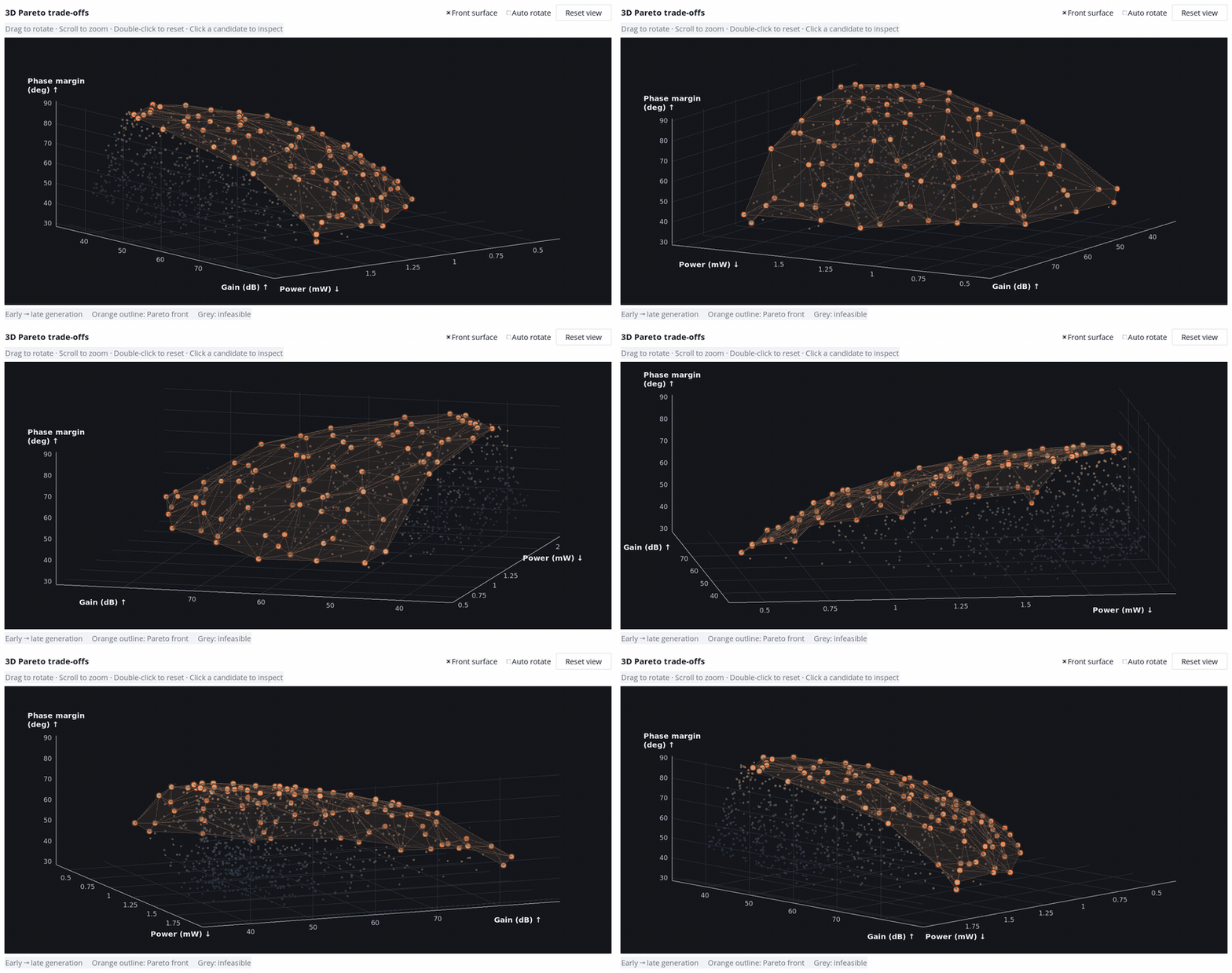
Version 1.4.5 (engine 3.4.0) adds an interactive 3D Pareto view for three-objective runs: drag to rotate, zoom, an optional translucent front surface, and colours that show the front forming generation by generation; the pairwise projections remain below. Opening Crescendo from the Maestro menu now works on IC 6.1.8, using a private, exclusively created local transport directory. Native Run separates a successful simulation whose measurement cannot be evaluated (penalized as a failed design) from shutdown-time diagnostics after valid results (kept as completed), retries a candidate once after a Cadence temporary-directory race, and waits briefly for finished points to record their final state before closing the run.
Version 1.4.4 (engine 3.3.4) makes generation batching the default for new runs and keeps it working on real designs. Stepped values are normalized exactly so floating-point residue no longer stops continuous values from being rounded to a precision Maestro preserves; when a value truly cannot be represented, the fallback record names the candidate, variable and values. A known harmless library initialization message in a single Native Run candidate is reported as a warning only when the candidate's results are complete, and a candidate that genuinely fails no longer stops the whole run when cleanup is proven.
Version 1.4.3 (engine 3.3.3) keeps long Native Run optimizations going when Virtuoso crashes at startup. If the session stalls before its first stage with the Cadence crash-reporter message, Crescendo stops it, confirms its processes are gone, retries once, and if it still fails marks only that candidate as failed; after a timeout it now waits a bounded time for cleanup proof before continuing. Selecting more than 50 variables shows a non-blocking advisory in every execution mode.
Version 1.4.2 (engine 3.3.2) extends the library initialization rule to simulator job logs. When a PDK library loaded inside a netlisting job raises the same harmless message that the session console already proved came from library initialization, and that netlisting finished with no errors and the job exited normally, the message is reported as a warning with its job file and line instead of failing the capture. Unrelated tool messages (ADE-5066/5067) in job logs follow the same tool rule as the console. All classified library warnings are now kept in the report.
Version 1.4.1 (engine 3.3.1) fixes netlisting of large designs: the working copy configuration no longer lists every generated view in its default view and stop lists (which crashed the IC618 netlister once the list passed about 4 KB, for example with over a hundred optimized instances). It now keeps the source configuration's lists, binds each optimized instance explicitly, reads every binding back, and stops with a clear message if a list would exceed 3,500 bytes.
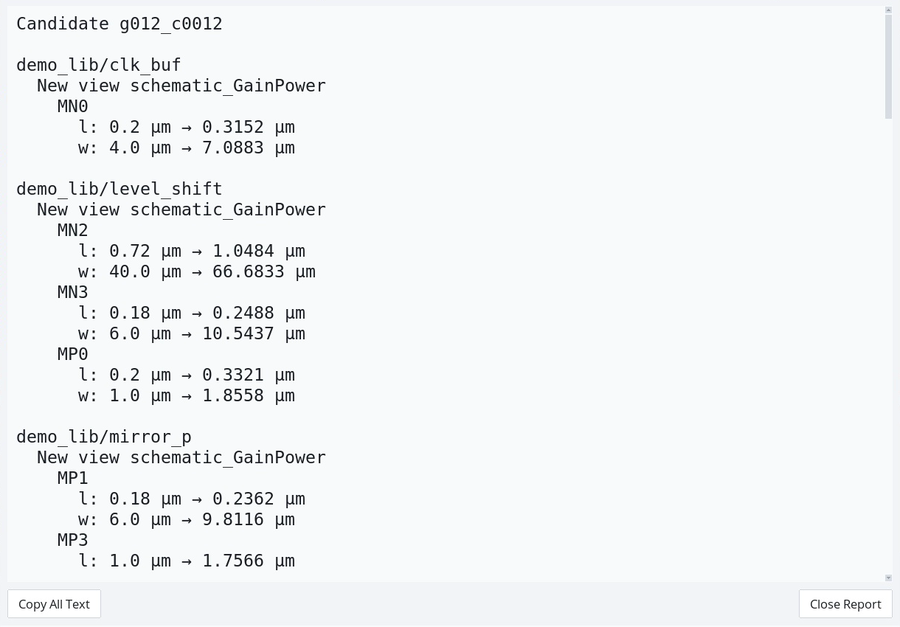
Version 1.4.0 (engine 3.3.0) lets you keep one completed result: from the results page, persist a single candidate from Native Run, Maestro Netlist or Template Netlist as new schematic_<run name> views of the cells it changed. Existing views are never overwritten (a suffix is added on collision), every instance value is read back before it is reported, and a copyable report lists each cell, instance, parameter, old and new value and unit, plus design variables that were not written and any failed cells. Native Run generation batching now rounds continuous values to a precision Maestro preserves, so the recorded value is exactly the simulated value; previously continuous parameters could fail a whole generation. Cadence messages that a PDK library initialization raises for an unrelated tool (ADE-5066/5067, and SKILL errors Cadence itself catches while loading libInit) are reported as warnings with their original text instead of stopping the run. Environment identity no longer drops files when unrelated entries change in a parent directory.
Version 1.3.2 (engine 3.2.2) restores readable original first causes beside compact mode verdicts. Each verdict fits within 200 characters with explicit truncation, existing secret redaction and a lossless first-cause reference. Full reports are unchanged. Process regression fixtures use readiness synchronization and verify finite owned cleanup, closed pipes and actual cancellation without wall-clock responsiveness assertions that include host scheduling delays. Product timeout, ownership and Stop policies remain unchanged.
Version 1.3.1 (engine 3.2.1) repairs injected legacy identity contracts: copied compact sections retain run context, first causes and sidecar manifests; evidence, scoped configuration, mixed native batch symbols and solver evidence filenames share the same runtime binding. Fictional legacy round trips cover compact/full reports, tamper detection, run data v2 and F2/F3. Default names, registry digest, old-data semantics and execution gates are preserved.
Version 1.3.0 makes Maestro global/top-level variables optimizable (overriding dependent device dimensions with a warning), accepts typed instance paths so large hierarchies need not be probed in full, and keeps the Pareto page responsive. New runs store run data v2: evidence is deduplicated by content and scheduler query originals are retained once, cutting run data by roughly an order of magnitude; existing runs and checkpoints keep v1. Diagnostic logs default to a compact summary with verified evidence sidecars (full inline output remains available), F2 consistency checks use explicit units and only required scalars, CLI readers report missing outputs as not collected, non-finite or failed instead of reusing stale values, native diagnostic identity checks distinguish budget exhaustion and atomic replacement, and first-generation netlist preparation is timed by phase.
Version 1.2.0 adds optional linked parameters (link_group): linked members share one search coordinate and each receives a value mapped to its own range, scale or grid; unlinked runs are unchanged and keep checkpoint v1, while linked runs use checkpoint v2 that older versions reject. Version 1.1.6 added verification and evidence-preserving recycling of isolated working copies, and bounded automatic retries of transient Spectre read-in crashes.
Version 1.1.5 combines compact eligible-only prepared.v2 catalogues, shared content-addressed storage and a GUI service subprocess with passive diagnostic checks F1–F4. Legacy suites and checkpoints retain their schemas, identity validation and execution semantics. GUI RPC cancellation retains ownership cleanup and Stop behaviour; catalogue encoding and decoding use bounded cooperative work. CDF discovery filters candidates before editor-condition evaluation and reuses read-only editor windows.
Diagnostics report generation checkpoint audits, cross-mode raw-result consistency, current-run dataset volume, and Setup/Tk responsiveness. F4 separates logical prepared bytes from reachable CAS storage, current copies and references, and parameter counts; legacy formats use their own adapter. Missing or corrupt references remain explicitly incomplete. Bounded report contributors extend exports without changing execution or qualification gates. The headless API, optimizer signatures and default registry identity remain unchanged.
The 1.1.4 checkpoint model is preserved: the exclusive writer incrementally hashes its own accepted byte slices, and one full disk audit verifies each generation before optimizer tell. Ordinary readers and Resume verify full disk contents. An external prefix rewrite can remain undetected until the generation barrier; intra-generation references describe the writer's own bytes. Former post-append and every-128-check scans remain removed. See CHANGELOG.md and docs/EXECUTION_TIMING.md.
Responsiveness regressions measure worker CPU slices between explicit yields and retain wall-gap distributions so OS scheduling does not become a product-stall verdict. The product's 200 ms observation and 1 s maximum diagnostic thresholds are unchanged. Synthetic regression evidence does not establish performance on every target-site setup.
Try it without any EDA tools:
python3 -m crescendo.demo_main --scale small --autoload
Use it in Virtuoso: add load("/path/to/crescendo/load.il") to your .cdsinit, restart, then Maestro → Plug-in → Open Crescendo Optimizer.
Requirements: Python 3.6+ with Tk 8.5+. Real optimization needs your own Cadence Virtuoso/Maestro, Spectre or ALPS, PDK and licences.
Known limitations: the original schematic view is never modified (persisted results go to new views); range checks verify end points only; target-site acceptance (your simulator, cluster and PDK) is up to you. The demo data is synthetic.
See it in action
Real Crescendo window, bundled demo service (synthetic data, no Cadence calls).
Two objectives — the Pareto front advances generation by generation
Three objectives — a 3D front that forms over generations and can be rotated
Persist the chosen design as schematic_<run name> and see exactly what was written
Speed-up figures are a local matched sample (3 generations × 6 candidates × 2 corners: 433 s → 101 s); your results depend on your design, simulator and cluster.
La...
Crescendo 1.1.4
Crescendo is a guided circuit optimizer for Cadence Maestro. Each release contains the window, the optimization engine, the Virtuoso menu loader and a synthetic demo.
Version 1.1.4 scopes native-log cleanup by overlapping lexical and resolved paths, preserves generation batch timings, and exposes nested storage and checkpoint measurements. Held dataset writers reuse verified disk prefixes for unchanged checkpoint references. Every append invalidates that proof; the first following evidence check rehashes the complete prefix to detect edits interleaved with the write. Unexpected timestamps also trigger full verification. Opening a writer or reading an uncached checkpoint verifies its complete disk prefix.
Every 128 evidence checks include a full audit. An older prefix modified with exactly unchanged mtime/ctime can pass intervening incremental checks and is detected at the next audit. Explicit RunDataStore.reference(force_full=True) requests an immediate full audit. Storage formats remain v1 and the 1.1.3 headless optimizer API retains its signatures, variable fields and algorithm names. See CHANGELOG.md and docs/EXECUTION_TIMING.md.
Verification binds its decision and disk reads to one file-state sample. Appends retain the immediate post-write sample and reject changes during synchronization instead of adopting the later stamp. Post-append full verification closes the remaining write/stat attribution window. This conservative implementation reduces repeated checks, but does not achieve linear read volume as appended history grows; that performance target remains incomplete.
Try it without any EDA tools:
python3 -m crescendo.demo_main --scale small --autoload
Use it in Virtuoso: add load("/path/to/crescendo/load.il") to your .cdsinit, restart, then Maestro → Plug-in → Open Crescendo Optimizer.
Requirements: Python 3.6+ with Tk 8.5+. Real optimization needs your own Cadence Virtuoso/Maestro, Spectre or ALPS, PDK and licences.
Known limitations: optimized values are not written back into the original schematic; range checks verify end points only; target-site acceptance (your simulator, cluster and PDK) is up to you. The demo data is synthetic.
Lab home (all tools, narrated films and progress): https://rf-fieldwork.pages.dev/?lang=en
Product page and narrated film: https://rf-fieldwork.pages.dev/crescendo/?lang=en
Crescendo 1.1.3
Crescendo is a guided circuit optimizer for Cadence Maestro. Each release contains the window, the optimization engine, the Virtuoso menu loader and a synthetic demo.
Version 1.1.2 names the execution modes Native Run, Maestro Netlist and Template Netlist, and calls owned setup/view copies working copies. The English and Chinese READMEs explain what is created, where data lives, what survives Stop/exit, and how to recover or clean up. Existing configuration keys, backend IDs and checkpoint behavior are unchanged. 1.1.3 adds a documented headless optimizer API (docs/HEADLESS_API.md) for tools that only need ask/tell. See CHANGELOG.md.
Try it without any EDA tools:
python3 -m crescendo.demo_main --scale small --autoload
Use it in Virtuoso: add load("/path/to/crescendo/load.il") to your .cdsinit, restart, then Maestro → Plug-in → Open Crescendo Optimizer.
Requirements: Python 3.6+ with Tk 8.5+. Real optimization needs your own Cadence Virtuoso/Maestro, Spectre or ALPS, PDK and licences.
Known limitations: optimized values are not written back into the original schematic; range checks verify end points only; target-site acceptance (your simulator, cluster and PDK) is up to you. The demo data is synthetic.
Product page and narrated film: https://rf-fieldwork.pages.dev/crescendo/
Crescendo 1.1.2
Crescendo is a guided circuit optimizer for Cadence Maestro. Each release contains the window, the optimization engine, the Virtuoso menu loader and a synthetic demo.
Version 1.1.2 names the execution modes Native Run, Maestro Netlist and Template Netlist, and calls owned setup/view copies working copies. The English and Chinese READMEs explain what is created, where data lives, what survives Stop/exit, and how to recover or clean up. Existing configuration keys, backend IDs and checkpoint behavior are unchanged. See CHANGELOG.md.
Try it without any EDA tools:
python3 -m crescendo.demo_main --scale small --autoload
Use it in Virtuoso: add load("/path/to/crescendo/load.il") to your .cdsinit, restart, then Maestro → Plug-in → Open Crescendo Optimizer.
Requirements: Python 3.6+ with Tk 8.5+. Real optimization needs your own Cadence Virtuoso/Maestro, Spectre or ALPS, PDK and licences.
Known limitations: optimized values are not written back into the original schematic; range checks verify end points only; target-site acceptance (your simulator, cluster and PDK) is up to you. The demo data is synthetic.
Product page and narrated film: https://rf-fieldwork.pages.dev/crescendo/