Repository navigation
Releases
v0.6.1


This release introduces custom camera background images and upgrades the default background removal model for significantly better performance. It also includes minor internal improvements and better error handling for system notifications.
🚀 Features
- Custom camera backgrounds: You can now replace your background with a custom PNG or JPEG image in the round camera. This is available in the graphical dialogue or via the
--camera-backgroundcommand-line flag. - MODNet camera matting: MODNet replaces U²-Net as the default model for background removal and replacement, which can be downloaded and managed directly through Preferences. The older U²-Net model remains available for comparison using the
--camera-matting-modelflag or theTEQUILASHOT_MATTING_MODELenvironment variable.
🐛 Bug Fixes
- Notification error reporting: Improved D-Bus context checks to accurately report timeouts and cancellations for system notifications, preventing misleading socket failure errors.
⚡ Performance Improvements
- Faster background processing: The transition to the new MODNet model roughly doubles the frame rate for camera background removal and replacement on local hardware.
🧹 Maintenance
- Addressed internal security linter warnings (gosec) within the image background loader.
- Updated project documentation to mention Omarchy alongside Arch Linux for AUR installation instructions.
v0.6.0
This release introduces local, AI-powered background noise and keyboard click removal for screen recordings. It also brings a brand-new project website and fixes an issue with ONNX Runtime compatibility.
🚀 Features
- Noise Removal: Added local background noise removal for recordings using the DeepFilterNet3 speech model via ONNX Runtime, keeping voice-overs clear of hiss, hum, and fan noise (#4).
- Precision Keyboard Click Reduction: The daemon now safely logs the exact timings of key presses (without recording which keys are pressed) during capture. This allows the noise removal process to surgically quieten keyboard clicks without degrading the surrounding speech (#4).
- Flexible Cleaning Options: Audio can be cleaned manually from the capture results and trim pages, automatically for all new recordings via a new preferences toggle, or directly from the command line using
tequilashot denoise(#4). - Metadata Preservation: Cleaned audio copies seamlessly retain their original start times, track flags, chapters, and file metadata (#4).
🐛 Bug Fixes
- ONNX Runtime Compatibility: Pinned the ONNX Runtime Go binding to match the correct system runtime API, resolving an issue where the round camera failed to start.
- Error Reporting: Added clearer and more descriptive error messaging for when an outdated ONNX Runtime is detected on the system.
🧹 Maintenance
- Project Website: Launched an official GitHub Pages landing site with expanded documentation covering screenshots, recordings, instant replay, and local AI models.
- Model Downloader: Refactored the secure, checksum-verified HTTPS downloader so it can be shared cleanly across both background removal and noise removal features.
- Preferences Cleanup: Removed the legacy 'Reduce Keyboard Clicks' preference, as the new timing-based click reduction handles this automatically and more effectively (#4).
v0.5.1
v0.5.0
This release introduces a comprehensive GUI for video trimming and application preferences, alongside AI-powered background removal for the round camera. It also replaces several external dependencies with native GTK interfaces and Go implementations for a smoother, more integrated desktop experience.
🚀 Features
- Video Trimming (#2): Added a fully featured GTK interface for trimming recordings and local videos. Includes timeline drag handles, precise frame stepping, undo/redo functionality, and short previews of cuts and boundaries.
- Preferences Dialogue (#3): Introduced a dedicated preferences window to configure save folders, frame rates, video codecs, helper program paths, and more, significantly reducing the need to manually manage environment variables.
- Background Removal (#2): Implemented AI-powered person segmentation using ONNX Runtime, allowing the round camera to make backgrounds transparent and float seamlessly over the desktop. Also includes an option to hide the outer white ring.
- Camera Bubble Positioning: Added a
tequilashot camera cyclecommand to move the camera bubble clockwise between screen corners. The bubble now automatically remembers its last position between captures. - Native Naming Dialogue: Replaced the external Zenity dependency with a custom GTK naming window that supports file previews, overwrite conflict handling, and AI name suggestions.
- Menu Reorganisation (#3): Relocated the "Open video" button to the main menu to preserve header bar space for essential capture controls.
🐛 Bug Fixes
- Audio/Video Synchronisation (#2): Fixed synchronisation issues when trimming videos by snapping cut points to exact frames. This ensures footage remains in step, even if the picture or sound starts late, and safely drops segments too short to hold a complete frame.
- Preferences Handling (#3): Fixed an issue where clearing a preference could overwrite existing configurations; empty fields now safely revert to their defaults. Additionally, damaged preference files now fail closed to protect user data.
🧹 Maintenance
- System Helpers: Replaced external
pgrepandgdbusshell calls with native Go process scanning and D-Bus integrations. - UI Adjustments: Removed the unused sponsor button from the header bar and updated the project description to specify GTK4 compatibility.
v0.4.0
Changelog
Features
- 989a4f5 feat: added branded desktop notifications
- d30610b feat: add instant replay buffering
- dce9509 feat: add about dialog and sponsorship buttons
- eb84c33 feat: Add automated release notes enrichment with Gemini
Other changes
- 87a73a1 Remove About and sponsoring section from README
v0.3.1
Release packages for x86_64 now carry the capture dialogue and a desktop launcher, so the dialogue can be installed from a tarball, deb, rpm or the AUR instead of being built from source.
🚀 Features
- The x86_64 archive, the deb and the rpm now include the capture dialogue, a
com.chmouel.Tequilashot.Recorderdesktop entry and the application icon. - The
tequilashot-binAUR package ships the same dialogue-enabled build, with the launcher installed to/usr/share/applicationsand the icon to the hicolor theme. - The AUR package declares its runtime dependencies: GTK 4, libadwaita 1.9 or newer, and libgirepository, with gtk4-layer-shell as an optional dependency for the round camera.
- The aarch64 archive and the apk packages remain command-line only, and the AUR package is now x86_64 only.
🧹 Maintenance
- Release builds run inside an Arch Linux container, because the dialogue needs a newer libadwaita than the Ubuntu runner provides.
📝 Documentation
- Documented the Hyprland and Sway window manager key bindings.
v0.3.0
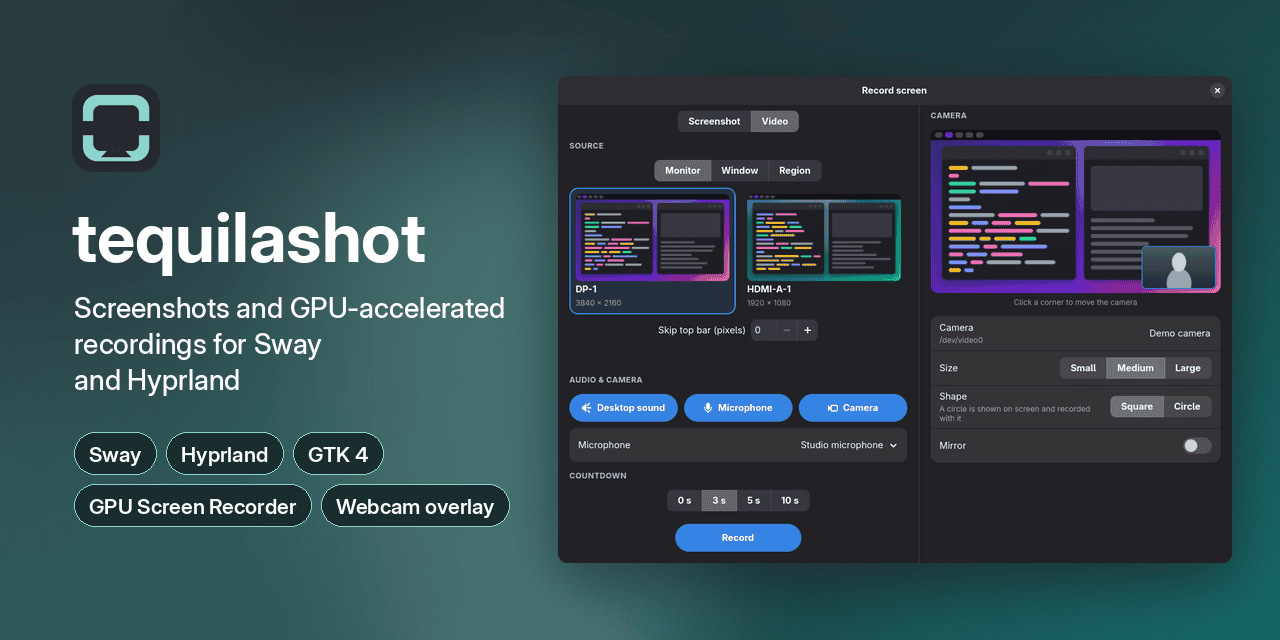
sway-easyshot is now tequilashot. This is the first release under the new name, and the biggest change since the project started. It began as a set of commands to bind to keys in Sway. It now has a GTK 4 capture dialogue, records with sound and webcam, runs on Hyprland as well as Sway, and can share your screen as a webcam in video calls.
The command line is still there for key bindings and Waybar. Run tequilashot with no arguments and the dialogue opens instead.
The capture dialogue
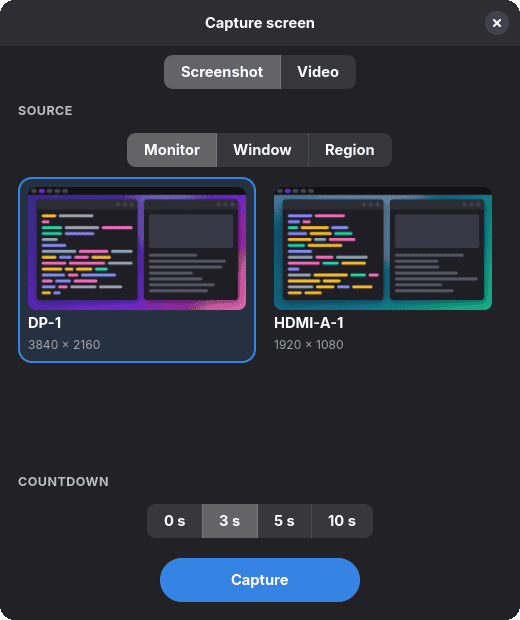
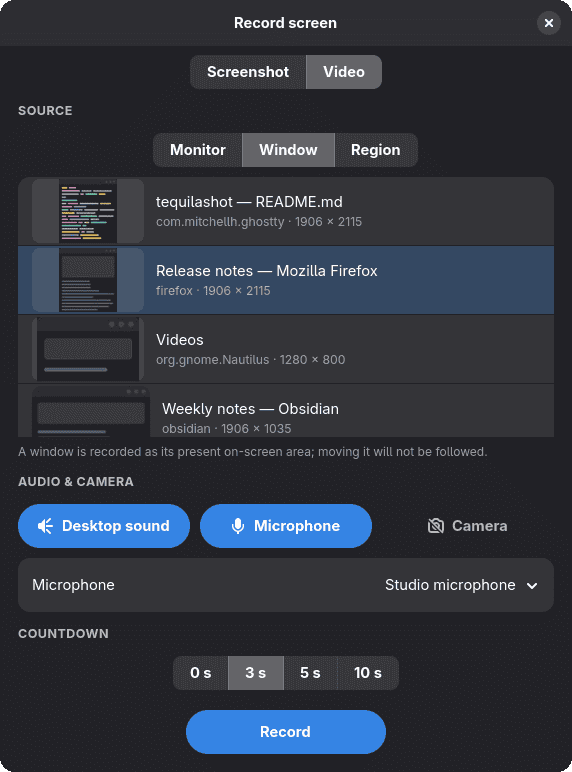
Pick Screenshot, Video or Camera, then a monitor, a window or a region. Monitors show live thumbnails and windows show a preview with their application and size. You can set a countdown of up to ten seconds, and the dialogue hides itself before it captures. Enter captures, Escape closes, and it remembers your last settings.
Recording with sound and webcam
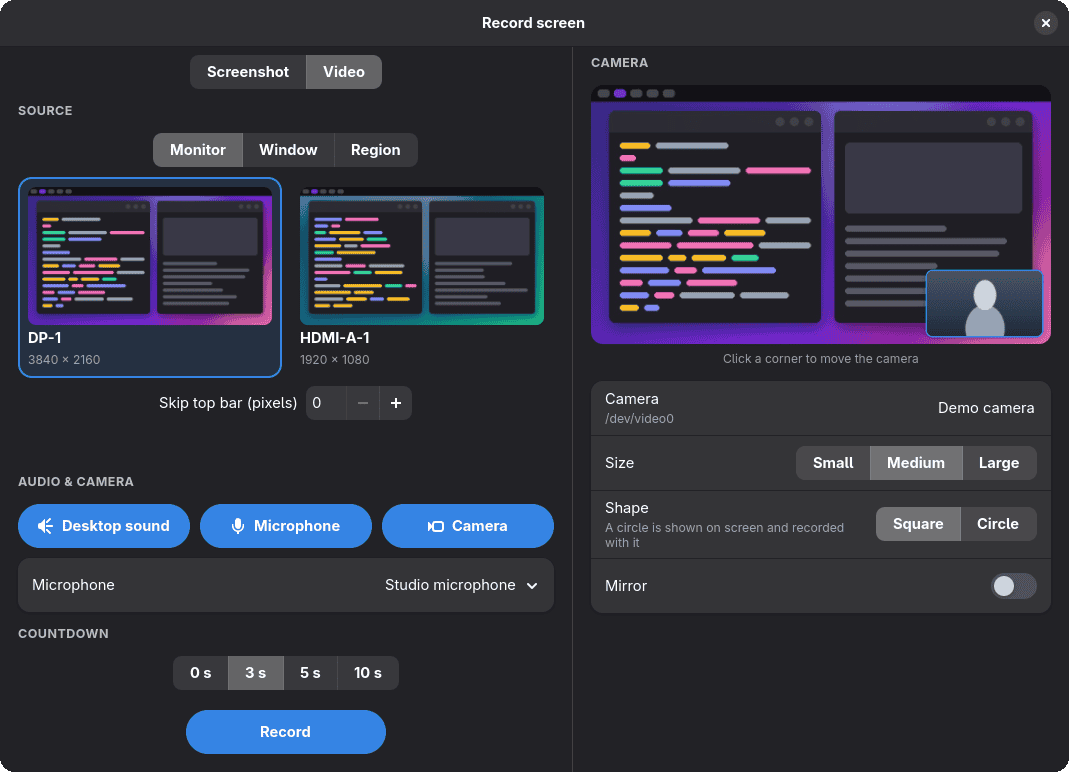
Recordings now go through GPU Screen Recorder in place of wf-recorder. You can record desktop sound and your microphone, and add your webcam in a corner of the video in one of three sizes, square or round, mirrored if you like. A Skip top bar option trims your status bar off monitor recordings.
To stop, run tequilashot again, run tequilashot stop-recording, or click the Waybar module.
A round camera you can move
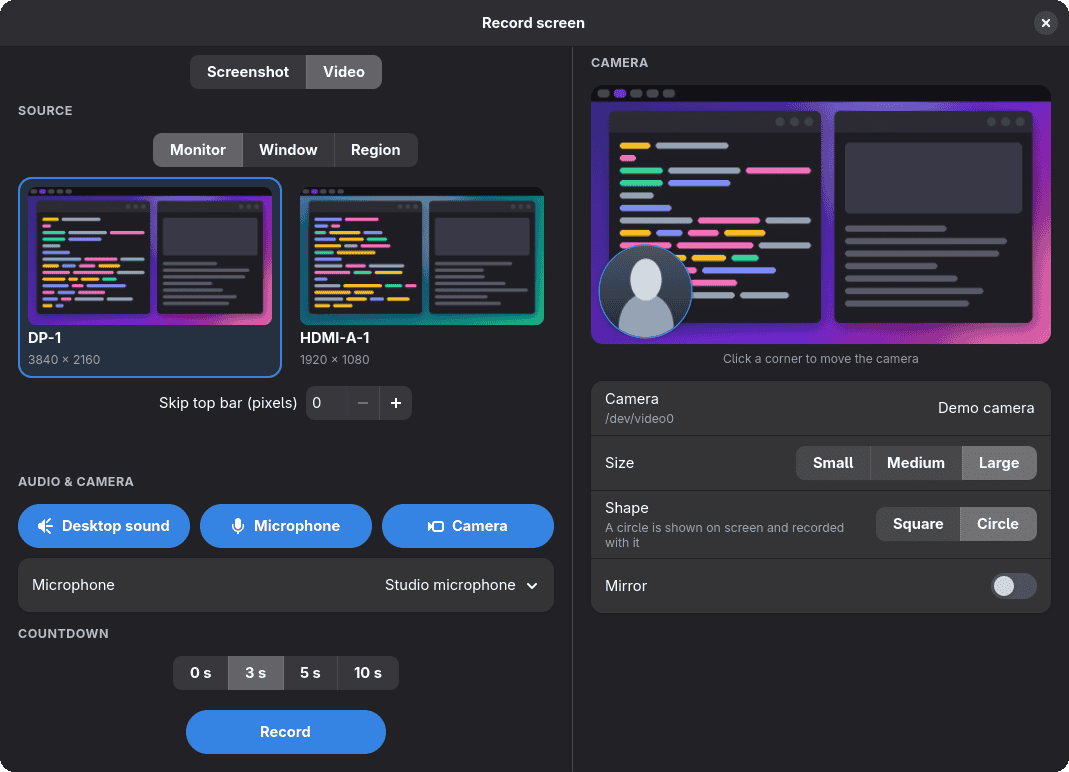
With the Circle shape, your webcam sits on screen as a round bubble above your windows, and the recording picks it up from there. Drag it wherever you want while you record. Clicks outside the circle reach the windows underneath. This needs gtk4-layer-shell.
Your screen as a webcam
Camera mode, or tequilashot virtual-camera start, turns a monitor, window or region into a camera that Google Meet, Chrome and other call apps can pick, with your webcam bubble on top. It works through v4l2loopback or PipeWire; the README covers the one-off setup.
After the capture
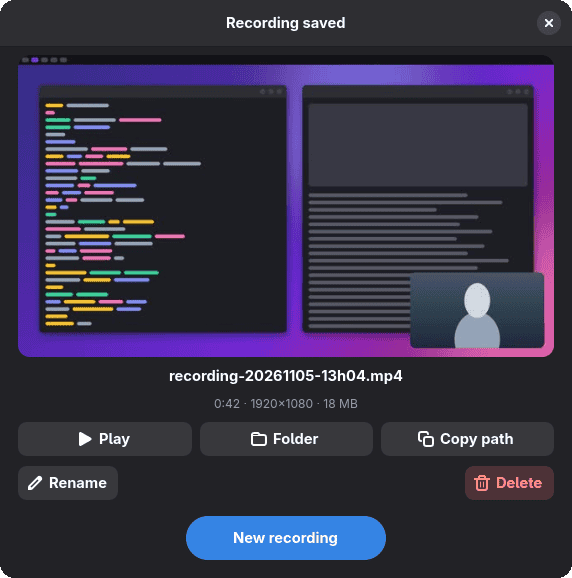
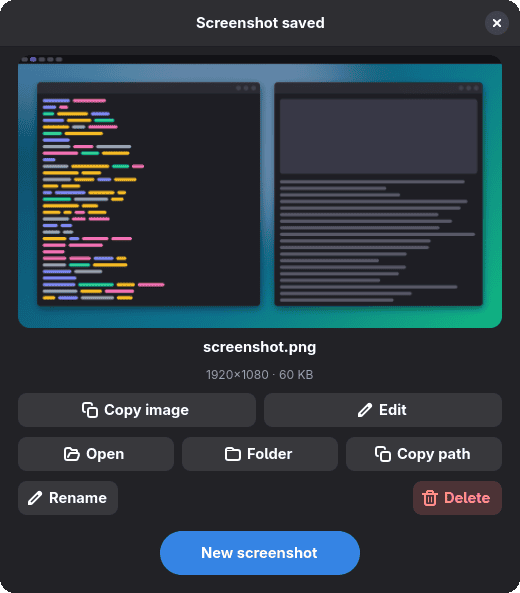
Once a capture is done, the dialogue shows a preview with the file size and resolution or length. From there you can play or open it, show it in its folder, copy its path, rename it or move it to the bin. Screenshots can also be copied as an image or opened in Satty for editing.
Upgrading from sway-easyshot
The binary, the AUR package and a few settings changed names, so a few manual steps are needed.
On Arch, install tequilashot-bin. It conflicts with sway-easyshot-bin, so pacman will offer to remove the old package. sway-easyshot-bin will not get further updates.
Update your Sway key bindings, Waybar config and scripts to call tequilashot in place of sway-easyshot. The subcommands and their flags are unchanged, so swapping the name is enough.
Rename these environment variables if you set any of them:
| Old | New |
|---|---|
SWAY_SCREENSHOT_SAVE_LOCATION |
TEQUILASHOT_SAVE_LOCATION |
SWAY_SCREENSHOT_AI_MODEL |
TEQUILASHOT_AI_MODEL |
SWAY_SCREENSHOT_WAYBAR_POLL_INTERVAL |
TEQUILASHOT_WAYBAR_POLL_INTERVAL |
The systemd user unit is now tequilashot.service. If you ran the old one, disable it and install the new one from systemd/.
The OBS commands (obs-toggle-recording, obs-toggle-pause) are gone, along with the dependencies on obs-cli, pass and fd. Recording now needs GPU Screen Recorder, and the virtual camera also needs wf-recorder.
Getting it
The binaries and packages attached here, and tequilashot-bin on the AUR, are command line only. They have everything except the dialogue and the round camera. To get the dialogue, build from source with GTK 4 and libadwaita installed:
go install github.com/chmouel/tequilashot/cmd/tequilashot@v0.3.0The README lists the runtime tools you need.
Changelog
Features
- 05e3cb0 feat: add a virtual camera for video calls
- fdaa50f feat: let the round camera be dragged on screen
- ea9aaff feat: Add round webcam shape option using layer shell
- cc75417 feat: add interactive screenshot mode to gui and daemon
- 1bd183c feat: Make recording dialogue the default action
- 62c3807 feat: add webcam overlay and device selection for recordings
- 6d14242 feat: add automated gui screenshot generator for documentation
- a6bd119 feat: Add interactive recording result view to GUI
- 698822b feat: Add interactive GTK4/libadwaita recording dialogue
- 34f793e feat: replace wf-recorder with gpu-screen-recorder for recording
- cb9583f feat: add Hyprland compositor support
- e3e2f5f feat: Automate MKV to MP4 conversion for OBS recordings
- 5eeaca2 feat: Add audio recording support with improved OBS control
Fixes
- 3787d68 fix: resolved golangci-lint findings
- be5c497 fix: Prevent UI state getting stuck when toggling inactive OBS
Other changes
- e745b96 refactor: rename project to tequilashot
- f0c182f refactor: Remove OBS integration and related dependencies
Full diff: v0.2.0...v0.3.0
v0.2.0
Changelog
- 464c82b: Modify Sway configuration for easyshot commands (@chmouel)
- 1f02359: chore: update golangci-lint configuration (@chmouel)
- 91e6546: chore: update urfave/cli to version 3.7.0 (@chmouel)
- 403b871: feat: Add interactive notifications for recording management (@chmouel)
- 1cedc65: feat: add crop-top option to screen recording commands (@chmouel)
- dadc6d1: fix: Handle errors from closing connections and releasing processes (@chmouel)
Contributors
Assets 11
v0.1.0
Changelog
- 3823039: chore: Add Apache 2.0 license (Chmouel Boudjnah chmouel@chmouel.com)
- 3411d68: chore: Add GitHub Actions workflows (Chmouel Boudjnah chmouel@chmouel.com)
- d8e9039: chore: Add project configuration files (Chmouel Boudjnah chmouel@chmouel.com)
- f63b75c: chore: Remove nightly CI workflow (Chmouel Boudjnah chmouel@chmouel.com)
- a95d443: chore: Update goreleaser config (Chmouel Boudjnah chmouel@chmouel.com)
- 2a9f5b4: feat: Add README file with project documentation (Chmouel Boudjnah chmouel@chmouel.com)
- 6146547: feat: Add configurable icons for waybar status (Chmouel Boudjnah chmouel@chmouel.com)
- 3c72db4: feat: Add countdown icon and remove unused timeout flag (Chmouel Boudjnah chmouel@chmouel.com)
- 3100036: feat: Add option to suppress idle output for waybar status (Chmouel Boudjnah chmouel@chmouel.com)
- f266be9: feat: Add timeout option to commands (Chmouel Boudjnah chmouel@chmouel.com)
- fb292dd: feat: Add toggle record command and daemon debug flag (Chmouel Boudjnah chmouel@chmouel.com)
- 454adf4: feat: Display recording time in waybar status (Chmouel Boudjnah chmouel@chmouel.com)
- 0c3a650: feat: Implement sway-screenshot daemon and core functionality (Chmouel Boudjnah chmouel@chmouel.com)
- 87f9152: feat: Migrate to urfave/cli/v3 for command handling (Chmouel Boudjnah chmouel@chmouel.com)
- e8c0dec: fix: Adjust command line flags and internal logic (Chmouel Boudjnah chmouel@chmouel.com)
- c99212b: fix: Remove redundant notification for starting OBS recording (Chmouel Boudjnah chmouel@chmouel.com)
- f9684cf: fix: Remove systemd service files from goreleaser config (Chmouel Boudjnah chmouel@chmouel.com)
- f721df5: fix: Remove unnecessary notification for recording start (Chmouel Boudjnah chmouel@chmouel.com)
- bb77411: fix: Update idle icon and service path (Chmouel Boudjnah chmouel@chmouel.com)
- 69760c8: fix: Update main entrypoint in goreleaser config (Chmouel Boudjnah chmouel@chmouel.com)
- b4cf3f0: refactor: Move main package to cmd/sway-screenshot (Chmouel Boudjnah chmouel@chmouel.com)
- dffe1b8: refactor: Rename project to sway-easyshot (Chmouel Boudjnah chmouel@chmouel.com)