Repository navigation
Releases
v0.2.0 — Offline punching and kiosk devices

Offline mode. When the site cannot be reached, the kiosk keeps accepting PIN and badge punches, stores them on the device and books them once the connection is back. Offline punches carry a device-claimed time, so they go through a review queue (Timeclock Queued Punch) and become regular Employee Checkin records only after verification (PIN/badge, clock matched with the server, plausible time, no near duplicate). Everything else waits in quarantine for HR. A service worker lets /kiosk start even after a reboot during an outage.
Kiosk devices. Every terminal registers itself via a 30-second heartbeat (Timeclock Device): online/offline, kiosk build, outdated flag with automatic reload, punches waiting on the device, last sync. Optional email alert after a configurable silence, plus a recovery notice.
Upgrade: bench migrate (two new DocTypes, one custom field on Employee Checkin, new settings). Reload each kiosk once after the upgrade — the 0.1.x bundle cannot reload itself. Set Alert Recipients in Timeclock Settings to receive offline alerts.
v0.1.2 — the kiosk survives a server outage
A kiosk terminal runs unattended for weeks. This release fixes what it showed during that time when the server was briefly away — and documents honestly what the app does and does not do.
Fixed
The kiosk no longer paints a raw JavaScript error on the wall. During a deployment the reverse proxy answers with HTML, not JSON. frappe-ui's frappeRequest.js fails on JSON.parse, swallows it in an empty catch, and the error object stays undefined — line 69 guards with error?.exc_type, line 73 then reads error.exc unguarded. The resulting TypeError went straight to the screen.
The kiosk now shows a plain "no connection to the server" notice, disables the PIN keypad, retries get_kiosk_config every 15 s, and recovers on its own once the server is back. It deliberately does not try to tell maintenance apart from an outage: every company signals maintenance differently, or not at all, so it is treated as one undifferentiated state.
Related: all loads now go through one catching refresh() instead of auto: true. frappe-ui re-throws after logging, and nobody was awaiting those fetches — a terminal left running for weeks accumulated unhandled rejections.
Verified with Playwright against a server answering 503 + HTML: no raw JS text, notice visible, button disabled, 0 uncaught errors, and unattended recovery once the server returned.
Documentation
- Where your data goes — a three-level table of what the app writes: one Single, four custom fields, and
Employee Checkin. Nothing writesAttendancedirectly. - Scope and limitations — seven honest points about what this app is not, with the offline queue and a quarantine log for rejected scans leading the roadmap.
- The Auto Attendance checkbox is now named as it appears in the UI, with troubleshooting.
Upgrading
No migration steps beyond the usual bench migrate. Note that the deployment itself causes the outage that the old bundle will display incorrectly one last time.
Full changelog: v0.1.1...v0.1.2
v0.1.1 — forward compatibility and Auto Attendance handover
Maintenance release. No new features — this one makes the app survive future Frappe versions and stops it from fighting HRMS over Auto Attendance.
Fixed
-
Auto Attendance is HRMS's job again. The app shipped an hourly task that wrote
last_sync_of_checkinitself. HRMS provides that job (hourly_long), gated by the Automatically update Last Sync of Checkin checkbox on the Shift Type. Both ran against each other and the app's task overrode the site-wide opt-in. The task is gone;clear_eventsremoves the orphaned Scheduled Job Type on migrate.⚠️ After upgrading, tick Automatically update Last Sync of Checkin on your Shift Type (Auto Attendance Settings) — otherwiselast_sync_of_checkinfreezes and Auto Attendance stalls. -
Desk app tile no longer depends on Frappe internals. It used the private
create_desktop_icons_from_installed_appsimport; a rename in a future Frappe version would have killedbench migrateon every site. It now goes throughfrappe.get_hooks("after_app_install", app_name="frappe")with a guard, and stays self-healing. -
Dropped a write that disappears in Frappe v17 —
db.set_single_valueinstead ofdb.set_valueon Singles. -
pyqrcodeis declared as a dependency. It was only reachable transitively through Frappe.
Full changelog: v0.1.0...v0.1.1
v0.1.0 — first production-verified release
Turn any Android tablet into a wall-mounted punch clock for Frappe HR.
This milestone marks the first production deployment: a wall-mounted Samsung Galaxy Tab A11+ running the kiosk in FreeKiosk Device Owner mode — badge scans read in well under a second via the front camera.
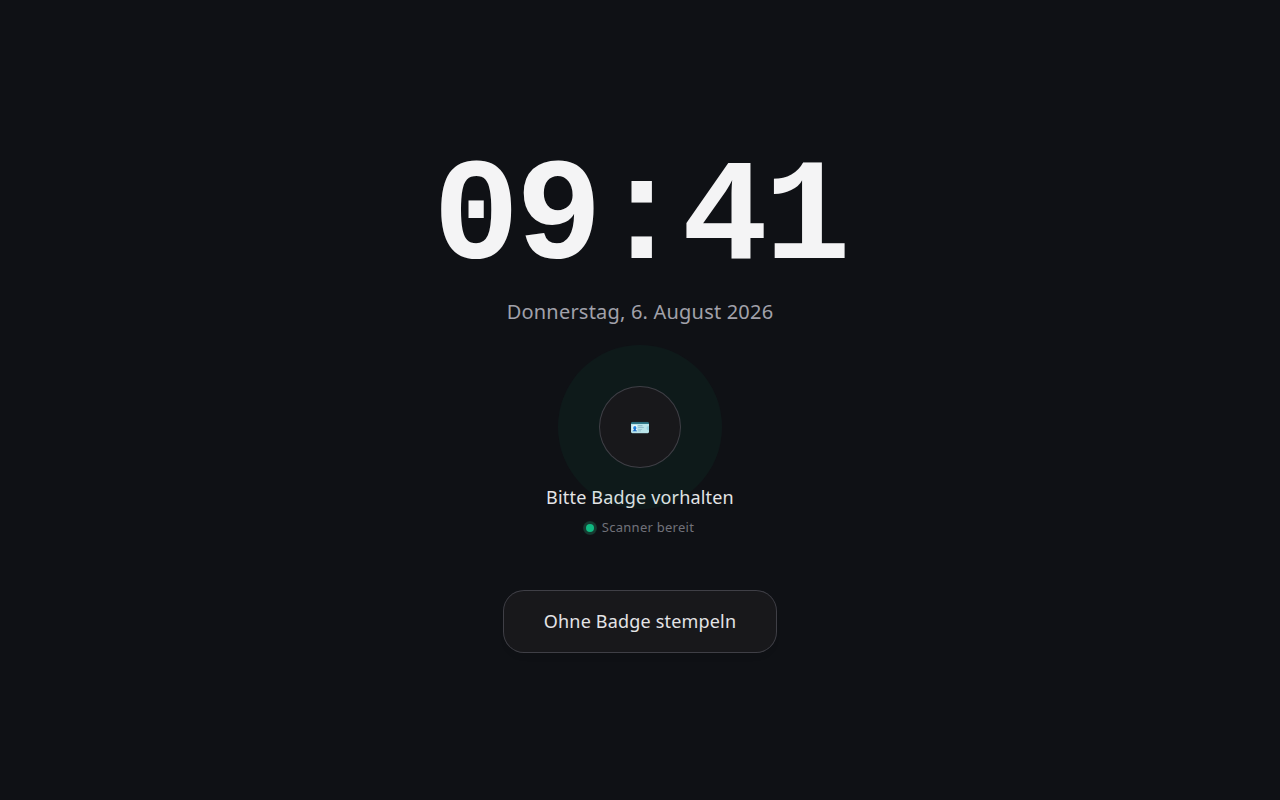
Highlights
- Clock-first dark terminal UI — big server-synced clock (the display can never disagree with the recorded time), initials avatars, live presence
- QR badge scanning with the device camera + an always-available PIN path; automatic IN/OUT toggle with a 5-second undo
- Privacy by default — the camera scans without showing its image
- Device token auto-login — kiosk hardware heals itself after reboots, no credentials on the device
- Badge management on the Employee form: encrypted PINs, revocable UUID badges, printable card labels
- Admin workspace with who's-in board, number cards and a working-hours chart
- German/English UI, confirmation sounds, HRMS Auto Attendance integration out of the box
- Test suite + CI, and a battle-tested FreeKiosk device-owner setup guide incl. the Google ghost-account trap
All punches are standard Employee Checkin records — attendance, timesheets and payroll just work. No proprietary hardware, no forked doctypes. GPL-3.0.