Repository navigation
Releases: cmyksoda/AM2R-GX
Release list
AM2R GX 1.2.1

A bug fix for 1.2.0. Download am2r-gx-1.2.1.zip below.
Fixed
- The waterfalls in the area just before the lab now show their foam. Before, the foot of each waterfall showed flickering scraps of other graphics, some of them letters (#3).
Updating from 1.2.0
Replace boot.dol and meta.xml in /apps/am2r/ with the ones from the zip. Nothing else changed, so your saves stay and the game built on the first boot is kept.
For a new install, the 1.0.0 release and the README explain the setup.
AM2R GX 1.2.0
New in 1.2.0: DualSense support, a fix for the DualShock 3, and an Aspect Correction setting. Download am2r-gx-1.2.0.zip below.
New
- DualSense: USB cable only. It plays as a Classic Controller with PlayStation button prompts, rumble, a blue light bar and the player 1 light, with the same buttons as a DualShock 4 (Create works as Share). The DualSense Edge is untested.
- Aspect Correction (Options → Display, right under Widescreen): widens the picture to the full width of the TV, so the game's pixels come out square, as on PC. Disabled keeps Nintendo's usual width, about 9% narrower, with thin black bars at the sides. It starts Disabled, so nothing changes until you turn it on.
- Brighter highlight in 240p: the options menus mark the selected row with a faint gray bar, which a CRT all but hides. In 240p the bar is now drawn brighter. 480p and 480i keep the original look.
Fixed
- DualShock 3: the controller lit up but the game didn't respond to it. It now starts the controller the way a PS3 does.
DualShock 3, DualShock 4 and DualSense support is no longer experimental: testers have played with official Sony controllers. If yours doesn't respond, please report on the issues page with /apps/am2r/profile.txt attached.
Thanks
Thank you to Marie99 for testing the DualShock 3 and DualSense builds.
Updating from 1.1.0
Replace boot.dol and meta.xml in /apps/am2r/ with the ones from the zip. Nothing else changed, so your saves stay and the game built on the first boot is kept.
For a new install, the 1.0.0 release and the README explain the setup.
AM2R GX 1.1.0
New in 1.1.0: scanlines for 480p, GameCube controller adapter support on a Wii U, and experimental DualShock 3 and 4 support. Download am2r-gx-1.1.0.zip below.
New
-
Scanlines (Options → Display, right under Widescreen): Left/Right to choose between Disabled, 100%, 75%, 50% and 25%. At 100%, every other line is black, which on a 480p CRT gives the look of 240p on a high-end CRT. The lower values darken the lines less. Only available in 480p.
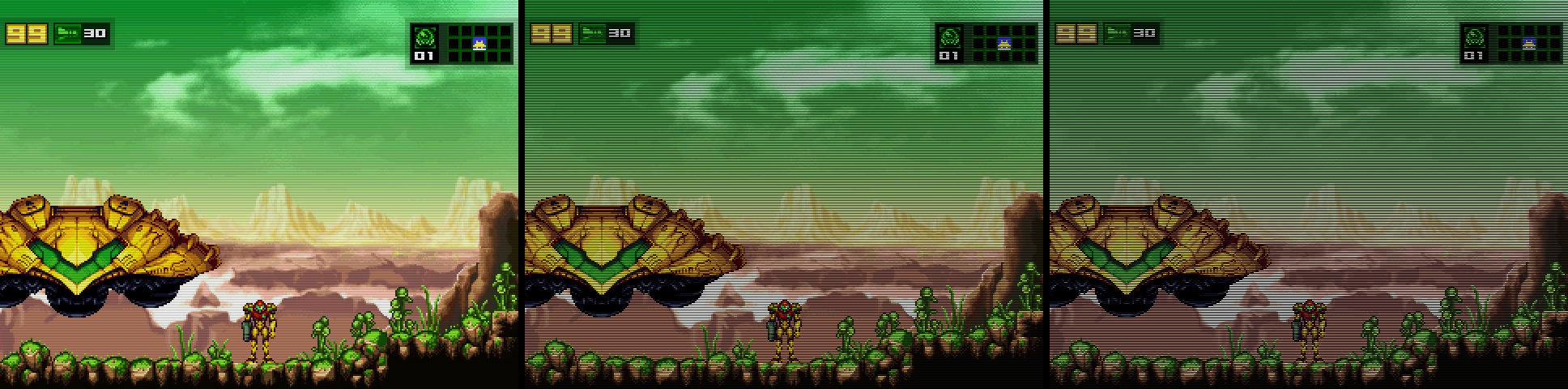
-
GameCube controller adapter (Wii U in Wii mode): Nintendo's WUP-028 or a clone. Plug the controller into port 1. The driver comes from quatric's libwiiinput.
-
DualShock 3 or 4 (experimental, untested on hardware): USB cable only. It plays as a Classic Controller with PlayStation button prompts, rumble, and the defaults in the README's controls table. If you try one, please report on the issues page with
/apps/am2r/profile.txtattached. On a DualShock 4, Share and Options work as Select and Start.
Thanks
Thank you to quatric for the GameCube controller adapter driver, and to Bob from RetroRGB for asking for scanlines.
Updating from 1.0.1
Replace boot.dol and meta.xml in /apps/am2r/ with the ones from the zip. Nothing else changed, so your saves stay and the game built on the first boot is kept.
For a new install, the 1.0.0 release and the README explain the setup.
AM2R GX 1.0.1
A bug fix for 1.0.0. Download am2r-gx-1.0.1.zip below.
Fixed
- The power beam opens blue doors again. In 1.0.0 only missiles opened them (#1).
Updating from 1.0.0
Replace boot.dol and meta.xml in /apps/am2r/ with the ones from the zip. Nothing else changed, so your saves stay and the game built on the first boot is kept.
For a new install, the 1.0.0 release and the README explain the setup.
AM2R GX 1.0.0
AM2R GX runs AM2R 1.5.5 (the Community Update) on the Wii and on the Wii U in Wii mode. It's built on the Butterscotch GameMaker runner with a native GX renderer. You bring the original AM2R 1.1 zip, and the first boot builds 1.5.5 from it.
Download am2r-gx-1.0.0.zip below.
Install
You need the Homebrew Channel, an SD card or a FAT32 USB drive, and a GameCube controller, Classic Controller, or Wii Remote with Nunchuk.
- Copy the zip's
apps/folder onto the SD card or USB drive. - Put
AM2R_11.zipin/apps/am2r/, next toboot.dolandpatch/. - Launch AM2R GX from the Homebrew Channel.
The first boot takes about four minutes and shows its progress on screen. Every later boot goes straight to the title. The README has the controls and display options.
Reporting a problem
Please report any bugs you find through the GitHub issues page. Say which room it happened in, and include /apps/am2r/profile.txt and profile-previous.txt from the SD card or USB drive.
Thanks
- Asophia Mills for the Classic Controller Pro art (CC BY 4.0).
- All of the beta testers: bonkmaykr, Erzaui, NiuuS and Splatterpunk.
- My sweet girlfriend, for always supporting me <3
- syl, for being the sweetest syl ever