Repository navigation
CLI
nemesis [flags]
| Flag | Default | Description |
|---|---|---|
--seed <n> |
0 |
World seed. 0 picks a random seed, printed on start |
--width <n> |
48 |
Level width in tiles |
--height <n> |
32 |
Level height in tiles |
--consoles <n> |
3 |
Objective consoles required to unlock the airlock |
--visualiser |
false |
Open the hunter AI visualiser window alongside the game |
Levels are deterministic from a seed: the same --seed, --width, --height and --consoles regenerate the same station.
A second, optional window shows the hunter's mind while you play: the real map, its current state and A* path, the director's nudges, and a live trigger feed (VENT CREAK AT 12 4). The game window stays honest — the visualiser is a separate process fed over a pipe, like a director's commentary track.
go run ./cmd/nemesis --visualiser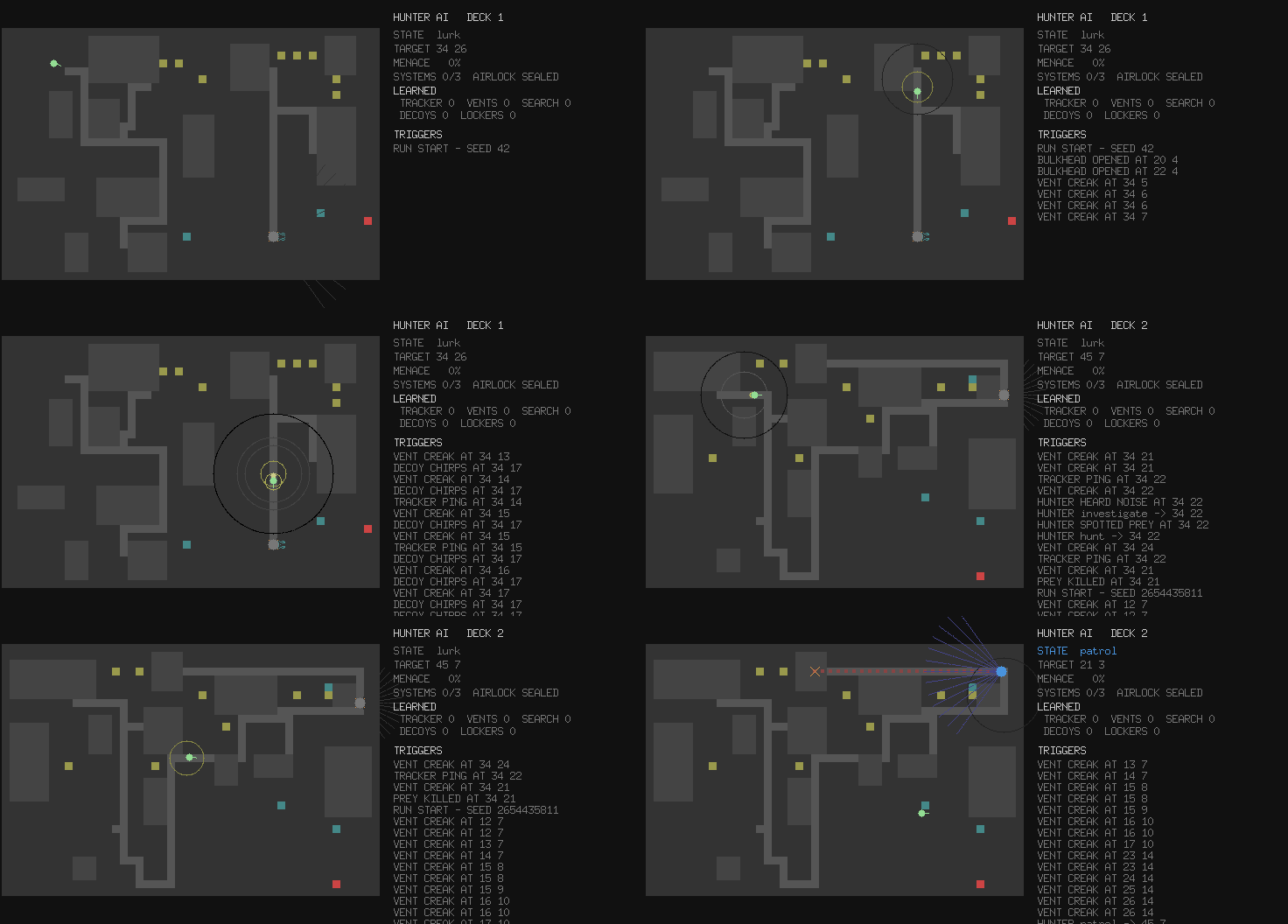
How to read everything on screen.
# A specific station, reproducibly
go run ./cmd/nemesis --seed 42

# A larger station with more objectives
go run ./cmd/nemesis --width 64 --height 48 --consoles 5

# Watch the hunter's mind while you play
go run ./cmd/nemesis --visualiserjust build # compile the binary into ./bin
just run # build and run
just run-visualiser # build and run with the AI visualiser
just test # run all tests
just lint # golangci-lint
just ci # lint + test + build