Repository navigation
Home
Start new task-driven consoles with ui.scene(): declare semantic regions,
relations, and modes; the browser resolves their geometry. A page containing only
a scene selects scene layout automatically. Existing classic layouts and authored
surfaces remain supported. See Scenes for a runnable example, transitions,
continuity controls, accessibility, and v8 limitations.
LCARS-WebUI is a Python library for building live, browser-rendered LCARS applications. You declare pages and instruments in Python; the package builds a typed manifest, serves it with FastAPI, and renders it with a bundled React frontend.
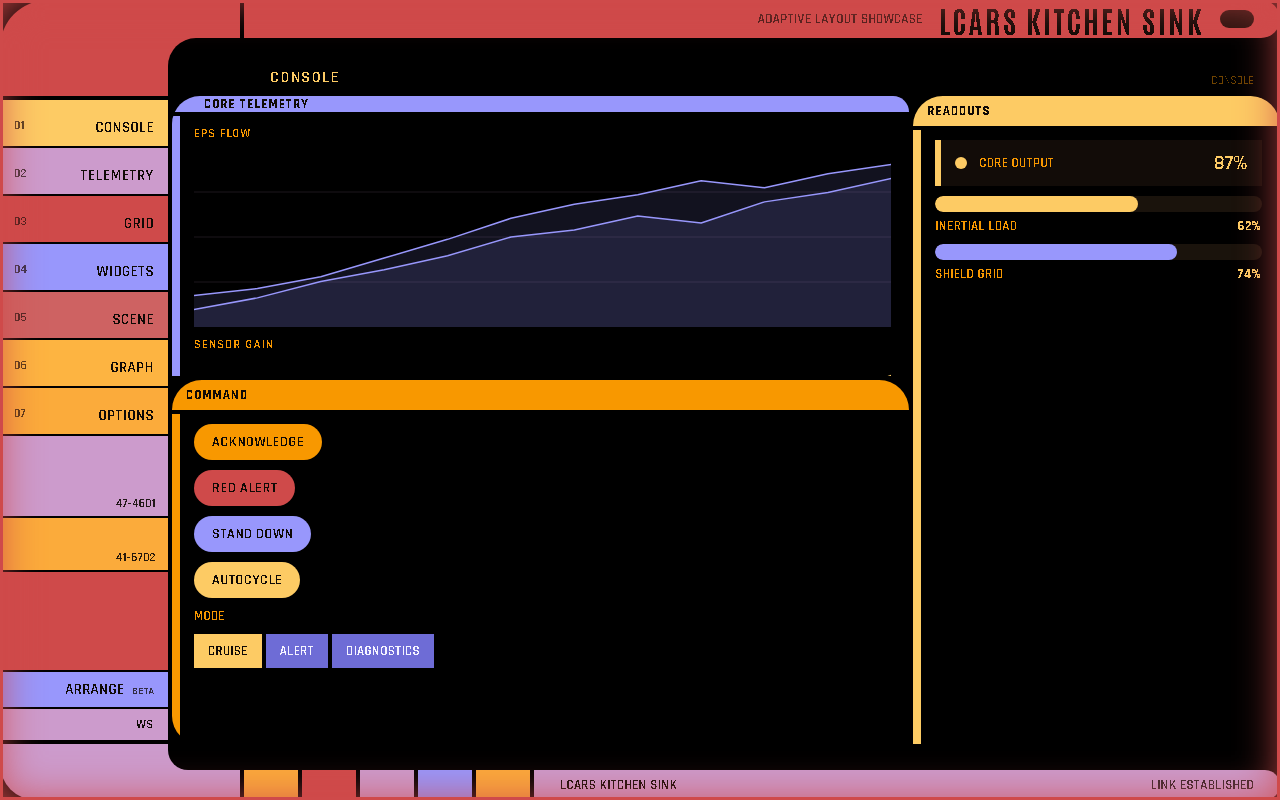
- Adaptive operational consoles, telemetry scopes, grid walls, menus, and diagnostic surfaces, plus exact authored compositions and arbitrary-topology Surface Engine screens for spatial layouts a grid can't express.
- Stateful controls, model-backed forms, sortable/filterable tables, live logs, notifications, financial charts, HLS video, WebGL shaders, Three.js scenes, and editable node graphs.
- Typed application and framework keyboard bindings, with browser-local remapping in the built-in Options page.
- LCARS-native choice, toggle, and numeric controls plus a purpose-built command/chat composer — there is no dropdown, native checkbox, or spinner anywhere in the product surface.
- Real-time dashboards driven by explicit action handlers or a server-side
@app.livejob. - Knowledge-graph clients using the two general-purpose evidence and tri-state instruments that survived the v7 audit.
- Generic graph proposal workspaces with canonical/proposal separation, structured values, transactional history, density navigation, virtualization, diff, and submission.
- Internet-facing applications with scoped token auth, CORS, secure headers, rate limits, and bounded uploads.
| Page | Use it when you need to |
|---|---|
| Getting Started | Install, run an example, and build a first app. |
| Build a Dashboard | Follow a complete multi-page dashboard tutorial. |
| Concepts | Understand App, pages, actions, IDs, state, and transport. |
| Scenes | Build adaptive consoles from regions, relations, and task modes. |
| Layouts | Choose page archetypes, containers, zones, and sizing hints. |
| Surface Engine | Build arbitrary-topology screens - arcs, polygons, mirrored consoles, effects. |
| Widgets | Find every supported widget family and its capabilities. |
| Knowledge Graph | Use the surviving support-panel and tri-state instruments. |
| Graph Workspace | Build generic proposal authoring and density navigation. |
| Actions and State | Handle controls, forms, table state, effects, and live updates. |
| Recipes | Copy practical authoring patterns. |
| Reference | Look up public entry points, accepted values, and routes. |
| Deployment | Configure HTTPS, auth, limits, uploads, and reverse proxies. |
| Troubleshooting | Diagnose install, state, upload, layout, and transport issues. |
| Visual Gallery | Inspect code-rendered example output. |
from lcars_ui import ActionContext, App, ui

app = App()
app.config("Bridge Ops", subtitle="Operations", theme="galaxy")


@app.page("Main", id="main", layout="console")
def main() -> None:
    with ui.data_panel("Readouts", zone="side", id="readouts"):
        ui.metric("Warp Core", "98%", status="ok", id="warp-core")
        ui.progress("Shield Recharge", 72, id="shield-recharge")

    with ui.control_panel("Commands", id="commands"):
        ui.button("Red Alert", color="red", id="red-alert")


@app.action("red-alert")
def red_alert(ctx: ActionContext[None]) -> None:
    ctx.set_alert_condition("red")
    ctx.notify("Battle stations", level="error")


if __name__ == "__main__":
    app.serve(port=8077, open_browser=True)
That direct script can be moved without editing it:
python app.py --port 8011 --ip 0.0.0.0 (--host aliases --ip).
(Built with app.build_manifest() and exercised through app.test_client() while
writing this page.)
-
No rerun.
@app.page("Main", id="main")registersmain(), which runs exactly once — at startup, and again wheneverapp.build_manifest()runs (e.g. in a test) — to declare that page's widgets. It never runs again when a browser action arrives. -
Actions are explicit. To react to something a widget did, register a handler for
its
idwith@app.action(...). It runs once per matching action and receives anActionContext[T], whosectx.valuecarries the event's payload. -
Effects are methods on
ctx—ctx.update(...),ctx.notify(...),ctx.append_log(...),ctx.set_theme(...),ctx.set_alert_condition(...)— private to the triggering session by default; passaudience="all"to broadcast. -
IDs are the operational contract. They route browser actions, retain session
state, connect form values, and target effects. Give every widget you'll reference
later an explicit
id=. -
Layout is semantic: declare LCARS panels and their content; the adaptive mosaic
composes the screen. Use placement hints only when the automatic result needs
direction, or opt into
layout="authored"/advanced.surface()when exact topology is itself meaningful. -
Keyboard bindings are managed: declare application shortcuts with
app.bind_key(); the Options page can change, disable, and reset them alongside framework graph commands.
The UI remains code-rendered. Reference screenshots (where used to build an authored or Surface Engine screen) are measurement inputs only, never page assets or backdrops.
If you know an earlier version of this library — lcars.run(ui), if lcars.button(...),
a flat lcars.* namespace — see docs/migration.md;
its lcars migrate scanner finds every place the change affects.
Next: Getting Started · Build a Dashboard · Widgets · Reference