Repository navigation
Releases
RM AI Agent 1.6.606

Real Memory AI Agent 1.6.606
Install the standalone CLI from npm with npm install --global @reallexi/rmai@1.6.606. Run rmai --version to check the installation. See the CLI README for usage.
The VS Code extension restores saved Scrum tickets on Continue. When Ollama repeats its response on a focused Writer ticket, it asks for one different approach in a separate advisory request before a bounded retry. Cancel waits for the owned work to stop before unlocking chat. A ticket still needs passing owned checks.
RM AI Agent 1.5.314
RM AI Agent 1.5.314
This release stops the destructive preservation-retry loop visible in the installed 1.5.312 trace while keeping the source-protection guard intact.
Behavior
- A destructive whole-file proposal still receives one bounded correction grounded in the complete current target source.
- The correction prompt explicitly warns that a
replacements[]entry whoseoldTextcovers most or all of a file is still a destructive rewrite. - If the correction is also rejected as destructive, the harness records
Preservation correction exhaustedand parks that chunk after the first outer attempt. It no longer spends the eight-attempt 5/10/20/40/60-second cooldown ladder on unchanged requests. - The blocker persists across automatic same-specification continuation while the protected file SHA-256 is unchanged, preventing a fresh mission from silently resetting the retry budget.
- A legitimate manual or agent edit changes the digest and reopens repair. Transient provider errors, rate limits, stalls and stale replacement anchors remain retryable.
- No rejected proposal writes application bytes or creates a review snapshot. Other independent chunks may continue.
The supplied trace is the before-state evidence: backend/src/server.js is repeatedly proposed as a much smaller replacement, the preservation guard rejects each initial and correction response, attempts advance through 7/8 and then an automatic continuation restarts at 1/8. The new regressions exercise both boundaries directly.
Validation
- Full suite: 3,144 passing and one existing POSIX-only skip on Windows.
- Focused post-package runtime/package suite: 62 passing.
- Required
npm run package: passed for 1.5.314. - VSIX package-content and credential scans: passed.
- Standalone CLI publication dry-run: passed for
@reallexi/rmai@1.5.314; four intended package files. - Installed VSIX:
reallexillc.real-memory-ai-agent@1.5.314; installed and source runtime, MCP, and credential-helper hashes match. - Production dependency audit: two existing high-severity findings in the Node 18 LangChain/Zod compatibility chain. This release is not described as vulnerability-free.
Downloads
real-memory-ai-agent-1.5.314.vsixreal-memory-browser-agent-chrome.zipreal-memory-browser-agent-edge.zipreallexi-rmai-1.5.314.tgz
Verify downloads with SHA256SUMS.
This patch changes runtime retry coordination rather than the webview layout. The current settings and Scrum/Harness screenshots remain the real source-rendered evidence in the main product guide; no artificial new screenshot was created for a non-visual change.
Publication status
- Private source commit:
68db1cc0 - Private source release:
v1.5.314 - Public packages:
rmai-v1.5.314(this release) - Protected build/test passed: run 40242026770.
- Protected npm publication failed at the first platform package with registry E404/permission for
@reallexi/rmai-ui-linux-amd64@1.5.314: run 40242029812. The CLI is available as the release tarball above, but 1.5.314 is not claimed as npm-published. - VS Code Marketplace publication failed with TF400813 because the configured publisher PAT is not authorized. The audited VSIX remains available above.
RM AI Agent 1.5.312
RM AI Agent 1.5.312
This release stops the follow-up ESLint configuration repair loop observed after 1.5.311 correctly narrowed ownership to eslint.config.js but still allowed malformed model candidates to replace the file.
Behavior
- The inherited malformed flat config remains the only writable target for a filename-less ESLint ESM-loader syntax failure.
- When the parser proves that one closing delimiter is missing, the harness generates a minimal local candidate and runs a read-only Node syntax check before writing it.
- Model-produced targeted replacements and whole-file candidates for that config pass the same syntax gate before mutation.
- A malformed candidate is rejected without changing disk bytes. Its bounded parser diagnostic is supplied to the next repair attempt.
- Rejected syntax candidates do not enter file recreation, so the recovery ladder cannot overwrite the config through a secondary path.
- Application files remain outside the loader-failure repair scope. The exact lint step and then the full validation bundle must pass before completion.
The installed-1.5.311 trace is the before-state evidence: ownership is correctly restricted to eslint.config.js, but alternating invalid candidates change the loader failure from Unexpected token ']' to Unexpected identifier 'js' and back. The new regression proves a malformed candidate is refused before either model write path reaches the filesystem.
Validation
- Full suite: 3,141 passing and one existing POSIX-only skip on Windows.
- Focused post-package repair/handoff suite: 59 passing.
- Required
npm run package: passed for 1.5.312. - VSIX package-content and credential scans: passed.
- Standalone CLI publication dry-run: passed for
@reallexi/rmai@1.5.312. - Installed VSIX:
reallexillc.real-memory-ai-agent@1.5.312; installed and source runtime hashes match. - Production dependency audit: two existing high-severity findings in the Node 18 LangChain/Zod compatibility chain. This release is not described as vulnerability-free.
Downloads
real-memory-ai-agent-1.5.312.vsixreal-memory-browser-agent-chrome.zipreal-memory-browser-agent-edge.zipreallexi-rmai-1.5.312.tgz
Verify downloads with SHA256SUMS.
This patch changes validation repair safety rather than the webview layout. The current settings and Scrum/Harness screenshots remain the real source-rendered 1.5.309 evidence in the main product guide.
Publication status
- Private source commit:
d3d3767ff2155b452b28c526cd75118dfafe22ec - Private source release:
v1.5.312 - Public packages:
rmai-v1.5.312 - Protected GitHub build/test passed: run 40239751284.
- Protected npm publication failed at the first platform package with registry E404/permission for
@reallexi/rmai-ui-linux-amd64@1.5.312: run 40239760368. The CLI is available as the release tarball above, but 1.5.312 is not claimed as npm-published. - VS Code Marketplace publication failed with TF400813 because the configured publisher PAT is not authorized. The audited VSIX remains available above.
RM AI Agent 1.5.311
RM AI Agent 1.5.311
This release fixes a validation-repair loop in which ESLint stopped in Node's ESM loader without printing the configuration filename, then repeated model repairs against unrelated application files.
Behavior
- The harness recognizes an ESLint version line, a syntax error, and Node module-loader frames as a configuration-load failure rather than an application lint result.
- A read-only
node --checkruns only against existingeslint.config.js,eslint.config.mjs, andeslint.config.cjsfiles in the executing package and its ancestors. - When exactly one malformed config is proven, its complete workspace-relative path and parser diagnostic become the persisted failure identity.
- Diagnosis and repair receive that config's current source, and the write boundary permits only that file.
- Application source is outside the repair scope until ESLint can load its configuration and report an actual source diagnostic.
- The exact failed lint step must pass first; the full validation bundle still runs before completion.
- Ambiguous or unproven configurations remain blocked for evidence instead of triggering a guessed write.
The user-provided installed-1.5.310 trace is the before-state evidence. It shows SyntaxError: Unexpected token ']' from compileSourceTextModule, followed by attempted repairs to frontend/src/App.jsx, backend/src/services/validatorService.ts, and frontend/src/services/api.js. Read-only inspection proved the actual cause was the inherited root eslint.config.js, whose final configuration object was missing its closing brace. The user's application was not modified during this extension repair.
Validation
- New deterministic syntax-localization regression: passed.
- Full suite: 3,139 passing and one existing POSIX-only skip on Windows.
- Focused post-package suite: 23 passing.
- Required
npm run package: passed. - VSIX package-content and credential scans: passed.
- Standalone CLI publication dry-run: passed for
@reallexi/rmai@1.5.311. - Installed VSIX:
reallexillc.real-memory-ai-agent@1.5.311; bundled runtime hash matches the source build. - Production dependency audit: two existing high-severity findings in the Node 18 LangChain/Zod compatibility chain. This release is not described as vulnerability-free.
Downloads
real-memory-ai-agent-1.5.311.vsixreal-memory-browser-agent-chrome.zipreal-memory-browser-agent-edge.zipreallexi-rmai-1.5.311.tgz
Verify downloads with SHA256SUMS.
This patch changes validation diagnosis and repair ownership, not the webview layout. The current settings and Scrum/Harness screenshots remain the real source-rendered 1.5.309 evidence. See the main product guide for those images and setup instructions.
Publication status
- Private source commit:
a131929984f23e21bc665b4ef76e3707bbeb66e1 - Private source release:
v1.5.311 - Public packages:
rmai-v1.5.311 - Protected CI, npm and Marketplace outcomes are added after those workflows finish. Local validation and a registry dry-run do not prove a registry or Marketplace publication.
RM AI Agent 1.5.310
RM AI Agent 1.5.310
This release stops malformed structured Ollama output from repeating the internal RM output-boundary key indefinitely.
Behavior
- Six consecutive boundary-key tokens are treated as a provider output cycle.
- The stream is cancelled before the repeated protocol text is sent to the Harness output reader.
- The partial JSON is never executed or written.
- The existing same-model recovery runs once with thinking disabled and unchanged task, error and file evidence.
- If recovery repeats the defect, the request stops at
provider_retry; it does not enter another unbounded stream. - Repetitive numeric fixtures inside otherwise valid structured patches remain accepted.
Validation
- Focused output/reasoning suite: 15 passing.
- Full post-package suite: 3,138 passing and one existing POSIX-only skip on Windows.
- Required
npm run package: passed. - VSIX package-content and credential scans: passed.
- Standalone CLI, Chrome and Edge artifacts are synchronized at 1.5.310.
The user-provided 1.5.309 trace is the before-state evidence: it contains 380 repeated _rm_ai_output_end_ markers in the visible 8,000-character tail and a model stream still running after 237 seconds. The new regression feeds the same structured shape through the production Ollama reader and proves cancellation plus zero repeated markers delivered to the transient output channel.
Downloads
real-memory-ai-agent-1.5.310.vsixreal-memory-browser-agent-chrome.zipreal-memory-browser-agent-edge.zipreallexi-rmai-1.5.310.tgz
Verify downloads with SHA256SUMS.
The settings and Scrum/Harness screenshots remain the source-rendered 1.5.309 UI evidence because this patch changes provider stream handling, not layout. See the main release page for those images and setup instructions.
RM AI Agent 1.5.309 — Adaptive harness and deterministic validation repair
RM AI Agent 1.5.309 — Adaptive harness and verified repair flow
Version 1.5.309 makes the optional VS Code Adaptive harness visible, readable, and responsible for coordinating validation repair around the selected model. It also repairs the installed-extension loading failure seen in 1.5.304 and ships synchronized VS Code, Chrome, Edge, MCP, and standalone CLI packages.
What changed
- The RM robot-head badge identifies whether the harness is enabled, idle, or coordinating the selected model in both Chat and the Scrum board.
- The Scrum board uses bounded horizontal Kanban lanes and a dedicated Harness workspace. Conversation and Activity tabs keep model requests, native reasoning/output when available, repair decisions, and validation results readable.
- At narrow widths, Board and Harness are separate selectable views instead of competing stacked panes. Live polling preserves lane scroll, the selected message, and reader scroll.
- A validation path is converted to workspace-relative form only after the host proves it belongs to the active workspace. Foreign drives, outside absolute roots, traversal, dependencies, generated output, and vendor paths stay blocked.
- When a scoped repair is saved, the harness reruns the exact failed check from the trusted validation bundle. A focused pass confirms the fix but does not complete the project; the full validation bundle must pass next.
- Different ESLint rule-loader failures now have different persisted fingerprints. A repair that exposes a new incompatible rule can receive its own bounded diagnosis instead of exhausting the previous rule's budget; identical failures and the total validation loop remain capped.
- For the recorded ESLint 8 failure, the host replaces one unambiguous
no-unassigned-varsconfig key with compatibleno-unused-varsand reruns lint. Ambiguous configs remain blocked for evidence-backed review rather than being rewritten broadly. - Validation failure, diagnosis, repair submission, focused verification, and final validation status appear as bounded transient Harness messages.
- Native model reasoning and output remain transient. They are not added to chat history, the runtime DB, or host logs. Known credential fields are redacted.
- Supported native three-argument scrypt evidence is computed from the documented credential and inspected source parameters. Unsupported or ambiguous algorithms remain explicit inspection work; model-invented hashes are not accepted as proof.
- Repeated speculative hash narratives and low-diversity numeric loops get one bounded output recovery before the existing provider retry/failover path.
Screenshots
Adaptive harness settings


Scrum and Harness workspace


Chat exchange view


The screenshots are source-rendered previews from the real production HTML functions, using identical fixtures at 1024×1000 and 320×1000. Example exchanges are explicitly labelled and are not presented as a live model conversation. The after-state has zero page errors and no horizontal page overflow. Native VS Code proof was captured for the shared 1.5.307 UI/runtime build; 1.5.309 was then installed successfully, its runtime/validator/credential/style hashes match source, and its packaged ESM entrypoint test passes. A new live application mission was not started solely to manufacture release evidence.
Install and start
VS Code
Download the audited 1.5.309 VSIX, then use Extensions → … → Install from VSIX and reload the affected VS Code window.
Open RM AI Agent → Settings → Controller to choose the provider/model and enable Adaptive harness for the current workspace.
Standalone CLI
npm install --global ./reallexi-rmai-1.5.309.tgz
rmai --version
rmai settings
rmai chat --project .
rmai run "Fix the failing tests" --dry-run
Download the audited CLI tarball. Node.js 18 or newer is required. The Adaptive harness controls described here currently belong to the VS Code extension; they do not train model weights or add new CLI settings.
Enable the harness
- Open RM AI Agent → Settings → Controller.
- Choose the provider, model, and flow normally.
- Turn Adaptive harness on. It defaults off.
- Add explicit Project guidance, such as “reuse the existing API and run the owning package tests.”
- Optionally enable Remember verified repairs. It defaults off.
- Keep Automatic repair enabled for bounded self-repair, or disable it to retain failures for manual review.
- Choose a Harness repair limit from 1–5; the default is 2 and existing safety limits still apply.
- Review, edit, or clear Verified repair memory at any time.
What learning means
The harness does not train or alter the selected model. It supplies reviewable workspace guidance and relevant verified observations as context.
Verified memory records involved workspace-relative file paths and successful validation outcomes. It does not copy raw diagnostics, credentials, source code, or model reasoning. A stored observation is only a hint: current source inspection and validation remain authoritative. Workspace settings and memory stay scoped to that workspace. The chosen provider still determines where inference runs.
Validation and repair behavior
The flow is:
request → inspect → implement → validate → diagnose → submit scoped repair → rerun the failed check → full validation
The focused rerun is selected only from the already-approved validation command bundle; command text printed by a failing tool cannot inject a new command. If that focused check passes, the Harness says the repair is verified but keeps completion false until the original full bundle passes. If it fails, the same fingerprint, evidence, budget, and full-validation ownership are retained.
Repeated Continue actions do not erase the fingerprint count. Reaching the configured or existing repair budget blocks another identical model attempt instead of claiming success. Turning Automatic repair off remains authoritative.
Validation and release evidence
- Pre-package full suite: 3,137 passing, one POSIX-only test skipped on Windows.
- Required
npm run package: passed for 1.5.309. - Final post-package full suite: 3,137 passing, the same single platform skip.
- Focused packaged checks: 25 passing, covering the recorded ESLint fingerprint and saved-config repair, native ESM import, shipped CSS, path ownership, focused/full validation ordering, runtime routing, and Windows Git-test cleanup.
- Standalone CLI publication dry-run: passed for
@reallexi/rmai@1.5.309. - Installed VSIX: VS Code reports
reallexillc.real-memory-ai-agent@1.5.309; source and installed runtime/validator/credential/style hashes match. - Artifact scan: no private source paths, source maps, or matching local credential values in the VSIX, CLI tarball, or browser ZIPs. The CLI tarball contains exactly four files.
Checksums are in SHA256SUMS.
The production dependency audit still reports two high findings in the existing Node 18 LangChain/Zod compatibility chain. This release is not described as vulnerability-free. A later installed 1.5.307 trace exposed the ESLint fingerprint collision repaired in 1.5.309; that external application mission remained validation-blocked and is not presented as completed here.
Private source, regression tests, pasted traces, runtime databases, native screenshots containing local paths, and raw proof logs are not included in this public media repository.
Publication status
- Private source commit:
005350a0, taggedv1.5.309. - Audited packages are attached to the public prerelease.
- GitHub build/test workflow: passed.
- npm publication workflow: blocked by registry
E404/missing permission for@reallexi/rmai-ui-linux-amd64@1.5.309; the local tarball and dry-run passed, but the package is not claimed as registry-published. - VS Code Marketplace publication: blocked because the configured publisher PAT is not authorized (
TF400813); the VSIX remains available from this audited prerelease.
Product and support
- Product: https://realmemoryai.com
- Publisher: https://reallexi.io
- Sponsors: https://github.com/sponsors/ddkits
- Support: https://reallexi.io/support
RM AI Agent 1.5.303 - Adaptive harness prerelease
RM AI Agent 1.5.303 — Adaptive harness
Optional project guidance, verified repair memory and bounded recovery for the VS Code agent, with synchronized browser and npm CLI builds.
What changed
- Adaptive harness controls are beside the VS Code model and flow selectors.
- Project guidance lets you save corrections and preferences explicitly.
- Verified repair memory is a separate opt-in. It records involved file paths and a successful-validation observation after a diagnosed repair passes its check.
- Automatic repair can be disabled. A per-fingerprint limit prevents repeated diagnosis attempts from gaining a fresh budget through Continue.
- Ollama recovery detects sustained repeated reasoning and numeric narrative cycles. It tries one output recovery; a repeated failure follows the existing provider retry/failover path. Distinct long reasoning and structured patches containing numeric fixtures remain supported.
- Authentication browser failures identify inspected hashing-source files. The repair instruction requires executable digest computation with the actual algorithm, salt, encoding and length, followed by valid and invalid sign-in checks. A plausible-looking model-generated hash is not verification.
Settings screenshots
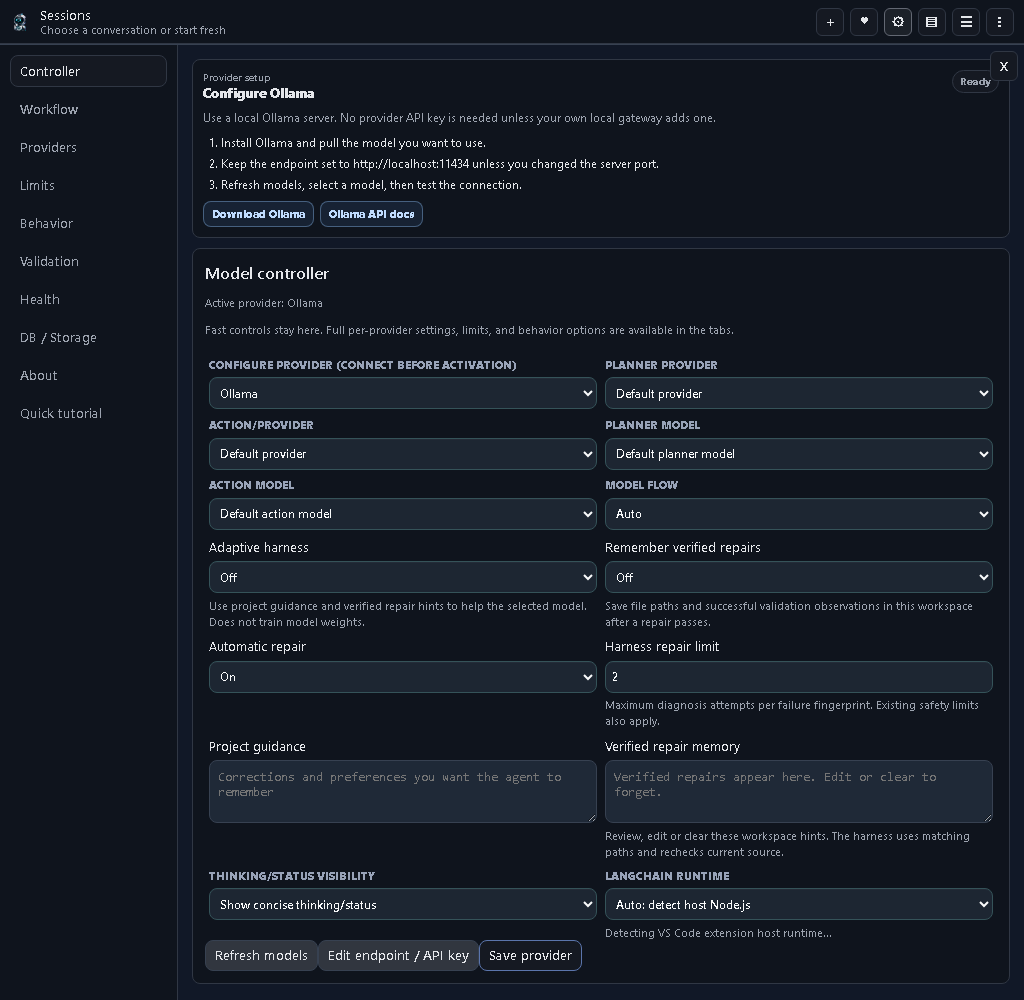
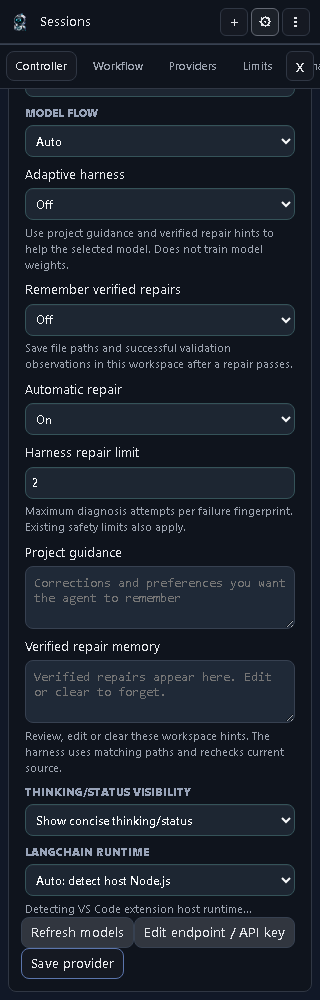
These are screenshots of the actual source-rendered VS Code webview in Chromium, using the same Controller route at 1024×1000 and 320×1000. The compact view is scrolled to Model flow. They demonstrate settings layout and messages, not a live installed model mission. Before/after comparison and raw test logs stay in private release evidence.
Install and start
VS Code
Install the audited 1.5.303 VSIX through Extensions → … → Install from VSIX. Reload VS Code after replacing an installed version. The Marketplace publication attempt was rejected by the publisher credential, so the Marketplace listing has not been updated to this version.
Open a project folder, open RM AI Agent, and choose a provider and model. For local inference, connect the Ollama or llama.cpp server you already run. Use the connection test before sending a task. Choose Agent mode for implementation work, and review the active approval settings before allowing file changes or commands.
CLI
npm install --global ./reallexi-rmai-1.5.303.tgz
rmai --version
rmai settings
rmai chat --project .
rmai run "Fix the failing tests" --dry-run
First download the audited CLI tarball. Node.js 18 or newer is required. The CLI is independent of the VS Code extension. These new Adaptive harness controls are currently a VS Code feature; the CLI and Chrome/Edge clients keep their own settings. Version 1.5.303 is not available from npm: the tagged publication workflow was rejected while publishing its first platform UI dependency.
Enable the harness
- Open RM AI Agent → Settings → Controller.
- Select your provider, model and flow.
- Turn Adaptive harness on. It defaults off.
- Enter your preferences in Project guidance, for example: “Reuse the existing API; preserve unrelated files; run the owning package tests.”
- Turn Remember verified repairs on only if you want successful path/outcome observations saved. It defaults off.
- Choose Automatic repair and a Harness repair limit from 1 to 5. Automatic repair defaults on within the optional harness, and the limit defaults to 2. Existing safety limits still apply.
- Review Verified repair memory whenever needed. Edit it or clear the field to forget observations.
What learning means
This feature does not train or modify model weights. It supplies reviewable project guidance and relevant historical observations to the selected model. It does not automatically treat every chat correction, failed attempt or model explanation as a permanent instruction.
Learned observations contain file paths and successful validation outcomes. They do not copy raw diagnostics, credentials, source or reasoning into this memory. A saved observation is supplied only when its file path matches current context, and must be checked against current source. You can edit or clear both guidance and memory.
Settings saved by these controls are scoped to the current workspace. The selected provider determines where inference runs. A hosted provider receives the context supplied to that model; choosing a local provider keeps inference on that local endpoint. Do not put credentials in project guidance.
Failure and recovery behavior
The workflow is request → inspect → implement → validate → diagnose → bounded repair → validate again. A failed check is retained as evidence. It does not become a successful result merely because the model says it is fixed.
The harness limit applies to the existing persisted failure fingerprint, including its recorded count. Continue does not clear that history. Disable Automatic repair to retain the failure for review before another automatic diagnosis/repair attempt. Reaching either the harness limit or an existing safety budget blocks further attempts for that failure. Inspect the retained cause, source, command output and environment before deciding what to change.
For a documented sign-in failure, inspect the current README credential, authentication seed and verifier together. Compute the digest with executable code, retain the documented credential and rejection behavior, rebuild the owning API, and verify that the running server uses the rebuilt code. The extension repair adds evidence and ownership guidance; it does not silently rewrite a user's application seed or live task database.
Validation and release status
All 3,114 extension tests passed locally, including compile/typecheck/bundles. The required npm run package completed for 1.5.303; 58 post-package checks and the CLI publish dry-run passed. The installed extension and validator hashes match the packaged build.
The packaged VSIX, Chrome/Edge ZIPs and CLI tarball were inspected: no private source entries, source maps or matching local credential values were found. The CLI tarball has exactly four files: executable, package manifest, README and license. Checksums are in SHA256SUMS. The downloadable CLI uses the previously released optional terminal UI dependency; the tagged workflow builds fresh platform packages before publishing the CLI.
The production dependency audit still reports two high-severity findings in the existing Node 18 compatibility LangChain/Zod chain. This release is not described as vulnerability-free or fully published. The original application's live sign-in mission was not rerun or manually marked complete; its seed and runtime database were preserved.
Publication outcomes:
- Private source and tag
v1.5.303pushed: source commit. - npm workflow failed with registry
E404on PUT for@reallexi/rmai-ui-linux-amd64@1.5.303. The configuredODIC_TOKENneeds valid publication access; the CLI publish step was not reached. Workflow result. - Marketplace publication failed with
TF400813: the publisher credential is not authorized. - Audited local packages are offered as prerelease downloads, while registry, Marketplace and dependency findings remain unresolved.
Screenshots and documents are public; private source changes, regression tests, runtime databases, pasted traces and raw local proof remain outside this media repository.
Product and support
- Product: https://realmemoryai.com
- Publisher: https://reallexi.io
- Sponsors: https://github.com/sponsors/ddkits
- Support: https://reallexi.io/support