Repository navigation
Releases
Mitosis 0.2.3

Mitosis 0.2.3 makes apps like Muse cloneable and keeps the same thing from happening with other apps.
Install or update
Click Update Now in Mitosis, or:
brew upgrade --cask deadhearth01/tap/mitosiscurl -fsSL https://raw.githubusercontent.com/deadhearth01/Mitosis/main/scripts/install.sh | bashFixed
- Muse and similar apps can be cloned. Some apps leave out the Info.plist entry that names their program; Mitosis now finds it the way macOS does, so they no longer fail with "MitosisCore.InspectionError error 1".
- Errors now read in plain words.
Changed
- Apps with developer-only features get a full clone (own data and Dock icon) instead of compatibility mode, which can't work for apps that allow one copy at a time, like Muse. You may need to sign in again when you open such a copy.
- Automatic mode retries in compatibility mode when a full clone won't start, instead of asking you to.
See the changelog.
Mitosis 0.2.2 — one-click updates
Update Now. When a new version of Mitosis is out, the banner, Settings, and the menu bar menu now offer Update Now. Mitosis downloads the release, checks its checksum and signature, replaces itself, and reopens. No Terminal needed.
This is the last time you need the command: update to 0.2.2 once, and future updates are one click.
curl -fsSL https://raw.githubusercontent.com/deadhearth01/Mitosis/main/scripts/install.sh | bashor brew upgrade --cask mitosis. macOS 15 or later on Apple silicon.
Mitosis 0.2.1 — separate Codex accounts
Codex clones now have their own account.
Codex keeps its sign-in in a ~/.codex folder, outside the app's normal data folder, so a Codex clone showed the same account as the original. Each Codex clone now gets its own Codex folder (account, settings, history) and starts signed out, so you can sign in with a different account. Your original Codex is untouched.
Already have a Codex clone? It's rebuilt automatically after you update (or choose Refresh). Then sign in inside the clone.
Also: when Mitosis learns a better way to clone an app, existing clones of that app are rebuilt like after an app update.
Install or update
curl -fsSL https://raw.githubusercontent.com/deadhearth01/Mitosis/main/scripts/install.sh | bashor brew upgrade --cask mitosis.
Mitosis 0.2.0 — sign in to each copy
Sign in to each copy. Many apps sign you in through your browser and then get a link back, such as slack://…. macOS normally hands that link to the original app, so the wrong copy got signed in. Now:
- Turn on Send sign-in links to the right copy on a clone's page. Mitosis delivers each sign-in link to the copy you signed in from, and asks which one when several are open.
- Turning it off, or deleting the app's last clone, gives the links back to the original app.
- From Terminal:
mitosis links on Slack,mitosis links off Slack,mitosis links.
Install or update
curl -fsSL https://raw.githubusercontent.com/deadhearth01/Mitosis/main/scripts/install.sh | bashor brew install --cask deadhearth01/tap/mitosis (brew upgrade --cask mitosis to update). macOS 15 or later on Apple silicon.
Mitosis 0.1.1
A small follow-up to 0.1.0, the first release of the Mac app.
- Mito in the menu bar. The optional menu bar icon (Settings ▸ General) is now a small Mito instead of a generic symbol.
- Put Back works. A clone restored from the Trash shows up in Mitosis again, and a clone you trash in Finder leaves the list.
Install or update
curl -fsSL https://raw.githubusercontent.com/deadhearth01/Mitosis/main/scripts/install.sh | bashor brew install --cask deadhearth01/tap/mitosis (brew upgrade --cask mitosis to update). macOS 15 or later on Apple silicon.
Mitosis 0.1.0 — the Mac app
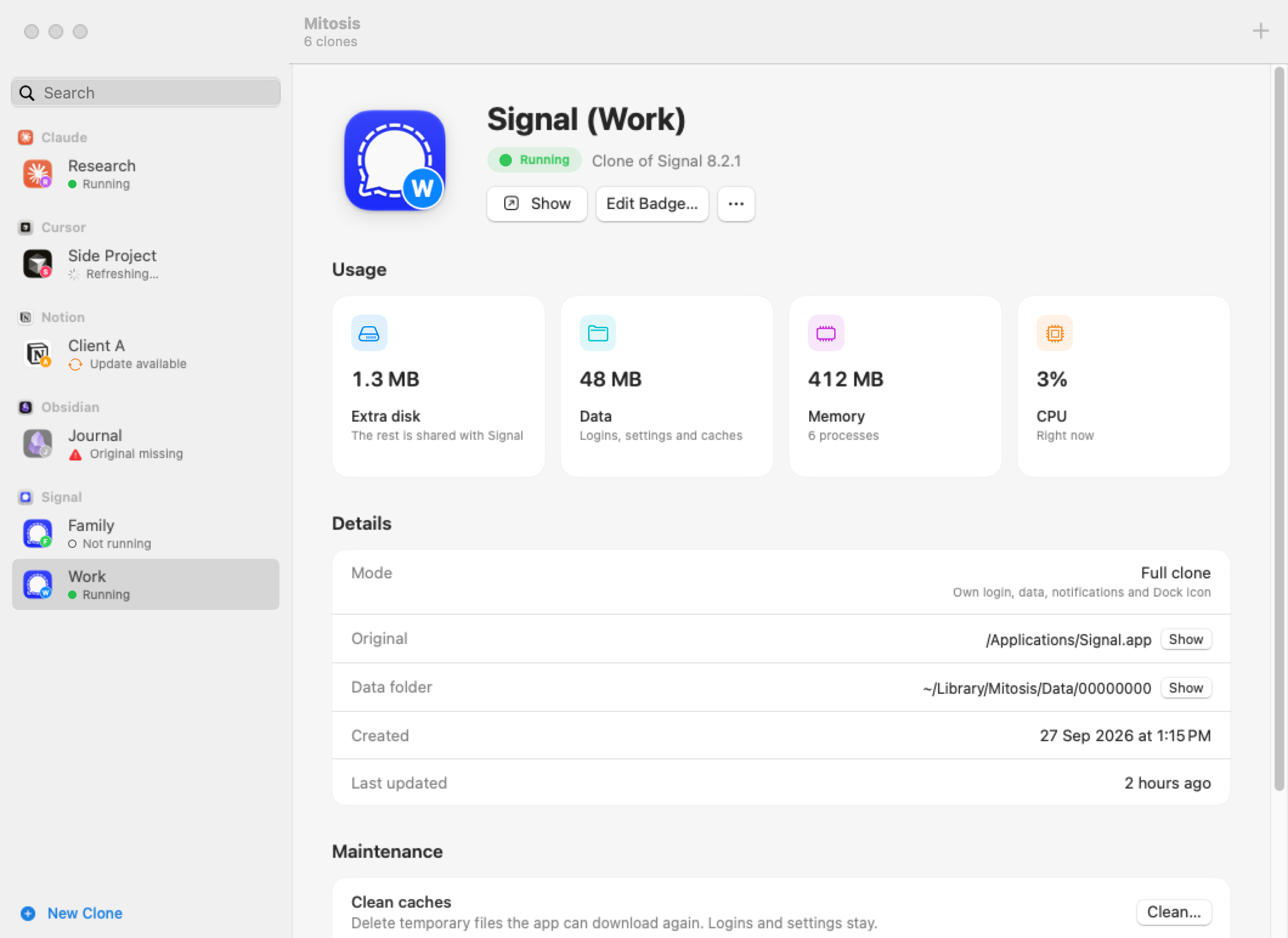
Mitosis 0.1.0 is the first release of the Mac app. Run separate copies of your Mac apps, each with its own login, data and Dock icon, now with a native window instead of only the command line.
Install
curl -fsSL https://raw.githubusercontent.com/deadhearth01/Mitosis/main/scripts/install.sh | bashor with Homebrew:
brew install --cask deadhearth01/tap/mitosisRequires macOS 15 or later on Apple silicon. The script installs Mitosis in /Applications, links the mitosis command, and checks the download's checksum and signature. Downloading the .zip below instead? Mitosis isn't notarized, so run xattr -dr com.apple.quarantine /Applications/Mitosis.app once after moving it to Applications.
What's new
- The Mac app. Clones are listed by app in the sidebar. Each one gets a page with its status, actions (Open, Edit Badge, Refresh, Clean Caches, Delete) and usage: extra disk, data, memory and CPU.
- Guided New Clone flow. Search your apps, see which work before you start, add a label and badge (letters or an emoji) with a live icon preview, and watch Mitosis build the clone and check that it starts.
- Clones update themselves. When an original app updates, Mitosis rebuilds its clones in the background, even while Mitosis is closed. Logins and data stay; open clones update after you quit them.
- Full-size icons on macOS 26 and later. Clone badges now sit inside the icon's corner, so macOS no longer shrinks clone icons onto a gray plate.
- Welcome screen, built-in help guide, optional menu bar menu, and an update check you can turn off.
mitosis refresh --outdatedfor scripted updates.
Updating from 0.1.0-alpha.1? Run the install command again; it replaces the old command-line install with the app.
See the changelog for everything else.
Mitosis 0.1.0-alpha.1 — command-line preview
The first Mitosis preview. This release brings the clone engine and the mitosis command-line tool. The native Mac app is coming in 0.1.
Install
curl -fsSL https://raw.githubusercontent.com/deadhearth01/Mitosis/main/scripts/install.sh | bashThe installer verifies the SHA-256 checksum and installs to ~/.local/bin. No admin password needed.
Requires macOS 15 or later on an Apple silicon Mac.
What you can do
mitosis doctor Slack                 # can Slack be cloned, and how?
mitosis clone Slack --label Work     # creates "Slack (Work)" and checks that it starts
mitosis stats "Slack (Work)"         # extra disk, data, RAM, and CPU
mitosis refresh --all                # rebuild clones after the original app updates
What's inside
- Separate copies with their own login, data folder, Dock icon, and badge, named like
Slack (Work). - Light on disk: copies share the original's files (APFS cloning) and usually cost a couple of megabytes.
- Verified: a new copy is opened once to confirm it starts; a failed refresh restores the previous version.
- Safe: the original app is never modified, and deleting moves things to the Trash.
- Private: no analytics; the clone engine makes no network connections.
Works great with Slack, Discord, Signal, VS Code, Obsidian, Notion, Claude, and most Electron or Chromium apps. Run mitosis doctor <App> for any app.
Good to know
- This is a pre-release for early testers. Please report how your apps behave.
- Mitosis isn't notarized (it's built without a paid Apple Developer account). The install script avoids browser quarantine; the source is all here to read.
SHA-256 mitosis-macos-arm64.tar.gz: 90f16555b9fc6ed29f01a315156753949329e0a75698ebf39771830e3691095d
Free and source-available under the PolyForm Noncommercial License. Free to use at work.