Repository navigation
Releases
RailtyMaps 1.1.0

RailtyMaps now works across most of the US, and any place can be reached by car or on foot as well as by transit.
What's new
- Most of the US. Anywhere Transitous has schedules: about 350 transit feeds in 41 states and DC, including New York, LA, the Bay Area, Chicago, Boston, Philadelphia, Seattle, Portland, Denver, Atlanta, Phoenix, Minneapolis and the big Texas and Florida metros. Deadlines are in each place's own time zone.
- Driving and walking. Set any place to car or on foot instead of transit, so the person who drives to work and the one who walks to school show up on the same card. Driving times don't include traffic, so expect rush hour to take longer.
- Suggestions as you type when adding a place, for US addresses and named places like "Union Station".
- Trips past the walking limit. If nothing fits someone's longest walk, RailtyMaps looks again allowing up to an hour on foot. Instead of "90+", the card shows that time with a dashed outline and a warning mark, and the side panel shows the route with the long walk called out. That way you can tell a stop that's two minutes too far from one that's twenty.
- An off switch for the shading, on the map itself and in Settings.
- Long drives. The side panel shows driving routes of up to six hours.
- Smaller fixes: messages about the default person, "Me", now say "you" and "your". The copied Saved summary marks which places are by car or on foot.
Install or update
The Chrome Web Store listing is on its way. Until then:
- Download
railtymaps-1.1.0-chrome.zipbelow and unzip it. - Open
chrome://extensionsand turn on Developer mode. - Click Load unpacked and pick the unzipped folder.
- Pin RailtyMaps to the toolbar and click it to set up.
Updating from 1.0.0? Unzip over the folder you loaded before, then click the reload button on RailtyMaps in chrome://extensions. Your people, places and saved homes carry over. Chrome treats a different folder as a separate extension, so loading this one from a new folder starts with empty settings.
Needs Chrome 116 or newer. To build it yourself instead, see the README.
Good to know
- Times mean how many minutes before the deadline you have to leave home, using published schedules. Live delays aren't included.
- If your area has buses or trains but RailtyMaps says there's no transit nearby, the agency's schedules may not be in Transitous yet. Their source list shows what's included, and new feeds can be added there.
- Your people, places and saved homes stay in your browser. Trip planning and place search go to Transitous. Details in PRIVACY.md.
- If badges stop showing up after Zillow or Redfin changes their pages, please open an issue with the page URL.
Full changes: v1.0.0...v1.1.0
SHA-256 of the zip: 5b5156aee1a5a0f13e971e53e624a5b8e038f7b1e09c6e45ac6aa10c14949647
RailtyMaps 1.0.0

First public release.
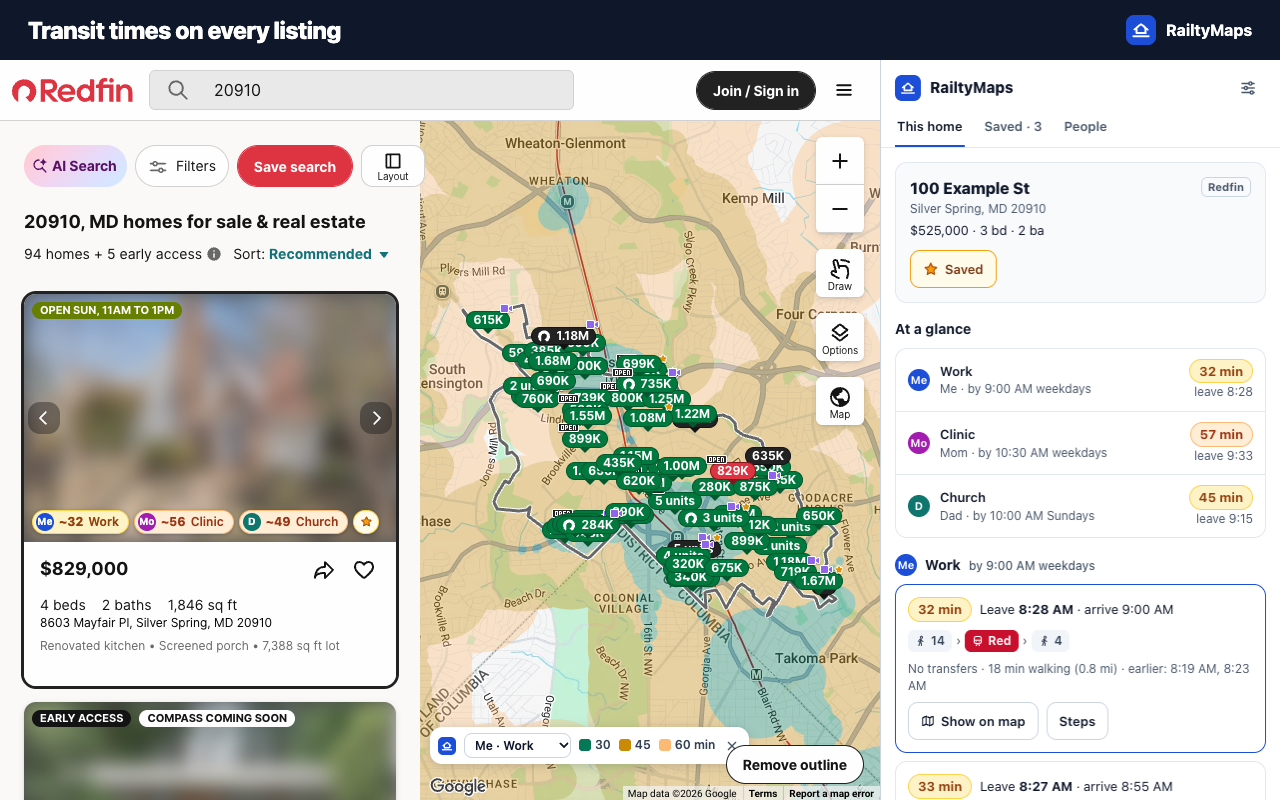
RailtyMaps adds public-transit times to Zillow and Redfin listings for everyone in your household. Every search result gets a time per person and place, the listing map shades where you can live and still arrive on time, the side panel shows full routes, and saved homes can be compared side by side. It covers the Washington, DC area.
Install
The Chrome Web Store listing is on its way. Until then:
- Download
railtymaps-1.0.0-chrome.zipbelow and unzip it. - Open
chrome://extensionsand turn on Developer mode. - Click Load unpacked and pick the unzipped folder.
- Pin RailtyMaps to the toolbar and click it to set up.
Needs Chrome 116 or newer. To build it yourself instead, see the README.
Good to know
- Times mean how many minutes before the deadline you have to leave home, using published schedules. Live delays aren't included.
- Your people, places and saved homes stay in your browser. Details in PRIVACY.md.
- If badges stop showing up after Zillow or Redfin changes their pages, please open an issue with the page URL.
SHA-256 of the zip: ca454dc198fab78699a861cbf770a422b2e83b913e5df2e62bfd988b151ded9a