Repository navigation
Releases
SolidCraft 0.40.0-rc.2a for Android

This is a pre-release, like upstream's 0.40.0-rc.2, for people who choose to test it. Designs saved in it are format 51 and won't open in 0.30.1a, so keep a copy of anything you care about. For work, stay on 0.30.1a. It installs over 0.30.1a; going back means uninstalling first, which deletes the app's settings and crash reports.
New in 0.40.0-rc.2a
- Upstream's new geometry kernel, solidcore, replaces truck for every boolean, fillet, shell and thread; upstream's modelled threads gain trapezoidal, Acme, buttress and pipe forms, several starts, both hands, runouts and chamfered tips. Upstream's own known problems are in its release notes.
- The port's helical threads on solidcore: any pitch, depth, flank angle, clearance and start angle, now an exact screw sweep. Custom is the last entry of the Thread dialog's Form list.
- Threads run off a free end with a negative start or end offset, so a nut with countersinks fits its bolt.
- No crash at launch on Qualcomm Adreno GPUs: upstream 0.40's GPU tessellation shader crashes Adreno's compiler, so bodies are built on the CPU there.
- Gears work unchanged; designs from every earlier port release open.
- Tested on a Galaxy Z Fold (Android 17): the test, including a 12 mm × 2.2 mm bolt and nut.
SolidCraft 0.40.0-rc.2a for Android (SolidCraft 0.40.0-rc.2, port release a).
Built from upstream SolidCraft v0.40.0-rc.2 (777f9609) with the Android port on top.
Install: download SolidCraft-0.40.0-rc.2a-android-arm64.apk on an Android 8.0+ phone or tablet (arm64) and open it, allowing installs from that source; or adb install -r SolidCraft-0.40.0-rc.2a-android-arm64.apk. Signed with a development key: uninstall a build from elsewhere first if Android refuses to update it.
Works: the full SolidCraft app (sketches, features, the timeline, the Render workspace) on Vulkan or GLES; mouse and keyboard as on the desktop (hover, selection, navigation buttons, wheel, right-click menu, shortcuts); touch (one finger orbits, tap selects, two fingers pan, pinch zooms, a finger drags a dialog's arrows); Back closes what is open; open, save, import and export through Android's file picker (STEP, STL, 3MF and OBJ tested); the on-screen keyboard for typing. Port-only: helical B-rep, custom and clearance threads (docs/android-threads.md) and involute gears: spur, helical, herringbone, internal, rack, bevel, miter, worm, worm wheel, crossed helical (docs/android-gears.md). The port saves designs one file format past upstream's release, so upstream's releases ask to be updated instead of opening them; export STEP to share.
Not yet: the on-screen keyboard covers the lower half of the screen (the app doesn't move above it), the phone layout is usable but cramped (best on a tablet or a foldable's inner screen), autosave recovery. Known issues, with work-arounds: docs/android-known-issues.md. How to use it: docs/android-touch.md; details: docs/android.md.
SolidCraft 0.30.1a for Android
SolidCraft 0.30.1a for Android (SolidCraft 0.30.1, port release a).
Built from upstream SolidCraft v0.30.1 (8e2b0cd6) with the Android port on top.
New in 0.30.1a:
- Upstream 0.29.0, 0.30.0 and 0.30.1 (442 commits): Preferences in twelve pages, saved as they change; lasso selection; Measure from your selection; Plane through an axis and a point; keep and compare renders; inch fasteners; security fixes. Designs are format 49.
- An OpenGL ES fallback (#4): when a phone's graphics can't start, the app leaves cleanly instead of being aborted, the next launch uses OpenGL ES, and
startup-error.txtin the app's folder says why. - The 3D view draws on OpenGL ES: upstream 0.30.1's viewport shader doesn't compile there; the port fixes it.
- Crash reports you can save: shown at the next start, Save a copy through Android's picker; Report a bug drafts the issue on this port's tracker.
- Tested on Vulkan and OpenGL ES: docs/android-0301a-test.md.
Install: download SolidCraft-0.30.1a-android-arm64.apk on an Android 8.0+ phone or tablet (arm64) and open it, allowing installs from that source; or adb install -r SolidCraft-0.30.1a-android-arm64.apk. Signed with a development key: uninstall a build from elsewhere first if Android refuses to update it.
Works: the full SolidCraft app (sketches, features, the timeline, the Render workspace) on Vulkan or GLES; mouse and keyboard as on the desktop (hover, selection, navigation buttons, wheel, right-click menu, shortcuts); touch (one finger orbits, tap selects, two fingers pan, pinch zooms, a finger drags a dialog's arrows); Back closes what is open; open, save, import and export through Android's file picker (STEP, STL, 3MF and OBJ tested); the on-screen keyboard for typing. Port-only: helical B-rep, custom and clearance threads (docs/android-threads.md) and involute gears: spur, helical, herringbone, internal, rack, bevel, miter, worm, worm wheel, crossed helical (docs/android-gears.md). The port saves designs one file format past upstream's release, so upstream's releases ask to be updated instead of opening them; export STEP to share.
Not yet: the on-screen keyboard covers the lower half of the screen (the app doesn't move above it), the phone layout is usable but cramped (best on a tablet or a foldable's inner screen), autosave recovery. Known issues, with work-arounds: docs/android-known-issues.md. How to use it: docs/android-touch.md; details: docs/android.md.
SolidCraft 0.28.0a for Android
SolidCraft 0.28.0a for Android (SolidCraft 0.28.0, port release a).
Built from upstream SolidCraft v0.28.0 (ee6b8560) with the Android port on top.
Install: download SolidCraft-0.28.0a-android-arm64.apk on an Android 8.0+ phone or tablet (arm64) and open it, allowing installs from that source; or adb install -r SolidCraft-0.28.0a-android-arm64.apk. Signed with a development key: uninstall a build from elsewhere first if Android refuses to update it.
Works: the full SolidCraft app (sketches, features, the timeline, the Render workspace) on Vulkan or GLES; mouse and keyboard as on the desktop (hover, selection, navigation buttons, wheel, right-click menu, shortcuts); touch (one finger orbits, tap selects, two fingers pan, pinch zooms, a finger drags a dialog's arrows); Back closes what is open; open, save, import and export through Android's file picker (STEP, STL, 3MF and OBJ tested); the on-screen keyboard for typing. Port-only: helical B-rep, custom and clearance threads (docs/android-threads.md) and involute gears: spur, helical, herringbone, internal, rack, bevel, miter, worm, worm wheel, crossed helical (docs/android-gears.md). The port saves designs one file format past upstream's release, so upstream's releases ask to be updated instead of opening them; export STEP to share.
Not yet: the on-screen keyboard covers the lower half of the screen (the app doesn't move above it), the phone layout is usable but cramped (best on a tablet or a foldable's inner screen), autosave recovery. Known issues, with work-arounds: docs/android-known-issues.md. How to use it: docs/android-touch.md; details: docs/android.md.
SolidCraft 0.27.1a for Android
SolidCraft 0.27.1a for Android (SolidCraft 0.27.1, port release a).
Built from upstream SolidCraft v0.27.1 (aa1fe28d) with the Android port on top.
Install: download SolidCraft-0.27.1a-android-arm64.apk on an Android 8.0+ phone or tablet (arm64) and open it, allowing installs from that source; or adb install -r SolidCraft-0.27.1a-android-arm64.apk. Signed with a development key: uninstall a build from elsewhere first if Android refuses to update it.
Works: the full SolidCraft app (sketches, features, the timeline, the Render workspace) on Vulkan or GLES; mouse and keyboard as on the desktop (hover, selection, navigation buttons, wheel, right-click menu, shortcuts); touch (one finger orbits, tap selects, two fingers pan, pinch zooms, a finger drags a dialog's arrows); Back closes what is open; open, save, import and export through Android's file picker (STEP, STL, 3MF and OBJ tested); the on-screen keyboard for typing. Port-only: helical B-rep, custom and clearance threads (docs/android-threads.md) and involute gears: spur, helical, herringbone, internal, rack, bevel, miter, worm, worm wheel, crossed helical (docs/android-gears.md). The port saves designs one file format past upstream's release, so upstream's releases ask to be updated instead of opening them; export STEP to share.
Not yet: the on-screen keyboard covers the lower half of the screen (the app doesn't move above it), the phone layout is usable but cramped (best on a tablet or a foldable's inner screen), autosave recovery. Known issues, with work-arounds: docs/android-known-issues.md. How to use it: docs/android-touch.md; details: docs/android.md.
SolidCraft 0.25.1a for Android
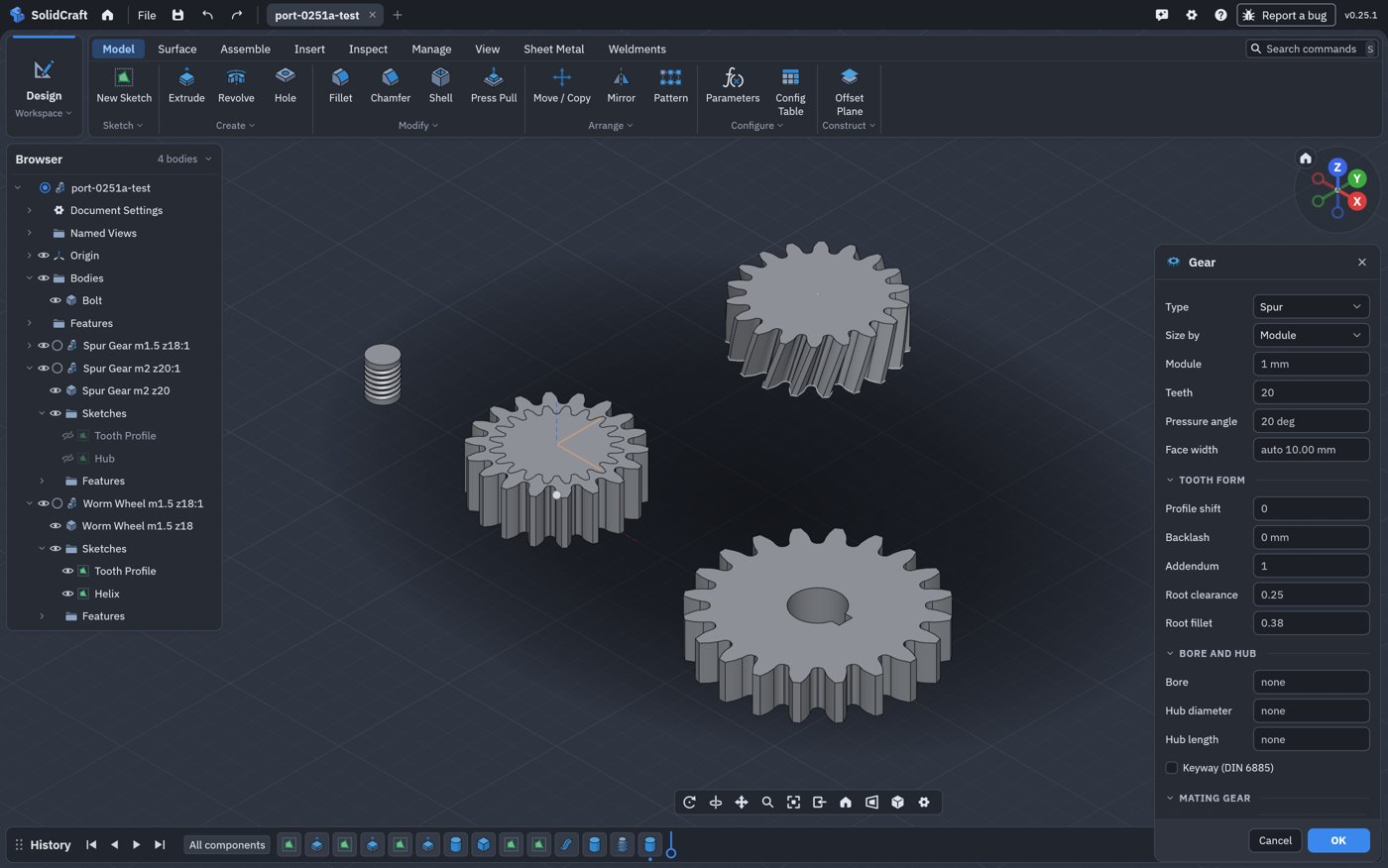
New in this release: upstream 0.24.1, 0.25.0 and 0.25.1 merged, all three released in one night. Every port feature (gears, helical B-rep threads, the MCP server, touch input) checked and tested on a Galaxy Tab. The full report, with every check, timing and screenshot: port report 0.25.1a.
From upstream:
- Copy and paste bodies and components, also between designs.
- A Cone primitive, Sketch Transform, Canvas to Sketch, adding points to a spline.
- Define parameters by typing
name = value, better sketch dimensions, Repeat Last Command. - Cylinder and Box placed by reference edges.
- Settings search, new themes, Arabic; Turkish and French complete.
- A faster viewport on big models.
- New designs save as
.sc;.solidcraftkeeps working. - 0.25.1's fix: an Extrude to Object Join no longer merges bodies of different components.
In the port:
- Design files are format 42 (upstream's 41 plus the helical threads). Designs saved by every earlier port release open, gears and helical threads included; upstream releases still ask to be updated rather than open a port design (export STEP to share).
- Following upstream, made sturdier. Every upstream file the port changes is registered with the tests that prove it.
scripts/android-sync.sh --previewshows what the next upstream release will conflict with before anything changes; it predicted everything this merge needed. A design saved by 0.24.0b is now part of the design-file tests, so each merge proves old port designs still open (how it works). - Tested on a Galaxy Tab:
- installs over 0.24.0b with settings kept;
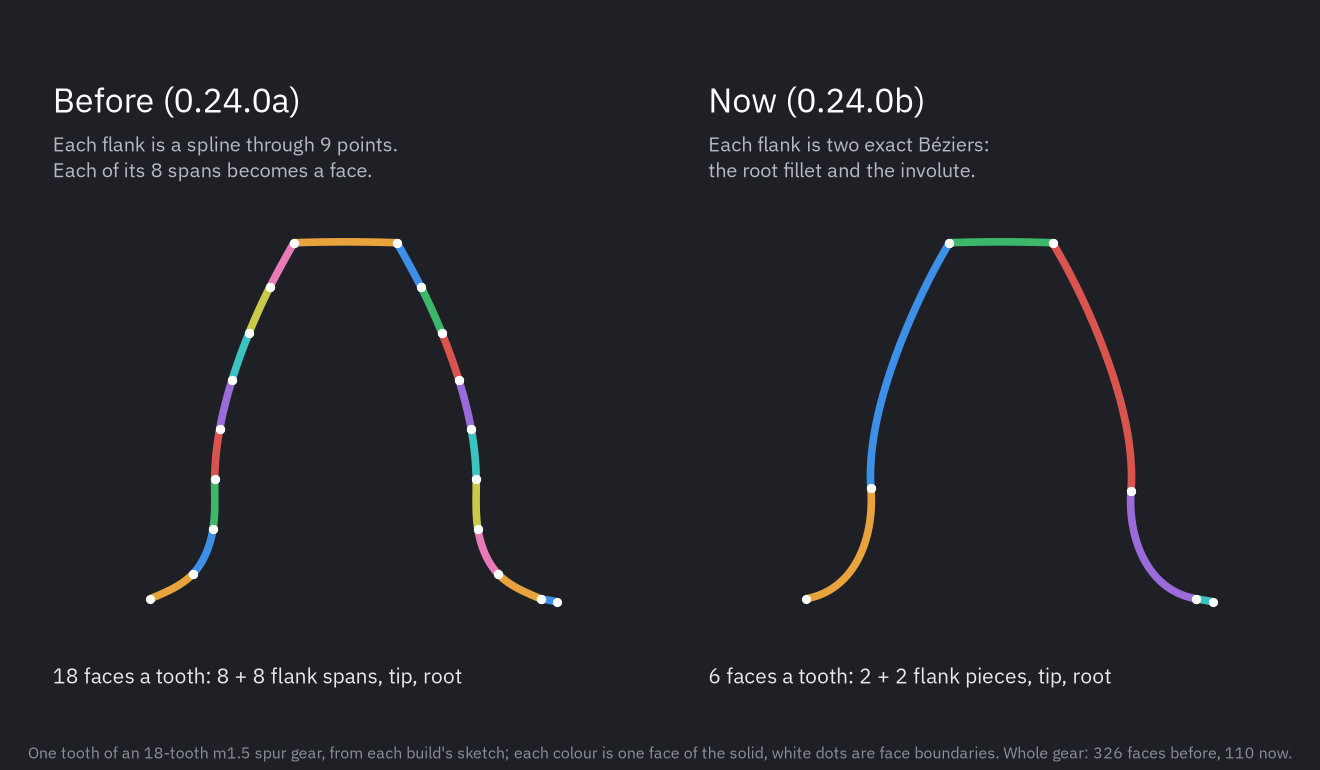
- MCP, gears (still 110 faces for 18 teeth), helical threads, timed batches;
- the 0.24.0b gearbox design opens with its gears still editable;
- Save As offers
.sc; touch navigation works.
Known:
- Upstream's Reopen designs has no effect on Android yet (it records at quit, which Android never does).
- The first open of a big design after an update rebuilds it once; saved again, it opens at once.
- More: known issues.
All changes: what's new.
SolidCraft 0.25.1a for Android (SolidCraft 0.25.1, port release a).
Built from upstream SolidCraft v0.25.1 (37a586dd) with the Android port on top.
Install: download SolidCraft-0.25.1a-android-arm64.apk on an Android 8.0+ phone or tablet (arm64) and open it, allowing installs from that source; or adb install -r SolidCraft-0.25.1a-android-arm64.apk. It updates 0.24.0b in place, settings kept. Signed with a development key: uninstall a build from elsewhere first if Android refuses to update it.
SHA-256: 936e8b9b3b9d854dd8acf6127c7671be7093440ee9abb7a166b36cc3b51756b8
Works: the full SolidCraft app on Vulkan or GLES; mouse and keyboard as on the desktop; touch (one finger orbits, tap selects, two fingers pan, pinch zooms); open, save, import and export through Android's file picker. Port-only: helical B-rep threads (threads), ten involute gear types (gears), the MCP server on the network (MCP server).
Not yet: the on-screen keyboard covers the lower half of the screen, the phone layout is cramped (best on a tablet or a foldable's inner screen), autosave recovery. How to use it: touch; details: android.md.
SolidCraft 0.24.0b for Android
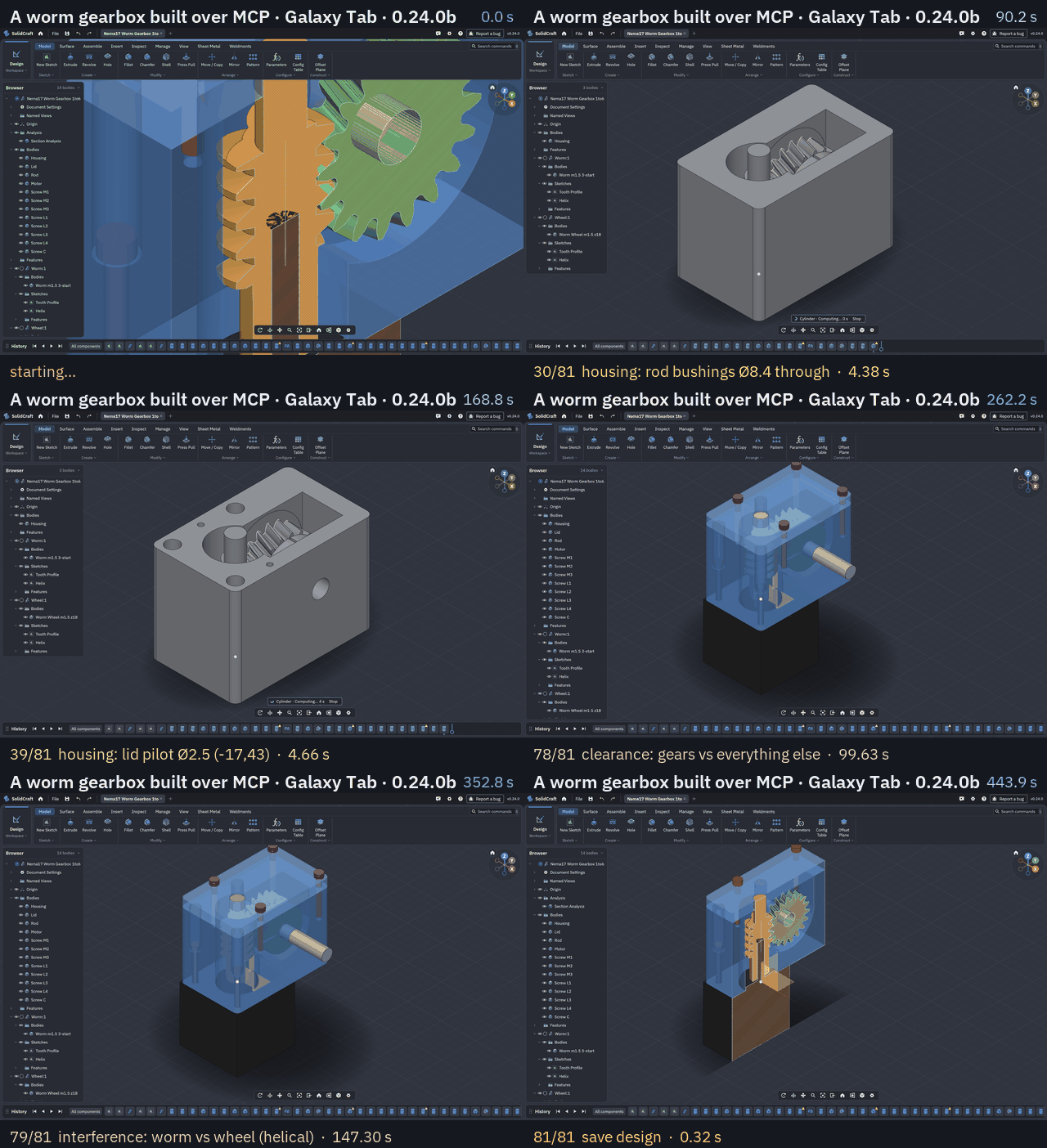
New in this release (still upstream 0.24.0): faster gears and a steadier MCP server. A live session went wrong on a Galaxy Tab: Claude Code designing a worm gearbox saw its calls time out, a hub join run for over 25 minutes, and the app closed as "not responding". Every part of that is fixed; the whole story with before-and-after numbers: Faster gears and a steadier MCP server.
- The app stays responsive during an agent's long command. Agent commands, timed batches included, compute off the window thread, with a chip showing what is computing and a Stop button. Android no longer closes the app.
- Long MCP calls wait instead of timing out. A call still running answers "still running: call
pending", and the agent waits throughpendinginstead of sending it again. Each MCP session has its own thread. - Gears are simple B-rep. A tooth flank is one to three exact Béziers (root fillet, involute) instead of a spline whose every span was a face: an 18-tooth spur gear has 110 faces instead of 326, the same shape to within 3.4 µm.
- Much faster booleans on gears. A hub joined flat on a gear's face: over 25 minutes → 5.7 s on the tablet.
gear.createwith bore, keyway and hub: 161 s → 2.5 s. B-spline surfaces skip their zero terms: booleans on gears and helical threads 2–3× faster, with identical results. - Tested on a Galaxy Tab: the whole worm gearbox over MCP, 81 calls, all succeeded, no "not responding".
- Upstream merges keep these fixes:
scripts/android-sync.shstops if a merge drops one.
Still slow (upstream's kernel): interference and clearance between two gears take a minute or two, and a few holes whose first boolean is retried. Known issues.
All changes: what's new.
SolidCraft 0.24.0b for Android (SolidCraft 0.24.0, port release b).
Built from upstream SolidCraft v0.24.0 (5965439a) with the Android port on top.
Install: download SolidCraft-0.24.0b-android-arm64.apk on an Android 8.0+ phone or tablet (arm64) and open it, allowing installs from that source; or adb install -r SolidCraft-0.24.0b-android-arm64.apk. It updates 0.24.0a in place. Signed with a development key: uninstall a build from elsewhere first if Android refuses to update it.
SHA-256: 60c0524d382c37fed6b605331da8ece05d94d9b890a4ab28f025516892e6da06
Works: the full SolidCraft app (sketches, features, the timeline, the Render workspace) on Vulkan or GLES; mouse and keyboard as on the desktop; touch (one finger orbits, tap selects, two fingers pan, pinch zooms); Back closes what is open; open, save, import and export through Android's file picker. Port-only: helical B-rep threads (threads), ten involute gear types (gears) and the MCP server on the network (MCP server). The port saves designs one file format past upstream's release; export STEP to share.
Not yet: the on-screen keyboard covers the lower half of the screen, the phone layout is cramped (best on a tablet or a foldable's inner screen), autosave recovery. How to use it: touch; details: android.md.
SolidCraft 0.24.0a for Android
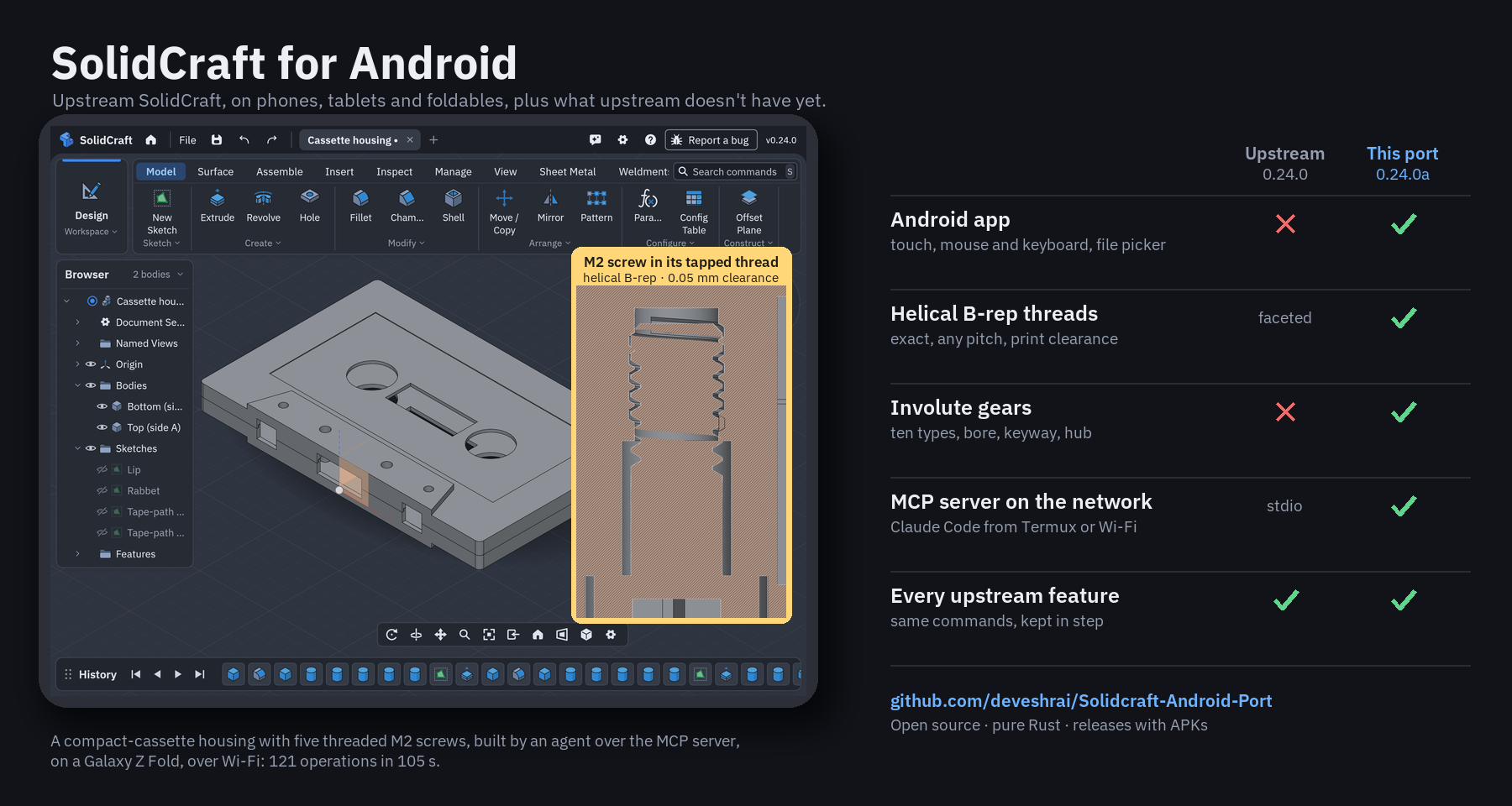
New in this release (upstream 0.24.0 merged):
- Settings › MCP server: one switch, and Claude Code in Termux on the device, or on a computer on the same Wi-Fi, models in the app while you watch. The page shows the address and one command to paste; every request needs the access token. Guide.
- Live test on a Galaxy Z Fold over Wi-Fi: a cassette housing with five M2 screws on helical threads, built and checked to fit through the server, 121 operations in 105 s, none failed. The test.
- Helical threads now use upstream's new Thread direction (left- or right-handed); older port designs open unchanged.
- Fixed: a helical thread tapped into a boss under a hollow shell was refused; an internal ISO thread with a clearance in too small a hole came out too shallow for its bolt (it now names the drill); Back with Settings open left the app.
- Copy reaches Android's clipboard.
All changes: what's new.
SolidCraft 0.24.0a for Android (SolidCraft 0.24.0, port release a).
Built from upstream SolidCraft v0.24.0 (5965439a) with the Android port on top.
Install: download SolidCraft-0.24.0a-android-arm64.apk on an Android 8.0+ phone or tablet (arm64) and open it, allowing installs from that source; or adb install -r SolidCraft-0.24.0a-android-arm64.apk. Signed with a development key: uninstall a build from elsewhere first if Android refuses to update it.
Works: the full SolidCraft app (sketches, features, the timeline, the Render workspace) on Vulkan or GLES; mouse and keyboard as on the desktop (hover, selection, navigation buttons, wheel, right-click menu, shortcuts); touch (one finger orbits, tap selects, two fingers pan, pinch zooms, a finger drags a dialog's arrows); Back closes what is open; open, save, import and export through Android's file picker (STEP, STL, 3MF and OBJ tested); the on-screen keyboard for typing. Port-only: helical B-rep, custom and clearance threads (docs/android-threads.md) and involute gears: spur, helical, herringbone, internal, rack, bevel, miter, worm, worm wheel, crossed helical (docs/android-gears.md). The port saves designs one file format past upstream's release, so upstream's releases ask to be updated instead of opening them; export STEP to share.
Not yet: the on-screen keyboard covers the lower half of the screen (the app doesn't move above it), the phone layout is usable but cramped (best on a tablet or a foldable's inner screen), autosave recovery. Known issues, with work-arounds: docs/android-known-issues.md. How to use it: docs/android-touch.md; details: docs/android.md.
SolidCraft 0.23.0b for Android
SolidCraft 0.23.0b for Android (SolidCraft 0.23.0, port release b).
New in this release: ribbon menus taller than the screen now scroll with a finger. On a foldable's inner screen, Model › Create ran past the bottom and couldn't be scrolled by touch, so Gear (and Boss, Lip, Snap Fit, Rest, Frame Member) looked missing; drag the list up to reach them. A mouse still drags a menu row onto the ribbon to pin it. Helical threads are in Create › Thread: tick Modeled, then set Geometry to Helical B-rep. Tested end to end on a Galaxy Z Fold, with screenshots in the gears and threads guides. Known issues and what the next release fixes: docs/android-known-issues.md.
Built from upstream SolidCraft v0.23.0 (7770f898) with the Android port on top.
Install: download SolidCraft-0.23.0b-android-arm64.apk on an Android 8.0+ phone or tablet (arm64) and open it, allowing installs from that source; or adb install -r SolidCraft-0.23.0b-android-arm64.apk. Signed with a development key: uninstall a build from elsewhere first if Android refuses to update it.
Works: the full SolidCraft app (sketches, features, the timeline, the Render workspace) on Vulkan or GLES; mouse and keyboard as on the desktop (hover, selection, navigation buttons, wheel, right-click menu, shortcuts); touch (one finger orbits, tap selects, two fingers pan, pinch zooms, a finger drags a dialog's arrows); Back closes what is open; open, save, import and export through Android's file picker (STEP, STL, 3MF and OBJ tested); the on-screen keyboard for typing. Port-only: helical B-rep, custom and clearance threads (docs/android-threads.md) and involute gears: spur, helical, herringbone, internal, rack, bevel, miter, worm, worm wheel, crossed helical (docs/android-gears.md). The port saves designs one file format past upstream's release, so upstream's releases ask to be updated instead of opening them; export STEP to share.
Not yet: the on-screen keyboard covers the lower half of the screen (the app doesn't move above it), the phone layout is usable but cramped (best on a tablet or a foldable's inner screen), autosave recovery. Known issues, with work-arounds: docs/android-known-issues.md. How to use it: docs/android-touch.md; details: docs/android.md.
SolidCraft 0.23.0a for Android
SolidCraft 0.23.0a for Android (SolidCraft 0.23.0, port release a).
Built from upstream SolidCraft v0.23.0 (7770f898) with the Android port on top.
Install: download SolidCraft-0.23.0a-android-arm64.apk on an Android 8.0+ phone or tablet (arm64) and open it, allowing installs from that source; or adb install -r SolidCraft-0.23.0a-android-arm64.apk. Signed with a development key: uninstall a build from elsewhere first if Android refuses to update it.
New in this release: SolidCraft 0.23.0 (upstream's notes: solid section views, drawn cosmetic threads, text parameters, sheet-metal Perforate, new themes and translations). Port-only: the Gear command (Create › Gear) with ten involute gear types, live preview, bore, keyway and hub, and Edit Gear (docs/android-gears.md); OK runs long features off the window thread (no "not responding" dialog); the system bars are hidden so a tablet's taskbar doesn't cover the app. Fixed: Save As names the tab after the name typed in the picker (it showed "Untitled (4)"). Tested on a Pixel 9, a Galaxy Tab and the Pixel Tablet emulator.
Works: the full SolidCraft app (sketches, features, the timeline, the Render workspace) on Vulkan or GLES; mouse and keyboard as on the desktop (hover, selection, navigation buttons, wheel, right-click menu, shortcuts); touch (one finger orbits, tap selects, two fingers pan, pinch zooms, a finger drags a dialog's arrows); Back closes what is open; open, save, import and export through Android's file picker (STEP, STL, 3MF and OBJ tested); the on-screen keyboard for typing. Port-only: helical B-rep, custom and clearance threads (docs/android-threads.md) and involute gears: spur, helical, herringbone, internal, rack, bevel, miter, worm, worm wheel, crossed helical (docs/android-gears.md). The port saves designs one file format past upstream's release, so upstream's releases ask to be updated instead of opening them; export STEP to share.
Not yet: the on-screen keyboard covers the lower half of the screen (the app doesn't move above it), the phone layout is usable but cramped (best on a tablet or a foldable's inner screen), autosave recovery. How to use it: docs/android-touch.md; details: docs/android.md.
SolidCraft 0.22.0a for Android
SolidCraft 0.22.0a for Android (SolidCraft 0.22.0, port release a).
Built from upstream SolidCraft v0.22.0 (0537623a) with the Android port on top.
New in this release: upstream SolidCraft 0.22.0 (the Render workspace, frames, hole placement and tapped-hole catalogues, and more: upstream's notes), and the port's helical B-rep threads: smooth exact threads instead of faceted ones, custom pitches on any shaft or hole, clearance for printed parts, start and end offsets, left-handed threads (guide). Tested on a Galaxy Z Fold.
Install: download SolidCraft-0.22.0a-android-arm64.apk on an Android 8.0+ phone or tablet (arm64) and open it, allowing installs from that source; or adb install -r SolidCraft-0.22.0a-android-arm64.apk. Signed with a development key: uninstall a build from elsewhere first if Android refuses to update it.
Works: the full SolidCraft app (sketches, features, the timeline, the Render workspace) on Vulkan or GLES; mouse and keyboard as on the desktop (hover, selection, navigation buttons, wheel, right-click menu, shortcuts); touch (one finger orbits, tap selects, two fingers pan, pinch zooms, a finger drags a dialog's arrows); Back closes what is open; open, save, import and export through Android's file picker (STEP, STL, 3MF and OBJ tested); the on-screen keyboard for typing. Port-only: helical B-rep, custom and clearance threads (docs/android-threads.md); designs with them are a newer file format than upstream's release reads.
Not yet: the on-screen keyboard covers the lower half of the screen (the app doesn't move above it), a phone-sized layout (best on a tablet or a foldable's inner screen), autosave recovery. How to use it: docs/android-touch.md; details: docs/android.md.