Repository navigation
Using the bcdk A Jenkins Pipeline That is PR Triggered
- You will have been given projects/namespaces in OpenShift. These are "your root namespace" suffixed with
-tools,-dev,-test,-prod. The thing to understand is yourtoolsnamespace will have your running Jenkins, itsbuildConfigandImageStream. - Further, your project's components, the pipelines, the buildConfigs for your components and the ImageStreams will also live in your
toolsnamespace. - Everything that runs in our namespace can (should) have a ci/cd pipeline:
dev,test,prod - This is not only applicable to the system we are developing but it is applicable to the supporting systems we use in our environment:
- our deployment of jenkins,
- our sonarqube,
- our DataBase
- You have a github account and a repository.
- For this (your github repo), you'll need to setup an access token. This is for "kicking the tires" and not the same setup to use for a team project. See Creating a personal access token for the command line.
- You have a minimum of a
toolsnamespace and another such asprodordev. - You need to be a developer in those namespaces.
- A node package.
- A command line tool that scaffolds a set of configurations.
- When you run it, it prompts you for input.
- It will generate files, folder, configurations and scripts which you will add to your repo.
- It automates the processes for:
- Setting up Jenkins in your namespace,
- Setting up the jenkins pipeline(s) for components of your project, and
- Setting the jobs that will run the pipelines.
- In your project folder, you will run a series of
bcdkcommands-(see Step by Step Example). - Each command will prompt you for some information.
- When each command completes it will have generated configuration and scripts for you.
- You will then execute commands to trigger a build of the image for Jenkins in your namespace; then you will run commands to deploy it.
- You will also add the generated configurations to your project's git repository.
There's more to understand. I'll explain what these are and what they mean.
| Command | Description |
|---|---|
yo bcdk:jenkins |
Scaffolds the setup of Jenkins
(note: In the past, the "default" jenkins provided by RedHat was laging behing trunk — by building our own custom image we can select the revision of Jenkins we wish) |
yo bcdk:pipeline |
Scaffolds a pipeline for a component of your project
|
yo bcdk:jenkins-job |
Scaffolds a job for your pipeline
|
yo bcdk:jenkins-overwrites |
TODO |
yo bcdk:python-hello |
TODO |
- A
modulecan correspond to componenst of your project: the API, the Front-end UI, the DB, Workers. - A
modulecan correspond to components of your CI/CD such as: your sonarQube, components of your BDD stack. - Roughly, a
modulecorresponds to a distinct pipeline for a component of your project.
Clecio suggests that you used a single module for your application and manage all components in your pipeline through your Jenkinsfile
# be sure to be logged into the correct namespace with the right account.

> yo bcdk:jenkins
You are authenticated in OpenShift as developer

? What is your openshift 'tools' namespace name? demo-tools
One or more required secrets are missing.
? We will need a GitHub username. We strongly recommend creating an account shared with the team for CI/CD/Automation purposes.
 dkelsey
? What is the personal access token for the GitHub account?
          See https://help.github.com/en/articles/creating-a-personal-access-token-for-the-command-line
          Required priveleges: public_repo, repo:status, repo_deployment, admin:repo_hook [hidden]
Setting module
? What is this module name? jenkins
? What is this module version? 1.0.0
? What environments are supported by your app? separated by space build dev prod
? What is the source code directory for this module? .jenkins
? What namespace/project name is used for 'build?' demo-tools
? What namespace/project name is used for 'dev?' demo-dev
? What namespace/project name is used for 'prod?' demo-prod
? What is the GitHub organization where the repository is located? dkelsey
? What is the repository's name? os-sample-python
? What is the Jenkinsfile path? .jenkins/Jenkinsfile
Installing Node Modules in .jenkins/.pipeline
Writing 'jenkins' files.
Writing 'pipeline' files.
Writing 'jenkins-job' files.
Writing 'jenkins-overwrites' files.
   create .jenkins/docker/contrib/jenkins/configuration/jobs/_jenkins/config.xml
   create .jenkins/docker/Dockerfile
   create .jenkins/openshift/build-master.yaml
   create .jenkins/openshift/build-slave.yaml
   create .jenkins/openshift/deploy-master.yaml
   create .jenkins/openshift/deploy-prereq.yaml
   create .jenkins/openshift/deploy-slave.yaml
   create .jenkins/openshift/secrets.json
   create .jenkins/README.md
   create .jenkins/.pipeline/build.js
   create .jenkins/.pipeline/clean.js
   create .jenkins/.pipeline/deploy.js
   create .jenkins/.pipeline/lib/build.js
   create .jenkins/.pipeline/lib/clean.js
   create .jenkins/.pipeline/lib/config.js
   create .jenkins/.pipeline/lib/deploy.js
   create .jenkins/.pipeline/npmw
   create .jenkins/.pipeline/package.json
   create .jenkins/Jenkinsfile
npm notice created a lockfile as package-lock.json. You should commit this file.
added 6 packages from 8 contributors and audited 6 packages in 4.269s
found 0 vulnerabilities
| Questions you will be prompted with | The answer I gave | Description |
|---|---|---|
You are authenticated in OpenShift as developer |
This is simply the bcdk asserting you are authenticated with OpenShift |
|
What is your openshift 'tools' namespace name? |
demo-tools |
I provided demo-tools as that is the namespace I have in my minishift cluster. |
One or more required secrets are missing.We will need a GitHub username. We strongly recommend creating an account shared with the team for CI/CD/Automation purposes.
|
dkelsey |
For this demo I used my personal github account. |
What is the personal access token for the GitHub account?See https://help.github.com/en/articles/creating-a-personal-access-token-for-the-command-line Required priveleges: public_repo, repo:status, repo_deployment, admin:repo_hook [hidden]
|
my personal access token |
See the Prerequisites |
What is this module name? |
jenkins |
See our note Our use of the word module. module is synonymous with pipeline. Think about it: you have an empty tools namespace. Here you are going to use the bcdk to scaffold the setup of Jenkins in your tools namespace. Module is also a name under which to collect all the relevant settings of the particular component, in this case Jenkins. |
What is this module version? |
1.0.0 |
You could have different version of the same module. I'm not clear on this (dk) |
What environments are supported by your app? separated by space |
build dev |
Important to understand The prompt will show "build dev test prod" build and another environment are necessary.These are abstractions of logical stages of a pipeline. With yo bcdk:jenkins we are scaffolding up our Jenkins. Following Concepts to Keep in mind this is asking you will have a dev, test, and prod version of your Jenkins. Colsider you have a PROD version of Jenkins running, which orchestrates CI/CD for your project. Now you want to experiment with a new version of Jenkins, or a plugin update, or a new way of doing something, but you can't break your production Jenkins as it it actively being used. Thus you can have another environment to test out changes to your Jenkins. |
What is the source code directory for this module? |
.jenkins |
The value .jenkins is a default provided for you. This will be the source code directory for your Jenkins. It is the folder that collects/organizes the code for your instance of Jenkins. It will exist along side your projects' source code in your project repository. What is the signifigance of the '.' prefix? Folders and files prefixed with '.' (dot) are hidden. The idea is "project-supporting" components such as Jenkins, sonarQube, nexus are part of your project, but should be hidden; thus the '.'. Another way to organized a folder structure is: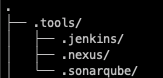
|
What namespace/project name is used for 'build?' |
demo-tools |
Here you are identifying the OpenShift Namespace you want to use which will contain the imageStream for your Jenkins. You are free to put this in any namespace you wish but we suggest your tools namespace. |
What namespace/project name is used for 'dev?' |
demo-dev |
When I was prompted for 'supported environments' I specified build, dev, prod environment. In another run I only had a single OpenShift namespace. For this run I had a tools, dev, test and prod namespace. You can associate your each 'supported environment' in any namespace you like (that you have access to). Again we are only setting up our Jenkins: everything relevant to Jenkins would go in the tools namespace. |
What namespace/project name is used for 'prod?' |
demo-prod |
When I ran this I specified a dev environment. I only had a single namepace, so I re-used it. Again we are only setting up our Jenkins: everything relevant to Jenkins would go in the tools namespace. |
What is the GitHub organization where the repository is located? |
dkelsey |
Likely you will answer bcgov. This was my own repo so I answered dkelsey. Why do I need a repo? We are defining a pipeline for jenkins, which is part of our project. hint: A Jenkinsfile will be generated in this process. That Jenkinsfile is the pipeline for your jenkins in your project. In the end, you will have a running jenkins which will be configured to respond to Github Webhooks from this repository. These webhooks will trigger a build of a new image for jenkins |
What is the repository's name? |
os-sample-python |
This is the repo where my configuration will be maintained. |
What is the Jenkinsfile path? |
.jenkins/Jenkinsfile |
This is a default prompt. The bcdk will generate this Jenkinsfile for you |
- At this point you have everthing necessary to build an imageStream for Jenkins in your tools namespace.
- You can build the image stream and deploy a
dev,testorprodversion (if you provided those). - You do not need to commit the generated files to your repo and push them to GitHub; you can build and deploy right now.
Have a look at what got generated under the .jenkins/ folder; explore!
TODO: show how to do this here deploying will add github hooks no? Now any change in the repo will trigger a new image build and deployment.
  yo bcdk:pipeline
  ? What is this module id/key? os-sample-python
  ? What is this module name? os-sample-python
  ? What is this module version? 1.0.0
  ? What environments are supported by your app? separated by space build dev
  ? What is the source code directory for this module? .
  ? What namespace/project name is used for 'build?' ikpp1u-dev
  ? What namespace/project name is used for 'dev?' ikpp1u-dev
  Installing Node Modules in ./.pipeline
  Writing 'pipeline' files.
     create .pipeline/build.js
     create .pipeline/clean.js
     create .pipeline/deploy.js
     create .pipeline/lib/build.js
     create .pipeline/lib/clean.js
     create .pipeline/lib/config.js
     create .pipeline/lib/deploy.js
     create .pipeline/npmw
     create .pipeline/package.json
conflict Jenkinsfile| Questions you will be prompted with | The answer I gave | Description |
|---|---|---|
What is this module id/key? |
os-sample-python | |
What is this module name? |
os-sample-python | |
What is this module version? |
1.0.0 | |
What environments are supported by your app? separated by space |
build dev | |
What is the source code directory for this module? |
. | |
What namespace/project name is used for 'build?' |
ikpp1u-dev | |
What namespace/project name is used for 'dev?' |
ikpp1u-dev |
  yo bcdk:jenkins-job
  ? Module name? .
  ? Jenkins Job name? os-sample-python
  ? What is the GitHub organization where the repository is located? dkelsey
  ? What is the repository's name? os-sample-python
  ? What is the Jenkinsfile path? Jenkinsfile
  Writing 'jenkins-job' files.
create .jenkins/docker/contrib/jenkins/configuration/jobs/os-sample-python/config.xml| Questions you will be prompted with | The answer I gave | Description |
|---|---|---|
Module name? |
. | |
Jenkins Job name? |
os-sample-python | |
What is the GitHub organization where the repository is located? |
dkelsey | |
What is the repository's name? |
os-sample-python | |
What is the Jenkinsfile path? |
Jenkinsfile |
git add,commit no need to push yet.
( cd "$(git rev-parse --show-toplevel)/.jenkins/.pipeline" && npm run build -- --pr=0 --dev-mode=true )

> pipeline@1.0.0 build /Users/dkelsey/Development/DevOps/Development/os-sample-python-pathfinder/.jenkins/.pipeline
> node build.js "--pr=0" "--dev-mode=true"

Starting new build for  buildconfig.build.openshift.io/jenkins-build-0
Starting new build for  buildconfig.build.openshift.io/jenkins-slave-main-build-0
This kicks off the build of the jenkins images in your tools namespace — if you've set things up that way.
--dev-mode=true configures the build to use your local files, such as they are, rather than using what is in our github repo.
( cd "$(git rev-parse --show-toplevel)/.jenkins/.pipeline" && npm run deploy -- --pr=0 --env=dev )

> pipeline@1.0.0 deploy /Users/dkelsey/Development/DevOps/Development/os-sample-python-pathfinder/.jenkins/.pipeline
> node deploy.js "--pr=0" "--env=dev"
This worked. Jenkins is up and running.
The webhooks are also setup in the github repo:
# modify misc .js files under .pipeline/lib

# config.js
# build.js
# deploy.js
the scafolded Jenkinsfile calls the pipeline-cli node module to perform build steps.
Here's the generated Jenkinsfile:
pipeline {
    agent none
    options {
        disableResume()
    }
    stages {
        stage('Build') {
            agent { label 'build' }
            steps {
                script {
                    def filesInThisCommitAsString = sh(script:"git diff --name-only HEAD~1..HEAD | grep -v '^.jenkins/' || echo -n ''", returnStatus: false, returnStdout: true).trim()
                    def hasChangesInPath = (filesInThisCommitAsString.length() > 0)
                    echo "${filesInThisCommitAsString}"
                    if (!currentBuild.rawBuild.getCauses()[0].toString().contains('UserIdCause') && !hasChangesInPath){
                        currentBuild.rawBuild.delete()
                        error("No changes detected in the path ('^.jenkins/')")
                    }
                }
                echo "Aborting all running jobs ..."
                script {
                    abortAllPreviousBuildInProgress(currentBuild)
                }
                echo "Building ..."
                sh "cd .pipeline && ./npmw ci && ./npmw run build -- --pr=${CHANGE_ID}"
            }
        }
        stage('Deploy (DEV)') {
            agent { label 'deploy' }
            steps {
                echo "Deploying ..."
                sh "cd .pipeline && ./npmw ci && ./npmw run deploy -- --pr=${CHANGE_ID} --env=dev"
            }
        }
        /*
        stage('Deploy (TEST)') {
            agent { label 'deploy' }
            input {
                message "Should we continue with deployment to TEST?"
                ok "Yes!"
            }
            steps {
                echo "Deploying ..."
                sh "cd .pipeline && ./npmw ci && ./npmw run deploy -- --pr=${CHANGE_ID} --env=test"
            }
        }
        stage('Deploy (PROD)') {
            agent { label 'deploy' }
            input {
                message "Should we continue with deployment to TEST?"
                ok "Yes!"
            }
            steps {
                echo "Deploying ..."
                sh "cd .pipeline && ./npmw ci && ./npmw run deploy -- --pr=${CHANGE_ID} --env=prod"
            }
        }
        */
    }
}
Also, first time, only build the app, no deploy--i commented out the other stages.
I modified the lib/build.js to get a basic build working:
'use strict';
const {OpenShiftClientX} = require('pipeline-cli')
const path = require('path');

module.exports = (settings)=>{
  const phases = settings.phases
  const options = settings.options
  const oc=new OpenShiftClientX(Object.assign({'namespace':phases.build.namespace}, options));
  const phase='build'
  let objects = []
  const templatesLocalBaseUrl =oc.toFileUrl(path.resolve(__dirname, '../../openshift'))

  // The building of your cool app goes here ▼▼▼
  objects = objects.concat(...oc.processDeploymentTemplate(
  `${templatesLocalBaseUrl}/image-stream-build.yaml`,
  {
    'param':{
      'SAMPLE_APP_SERVICE_NAME': phases[phase].name,
      'NAMESPACE': phases[phase].namespace,
      //'SUFFIX': phases[phase].suffix,
      'VERSION': phases[phase].tag,
      'GIT_URL': oc.git.http_url,
      'GIT_REF': oc.git.ref
    }
  }))

  oc.applyRecommendedLabels(objects, phases[phase].name, phase, phases[phase].changeId, phases[phase].instance)
  oc.applyAndBuild(objects)
}
Add all changes to a PR and push it to the repo AND create a PR agains the master branch in the same repo (for me the repo is owned by me dkelsey)
I created a PR called jenkins-setup for all this. this is the first PR to the "new" repo
attempted to get sonarqube integrated with the pipeline. standing up sonarqube is straight forward. I used the bcdk to create a build and a job for said build. it did not go well :(
-
I rebuilt and deployed jenkins - after adding the new module/job.
-
the new version accepted a new PR however it re-built itself rather than the pipeline for
os-sample-python -
I used the cleanup stuff, though it did not delete the
ImageStreams. I did that and rebuid Jenkins from a good PR, and deployed it. I was able to get it going, the way I expect easily enough again.- check your webhooks in github.
- check you entered your github password/token correctly
- Create a PR in your code repo and watch.
You now have a build pipeline, running in Jenkins in your tools namespace, for your project, that is triggered by PRs. This is intended as a guide that explores the components, tasks, and configurations that together create an orchestrated Continuous Delivery (CD) Pipeline. It is intended as a starting point.