Repository navigation
Releases: dortanes/openspatial
Release list
OpenSpatial 1.2.0

OpenSpatial 1.2.0 gets Netflix in Safari to play in 5.1 instead of stereo, plays the back speakers of Mac apps in 7.1, and can start when you log in.
What's new
- Netflix in 5.1 in Safari. Netflix sends Safari only stereo. OpenSpatial now comes with a Safari extension that asks Netflix for the 5.1 track, so movies and shows play around you, titles in Atmos too. Click Open in Safari in Settings → Sound, turn on OpenSpatial, allow it on netflix.com and reload the page. The extension runs only on netflix.com and changes nothing but the sound format Netflix is asked for.
- Opens at login. Turn on Open at login in the new Settings → General, and OpenSpatial is in the menu bar after every restart.
- Back speakers for Mac apps. Mac apps that play 7.1 now reach the back speakers. Before, their back pair mixed into the sides.
- Windows games in 7.1. Mac apps and Windows games in Wine lay out 7.1 differently, so Settings → Speakers has a Channel layout switch: set it to Windows for games in Wine. The README explains how to set a Wine bottle to 7.1. It needs Wine 11.7 or later and has been tested only with CrossOver Preview.
Download
| Platform | File | Requirements |
|---|---|---|
| macOS | OpenSpatial-1.2.0-macos-arm64.dmg | Apple silicon, macOS 15 or later |
To update, quit OpenSpatial, open the disk image and drag OpenSpatial to Applications, replacing the old one. Your settings stay. On first launch OpenSpatial updates its audio driver and asks for your password once.
Installing for the first time? The steps are in the 1.0.0 release notes.
Known limitations
- Other streaming sites in browsers usually play stereo. OpenSpatial spreads it around you, but sound that is mixed for behind you only reaches the back speakers when the app plays 5.1 or 7.1.
- Netflix titles in Atmos play as 5.1, the six channels Safari passes on.
- With AI surround on, stereo plays about 2 seconds late, so it suits music better than videos and games.
- Head tracking needs your face in view of the camera.
- The 3D view draws the rooms at approximate sizes.
Verify your download
The disk image is listed in SHA256SUMS and carries a build provenance attestation from this repository's release workflow:
shasum -a 256 -c SHA256SUMS --ignore-missing
gh attestation verify OpenSpatial-1.2.0-macos-arm64.dmg --repo dortanes/openspatial
Found a bug? Open an issue. Found a vulnerability? Report it privately as described in SECURITY.md.
OpenSpatial 1.1.0
OpenSpatial 1.1.0 lets you choose the room the speakers play in, makes the subwoofer behave like the one in a home theater, and has head tracking follow where you sit as well as where you look.
What's new
- Pick the room. The speakers can stand in two studio control rooms, a small hall or a large concert hall, or play with no room at all. Choose one in Settings → Sound → Room, and the 3D view redraws to match. The second control room and the two halls download when you first pick them, 21 to 24 MB each.
- Subwoofer like in a home theater. The effects channel of 5.1 and 7.1 plays 10 dB louder, the level cinemas and receivers use, and the bass reaches down to 20 Hz. Settings → Speakers has a crossover from 40 to 160 Hz and a phase switch.
- Head tracking follows where you sit. Lean toward the screen or shift sideways, and you move among the speakers: the ones you approach come closer and play louder. Center on current position sets the middle.
- Opens without internet. A first launch offline works now. In 1.0.0 macOS needed a connection to check the app.
Download
| Platform | File | Requirements |
|---|---|---|
| macOS | OpenSpatial-1.1.0-macos-arm64.dmg | Apple silicon, macOS 15 or later |
To update, quit OpenSpatial, open the disk image and drag OpenSpatial to Applications, replacing the old one. Your settings stay, and the audio driver is the same, so macOS doesn't ask for your password again.
Installing for the first time? The steps are in the 1.0.0 release notes.
Known limitations
- Browsers usually play streaming video as stereo. OpenSpatial spreads it around you, but sound that is mixed for behind you only reaches the back speakers when the app plays 5.1 or 7.1.
- With AI surround on, stereo plays about 2 seconds late, so it suits music better than videos and games.
- Head tracking needs your face in view of the camera.
- The 3D view draws the rooms at approximate sizes.
Verify your download
The disk image is listed in SHA256SUMS and carries a build provenance attestation from this repository's release workflow:
shasum -a 256 -c SHA256SUMS --ignore-missing
gh attestation verify OpenSpatial-1.1.0-macos-arm64.dmg --repo dortanes/openspatial
Found a bug? Open an issue. Found a vulnerability? Report it privately as described in SECURITY.md.
OpenSpatial 1.0.0
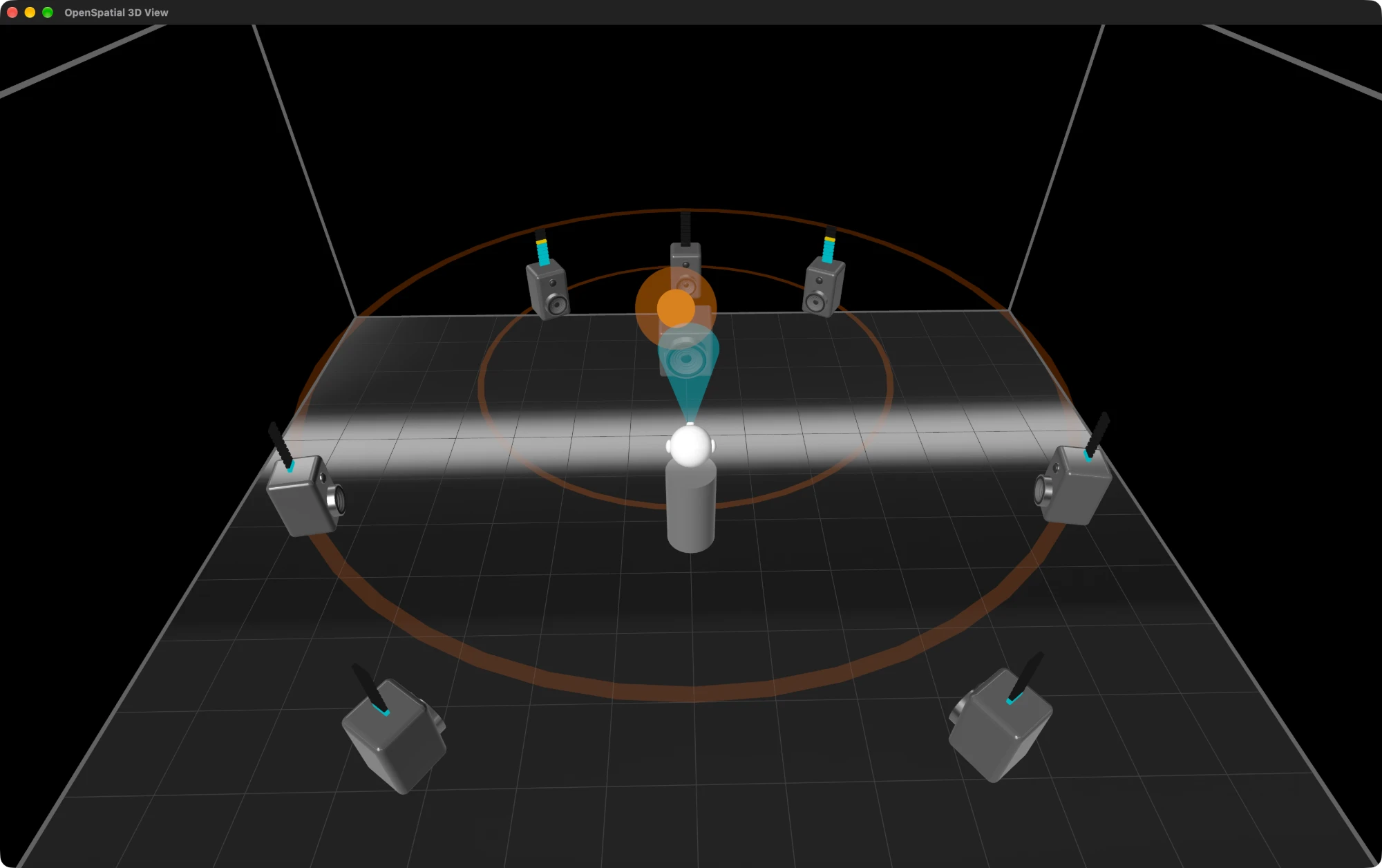
The first release of OpenSpatial: spatial audio for any headphones. Every app on your Mac plays through a 7.1 speaker set around you, and with head tracking the speakers stay where they are when you turn your head.
Highlights
- Any headphones, any app. Wired or wireless, over-ear or in-ear; browsers, players, games and music apps.
- Speakers that stay put. Head tracking follows you through your Mac's camera, so the front stays in front.
- Surround from stereo. Stereo spreads to every speaker around you, and 5.1 gets its missing back speakers.
- AI surround. Pulls the voice out of stereo and puts it in front of you, like a center speaker in a cinema. The model runs on your Mac and downloads only when you turn it on.
- Works with Wine. Windows games play in full 7.1.
- Louder and even. Boost quiet apps, even out loud and quiet scenes, and shape the tone.
- See the sound. Watch the speakers play and where each sound comes from in a 3D view of the room.
Download
| Platform | File | Requirements |
|---|---|---|
| macOS | OpenSpatial-1.0.0-macos-arm64.dmg | Apple silicon, macOS 15 or later |
- Open the disk image and drag OpenSpatial to Applications, then open it. Its icon appears in the menu bar.
- On first launch, OpenSpatial installs its audio driver. macOS asks for your password in a window titled Allow administrator access for a script started by "OpenSpatial": that is the driver install.
- Allow the microphone when macOS asks: it is how OpenSpatial hears your apps. Allow the camera if you want head tracking.
- Choose your headphones in Settings → Sound → Output device and play anything.
Known limitations
- Browsers usually play streaming video as stereo. OpenSpatial spreads it around you, but sound that is mixed for behind you only reaches the back speakers when the app plays 5.1 or 7.1.
- With AI surround on, stereo plays about 2 seconds late, so it suits music better than videos and games.
- Head tracking follows turns to the left and right, and needs your face in view of the camera.
- The first launch needs an internet connection, so macOS can check the notarization of the app copied out of the disk image.
Verify your download
The disk image is listed in SHA256SUMS and carries a build provenance attestation from this repository's release workflow:
shasum -a 256 -c SHA256SUMS --ignore-missing
gh attestation verify OpenSpatial-1.0.0-macos-arm64.dmg --repo dortanes/openspatial
Found a bug? Open an issue. Found a vulnerability? Report it privately as described in SECURITY.md.
Rooms 1
The rooms OpenSpatial downloads when you pick them in Settings → Sound → Room, built by room/export.py.
| Room | File | SHA-256 |
|---|---|---|
| Second control room | cr7.zip |
0a05ffb76753a6ecc9af971693262c7d3f9e4f18c86cec9b8f67026d251f510d |
| Small hall | sbs.zip |
ff935f3114a727bb2f3b21676c343831d92081831e7ac5926ed045ef99bd941d |
| Large hall | lbs.zip |
922571135ba80dd726baf8825d1b7126b8af2a02dc3628d67f22a35d73ebad62 |
Based on the WDR Spatial Audio Impulse Response Compilation by TH Köln (P. Stade, B. Bernschütz, M. Rühl, 2012), licensed under CC BY-SA 3.0, from the SOFA database. Changes: converted, equalized, re-aimed around the listener and shortened. These derived tables are shared under the same license.
AI surround model 1
The AI surround model OpenSpatial downloads when AI surround is turned on: the vocals model of HT-Demucs FT by Meta Platforms, converted to Core ML by separation/export.py to run on the Neural Engine.
HT-Demucs is licensed under the MIT License; its notice is attached as LICENSE-HT-Demucs.txt. Source: https://github.com/facebookresearch/demucs
SHA-256 of HTDemucsVocals.mlpackage.zip: 0fd5e706e34033e43f2d13534978a9747da728204be28fe8a53ae82c8c6d355c