Repository navigation
Releases
Stereo3D Studio 1.1

Stereo3D Studio 1.1
Two big additions: Apple Depth Pro 2, Apple's newest depth model, and Moments preview for fair A/B testing.
Download
Stereo3DStudio_v1.1_Setup.zip — extract it, run Install Stereo3D Studio.bat, then start Stereo3D Studio from the Desktop shortcut.
Upgrading: copy the models folder from your previous install into the new folder before installing.
🆕 Apple Depth Pro 2
Depth Pro 2 is Apple's newest depth model, and it's a great fit for 2D→3D video:
- Sharp edges — depth stays crisp at hair, fingers, leaves and thin objects, where conversions usually smear.
- Stable, flicker-free video depth — it's a multi-frame model: each frame also looks at the frames before it
(up to 16), so depth doesn't flicker or "breathe". The memory resets at every new video and scene cut. - Four sizes: Small (97 MB), Base (386 MB), Large (1.3 GB, recommended) and Huge+ (3.5 GB, sharpest, needs a lot
of GPU memory). - Get it: Models → select a Depth Pro 2 size → accept its license → Download. It downloads straight from Apple into
yourmodelsfolder; then pick it under Depth model. Depth resolution, edge fix and flip TTA all work with it. - License: the weights are under the Apple Machine Learning Research Model License — research use only,
non-commercial — and are not included in the download. "Apple Machine Learning Research Model is licensed under the
Apple Machine Learning Research Model License Agreement."
🆕 Moments preview — A/B testing
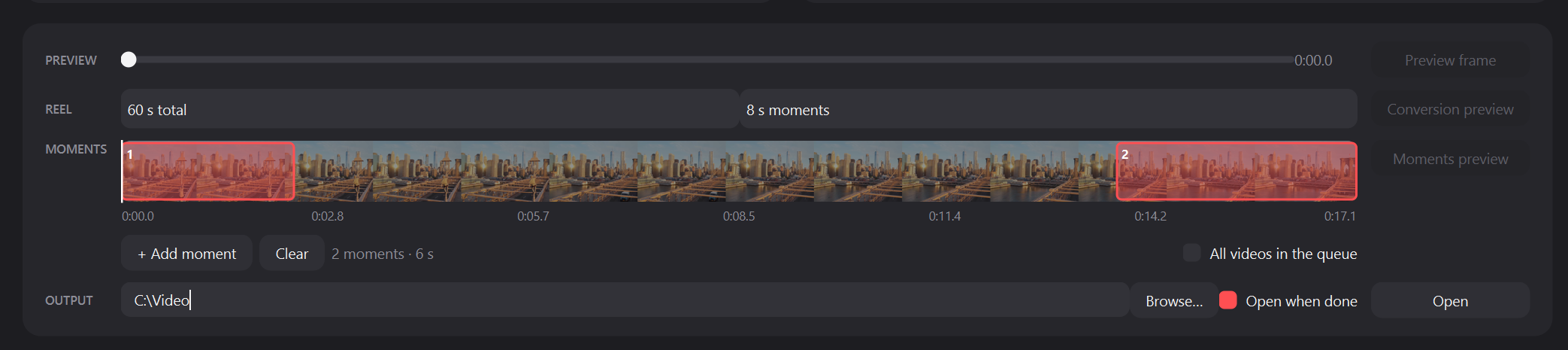
The conversion preview reel picks random moments, so every run shows different scenes. Moments preview lets you pick
the scenes yourself, once, and reuse them for every test:
- Select a video. The new Moments timeline under the reel shows a filmstrip of it.
- Double-click to add a moment, drag to move it, drag its edges to resize, right-click to remove.
The playhead follows the Preview slider. - Click Moments preview to convert only those moments, with their sound.
- Change the model or any setting and run it again — same scenes, so you compare like for like.
Every run is kept (<name>_moments-preview_<model>_HSBS.mp4, then _01, _02…). Moments are remembered and shared
by every clip in the queue — tick All videos in the queue to convert the same moments of each video.
Also new
- The Models window shows each model's own license.
- The load screen no longer shows "Loading GPU engine…".
Created by Drew Medina — made with Claude Opus 5.5. Built on nunif / iw3 by nagadomi.
Depth Pro 2 © Apple Inc.
Thanks to u/pagineinternet on Reddit for the "Moments preview" idea!
Stereo3D Studio 1.0.3
Stereo3D Studio 1.0.3
Download
Stereo3DStudio_v1.0.3_Setup.zip — extract it, run Install Stereo3D Studio.bat, then start Stereo3D Studio from the Desktop shortcut.
Upgrading: copy the models folder from your previous install into the new folder before installing.
What's fixed
- "Invalid argument returned 22" on some phone and stock-site videos. These use full-range colour (
yuvj420p)
or 4:2:2 / 4:4:4 colour, which the GPU-decode (NVDEC) path can't handle. Stereo3D Studio now detects them and
decodes them on the CPU automatically — depth and encoding still run on the GPU.
Created by Drew Medina — made with Claude Opus 5.5. Built on nunif / iw3 by nagadomi.
Stereo3D Studio 1.0.2
Stereo3D Studio 1.0.2
Fixes 3D for 4:3 videos such as DVDs, classic cartoons and old TV shows.
Download
Stereo3DStudio_v1.0.2_Setup.zip — extract it, run Install Stereo3D Studio.bat, then start Stereo3D Studio from the Desktop shortcut.
Upgrading: copy the models folder from your previous install into the new folder before installing.
What's fixed
- 4:3 videos: each eye now gets black side bars so the side-by-side (or top-bottom) frame is 16:9. 3D displays
like the Odyssey 3D split the screen exactly in half — a 4:3 SBS frame that the player shrank to fit put each eye
in the wrong place, so the 3D looked broken. Video tab → Fit 4:3 videos to 16:9 (on by default). - DVD pixels: 720×480 / 720×576 videos with non-square pixels are converted to square pixels first, so the
picture keeps its true shape instead of looking stretched.
Created by Drew Medina — made with Claude Opus 5.5. Built on nunif / iw3 by nagadomi.
Stereo3D Studio 1.0.1
Stereo3D Studio 1.0.1
Much faster 4K conversions.
Download
Stereo3DStudio_v1.0.1_Setup.zip — extract it, run Install Stereo3D Studio.bat, then start Stereo3D Studio from the Desktop shortcut.
Upgrading from 1.0: copy the models folder from your 1.0 folder into the new folder before installing.
What's new
- Processing size setting in the Video tab, default 1080p. 4K videos are scaled down before converting, which is
several times faster and stays inside GPU memory. Pick 1440p, 4K or Source size when you want the extra detail. - Videos larger than 1080p automatically use a smaller batch so they don't overflow GPU memory (which made 4K clips
crawl — hours for a few seconds of video).
Created by Drew Medina — made with Claude Opus 5.5. Built on nunif / iw3 by nagadomi.
Stereo3D Studio 1.0

Stereo3D Studio 1.0
2D → 3D image & video converter for Windows with NVIDIA GPU acceleration, made for the Samsung Odyssey 3D.
Download
Stereo3DStudio_v1.0_Setup.zip — extract it, run Install Stereo3D Studio.bat, then start Stereo3D Studio from the Desktop shortcut. Requires Windows 10/11 64-bit and an NVIDIA GPU with a current driver (about 7 GB disk space).
Highlights
Nine 3D output modes: Half / Full SBS, Half / Full Top-Bottom, VR180, cross-eyed, anaglyph, RGB + depth
Half SBS output and Odyssey 3D presets (Depth Anything V2 Large, MLBW + inpaint, flip TTA)
Queue with thumbnails and a live view window while encoding — pin it to the app or let it float
NVENC / NVDEC / CUDA throughout, automatic recovery from GPU out-of-memory errors
Titles that fade in, hold and fade out at the start or end — font, placement, opacity and 3D depth
Settings stored inside every output video — drop it back in to restore them
⭐ Conversion preview reel
Judge your settings on a whole movie in about a minute instead of converting all of it. Select a video and click Conversion preview: Stereo3D Studio picks random moments spread evenly from the start to the end of the film (by default 8-second moments adding up to 60 seconds), joins them with their sound, and converts that reel with your current settings. You get a short 3D sizzle reel showing how the depth looks in dialogue, action, dark scenes and wide shots — then tweak the settings and run another reel (each click picks new moments), or press Convert to 3D when it looks right. Reel length and moment length are adjustable.
Notes
License: PolyForm Noncommercial 1.0.0 — free for personal and other noncommercial use; selling it or any commercial use is not allowed.
Depth models are not included. Depth Anything V2 Large and several others are CC BY-NC 4.0 (non-commercial); the installer and the Models window ask before downloading them.
Upgrading: copy the models folder from your previous install into the new folder before installing.
Very special thanks
A very special thanks to nagadomi, author of nunif / iw3. Stereo3D Studio is built on the iw3 engine — its depth pipeline, stereo generation and video processing are nagadomi's outstanding work, shared openly under the MIT License. None of this would exist without it. Thank you!
Created by Drew Medina — made with Claude Opus 5.5.