Repository navigation
Installing the mod
You have two options for installing the mod. From an official release package, or compiling directly from the latest source.
Download the latest installer or portable archive from the releases page.
Please note for the Windows portable release: Windows places run restrictions on downloaded archives containing executables. You will need to check Unblock in the file properties for every single DLL and EXE in the archive.
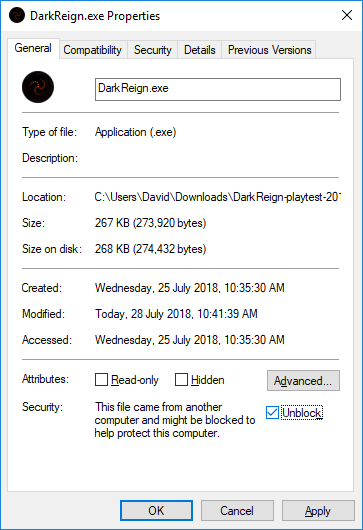
There's no easy workaround for this one at the moment, sorry.
- Download the latest version of the OpenDR mod repository from https://github.com/drogoganor/OpenDR/archive/OpenDR.zip.
- Unzip it and run
make all(in the command line) on Windows andmakeon Unix systems. - Use
launch-game.cmdon Windows andlaunch-game.shon Unix systems to run Dark Reign. or the first time, you will be prompted to install game content. See Installing game content for instructions on how to proceed.