Repository navigation
Releases: eknowledger/scrappy
Release list
Scrappy 0.1.0

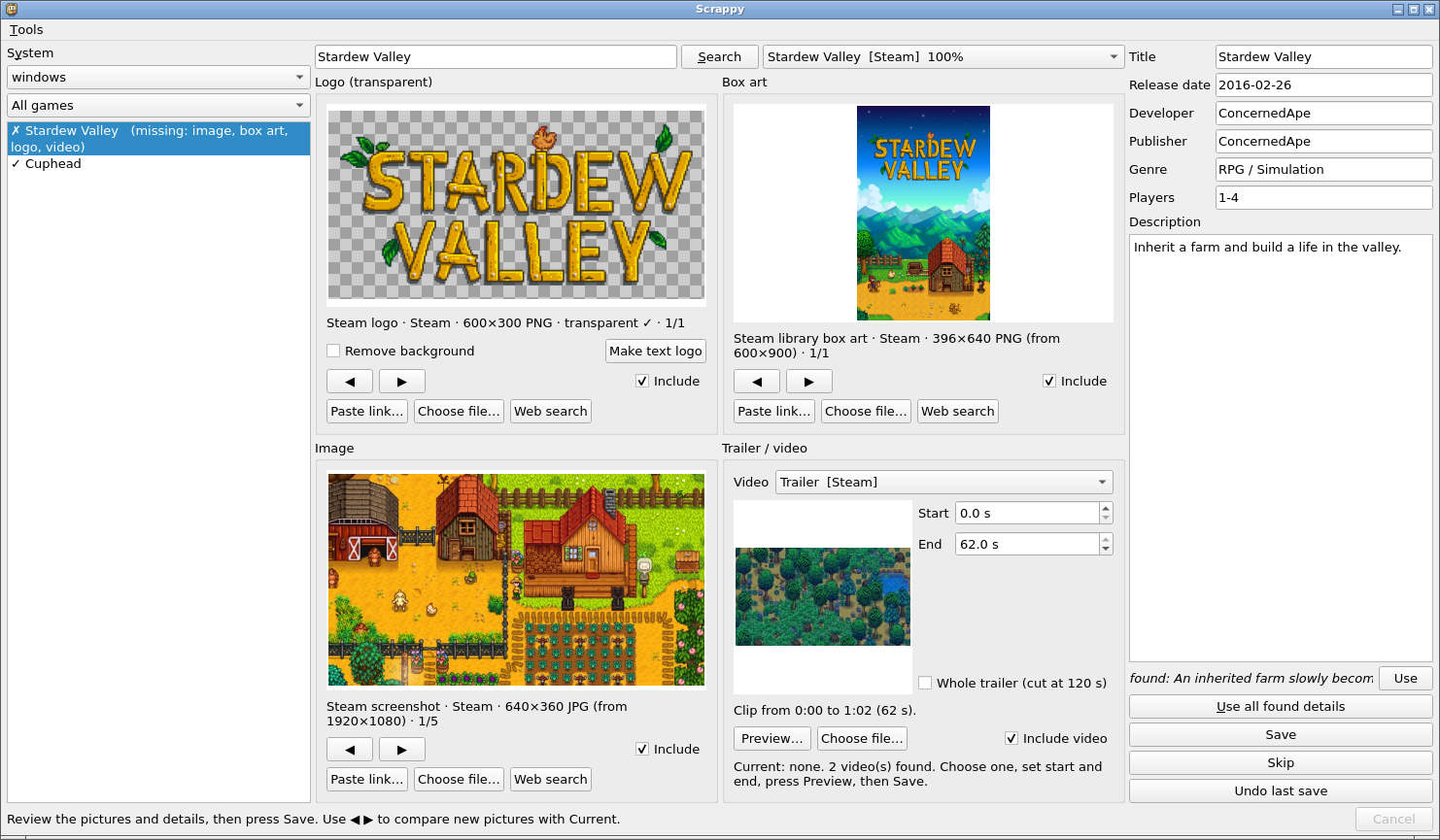
Scrappy fills in the artwork, trailers and descriptions your scraper missed. It is a desktop utility for Batocera: pick a game that has nothing, press Search, check what it found next to what the game has now, and Save. Everything is written where EmulationStation looks, with a backup and an Undo.
First public release. Alpha: it has been verified on Batocera v41 (x86_64) and its installer's aarch64 path is tested in a virtual machine. See COMPATIBILITY.md for what is and is not verified.
What you get
- A list of games with a "Missing something" filter, and for each game what it already has ("Current") next to the candidates found.
- Sources: Steam (details, screenshots, library box art, transparent logos, trailers) and YouTube trailers through yt-dlp, asked at the same time; one failing never blocks the other. Your own pictures and files work too (paste a link, choose a file, drag and drop).
- Conversion to the theme's formats (image, box art, logo, trailer cut to the part you choose), with background removal for logos and a generated text logo as a fallback.
- A review window before anything is written: new next to current, every changed detail old and new, which files are replaced or left alone.
- Safe saving: atomic writes, a backup of
gamelist.xml, a journal, a full rollback on any failure, and Undo last save (the last 20 saves, also after a restart). It checks that EmulationStation did not overwrite the change with its own copy. - Progress and results you can see: the Tools actions (install the YouTube downloader, reload the game lists) show a progress window that ends in a clear success or failure.
- A safe downloader: public hosts only, size and time limits, no cookies, no credentials.
- A guided user guide with nine annotated screenshots: docs/USAGE.md.
Install
From a computer that can ssh to your Batocera (key-based login):
git clone https://github.com/eknowledger/scrappy.git
cd scrappy
deploy/install.sh --dry-run     # shows every step; nothing is changed
deploy/install.sh               # installs to root@batocera.local
Then start Scrappy from the Applications menu (F1) or the Desktop icon. The installer checks free space and the machine's architecture (x86_64 or aarch64), tests the new version on the box before swapping it in (the old one is kept as scrappy.previous), and ships a working Pillow because Batocera's own cannot write JPEG. Remove it with deploy/install.sh --uninstall.
Try it without risk
python -m scrappy.app --demo opens the real window on a made-up library of invented games. Nothing real is read or written, and it contacts no network.
Known limitations
- Sources today are Steam and YouTube. Games Steam does not sell (most older console games) get no match, so you supply the pictures and trailer yourself. More sources and a plugin system are planned: docs/PROVIDERS.md and ROADMAP.md.
- The picture and video sizes are fixed; Scrappy does not read your theme.
- Only Batocera is supported. RetroBat and other EmulationStation based systems are not verified.
- The YouTube downloader (yt-dlp) is not bundled; install it once from Tools or the Trailer panel when you want YouTube trailers.
More in docs/KNOWN-LIMITATIONS.md. Report a vulnerability privately via SECURITY.md.
Documentation
README · User guide · Architecture · Providers · Changelog · Roadmap
Trademarks and artwork. The screenshots in this repository show the names, box art and in-game pictures of commercial video games and consoles. All of them belong to their respective owners and are shown only to illustrate how this tool works. This project is not affiliated with, endorsed by or sponsored by any of them. The artwork is not part of this project's source code, is not covered by its MIT licence, and is not needed to run the program. If you are a rights holder and want an image removed, open an issue and it will be removed promptly.