Repository navigation
Releases: erinuckuzular-ai/arrow-switch
Release list
Arrow Switch 1.6.1

Fixed: multicam 🎛
- Multicam cuts now switch angles. On Macs that still had the old Arrow AutoCut installed, its older code took over part of Arrow Switch inside Premiere. The panel stopped recognising multicam sequences and cut everything on the wide shot. Arrow Switch's Premiere code now has its own names, so an old copy can't interfere.
- Who's who is re-checked when a sequence reads differently from last time, so a wrong guess saved earlier doesn't stick.
- The installer app spots an old copy installed for everyone on the Mac and offers to remove it (asks for your password once).
New: updates inside the panel ⬇️
From this version on, a bar at the top of the panel tells you when there's a new version. Press Update, restart Premiere, done. No more downloading DMGs.
Install: open the DMG and run Install Arrow Switch. Windows: install Arrow-Switch-1.6.1.zxp with a ZXP installer. Requires Premiere Pro 2022+.
GPL: the bundled ffmpeg is GPL-3.0. Its source (ffmpeg-9.0.1.tar.xz) and build script are attached.
Arrow Switch 1.6.0
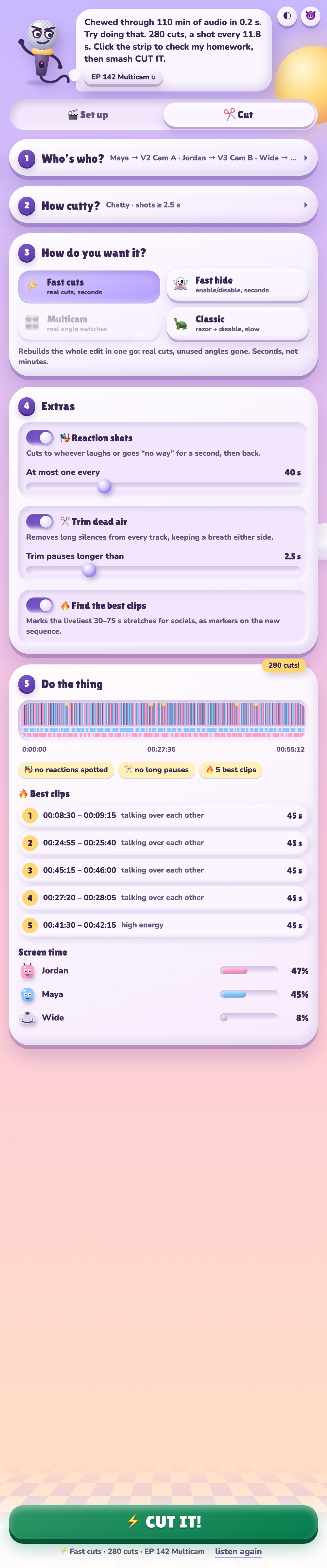
New: Extras 🎭✂️🔥
- Reaction shots: when someone laughs or goes "no way" while the other person talks, Arrow Switch cuts to them for a second and back. You choose how often, at most.
- Trim dead air (Fast cuts / Fast hide): long silences are removed from every track, with a breath kept either side. In testing it found every long pause and trimmed zero speech.
- Best clips: the liveliest 30–75 s stretches for socials, in a clickable list and as markers on the new sequence.
- The preview strip shows it all: gold = best clips, dark = dead air, notches = reactions.
Your original sequence is still never touched.
Install: open the DMG and run Install Arrow Switch (see README). Requires Premiere Pro 2022+.
GPL: the bundled ffmpeg is GPL-3.0. Its source (ffmpeg-9.0.1.tar.xz) and build script are attached.
Arrow Switch 1.5.0
A much nicer panel. 3D buttons, a panel that follows Premiere, one-click undo, and colours you can actually read.
New
- Always-visible action bar: LISTEN / CUT IT / SYNC & BUILD sit at the bottom of the panel with the output style and cut count. Tweak a knob and a "+6 cuts" / "−4 cuts" chip pops up.
- Cards fold away: after listening, Who's who and How cutty collapse to one-line summaries so your result is in view. Click to reopen.
- Follows Premiere: open another sequence and the panel switches to it. It also remembers who's who for each sequence, including names you've edited.
- Last cut: Show it jumps to the sequence Arrow Switch made. Undo deletes it (click twice); your original is never touched.
- 3D look: buttons press down like real keys, cards tilt toward your cursor, and the mascot turns in 3D.
- No beer: the mic waves, throws its arms up when it's done, and gets dizzy when something breaks. Tone button: 😈 mean / 😇 nice.
Better
- Readable colours: every piece of text now meets WCAG contrast in light and dark mode, measured on the actual rendered panel. Step numbers, error messages and secondary text were the worst offenders.
- Clearer colour meaning: main buttons are violet, red now only means errors or deleting, and selected things use one accent colour.
- Speaker colours: blue, pink, teal, peach, lime and magenta, softer in dark mode. Premiere clip labels and markers match.
- Smoother: press feedback everywhere, theme switching snaps instead of smearing, icons cross-fade, and nothing re-animates while you drag a slider.
Install (Mac, recommended)
curl -fsSL https://raw.githubusercontent.com/erinuckuzular-ai/arrow-switch/main/install.sh | bashThen restart Premiere Pro and open Window → Extensions → Arrow Switch.
Or install from the DMG: download Arrow-Switch-1.5.0.dmg, quit Premiere Pro and run Install Arrow Switch.pkg. If macOS says it can't verify the installer, open System Settings → Privacy & Security and click Open Anyway.
Windows: the DMG also contains Arrow Switch.zxp for ZXP installers (needs ffmpeg.exe in the extension's bin folder).
Licenses: Arrow Switch is MIT licensed. It bundles ffmpeg under the GNU GPL v3; the source is attached.
🤖 Generated with Claude Code
Arrow Switch 1.4.0
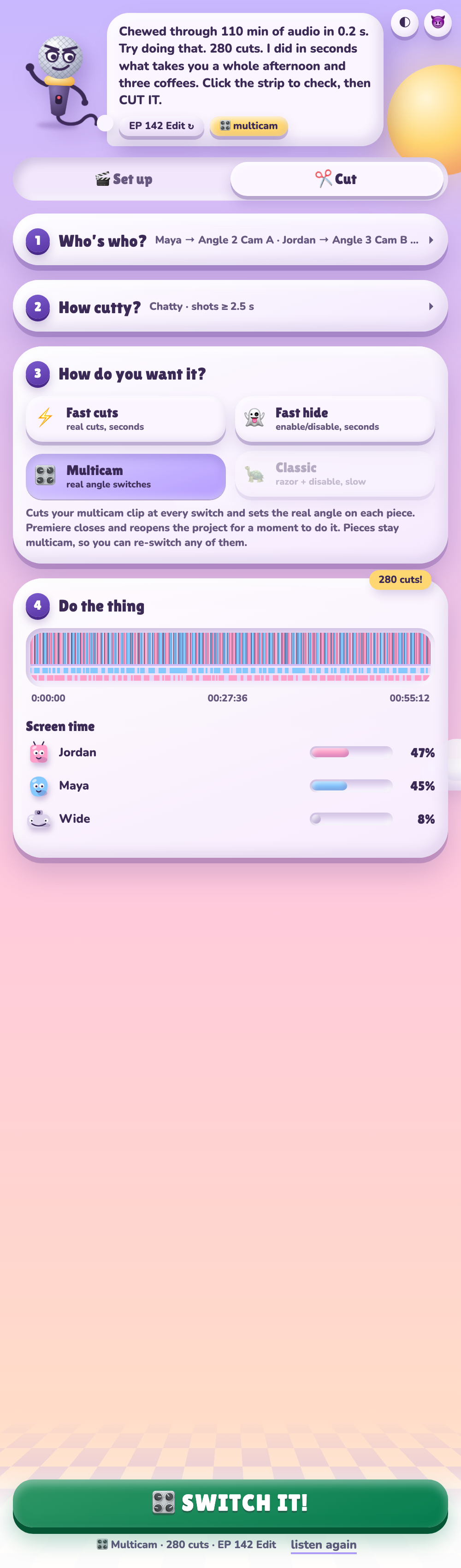
Multicam actually switches angles now. Plus Fast hide, and a stack of fixes found by testing inside Premiere 2026.
New
- 🎛 Real multicam angles: Arrow Switch cuts your multicam clip at every switch and sets the right angle on each piece. The pieces stay real multicam clips, so you can re-switch any of them. Premiere doesn't let scripts set angles, so Arrow Switch saves your project, writes the angles in and reopens it. You'll see it close and reopen for a second, and a backup copy is kept.
- ⚡ Fast hide: everything you liked about Fast cuts, but every angle stays in the timeline, switched off when it isn't on screen.
- 🎬 Set up → "Also make a multicam edit": after syncing, it builds a multicam edit ready for 🎛 Multicam.
Fixed
- Wrong wide shot in Set up: cameras were matched to mics by the order files were added, so the wide could land on a close-up. Matching is now by name: a file called wide/WS/master is the wide, and
Chloe.wavgoes withCamChloe.mp4. - Black shots: it no longer cuts to a camera that hasn't started (or has stopped) recording. Those shots use the wide or whichever camera is rolling.
- Camera audio treated as a person: a camera's master audio track is no longer mistaken for someone's mic.
- Sync accuracy: synced clips land on the nearest frame instead of Premiere rounding them up.
- Cutting straight after Set up: no longer fails with "active sequence changed".
Output styles
⚡ Fast cuts · ⚡ Fast hide · 🎛 Multicam · 🐢 Classic
Install (Mac, recommended)
curl -fsSL https://raw.githubusercontent.com/erinuckuzular-ai/arrow-switch/main/install.sh | bashThen restart Premiere Pro and open Window → Extensions → Arrow Switch.
Or install from the DMG: download Arrow-Switch-1.4.0.dmg, quit Premiere Pro and run Install Arrow Switch.pkg. If macOS says it can't verify the installer, open System Settings → Privacy & Security and click Open Anyway.
Windows: the DMG also contains Arrow Switch.zxp for ZXP installers (needs ffmpeg.exe in the extension's bin folder).
Licenses: Arrow Switch is MIT licensed. It bundles ffmpeg under the GNU GPL v3; the source is attached.
🤖 Generated with Claude Code
Arrow Switch 1.3.0
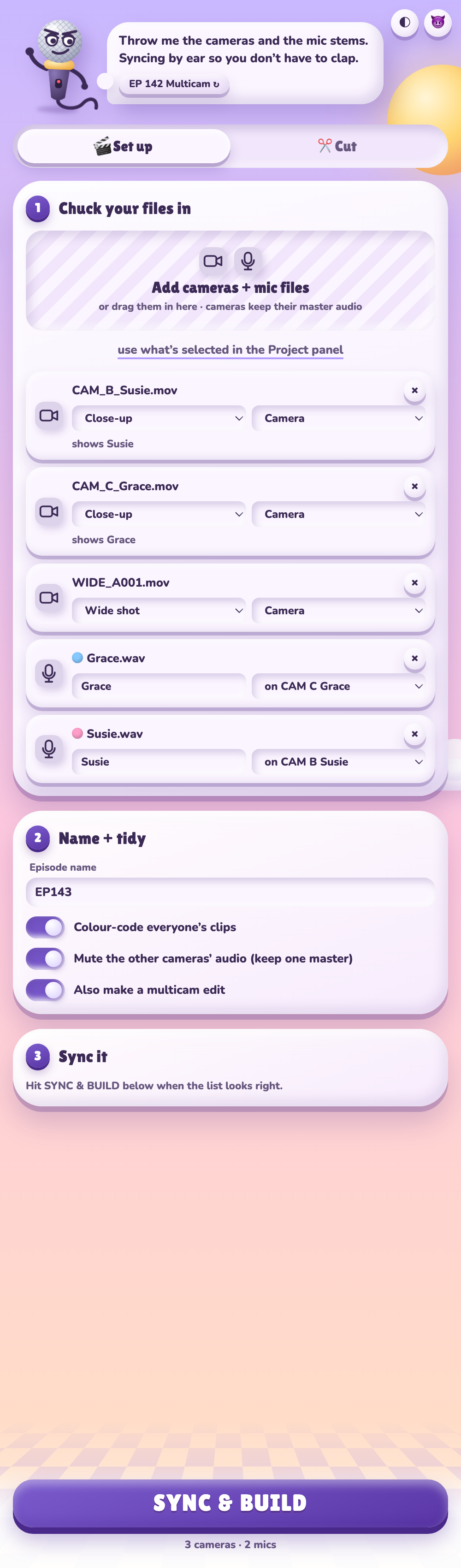
The big one. Arrow Switch now sets up and syncs your episode, cuts it four different ways, and is run by a microphone with a beer who will be rude to you.
New
- 🎬 Set up tab: drop in the camera files (with their master audio) and everyone's mic files. Arrow Switch works out which is which and syncs everything by audio. Then it imports it all into a bin, colour-codes each person's clips, mutes the extra camera audio and builds the sequence ready to cut. Anything it isn't sure about gets a
⚠️ . - Custom presets: tweak the knobs and hit + save mine. Presets are saved to a file, so reinstalling doesn't wipe them.
- Four ways to cut:
- 👻 Hide: disables unused angles (as before).
- 🔪 Razor: cuts and deletes unused angles.
- ⚡ Fast cuts: rebuilds the edit in one go with real cuts. Much faster on long episodes.
- 🎛 Multicam: for sequences cut from a multicam clip. It reads the angles and mics inside the multicam, cuts the clip at every switch and drops a marker naming the angle to pick. Premiere doesn't let scripts switch multicam angles, so you click them.
- Themes: auto (follows Premiere), light or dark.
- Tone: 🍺 mean (default) or 🧃 nice, for when the client is watching.
- A new face: new mascot, a wide-shot critter, smoother animations, beer confetti. ⌘/Ctrl+Enter does the next step.
Heads-up
The setup/sync, Fast cuts and Multicam modes are new and haven't had much time in real Premiere projects yet. Arrow Switch always saves your project first and works on a new sequence, so your original is safe, but please report anything odd.
Install (Mac, recommended)
Paste this into Terminal. It installs for your user, needs no admin password, and avoids the macOS malware warning:
curl -fsSL https://raw.githubusercontent.com/erinuckuzular-ai/arrow-switch/main/install.sh | bashThen restart Premiere Pro and open Window → Extensions → Arrow Switch.
Or install from the DMG: download Arrow-Switch-1.3.0.dmg, quit Premiere Pro, open the DMG and run Install Arrow Switch.pkg. If macOS says it can't verify the installer, open System Settings → Privacy & Security and click Open Anyway.
Windows: the DMG also contains Arrow Switch.zxp for ZXP installers (needs ffmpeg.exe in the extension's bin folder).
Licenses: Arrow Switch is MIT licensed. It bundles ffmpeg under the GNU GPL v3; the source is attached (ffmpeg-9.0.1.tar.xz, ffmpeg-build-script.tar.gz).
🤖 Generated with Claude Code
Arrow Switch 1.2.1
Fixes one speaker getting far too much screen time.
When the mics hear each other almost as loudly as their own person (lavs close together, mics set to different gains, or a mic that picks up both people), 1.2.0 could hand most of the episode to one speaker. On a real episode one person got 83% of the screen.
Arrow Switch now recognises each person by their mic fingerprint, the pattern of how loud they are across all the mics. That doesn't change with mic gain or how loudly someone speaks. In testing with mics only a few dB apart, it's on the right camera 98.9% of the time (was 74.6%), and screen time matches who actually talked.
Install (Mac, recommended): paste this into Terminal. It installs the latest version for your user, needs no admin password, and avoids the macOS malware warning:
curl -fsSL https://raw.githubusercontent.com/erinuckuzular-ai/arrow-switch/main/install.sh | bashThen restart Premiere Pro and open Window → Extensions → Arrow Switch.
Or install from the DMG: download Arrow-Switch-1.2.1.dmg, quit Premiere Pro, open the DMG and run Install Arrow Switch.pkg. Then in Premiere: Window → Extensions → Arrow Switch.
If macOS says it can't verify the installer is free of malware, open System Settings → Privacy & Security and click Open Anyway.
Windows: the DMG also contains Arrow Switch.zxp for ZXP installers (needs ffmpeg.exe in the extension's bin folder).
Licenses: Arrow Switch is MIT licensed. It bundles ffmpeg under the GNU GPL v3; the source is attached (ffmpeg-9.0.1.tar.xz, ffmpeg-build-script.tar.gz).
🤖 Generated with Claude Code