Repository navigation
Agent Session Center v1.0.0 —— 首个公开版本

8 个编码 agent 的同一个中心。 查找、恢复、分叉并交接每一个会话 —— 还能在手机上审批。
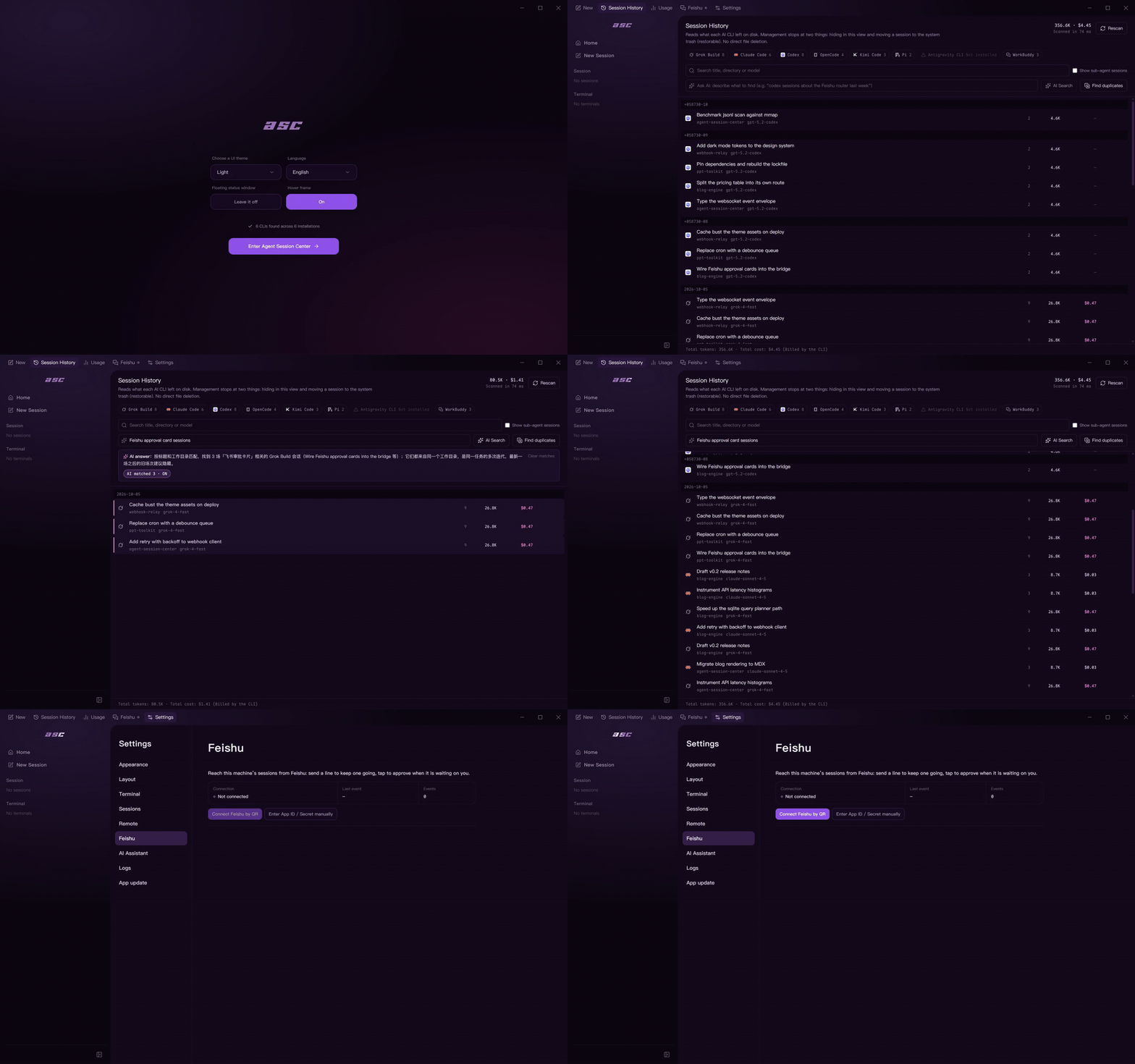
Agent Session Center(ASC)是面向 Claude Code、Codex CLI、OpenCode、Grok Build、Kimi Code、Pi、Antigravity 与 WorkBuddy 的桌面会话中心。每个 CLI 都保留自己的原生 TUI、干完所有的活;ASC 补上的,是它们周围那层通常缺失的东西。
为什么要有它
不同的 agent 擅长不同的活,于是一个终端变成了好几个 —— 然后你一整天都在到处找那个需要你的标签页:
- 你切走去忙别的,回来发现某个 agent 一直卡在权限确认上干等;
- 通知从不触发,看不出某个 agent 是在等你回答问题,还是漏掉了某个等待输入的交互式 shell;
- 上周的会话就躺在磁盘上某处,可你找不到它,也忘了它是在哪个目录跑的。
ASC 把这些会话收进一张表,告诉你哪一个需要你,再把你带回正确的位置。
亮点
- 每个会话一张表。 会话历史读取的是每个 CLI 自己写到磁盘上的内容,横跨全部八个来源:浏览、语义搜索、隐藏,或送进回收站。底层的会话文件从不被改动。
- 就地恢复。 只要某个 agent 暴露了可恢复的会话,一键就能在原始工作目录里恢复它 —— 并且诚实地拆分出哪些可恢复、其余为什么不行。
- 让 AI 帮你找会话。 用一句话描述你要找什么;ASC 会把匹配的会话连同它的回答一起返回。助手端点由你配置,桌面端直接调用。
- 六个 harness 的实时状态。 Claude Code、Codex CLI、OpenCode、Grok Build、Kimi Code 与 Pi 通过各自的官方 Hooks、SSE 或扩展 API 上报思考、工具调用、审批与完成。DeepSeek Harness 则通过它的官方 Web 界面来跟进。
- 注意力推送与手机审批。 当某个 agent 卡在审批上,一次飞书推送就把它送到你手机上 —— 点一下即可批准。
- 按 agent 统计 token 与成本,聚合自各 CLI 自己的记录。成本已知就显示,未知就留空,绝不靠猜。
- 自定义悬浮渲染器,用 HTML、CSS、JavaScript、动画库、canvas 或 Live2D 构建,走的是和内置监视器同一套公开接口。
- 终端旁的只读工作区查看器:文件树、语法高亮源码、Markdown 预览。
- 五种界面语言 —— English、简体中文、繁體中文、日本語、한국어 —— 应用主题与终端主题互相独立。
安装
Windows x64
下载下方的 AgentSessionCenter-Setup-1.0.0.exe 并运行。它是引导式 NSIS 安装包,可以选择安装目录,并会创建开始菜单和桌面快捷方式。下载体积 97 MB。
040656caf7007724e8926ffb0316aea2316f6c88e12af1e8dc96947791ee18a8 AgentSessionCenter-Setup-1.0.0.exe
这一次构建不带代码签名,所以首次启动时 Windows SmartScreen 可能显示安全提示。选择「更多信息 → 仍要运行」,或者先校验上面的 SHA-256。注意:哈希匹配只能证明这次下载是完整的、且就是这里发布的那个文件 —— 它证明不了是谁构建的。
代码签名已在计划中,但尚未申请,因此今天没有任何版本带签名。现在已具备什么、签名能断言什么与不能断言什么,见代码签名政策。
macOS 与 Linux
macOS(arm64 dmg/zip)与 Linux(AppImage/deb)目标都已配置,并各自由带守卫的发布脚本验证,但这些包必须在它们对应的操作系统上构建。v1.0.0 只发布 Windows x64 —— macOS 与 Linux 构建会在后续版本跟进。
首次运行
- 启动 Agent Session Center,等首次 CLI 扫描跑完。
- 挑一个终端或编码 CLI。
- 选择它的运行时与工作区。
- 启动会话。原生 TUI 留在主窗格里;ASC 在它周围发布状态。
如果 Codex 让你审核 Hooks,打开 /hooks,检查 Agent Session Center 的定义,然后信任它。对 Kimi Code,ASC 会在生效的用户 config.toml 里维护一个带版本管理的托管块,并原样保留块外的所有内容。
更新
这是第一个打包出来的客户端会在启动时检查 GitHub Release 订阅源的版本。更新只会被通告,绝不静默安装。设置 ASC_DISABLE_UPDATES=1 可完全跳过检查。
支持的 harnesses
| Harness | 集成方式 | 会话历史 | 实时状态 |
|---|---|---|---|
| DeepSeek Harness | 官方 Web 界面 + 运行时桥接 | — | 跟踪会话与生命周期 |
| Claude Code | 官方 Hooks | 有 | 思考、工具、审批、完成 |
| Codex CLI | 稳定 Hooks | 有 | 轮次、工具、审批、压缩 |
| OpenCode | Server + SSE | 有 | 会话、思考、工具、提问、权限 |
| Pi | 扩展 API | 有 | 思考、回复、工具、轮次 |
| Kimi Code | 官方 Hooks | 有 | 轮次、思考、工具、审批 |
| Grok Build | 官方 Hooks | 有 | 轮次、思考、工具、审批 |
| Antigravity、WorkBuddy | 会话文件 | 有 | 尚未支持 |
ASC 还能发现并启动 Devin CLI、Cline、Qwen Code、Amp、Aider、Goose、Kiro CLI、GitHub Copilot CLI 等已注册的 CLI;仅启动型集成暂不暴露同样的状态细节。
上游
早期原型派生自 UniRound-Tec/hrack(Apache-2.0)。ASC 是一个独立维护的硬分叉,拥有自己的身份、路线图与发布渠道。
下一步
- 在各自平台上构建的 macOS 与 Linux 包。
- 为 DeepSeek Harness 加入会话历史,让它的
.dsh会话和其它每个 agent 出现在同一张表里。 - 让仅启动型 CLI 在会话历史上追得更齐。
- 代码签名,让首次启动不再显示安全提示。
如果 ASC 帮你省下了一次满屏找标签页的功夫,一个 ⭐ 能帮更多人找到它。Bug 报告和可复现的边界情况,非常欢迎提到 Issues。
Apache-2.0. 解放你的大脑,回去 vibe coding。
English
One center for 8 coding agents. Find, resume, fork and hand off every session — and approve from your phone.
Agent Session Center (ASC) is a desktop session center for Claude Code, Codex CLI, OpenCode, Grok Build, Kimi Code, Pi, Antigravity and WorkBuddy. Every CLI keeps its native TUI and does all the work. ASC adds the layer that is usually missing around it.
Why this exists
Different agents are good at different jobs, so one terminal becomes several — and then you spend the day hunting for the tab that needs you:
- you switch away, come back, and find an agent has been sitting on a permission prompt the whole time;
- a notification never fires, can't tell that the agent is waiting for an answer, or misses an interactive shell waiting for input;
- last week's session is somewhere on disk, but you can't find it, and you've forgotten which directory it ran in.
ASC keeps those sessions in one table, tells you which one needs attention, and takes you back to the right place.
Highlights
- One table for every session. Session history reads what each CLI itself wrote to disk, across all eight sources: browse, semantic search, hide, or send to the recycle bin. The underlying session files are never modified.
- Resume in place. Where an agent exposes a resumable session, one click resumes it in the original working directory — with an honest split of what is resumable and why the rest is not.
- Ask AI to find a session. Describe what you want in one sentence; ASC returns the matching sessions together with its answer. You configure the assistant endpoint, and the desktop app calls it directly.
- Live status for six harnesses. Claude Code, Codex CLI, OpenCode, Grok Build, Kimi Code and Pi report thinking, tool calls, approvals and completion through their official Hooks, SSE or extension APIs. DeepSeek Harness is followed through its official web surface.
- Attention push and mobile approval. When an agent stalls on an approval, a Feishu push brings it to your phone — one tap to approve.
- Tokens and cost per agent, aggregated from each CLI's own records. Cost is shown when it is known and left blank rather than guessed when it is not.
- Custom floating renderers built with HTML, CSS, JavaScript, animation libraries, canvas or Live2D, through the same public interface the built-in monitor uses.
- Read-only workspace viewer beside the terminal: file tree, syntax-highlighted source, Markdown preview.
- Five UI languages — English, 简体中文, 繁體中文, 日本語, 한국어 — with independent application and terminal themes.
Install
Windows x64
Download AgentSessionCenter-Setup-1.0.0.exe below and run it. It is a guided NSIS installer, so you can choose the installation directory, and it creates Start Menu and desktop shortcuts. The download is 97 MB.
040656caf7007724e8926ffb0316aea2316f6c88e12af1e8dc96947791ee18a8 AgentSessionCenter-Setup-1.0.0.exe
The build is not code-signed, so Windows SmartScreen may show a security prompt on first launch. Choose "More info → Run anyway", or verify the SHA-256 above first. Note that a matching hash proves the download is intact and is the file published here — it does not prove who built it.
Code signing is planned but not applied for yet, so no release carries a signature today. See the Code signing policy for what is in place now and what a signature would and would not assert.
macOS and Linux
The macOS (arm64 dmg/zip) and Linux (AppImage/deb) targets are configured and validated by their own guarded release scripts, but those packages must be built on their matching operating systems. v1.0.0 ships Windows x64 only — macOS and Linux builds will follow in a later release.
First run
- Start Agent Session Center and let the initial CLI scan finish.
- Pick a terminal or coding CLI.
- Choose its runtime and workspace.
- Start the session. The native TUI stays in the main pane; ASC publishes its status around it.
If Codex asks you to review Hooks, open /hooks, inspect the Agent Session Center definition, and trust it. For Kimi Code, ASC maintains a versioned managed block in the effective user config.toml and preserves everything outside it.
Updating
This is the first release whose packaged clients check the GitHub Release feed at startup. Updates are announced, never installed silently. Set ASC_DISABLE_UPDATES=1 to skip the check entirely.
Supported harnesses
| Harness | Integration | Session history | Live status |
|---|---|---|---|
| DeepSeek Harness | Official Web surface + runtime bridge | — | Followed session and lifecycle |
| Claude Code | Official Hooks | Yes | Thinking, tools, approvals, completion |
| Codex CLI | Stable Hooks | Yes | Turns, tools, approvals, compaction |
| OpenCode | Server + SSE | Yes | Sessions, thinking, tools, questions, permissions |
| Pi | Extension API | Yes | Thinking, responses, tools, turns |
| Kimi Code | Official Hooks | Yes | Turns, thinking, tools, approvals |
| Grok Build | Official Hooks | Yes | Turns, thinking, tools, approvals |
| Antigravity, WorkBuddy | Session files | Yes | Not yet |
ASC can also discover and launch Devin CLI, Cline, Qwen Code, Amp, Aider, Goose, Kiro CLI, GitHub Copilot CLI and other registered CLIs; launch-only integrations do not expose the same status detail yet.
Upstream
The early prototype was derived from UniRound-Tec/hrack (Apache-2.0). ASC is an independently maintained hard fork with its own identity, roadmap and release channel.
What's next
- macOS and Linux packages built on their own platforms.
- Session history for DeepSeek Harness, so its
.dshsessions appear in the same table as every other agent. - Deeper session-history parity for the launch-only CLIs.
- Code signing, so first launch stops showing a security prompt.
If ASC saves you a tab hunt, a ⭐ helps other people find it. Bug reports and reproducible edge cases are very welcome in Issues.
Apache-2.0. Free your mind, get back to vibe coding.